
- Forums
- Product Forums
- General Purpose MicrocontrollersGeneral Purpose Microcontrollers
- i.MX Forumsi.MX Forums
- QorIQ Processing PlatformsQorIQ Processing Platforms
- Identification and SecurityIdentification and Security
- Power ManagementPower Management
- Wireless ConnectivityWireless Connectivity
- RFID / NFCRFID / NFC
- Advanced AnalogAdvanced Analog
- MCX Microcontrollers
- S32G
- S32K
- S32V
- MPC5xxx
- Other NXP Products
- S12 / MagniV Microcontrollers
- Powertrain and Electrification Analog Drivers
- Sensors
- Vybrid Processors
- Digital Signal Controllers
- 8-bit Microcontrollers
- ColdFire/68K Microcontrollers and Processors
- PowerQUICC Processors
- OSBDM and TBDML
- S32M
- S32Z/E
-
- Solution Forums
- Software Forums
- MCUXpresso Software and ToolsMCUXpresso Software and Tools
- CodeWarriorCodeWarrior
- MQX Software SolutionsMQX Software Solutions
- Model-Based Design Toolbox (MBDT)Model-Based Design Toolbox (MBDT)
- FreeMASTER
- eIQ Machine Learning Software
- Embedded Software and Tools Clinic
- S32 SDK
- S32 Design Studio
- GUI Guider
- Zephyr Project
- Voice Technology
- Application Software Packs
- Secure Provisioning SDK (SPSDK)
- Processor Expert Software
- Generative AI & LLMs
-
- Topics
- Mobile Robotics - Drones and RoversMobile Robotics - Drones and Rovers
- NXP Training ContentNXP Training Content
- University ProgramsUniversity Programs
- Rapid IoT
- NXP Designs
- SafeAssure-Community
- OSS Security & Maintenance
- Using Our Community
-
- Cloud Lab Forums
-
- Knowledge Bases
- ARM Microcontrollers
- i.MX Processors
- Identification and Security
- Model-Based Design Toolbox (MBDT)
- QorIQ Processing Platforms
- S32 Automotive Processing Platform
- Wireless Connectivity
- CodeWarrior
- MCUXpresso Suite of Software and Tools
- MQX Software Solutions
- RFID / NFC
- Advanced Analog
-
- NXP Tech Blogs
- Home
- :
- i.MX论坛
- :
- i.MX RT 交叉 MCU
- :
- Re: LVGL guider RT1060 Rotation porting CPU Rotate and PXP
LVGL guider RT1060 Rotation porting CPU Rotate and PXP

Hi Commnuity,
I need help with a GUI design issue I'm facing on the RT1060 EVK platform. I'm using LVGL to design the GUI, but here's the catch: the RT1060 EVK is designed in landscape mode, while I actually need it to be in portrait mode. So, what I did was create a new project in GUI guide 1.5.1 and selected a custom resolution of 272*480 (since text and other elements can't be rotated).
The GUI guide project show as below.
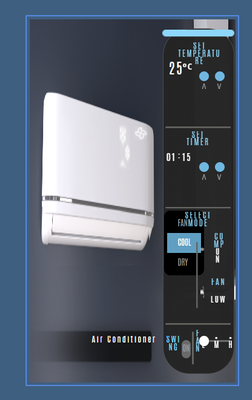
This configuration displays the GUI in the upper half of the screen, and I can scroll down to access the lower half where all the components work fine.
Now, here's where things get tricky. I did some research on the forum (I.MX 1060 SDK lvgl guider - rotation display ), and there was a discussion about this topic, but unfortunately, no clear conclusion was reached.
I came across the SDK PXP Rotate, and I tried to integrate it into my GUI Guide project. I called the PXP initialization function in lvgl_support.c show as below.
static void APP_InitPxp(void)
{
    PXP_Init(APP_PXP);

    /* PS configure. */
    const pxp_ps_buffer_config_t psBufferConfig = {
        .pixelFormat = APP_PXP_PS_FORMAT,
        .swapByte    = false,
        .bufferAddr  = (uint32_t)s_frameBuffer,
        .bufferAddrU = 0U,
        .bufferAddrV = 0U,
        .pitchBytes  = APP_PS_WIDTH * APP_BPP,
    };

#if defined(FSL_FEATURE_PXP_V3) && FSL_FEATURE_PXP_V3
    PXP_SetProcessSurfaceBackGroundColor(APP_PXP, 0U, 0U);
#else
    PXP_SetProcessSurfaceBackGroundColor(APP_PXP, 0U);
#endif

    PXP_SetProcessSurfaceBufferConfig(APP_PXP, &psBufferConfig);

    PXP_SetProcessSurfacePosition(APP_PXP, 0, 0, APP_IMG_WIDTH, APP_IMG_HEIGHT);

    /* Disable AS. */
    PXP_SetAlphaSurfacePosition(APP_PXP, 0xFFFFU, 0xFFFFU, 0U, 0U);

    outputBufferConfig.pixelFormat    = APP_PXP_OUT_FORMAT;
    outputBufferConfig.interlacedMode = kPXP_OutputProgressive;
    outputBufferConfig.buffer0Addr    = (uint32_t)s_frameBuffer[1];
    outputBufferConfig.buffer1Addr    = 0;
    outputBufferConfig.pitchBytes     = LCD_WIDTH * APP_BPP;
    outputBufferConfig.width          = LCD_WIDTH;
    outputBufferConfig.height         = LCD_HEIGHT;

    PXP_SetOutputBufferConfig(APP_PXP, &outputBufferConfig);

    /* Disable CSC1, it is enabled by default. */
    PXP_EnableCsc1(APP_PXP, false);

}
Used the PXP_SetRotateConfig function to rotate the display by 90 degrees within the Demo_FlushDisplay function.
static void DEMO_FlushDisplay(lv_disp_drv_t *disp_drv, const lv_area_t *area, lv_color_t *color_p)
{
//	irq = DisableGlobalIRQ();
    DCACHE_CleanInvalidateByRange((uint32_t)color_p, DEMO_FB_SIZE);
    /*------------------------modify by AF---------------------------*/

	/* Prepare next buffer for LCD. */
	PXP_SetRotateConfig(APP_PXP, kPXP_RotateProcessSurface, kPXP_Rotate90, kPXP_FlipDisable);

	outputBufferConfig.buffer0Addr = (uint32_t)color_p;
	PXP_SetOutputBufferConfig(APP_PXP, &outputBufferConfig);

	PXP_Start(APP_PXP);

	/* Wait for process complete. */
	while (!(kPXP_CompleteFlag & PXP_GetStatusFlags(APP_PXP)))
	{
	}

	PXP_ClearStatusFlags(APP_PXP, kPXP_CompleteFlag);

	APP_FillFrameBuffer((void*)color_p);

    ELCDIF_SetNextBufferAddr(LCDIF, (uint32_t)color_p);

    s_framePending = true;
But guess what? It didn't work. It seems that rotating the PXP on the RT1060 isn't as simple as I thought.
Later, I stumbled upon an example on the RT1170 that used CPU rotation. Intrigued, I attempted to port this method to the RT1060. Interestingly, when I displayed the buffer s_frameBuffer[0], only half of the screen was visible. However, when I displayed s_frameBuffer[1], it showed a successful rotation. I'm wondering if LVGL has some underlying mechanism that causes this behavior.

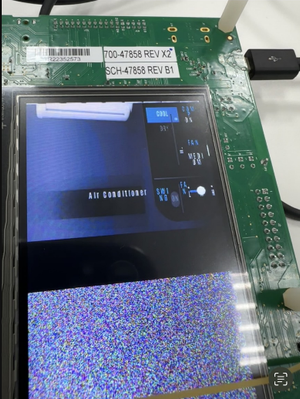

To sum it up, I have a few questions and observations:
- Can PXP Rotate function used in an LVGL project?
- It seems that when the configured panel size differs from the actual panel size, LVGL stores the excess portion somewhere and enables scrolling to display it, which leads to abnormal behavior during customer configuration.
- The CPU-based rotation seems to involve some calculations in LVGL that produce the observed outcome. How to fix it?
I would greatly appreciate your input and guidance on these matters. If you need any additional information or code snippets, please let me know.
Thanks a lot for your help!
已解决! 转到解答。

 Ramon_Vega
dear @kwf
Unfortunately for this case, it is not possible to develop this project with the RT1060-EVK and RK043FN02H-CT panel, because this panel does not support LVGL display rotation. That is the reason why GUI-guider does not have this feature available.
As advice, you may consider choosing the RT1170-EVK with panel. This one is suitable for your project.
MIMXRT1170-EVK | NXP Semiconductors
5.5" LCD Panel | NXP Semiconductors
I hope this information help you!.
Kind Regards.
-Ramon.

you might try using the function lv_gpu_pxp_blit in flushcb, you need 1 input buffer and 1 output/stationary buffer. In lv_disp_draw_buf_init put framebuf 1 and null, disp_drv should not be using software rotate; should use full refresh.
Ramon_Vega
dear @kwf
Unfortunately for this case, it is not possible to develop this project with the RT1060-EVK and RK043FN02H-CT panel, because this panel does not support LVGL display rotation. That is the reason why GUI-guider does not have this feature available.
As advice, you may consider choosing the RT1170-EVK with panel. This one is suitable for your project.
MIMXRT1170-EVK | NXP Semiconductors
5.5" LCD Panel | NXP Semiconductors
I hope this information help you!.
Kind Regards.
-Ramon.
