
- Forums
- Product Forums
- General Purpose MicrocontrollersGeneral Purpose Microcontrollers
- i.MX Forumsi.MX Forums
- QorIQ Processing PlatformsQorIQ Processing Platforms
- Identification and SecurityIdentification and Security
- Power ManagementPower Management
- Wireless ConnectivityWireless Connectivity
- RFID / NFCRFID / NFC
- Advanced AnalogAdvanced Analog
- MCX Microcontrollers
- S32G
- S32K
- S32V
- MPC5xxx
- Other NXP Products
- S12 / MagniV Microcontrollers
- Powertrain and Electrification Analog Drivers
- Sensors
- Vybrid Processors
- Digital Signal Controllers
- 8-bit Microcontrollers
- ColdFire/68K Microcontrollers and Processors
- PowerQUICC Processors
- OSBDM and TBDML
- S32M
- S32Z/E
-
- Solution Forums
- Software Forums
- MCUXpresso Software and ToolsMCUXpresso Software and Tools
- CodeWarriorCodeWarrior
- MQX Software SolutionsMQX Software Solutions
- Model-Based Design Toolbox (MBDT)Model-Based Design Toolbox (MBDT)
- FreeMASTER
- eIQ Machine Learning Software
- Embedded Software and Tools Clinic
- S32 SDK
- S32 Design Studio
- GUI Guider
- Zephyr Project
- Voice Technology
- Application Software Packs
- Secure Provisioning SDK (SPSDK)
- Processor Expert Software
- Generative AI & LLMs
-
- Topics
- Mobile Robotics - Drones and RoversMobile Robotics - Drones and Rovers
- NXP Training ContentNXP Training Content
- University ProgramsUniversity Programs
- Rapid IoT
- NXP Designs
- SafeAssure-Community
- OSS Security & Maintenance
- Using Our Community
-
- Cloud Lab Forums
-
- Knowledge Bases
- ARM Microcontrollers
- i.MX Processors
- Identification and Security
- Model-Based Design Toolbox (MBDT)
- QorIQ Processing Platforms
- S32 Automotive Processing Platform
- Wireless Connectivity
- CodeWarrior
- MCUXpresso Suite of Software and Tools
- MQX Software Solutions
- RFID / NFC
- Advanced Analog
-
- NXP Tech Blogs
- Home
- :
- RFID / NFC
- :
- NFC
- :
- How to connect into PNEV5180B V2.0 via PN5180 NFC Cockpit?
How to connect into PNEV5180B V2.0 via PN5180 NFC Cockpit?
- RSS フィードを購読する
- トピックを新着としてマーク
- トピックを既読としてマーク
- このトピックを現在のユーザーにフロートします
- ブックマーク
- 購読
- ミュート
- 印刷用ページ
How to connect into PNEV5180B V2.0 via PN5180 NFC Cockpit?

- 新着としてマーク
- ブックマーク
- 購読
- ミュート
- RSS フィードを購読する
- ハイライト
- 印刷
- 不適切なコンテンツを報告
Hello,
I try to work with PNEV5180B ev. Board and I’m not able to connect with it. In cockpit tool there is status: Board not connected and I’m not able to change this status. I work under Windows 10, the HW is directly connected into USB, I’m able to change the firmware inside the controller (USB connection works), but it doesn’t communicate with the Cockpit.
I think there is problem with USB driver (installation is noted in AN11744 on page 14). When I tried to install it manually, it returned fault that the driver is not digitally signed and Windows refuses to install it. I tried to find another driver, but I didn’t find anything usable.
How I can run this EV board with Cockpit tool?
- 新着としてマーク
- ブックマーク
- 購読
- ミュート
- RSS フィードを購読する
- ハイライト
- 印刷
- 不適切なコンテンツを報告
I had same problem, solved by reinstalling the 'lpc_main.bin' firmaware on board.
in my case, the originaly installed firmware dasn't work.
firmware location: "C:\nxp\NxpNfcCockpit_v3.7.0.0\ABENDToVCOM\fw"
this taked for me 1 or 2 houres of hazardous manipulations to find and solve the problem
So hope a better experience with next steps

 Jorge_Gonzalez
- 新着としてマーク
- ブックマーク
- 購読
- ミュート
- RSS フィードを購読する
- ハイライト
- 印刷
- 不適切なコンテンツを報告
Hello Lukas Hejkal,
Since you are using a Windows 10 computer, then you might need to disable the Driver Signature verification so you are able to install the provided driver. You can search in google for "how to disable driver signature enforcement windows 10" to find the tutorials.
Also, in case you reprogrammed the LPC1769 with a different firmware, then please follow the instructions in the PN5180 SW Quick start guide (chapter 4) to restore the bootloader and the application that communicates with the NFC Cockpit GUI:
http://cache.nxp.com/documents/user_manual/UM10954.pdf
I hope this helps. Let me know if you continue having issues.
Best Regards!,
Jorge Gonzalez
-----------------------------------------------------------------------------------------------------------------------
Note: If this post answers your question, please click the Correct Answer button. Thank you!
-----------------------------------------------------------------------------------------------------------------------
- 新着としてマーク
- ブックマーク
- 購読
- ミュート
- RSS フィードを購読する
- ハイライト
- 印刷
- 不適切なコンテンツを報告
Hello Jorge,
IT guy fight with the driver installation over an hour and the driver is now installed. But the NFC cockpit still returns Board not connected. I’m out of ideas now.
I supposed, that when I’m able to load the firmware via USB connection, the bootloader is working. So my assumption was wrong.
Unfortunately, I’m not familiar with LPC1769 controller and I don’t have the LPC-LINK2 now. I needed the board for HW verification only.
Thank you for your help
Best regards
Lukas Hejkal
- 新着としてマーク
- ブックマーク
- 購読
- ミュート
- RSS フィードを購読する
- ハイライト
- 印刷
- 不適切なコンテンツを報告
Hi Lukas, Jorge,
Same problem here.
Installed latest cockpit (3.7.0) with PNEV5180B on Windows 10.
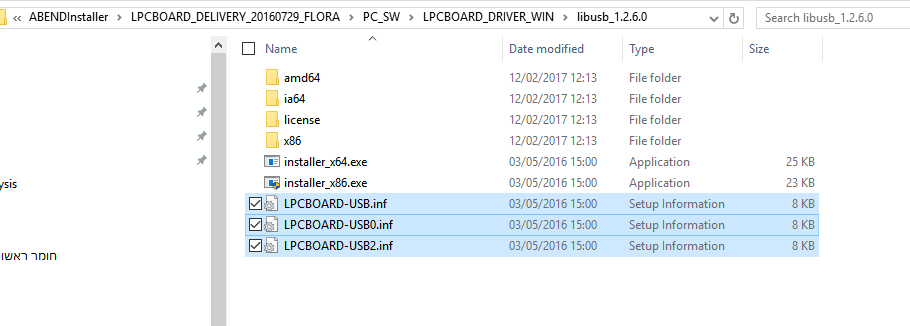
Disabled driver signature reinforcement as Jorge suggested and right click>install the 3 *.inf files in C:\nxp\NxpNfcCockpit_v3.7.0.0\ABENDInstaller\LPCBOARD_DELIVERY_20160729_FLORA\PC_SW\LPCBOARD_DRIVER_WIN\libusb_1.2.6.0 (LPCBOARD-USB.inf / LPCBOARD-USB0.inf / LPCBOARD-USB2.inf).
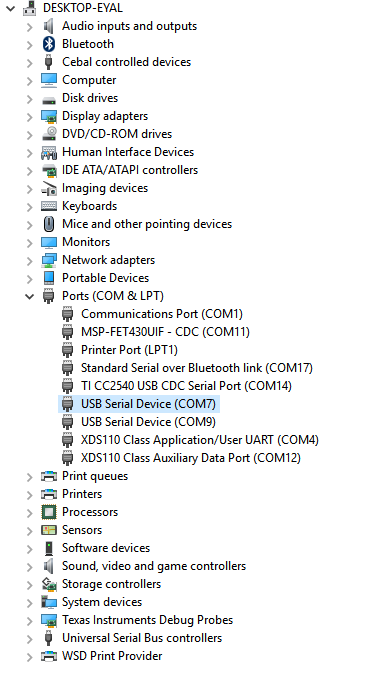
In device manager I only see virtual com ports, not libusb entries as mentioned in the quick start guide (AN11744 pg 15).
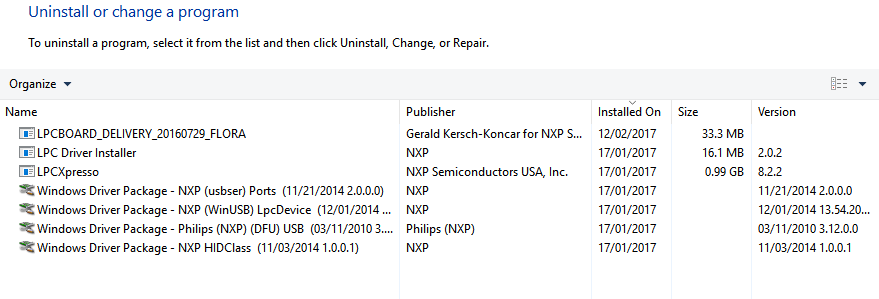
Installed program list shows (filtered for NXP)
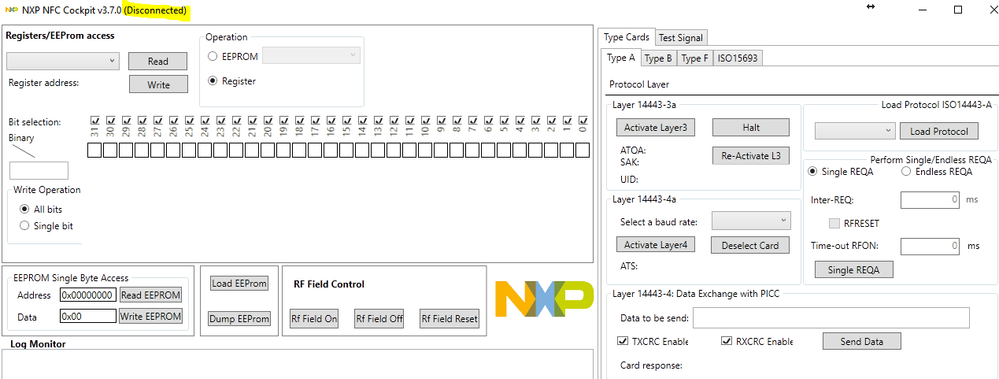
NFC Cockpit show "Disconnected"...
I also tried to re-program the board by momentarily shorting SW200 when powering the board.
However I got an error message when dragging-and-dropping bin file on the mass storage device (should I keep SW200 shorted after power up in order to copy ?)

btw, what is the firmware version that the board comes programmed with ?
Any advice ?
Thanks
Jorge_Gonzalez
- 新着としてマーク
- ブックマーク
- 購読
- ミュート
- RSS フィードを購読する
- ハイライト
- 印刷
- 不適切なコンテンツを報告
Hello Eyal Lasko,
For using the PNEV5180B with NFC Cockpit v3.7 you need to flash the latest VCOM interface firmware. Please follow the instructions in Chapter 5 of the PN5180 SW Quick Start Guide:
http://www.nxp.com/documents/user_manual/UM10954.pdf
The binaries are available in your NFC Cockpit installation folder.
Regards!
Jorge Gonzalez
- 新着としてマーク
- ブックマーク
- 購読
- ミュート
- RSS フィードを購読する
- ハイライト
- 印刷
- 不適切なコンテンツを報告
Hi Jorge,
As Lukas mentioned, he does not have the LPC_LINK2 to flash the firmware, so what can be done ?
Unfortunately, I am also having the same problem ... (worse as I cannot disable driver signature enforcement, but I guess that is not the root problem here)
cannot communicate with the cockpit and also no LPC_LINK2 ...
So is there an older version of the Cockpit that we can use to communicate with the PNEV5180B board ?
Please help ??!!??
Thank you in advance ...
Harpoon
Jorge_Gonzalez
- 新着としてマーク
- ブックマーク
- 購読
- ミュート
- RSS フィードを購読する
- ハイライト
- 印刷
- 不適切なコンテンツを報告
Hi Tuck Poon,
Please try with the attached NFC Cockpit v2.3. The drivers are in <SW3524>/LPCBOARD_DRIVER_WIN.
The drivers still have to be installed, so you need to look for the disable signature enforcement.
It is highly recommended to get an LPC-LINK2 so you can update the LPC1769 firmware and even make use of the NFC Reader Library example projects.
Regards!
Jorge Gonzalez
- 新着としてマーク
- ブックマーク
- 購読
- ミュート
- RSS フィードを購読する
- ハイライト
- 印刷
- 不適切なコンテンツを報告
Hi Jorge,
Many thanks for the quick reply.
I will be having a very tough (losing) battle with corporate IT to get around the driver signature signing issue on my Windows 10 (64 bit) machine later. Is it possible for NXP to get these USB drivers signed ? Surely they are needed elsewhere in the ecosystem ?
In the meantime, I managed to use the NFC cockpit v2.3 working using my Windows 7 netbook (32 bit).
For others who may be facing the same issue, here is what I did ...
###########
a) Download the ZIP file (NFC Cockpit v2.3) posted by Jorge
b) Install NFC cockpit
c) Plug in PNEV5180. It tries to install the drivers and when it fails, manually fix this.
d) Find the devices in question ... for me it was hidden in the Ports->USB Com ports
Open up ... Control Panel -> Devices Manager -> Ports -> USB COM ports
e) Right click on the device, select Update Driver, point to the ZIP file <SW3524_2_3>/LPCBOARD_DRIVER_WIN and let Windows install it. Click on OK when warned about driver signing
f) Repeat for the other USB COM port device (I am not sure why there are 2).
g) Launch NFC Cockpit v2.3 and it should connect straight away.
###########
Many thanks for your help !
Regards,
Harpoon
