Writing multiple NDEF text records with TagWriter app

cancel
Showing results for 
Show  only  | Search instead for 
Did you mean: 

Writing multiple NDEF text records with TagWriter app

Writing multiple NDEF text records with TagWriter app

Hello NFC Community,

This document describes how to write multiple NDEF Text Record by making use of NFC TagWriter app by NXP.

First of all, download the TagWriter app from the Play Store:

NFC TagWriter by NXP - Apps on Google Play 

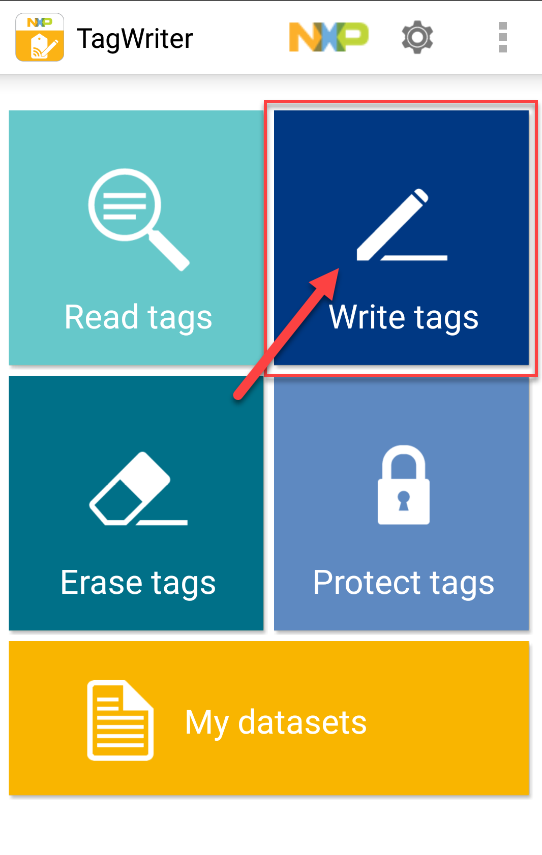
1) Once downloaded, go to the Write tags section.
pastedImage_1.png

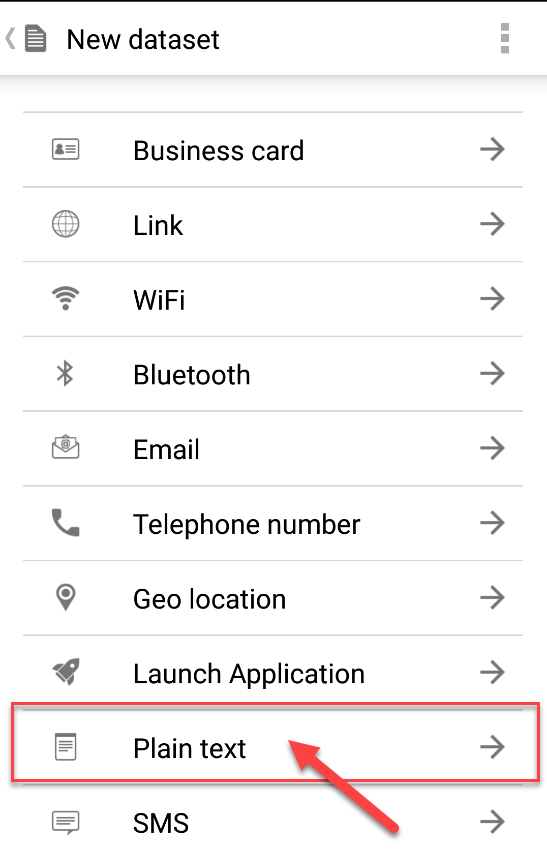
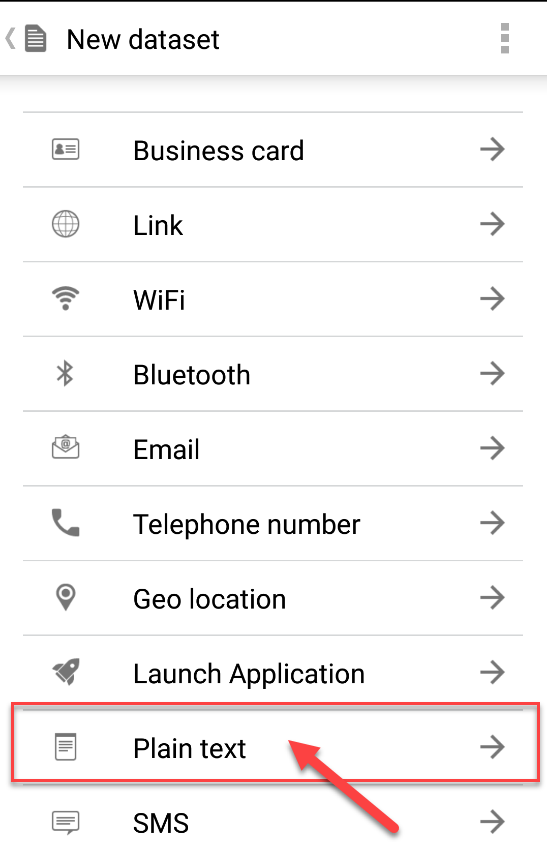
2) In this case, a NDEF text record will be written.
pastedImage_3.png

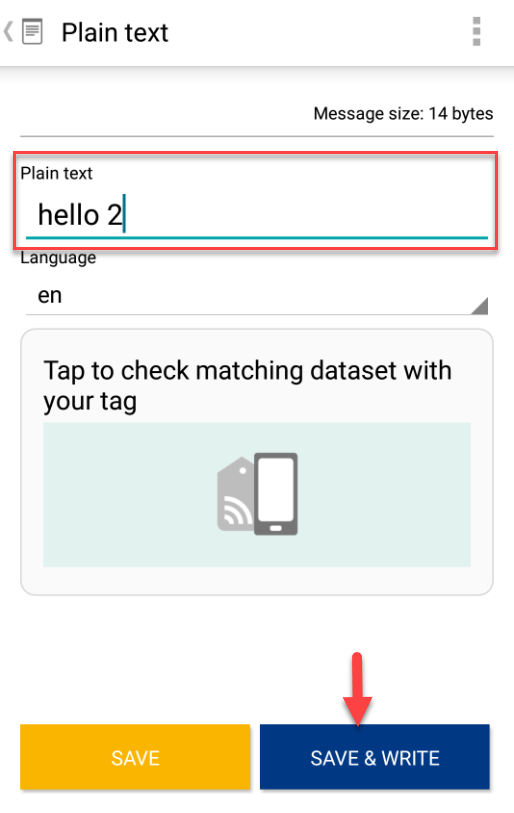
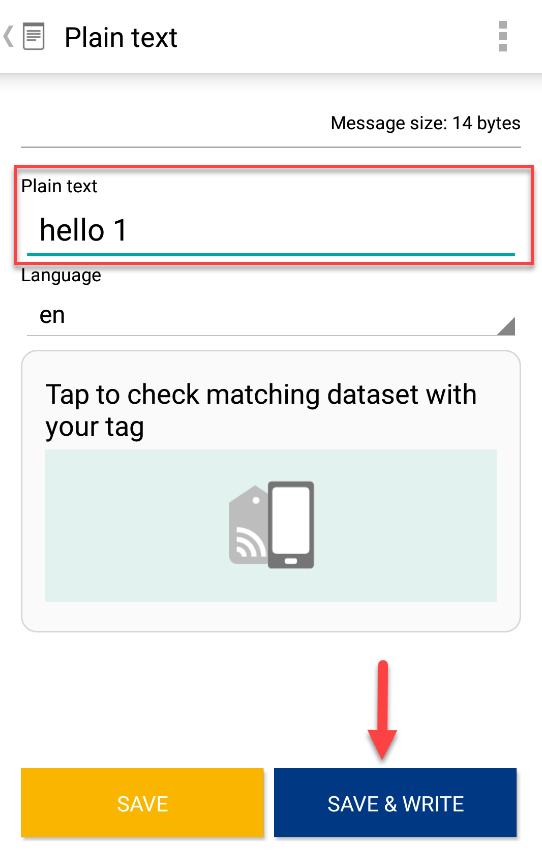
3) Write a text message in the TextBox and press the Save & Write Button.
pastedImage_20.png

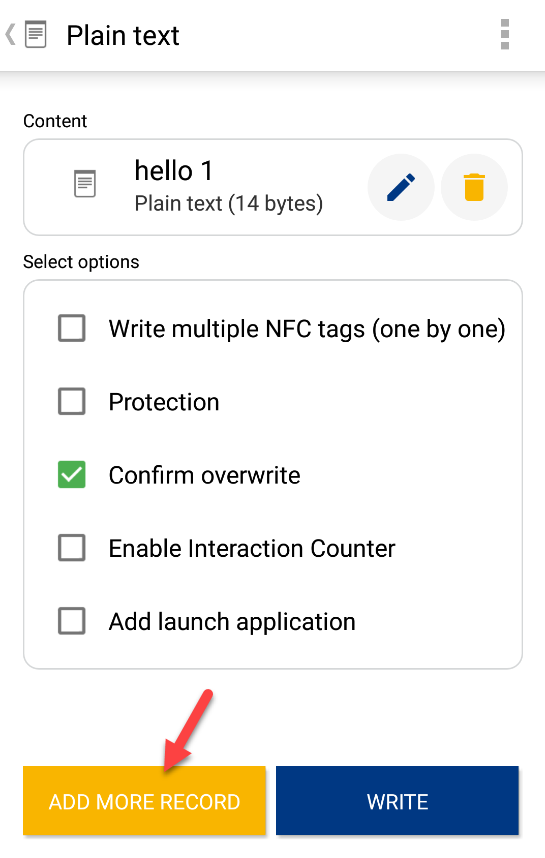
4) Now, press the ADD MORE RECORD Button so that another record can be added to the content to be written in the tag.
pastedImage_23.png

5) Select Plain Text again.

pastedImage_24.png


6) Same, procedure as in 3.

pastedImage_31.png

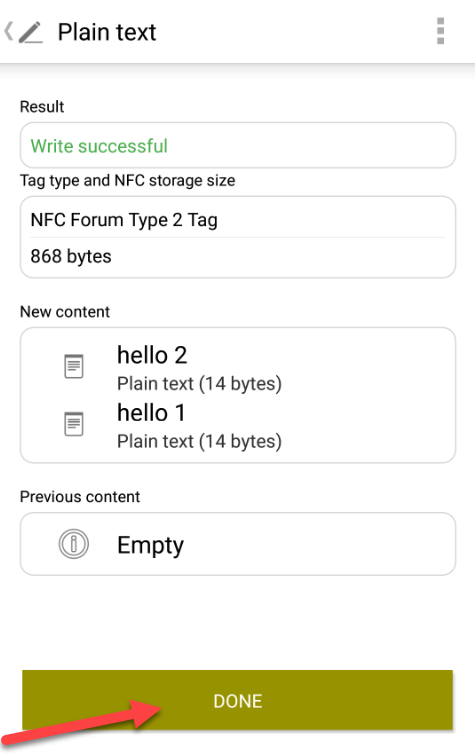
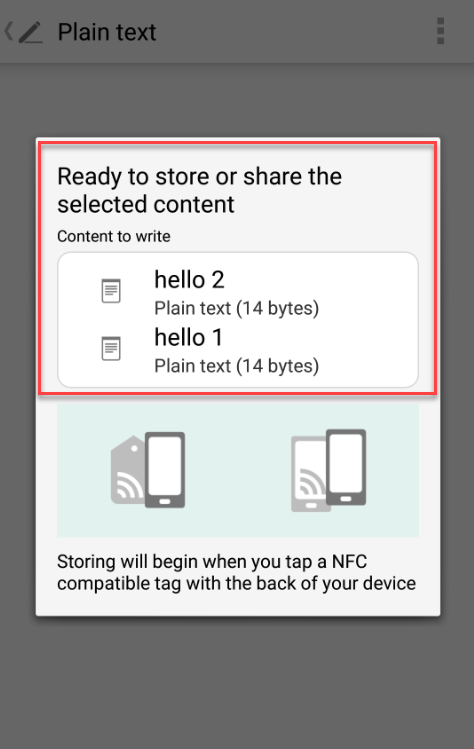
7) Finally, Tap the card and press the DONE Button.
pastedImage_33.pngpastedImage_32.png

I hope this is of great help!

Ivan R.

%3CLINGO-SUB%20id%3D%22lingo-sub-1099995%22%20slang%3D%22en-US%22%20mode%3D%22CREATE%22%3EWriting%20multiple%20NDEF%20text%20records%20with%20TagWriter%20app%3C%2FLINGO-SUB%3E%3CLINGO-BODY%20id%3D%22lingo-body-1099995%22%20slang%3D%22en-US%22%20mode%3D%22CREATE%22%3E%3CP%3EHello%20NFC%20Community%2C%3C%2FP%3E%3CP%3E%3C%2FP%3E%3CP%3EThis%20document%20describes%20how%20to%20write%20multiple%20NDEF%20Text%20Record%20by%20making%20use%20of%20NFC%20TagWriter%20app%20by%20NXP.%3C%2FP%3E%3CP%3E%3C%2FP%3E%3CP%3E%3C%2FP%3E%3CP%3EFirst%20of%20all%2C%20download%20the%20TagWriter%20app%20from%20the%20Play%20Store%3A%3C%2FP%3E%3CP%3E%3CA%20class%3D%22link-titled%22%20href%3D%22https%3A%2F%2Fplay.google.com%2Fstore%2Fapps%2Fdetails%3Fid%3Dcom.nxp.nfc.tagwriter%22%20title%3D%22https%3A%2F%2Fplay.google.com%2Fstore%2Fapps%2Fdetails%3Fid%3Dcom.nxp.nfc.tagwriter%22%20rel%3D%22nofollow%20noopener%20noreferrer%22%20target%3D%22_blank%22%3ENFC%20TagWriter%20by%20NXP%20-%20Apps%20on%20Google%20Play%3C%2FA%3E%26nbsp%3B%3C%2FP%3E%3CP%3E%3C%2FP%3E%3CP%3E%3C%2FP%3E%3CP%3E%3CSPAN%20style%3D%22font-size%3A%2022px%3B%22%3E%3CEM%3E1)%20Once%20downloaded%2C%20go%20to%20the%20%3CSTRONG%3EWrite%20tags%3C%2FSTRONG%3E%20section.%3C%2FEM%3E%3C%2FSPAN%3E%3C%2FP%3E%3CP%3E%3C%2FP%3E%3CP%3E%3CSPAN%20class%3D%22lia-inline-image-display-wrapper%22%20image-alt%3D%22pastedImage_1.png%22%3E%3Cspan%20class%3D%22lia-inline-image-display-wrapper%22%20image-alt%3D%22pastedImage_1.png%22%20style%3D%22width%3A%20542px%3B%22%3E%3Cimg%20src%3D%22https%3A%2F%2Fcommunity.nxp.com%2Ft5%2Fimage%2Fserverpage%2Fimage-id%2F61521i651FECA6209ECBAD%2Fimage-size%2Flarge%3Fv%3Dv2%26amp%3Bpx%3D999%22%20role%3D%22button%22%20title%3D%22pastedImage_1.png%22%20alt%3D%22pastedImage_1.png%22%20%2F%3E%3C%2Fspan%3E%3C%2FSPAN%3E%3C%2FP%3E%3CP%3E%3CSPAN%20style%3D%22font-size%3A%2022px%3B%22%3E%3CEM%3E2)%20In%20this%20case%2C%20a%20%3CSTRONG%3ENDEF%20text%3C%2FSTRONG%3E%20record%20will%20be%20written.%3C%2FEM%3E%3C%2FSPAN%3E%3C%2FP%3E%3CP%3E%3C%2FP%3E%3CP%3E%3CSPAN%20class%3D%22lia-inline-image-display-wrapper%22%20image-alt%3D%22pastedImage_3.png%22%3E%3Cspan%20class%3D%22lia-inline-image-display-wrapper%22%20image-alt%3D%22pastedImage_3.png%22%20style%3D%22width%3A%20547px%3B%22%3E%3Cimg%20src%3D%22https%3A%2F%2Fcommunity.nxp.com%2Ft5%2Fimage%2Fserverpage%2Fimage-id%2F61522i2E265E2E606146C9%2Fimage-size%2Flarge%3Fv%3Dv2%26amp%3Bpx%3D999%22%20role%3D%22button%22%20title%3D%22pastedImage_3.png%22%20alt%3D%22pastedImage_3.png%22%20%2F%3E%3C%2Fspan%3E%3C%2FSPAN%3E%3C%2FP%3E%3CP%3E%3C%2FP%3E%3CP%3E%3C%2FP%3E%3CP%3E%3CSPAN%20style%3D%22font-size%3A%2022px%3B%22%3E%3CEM%3E3)%20Write%20a%20text%20message%20in%20the%20%3CSTRONG%3ETextBox%3C%2FSTRONG%3E%20and%20press%20the%20%3CSTRONG%3ESave%20%26amp%3B%20Write%3C%2FSTRONG%3E%20Button.%3C%2FEM%3E%3C%2FSPAN%3E%3C%2FP%3E%3CP%3E%3C%2FP%3E%3CP%3E%3C%2FP%3E%3CP%3E%3CSPAN%20class%3D%22lia-inline-image-display-wrapper%22%20image-alt%3D%22pastedImage_20.png%22%3E%3Cspan%20class%3D%22lia-inline-image-display-wrapper%22%20image-alt%3D%22pastedImage_20.png%22%20style%3D%22width%3A%20542px%3B%22%3E%3Cimg%20src%3D%22https%3A%2F%2Fcommunity.nxp.com%2Ft5%2Fimage%2Fserverpage%2Fimage-id%2F61523i64AB5EC1589D57F1%2Fimage-size%2Flarge%3Fv%3Dv2%26amp%3Bpx%3D999%22%20role%3D%22button%22%20title%3D%22pastedImage_20.png%22%20alt%3D%22pastedImage_20.png%22%20%2F%3E%3C%2Fspan%3E%3C%2FSPAN%3E%3C%2FP%3E%3CP%3E%3C%2FP%3E%3CP%3E%3CSPAN%20style%3D%22font-size%3A%2022px%3B%22%3E%3CEM%3E4)%20Now%2C%20press%20the%20%3CSTRONG%3EADD%20MORE%20RECORD%3C%2FSTRONG%3E%20Button%20so%20that%20another%20record%20can%20be%20added%20to%20the%20content%20to%20be%20written%20in%20the%20tag.%3C%2FEM%3E%3C%2FSPAN%3E%3C%2FP%3E%3CP%3E%3C%2FP%3E%3CP%3E%3CSPAN%20style%3D%22font-size%3A%2022px%3B%22%3E%3CEM%3E%3CSPAN%20class%3D%22lia-inline-image-display-wrapper%22%20image-alt%3D%22pastedImage_23.png%22%3E%3Cspan%20class%3D%22lia-inline-image-display-wrapper%22%20image-alt%3D%22pastedImage_23.png%22%20style%3D%22width%3A%20545px%3B%22%3E%3Cimg%20src%3D%22https%3A%2F%2Fcommunity.nxp.com%2Ft5%2Fimage%2Fserverpage%2Fimage-id%2F61524i4AAAE86990DA5E3B%2Fimage-size%2Flarge%3Fv%3Dv2%26amp%3Bpx%3D999%22%20role%3D%22button%22%20title%3D%22pastedImage_23.png%22%20alt%3D%22pastedImage_23.png%22%20%2F%3E%3C%2Fspan%3E%3C%2FSPAN%3E%3C%2FEM%3E%3C%2FSPAN%3E%3C%2FP%3E%3CP%3E%3C%2FP%3E%3CP%3E%3C%2FP%3E%3CP%3E%3CSPAN%20style%3D%22font-size%3A%2022px%3B%22%3E%3CEM%3E5)%20Select%20%3CSTRONG%3EPlain%20Text%3C%2FSTRONG%3E%20again.%3C%2FEM%3E%3C%2FSPAN%3E%3C%2FP%3E%3CP%3E%3C%2FP%3E%3CP%3E%3CSPAN%20style%3D%22font-size%3A%2022px%3B%22%3E%3CEM%3E%3CSPAN%20class%3D%22lia-inline-image-display-wrapper%22%20image-alt%3D%22pastedImage_24.png%22%3E%3Cspan%20class%3D%22lia-inline-image-display-wrapper%22%20image-alt%3D%22pastedImage_24.png%22%20style%3D%22width%3A%20547px%3B%22%3E%3Cimg%20src%3D%22https%3A%2F%2Fcommunity.nxp.com%2Ft5%2Fimage%2Fserverpage%2Fimage-id%2F61525i69536F5E638CF468%2Fimage-size%2Flarge%3Fv%3Dv2%26amp%3Bpx%3D999%22%20role%3D%22button%22%20title%3D%22pastedImage_24.png%22%20alt%3D%22pastedImage_24.png%22%20%2F%3E%3C%2Fspan%3E%3C%2FSPAN%3E%3C%2FEM%3E%3C%2FSPAN%3E%3C%2FP%3E%3CP%3E%3CSPAN%20style%3D%22font-size%3A%2022px%3B%22%3E%3CEM%3E%26nbsp%3B%3C%2FEM%3E%3C%2FSPAN%3E%3C%2FP%3E%3CP%3E%3CSPAN%20style%3D%22font-size%3A%2022px%3B%22%3E%3CEM%3E6)%20Same%2C%20procedure%20as%20in%203.%3C%2FEM%3E%3C%2FSPAN%3E%3C%2FP%3E%3CP%3E%3CSPAN%20style%3D%22font-size%3A%2022px%3B%22%3E%3CEM%3E%3CSPAN%20class%3D%22lia-inline-image-display-wrapper%22%20image-alt%3D%22pastedImage_31.png%22%3E%3Cspan%20class%3D%22lia-inline-image-display-wrapper%22%20image-alt%3D%22pastedImage_31.png%22%20style%3D%22width%3A%20514px%3B%22%3E%3Cimg%20src%3D%22https%3A%2F%2Fcommunity.nxp.com%2Ft5%2Fimage%2Fserverpage%2Fimage-id%2F61526iBABE92DE1FF88B48%2Fimage-size%2Flarge%3Fv%3Dv2%26amp%3Bpx%3D999%22%20role%3D%22button%22%20title%3D%22pastedImage_31.png%22%20alt%3D%22pastedImage_31.png%22%20%2F%3E%3C%2Fspan%3E%3C%2FSPAN%3E%3C%2FEM%3E%3C%2FSPAN%3E%3C%2FP%3E%3CP%3E%3C%2FP%3E%3CP%3E%3CSPAN%20style%3D%22font-size%3A%2022px%3B%22%3E%3CEM%3E7)%20Finally%2C%20%3CSTRONG%3ETap%26nbsp%3B%3C%2FSTRONG%3Ethe%20card%20and%20press%20the%20%3CSTRONG%3EDONE%3C%2FSTRONG%3E%20Button.%3C%2FEM%3E%3C%2FSPAN%3E%3C%2FP%3E%3CP%3E%3C%2FP%3E%3CP%3E%3CSPAN%20style%3D%22font-size%3A%2022px%3B%22%3E%3CEM%3E%3CSPAN%20class%3D%22lia-inline-image-display-wrapper%22%20image-alt%3D%22pastedImage_33.png%22%3E%3Cspan%20class%3D%22lia-inline-image-display-wrapper%22%20image-alt%3D%22pastedImage_33.png%22%20style%3D%22width%3A%20474px%3B%22%3E%3Cimg%20src%3D%22https%3A%2F%2Fcommunity.nxp.com%2Ft5%2Fimage%2Fserverpage%2Fimage-id%2F61527iAF0B97296E27E2FC%2Fimage-size%2Flarge%3Fv%3Dv2%26amp%3Bpx%3D999%22%20role%3D%22button%22%20title%3D%22pastedImage_33.png%22%20alt%3D%22pastedImage_33.png%22%20%2F%3E%3C%2Fspan%3E%3C%2FSPAN%3E%3CSPAN%20class%3D%22lia-inline-image-display-wrapper%22%20image-alt%3D%22pastedImage_32.png%22%3E%3Cspan%20class%3D%22lia-inline-image-display-wrapper%22%20image-alt%3D%22pastedImage_32.png%22%20style%3D%22width%3A%20475px%3B%22%3E%3Cimg%20src%3D%22https%3A%2F%2Fcommunity.nxp.com%2Ft5%2Fimage%2Fserverpage%2Fimage-id%2F61528iE09093C4A0C3662E%2Fimage-size%2Flarge%3Fv%3Dv2%26amp%3Bpx%3D999%22%20role%3D%22button%22%20title%3D%22pastedImage_32.png%22%20alt%3D%22pastedImage_32.png%22%20%2F%3E%3C%2Fspan%3E%3C%2FSPAN%3E%3C%2FEM%3E%3C%2FSPAN%3E%3C%2FP%3E%3CP%3E%3C%2FP%3E%3CP%3E%3CSPAN%20style%3D%22font-size%3A%2022px%3B%22%3E%3CEM%3EI%20hope%20this%20is%20of%20great%20help!%3C%2FEM%3E%3C%2FSPAN%3E%3C%2FP%3E%3CP%3E%3C%2FP%3E%3CP%3E%3C%2FP%3E%3CP%3E%3C%2FP%3E%3CP%3E%3CSPAN%20style%3D%22font-size%3A%2022px%3B%22%3E%3CEM%3EIvan%20R.%3C%2FEM%3E%3C%2FSPAN%3E%3C%2FP%3E%3C%2FLINGO-BODY%3E
No ratings
Version history
Last update:
‎06-01-2018 02:53 PM
Updated by: