
- Forums
- Product Forums
- General Purpose MicrocontrollersGeneral Purpose Microcontrollers
- i.MX Forumsi.MX Forums
- QorIQ Processing PlatformsQorIQ Processing Platforms
- Identification and SecurityIdentification and Security
- Power ManagementPower Management
- Wireless ConnectivityWireless Connectivity
- RFID / NFCRFID / NFC
- Advanced AnalogAdvanced Analog
- MCX Microcontrollers
- S32G
- S32K
- S32V
- MPC5xxx
- Other NXP Products
- S12 / MagniV Microcontrollers
- Powertrain and Electrification Analog Drivers
- Sensors
- Vybrid Processors
- Digital Signal Controllers
- 8-bit Microcontrollers
- ColdFire/68K Microcontrollers and Processors
- PowerQUICC Processors
- OSBDM and TBDML
- S32M
- S32Z/E
-
- Solution Forums
- Software Forums
- MCUXpresso Software and ToolsMCUXpresso Software and Tools
- CodeWarriorCodeWarrior
- MQX Software SolutionsMQX Software Solutions
- Model-Based Design Toolbox (MBDT)Model-Based Design Toolbox (MBDT)
- FreeMASTER
- eIQ Machine Learning Software
- Embedded Software and Tools Clinic
- S32 SDK
- S32 Design Studio
- GUI Guider
- Zephyr Project
- Voice Technology
- Application Software Packs
- Secure Provisioning SDK (SPSDK)
- Processor Expert Software
- Generative AI & LLMs
-
- Topics
- Mobile Robotics - Drones and RoversMobile Robotics - Drones and Rovers
- NXP Training ContentNXP Training Content
- University ProgramsUniversity Programs
- Rapid IoT
- NXP Designs
- SafeAssure-Community
- OSS Security & Maintenance
- Using Our Community
-
- Cloud Lab Forums
-
- Knowledge Bases
- ARM Microcontrollers
- i.MX Processors
- Identification and Security
- Model-Based Design Toolbox (MBDT)
- QorIQ Processing Platforms
- S32 Automotive Processing Platform
- Wireless Connectivity
- CodeWarrior
- MCUXpresso Suite of Software and Tools
- MQX Software Solutions
- RFID / NFC
- Advanced Analog
-
- NXP Tech Blogs
- Home
- :
- MQXソフトウェアソリューション
- :
- MQX RTOSアプリケーション開発エッセンシャルコース - ラボガイド・ナレッジベース
- :
- Session 2: Designing for a Multi-Tasking Environment
Session 2: Designing for a Multi-Tasking Environment
- RSS フィードを購読する
- 新着としてマーク
- 既読としてマーク
- ブックマーク
- 購読
- 印刷用ページ
- 不適切なコンテンツを報告
Session 2: Designing for a Multi-Tasking Environment
Session 2: Designing for a Multi-Tasking Environment
This video presentation is the first installment of the Essentials of MQX RTOS Application Development training course. In this session, you will be introduced to multi-tasking, blocking calls, and switching.
This training was created by Embedded Access Inc., a Freescale sponsored training provider and proven partner.
| Session 2 Course Line | Lab Topic |
|---|---|
|
|
First, watch the video for Session 2: Designing for a Multi-Tasking Environment.
Then, follow through with the interactive lab assignment below.
SESSION 2: LAB ASSIGNMENT
INTRODUCTION
Now that we have our application outlined it's time to organize the code into a structure that is appropriate for a multi-tasking environment. For one thing we'll need the application to run indefinitely instead of doing a small task and terminating. As well, having multiple tasks running in parallel requires a degree of cooperation and synchronization between the tasks. This is a topic that will be visited at several points in the course but for starters we'll look at a couple of options and see the impact they have on performance.
OBJECTIVE
The objective of this lab is to understand the interaction of multiple tasks running indefinitely.This objective will be accomplished by:
- Converting each task into the proper format
- Exploring ways for tasks to share the CPU
ASSIGNMENT
UPDATING THE STRUCTURE OF EACH TASK
- You can either continue on with where you left off after the session 1 assignment or replace you files with the provided solution for lab 1. If you decide to use the provided solution it is suggested that you compile and run this code first to make sure that it is operational on your machine.
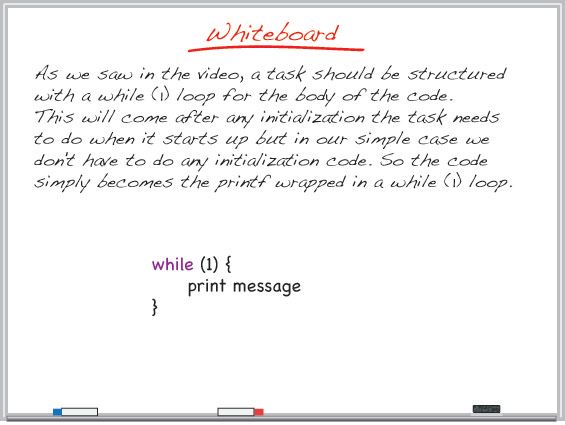
- Since in a real system tasks typically run indefinitely the code for each task should be modified so they print their unique message continuously.
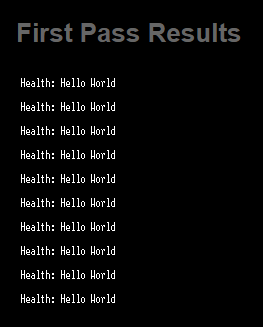
- Once these changes have been made compile and run the application. Observe the print out. Is this what you expected? Why do you think this happened?


COOPERATIVE SHARING OF THE CPU TIME
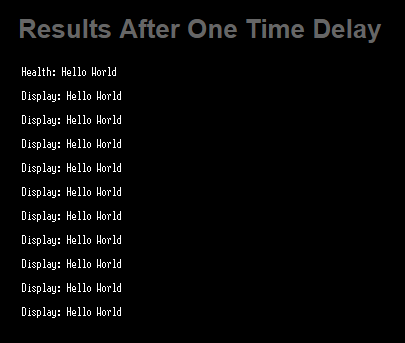
- Change the Health Task such that it does a 1 second time delay after it's printf. Compile and run the application.
- What impact did you observe? Put a breakpoint on the printf in the Display Tasks and pull up the Task List in Task Aware Debugging (TAD). Does this explain the results?
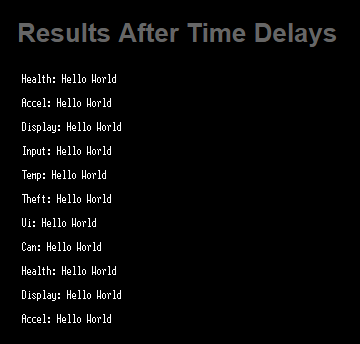
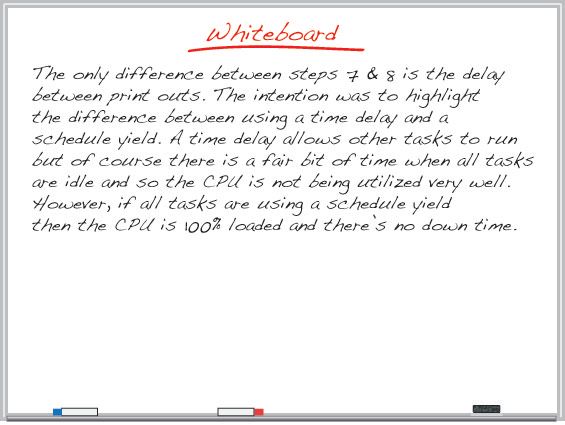
- Since the use of a time delay allowed the next task to run, putting a 1 second time delay after the print statement in all tasks should allow for better cooperation. Try this and re-run the application.
- Did you get all print messages? If so, what is the downside to this method ensuring shared use of the CPU?
- Try replacing all of the time delays with the schedule yield function (_sched_yield() ). Run your code and compare the results.






Need more help? The full source code for this lab can be found in the 'Lab Source Code' folder here.
