- Forums
- Product Forums
- General Purpose MicrocontrollersGeneral Purpose Microcontrollers
- i.MX Forumsi.MX Forums
- QorIQ Processing PlatformsQorIQ Processing Platforms
- Identification and SecurityIdentification and Security
- Power ManagementPower Management
- Wireless ConnectivityWireless Connectivity
- RFID / NFCRFID / NFC
- Advanced AnalogAdvanced Analog
- MCX Microcontrollers
- S32G
- S32K
- S32V
- MPC5xxx
- Other NXP Products
- S12 / MagniV Microcontrollers
- Powertrain and Electrification Analog Drivers
- Sensors
- Vybrid Processors
- Digital Signal Controllers
- 8-bit Microcontrollers
- ColdFire/68K Microcontrollers and Processors
- PowerQUICC Processors
- OSBDM and TBDML
- S32M
- S32Z/E
-
- Solution Forums
- Software Forums
- MCUXpresso Software and ToolsMCUXpresso Software and Tools
- CodeWarriorCodeWarrior
- MQX Software SolutionsMQX Software Solutions
- Model-Based Design Toolbox (MBDT)Model-Based Design Toolbox (MBDT)
- FreeMASTER
- eIQ Machine Learning Software
- Embedded Software and Tools Clinic
- S32 SDK
- S32 Design Studio
- GUI Guider
- Zephyr Project
- Voice Technology
- Application Software Packs
- Secure Provisioning SDK (SPSDK)
- Processor Expert Software
- Generative AI & LLMs
-
- Topics
- Mobile Robotics - Drones and RoversMobile Robotics - Drones and Rovers
- NXP Training ContentNXP Training Content
- University ProgramsUniversity Programs
- Rapid IoT
- NXP Designs
- SafeAssure-Community
- OSS Security & Maintenance
- Using Our Community
-
- Cloud Lab Forums
-
- Knowledge Bases
- ARM Microcontrollers
- i.MX Processors
- Identification and Security
- Model-Based Design Toolbox (MBDT)
- QorIQ Processing Platforms
- S32 Automotive Processing Platform
- Wireless Connectivity
- CodeWarrior
- MCUXpresso Suite of Software and Tools
- MQX Software Solutions
- RFID / NFC
- Advanced Analog
-
- NXP Tech Blogs
MCUXpresso support for MC56F parts

Is there any real support for MC56F parts? (specifically the MC56F8322 and MC56F8256)
I don't mean this to be a snarky question, I have downloaded the DSC8.3 IDE (so old it doesn't like 64bit Win10), tried getting the CW11.1 download (chat support was unable to tell me how to add MC56F to my licensed K60 CW for MCU install) and when I try the latest and greatest MCUXpresso IDE and try to Install a SDK from within the IDE it can't find the part and when I build and download the SDK zip I get the following:
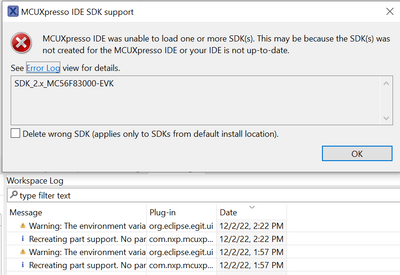
Is support for these parts really this bad?
Is there a way to download the latest build tools (assembler, compiler, linker) and just use a makefile?

jjt, in addition to what rong wrote, he is talking about 56F83xxx family, but you wrote 2 old chips 82xx and 83xx.
They are supported by CW11 SW and I am very satisfied with its activity.
You just have to make sure that you added the patch to support the all the supported DSC chips.
Maybe I did not understand you...please specify
Ben

If you already installed CW for MCU with K60 support, maybe the default install/upgrade settings are set for K60 only.
Have you tried looking deeper in the "install new software..." options and enable the toolchains/tools/libraries for other MCUs ?
Try again with CW for MCU, select menu "Help" then "Install New Software..", select the NXP update site as shown below:
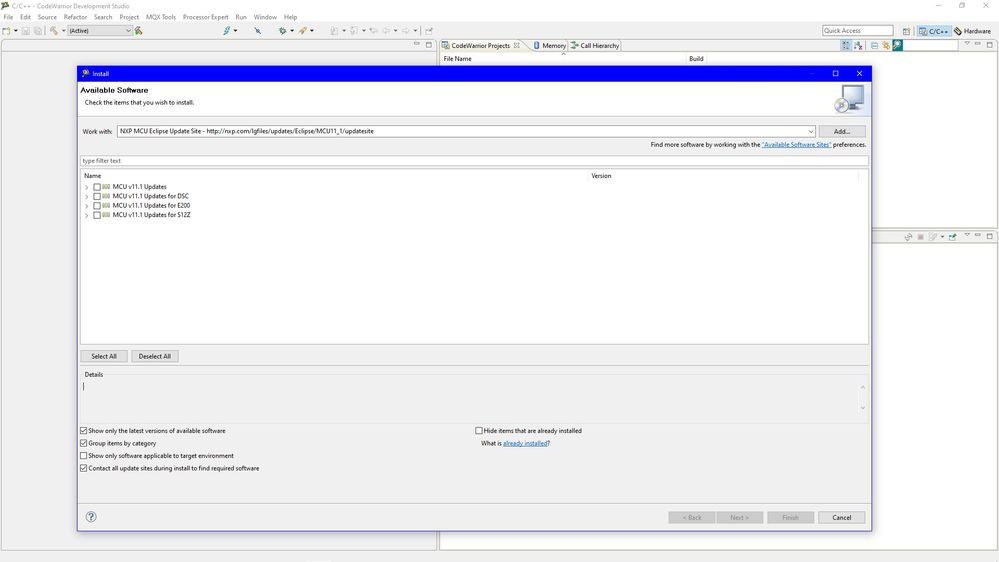
(the image above shows my update status, your dialog will look different, change the checkbox settings in the bottom of the dialog to view other optional installations).
Or maybe it's a problem due to the license for K60 not allowing to select other MCUs, have you tried with a separate clean installation of CW for MCU using the "free license" option ?
Besides this, it seems like current DSC MC56F hardware and software tools are in long term maintenance mode.
Toolchain is still the original Metrowerks one, but at least it gets periodic bugfixes and small improvements, CW for MCU is still based on an old Eclipse release, etc. etc.
Hopefully they will add support for it on MCUXpresso, but if they plan to do it it seems it's a very low priority task compared to support for their new ARM cores.
What I can see from outside is that most of NXP new MCU products are ARM based, with PowerPC, DSC, etc. slowly phased out.

 xiangjun_rong
Hi,
Unfortunately, the MCUXpresso tools does not support DSC family, you have to use CodeWarrior for MCU ver11.x to develop DSC family project.
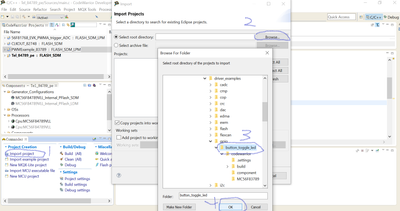
I suppose that you have download SDK for DSC and the CodeWarrior for MCU tools ver11.x, I mark the steps to import an example in SDK, pls try to follow it up to load an example in SDK driver.
Hope it can help you
BR
XiangJun Rong