
- Forums
- Product Forums
- General Purpose MicrocontrollersGeneral Purpose Microcontrollers
- i.MX Forumsi.MX Forums
- QorIQ Processing PlatformsQorIQ Processing Platforms
- Identification and SecurityIdentification and Security
- Power ManagementPower Management
- Wireless ConnectivityWireless Connectivity
- RFID / NFCRFID / NFC
- Advanced AnalogAdvanced Analog
- Neural Processing UnitsNeural Processing Units
- MCX Microcontrollers
- S32G
- S32K
- S32V
- MPC5xxx
- Other NXP Products
- S12 / MagniV Microcontrollers
- Powertrain and Electrification Analog Drivers
- Sensors
- Vybrid Processors
- Digital Signal Controllers
- 8-bit Microcontrollers
- ColdFire/68K Microcontrollers and Processors
- PowerQUICC Processors
- OSBDM and TBDML
- S32M
- S32Z/E
-
- Solution Forums
- Software Forums
- MCUXpresso Software and ToolsMCUXpresso Software and Tools
- CodeWarriorCodeWarrior
- MQX Software SolutionsMQX Software Solutions
- Model-Based Design Toolbox (MBDT)Model-Based Design Toolbox (MBDT)
- FreeMASTER
- eIQ Machine Learning Software
- Embedded Software and Tools Clinic
- S32 SDK
- S32 Design Studio
- GUI Guider
- Zephyr Project
- Voice Technology
- Application Software Packs
- Secure Provisioning SDK (SPSDK)
- Processor Expert Software
- Generative AI & LLMs
-
- Topics
- Mobile Robotics - Drones and RoversMobile Robotics - Drones and Rovers
- NXP Training ContentNXP Training Content
- University ProgramsUniversity Programs
- Rapid IoT
- NXP Designs
- SafeAssure-Community
- OSS Security & Maintenance
- Using Our Community
-
- Cloud Lab Forums
-
- Knowledge Bases
- ARM Microcontrollers
- i.MX Processors
- Identification and Security
- Model-Based Design Toolbox (MBDT)
- QorIQ Processing Platforms
- S32 Automotive Processing Platform
- Wireless Connectivity
- CodeWarrior
- MCUXpresso Suite of Software and Tools
- MQX Software Solutions
- RFID / NFC
- Advanced Analog
- Neural Processing Units
-
- NXP Tech Blogs
- Home
- :
- i.MX フォーラム
- :
- i.MX RT クロスオーバーMCU
- :
- Re: Problem mounting FAT filesystem using BOARD_SDRAM
Problem mounting FAT filesystem using BOARD_SDRAM
- RSS フィードを購読する
- トピックを新着としてマーク
- トピックを既読としてマーク
- このトピックを現在のユーザーにフロートします
- ブックマーク
- 購読
- ミュート
- 印刷用ページ

- 新着としてマーク
- ブックマーク
- 購読
- ミュート
- RSS フィードを購読する
- ハイライト
- 印刷
- 不適切なコンテンツを報告
I am using the RT1020 evaluation board and I am trying to get an SD Card to mount using the following example code from the sdcard_fatfs_freertos SDK demo :
if (f_mount(&g_fileSystem, driverNumberBuffer, 1U))
{
PRINTF("Mount volume failed.\r\n");
return kStatus_Fail;
}
If g_fileSystem resides in BOARD_SDRAM, the f_mount fails but if it is in SRAM_DTC, the function works.
Delving into the f_mount code, it calls find_volume, which calls check_fs which ends up reading sector 0 of the SD card using a call to disk_read(fs->pdrv, fs->win, sector, 1).
It would appear that reading a disc sector to a buffer (part of the g_fileSystem structure) which is in BOARD_SDRAM fails but if the buffer is in SRAM_DTC, it works. Some of the sector is read to BOARD_SDRAM but not the full 512 bytes. I don't know the technical reason for the failure but probably a timing issue due to the slower BOARD_SDRAM.
Does anyone have any ideas for solving this problem ?
Thanks,
Jon
解決済! 解決策の投稿を見る。

 jeremyzhou
- 新着としてマーク
- ブックマーク
- 購読
- ミュート
- RSS フィードを購読する
- ハイライト
- 印刷
- 不適切なコンテンツを報告
Hi Jon Welch
After further testing, I find it should disable D-cache in addition above two modifications, after that the sdcard_fatfs_freertos can work now, however, its performance obvious is lower than the original version.
To disable the D-cache feature, just comment out the SCB_EnableDCache() function in the BOARD_ConfigMPU(void) function, as the below shows.
/* Enable I cache and D cache */
//SCB_EnableDCache();
SCB_EnableICache();
Have a great day,
TIC
-------------------------------------------------------------------------------
Note:
- If this post answers your question, please click the "Mark Correct" button. Thank you!
- We are following threads for 7 weeks after the last post, later replies are ignored
Please open a new thread and refer to the closed one, if you have a related question at a later point in time.
-------------------------------------------------------------------------------
- 新着としてマーク
- ブックマーク
- 購読
- ミュート
- RSS フィードを購読する
- ハイライト
- 印刷
- 不適切なコンテンツを報告
Hello,
Also for me disable D-cache works for me also, but I don't understand why.
Could you please explain more where the isssue comes from?
I'm also using SDRAM and SD card together.
jeremyzhou
- 新着としてマーク
- ブックマーク
- 購読
- ミュート
- RSS フィードを購読する
- ハイライト
- 印刷
- 不適切なコンテンツを報告
Hi Jon Welch
Thank you for your interest in NXP Semiconductor products and
for the opportunity to serve you.
I think I need more information about the phenomenon, whether you can introduce what modification you did about the sdcard_fatfs_freertos demo, then I can replicate this phenomenon on my site and it can help me to figure it out.
Looking forward to your reply.
Have a great day,
TIC
-------------------------------------------------------------------------------
Note:
- If this post answers your question, please click the "Mark Correct" button. Thank you!
- We are following threads for 7 weeks after the last post, later replies are ignored
Please open a new thread and refer to the closed one, if you have a related question at a later point in time.
-------------------------------------------------------------------------------
- 新着としてマーク
- ブックマーク
- 購読
- ミュート
- RSS フィードを購読する
- ハイライト
- 印刷
- 不適切なコンテンツを報告
Hi and thanks for your reply.
I can replicate the 'mount failed' error at will but the root cause is now a different failure to what I was originally seeing.
What I did was import the sdcard_fatfs_freertos demo app. On the second tab of the import option, I moved the BOARD_SDRAM option to next to top. I also added two build options to initialise the SDRAM. There were XIP_BOOT_HEADER_DCD_ENABLE=1 and SKIP_SYSCLK_INIT. Finally, I changed line 273 of sdcard_fatfs_freertos.c to read if (f_mount(&g_fileSystem, driverNumberBuffer, 1U)), ie change the option flag to 1 at the end to force the mount straight away rather than delay it.
When I built and ran the demo under the debugger, I got the mount failed error. If I moved the BOARD_SDRAM memory option back to its original place near the bottom, it ran correctly. With the SDRAM setup, the error was in the SD_SelectBusTiming routine in fsl_sd.c. However, with my original test, this function worked and I got a further error in the disc read function as per my original message. I haven't checked this out yet but will if necessary.
The original problem came to light when I added the sdcard_fatfs_freertos code to my existing app. I am using a lot of RAM for an OPC UA Server so had to use SDRAM and not SRAM_DTC. I have got around the problem temporarily by changing the declaration of g_filesystem from static FATFS g_fileSystem; to FATFS *g_fileSystem = (FATFS *) 0x20000000; to force it to use SRAM_DTC memory. This is not ideal but works until I can work out why the SDRAM option fails.
Any further advice would be appreciated, thanks.
jeremyzhou
- 新着としてマーク
- ブックマーク
- 購読
- ミュート
- RSS フィードを購読する
- ハイライト
- 印刷
- 不適切なコンテンツを報告
Hi Jon Welch
After further testing, I find it should disable D-cache in addition above two modifications, after that the sdcard_fatfs_freertos can work now, however, its performance obvious is lower than the original version.
To disable the D-cache feature, just comment out the SCB_EnableDCache() function in the BOARD_ConfigMPU(void) function, as the below shows.
/* Enable I cache and D cache */
//SCB_EnableDCache();
SCB_EnableICache();
Have a great day,
TIC
-------------------------------------------------------------------------------
Note:
- If this post answers your question, please click the "Mark Correct" button. Thank you!
- We are following threads for 7 weeks after the last post, later replies are ignored
Please open a new thread and refer to the closed one, if you have a related question at a later point in time.
-------------------------------------------------------------------------------
- 新着としてマーク
- ブックマーク
- 購読
- ミュート
- RSS フィードを購読する
- ハイライト
- 印刷
- 不適切なコンテンツを報告
Hi,
Many thanks for your prompt reply. Your suggestion to disable the DCache has solved my problem and I can now read/write to my SDCARD using BOARD_SDRAM.
Thanks again, very much appreciated.
Jon
jeremyzhou
- 新着としてマーク
- ブックマーク
- 購読
- ミュート
- RSS フィードを購読する
- ハイライト
- 印刷
- 不適切なコンテンツを報告
Hi Jon Welch
Thanks for your reply.
I'd like to show the testing I did.
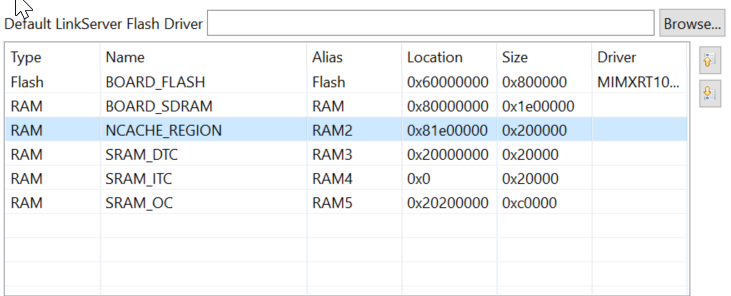
1) Enable DCD: adding XIP_BOOT_HEADER_DCD_ENABLE=1 and SKIP_SYSCLK_INI macros, in further, move up the BOARD_SDRAM and NCACHE_REGION, as below shows.
2) Place the g_fileSystem and g_fileSystem in the DTCM area.
__DATA(RAM3) static FATFS g_fileSystem; /* File system object */
__DATA(RAM3) static FIL g_fileObject; /* File object */
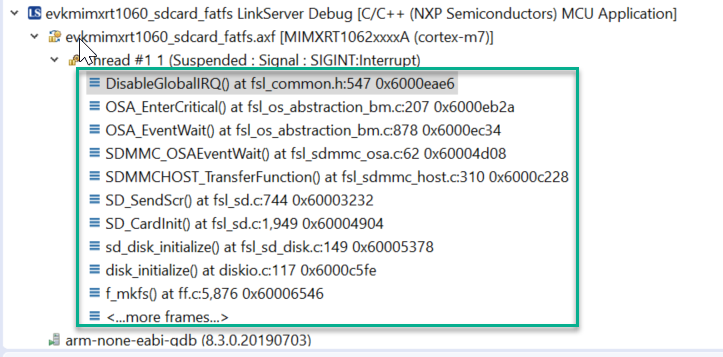
After doing the above work, I find that the demo will be stuck in the f_mkfs as below shows.
Now I'm still working on it.
Have a great day,
TIC
-------------------------------------------------------------------------------
Note:
- If this post answers your question, please click the "Mark Correct" button. Thank you!
- We are following threads for 7 weeks after the last post, later replies are ignored
Please open a new thread and refer to the closed one, if you have a related question at a later point in time.
-------------------------------------------------------------------------------
- 新着としてマーク
- ブックマーク
- 購読
- ミュート
- RSS フィードを購読する
- ハイライト
- 印刷
- 不適切なコンテンツを報告
Also, I would suspect it is because the SDRAM is cached (by default) and DTC isn't.
