
- Forums
- Product Forums
- General Purpose MicrocontrollersGeneral Purpose Microcontrollers
- i.MX Forumsi.MX Forums
- QorIQ Processing PlatformsQorIQ Processing Platforms
- Identification and SecurityIdentification and Security
- Power ManagementPower Management
- Wireless ConnectivityWireless Connectivity
- RFID / NFCRFID / NFC
- Advanced AnalogAdvanced Analog
- Neural Processing UnitsNeural Processing Units
- MCX Microcontrollers
- S32G
- S32K
- S32V
- MPC5xxx
- Other NXP Products
- S12 / MagniV Microcontrollers
- Powertrain and Electrification Analog Drivers
- Sensors
- Vybrid Processors
- Digital Signal Controllers
- 8-bit Microcontrollers
- ColdFire/68K Microcontrollers and Processors
- PowerQUICC Processors
- OSBDM and TBDML
- S32M
- S32Z/E
-
- Solution Forums
- Software Forums
- MCUXpresso Software and ToolsMCUXpresso Software and Tools
- CodeWarriorCodeWarrior
- MQX Software SolutionsMQX Software Solutions
- Model-Based Design Toolbox (MBDT)Model-Based Design Toolbox (MBDT)
- FreeMASTER
- eIQ Machine Learning Software
- Embedded Software and Tools Clinic
- S32 SDK
- S32 Design Studio
- GUI Guider
- Zephyr Project
- Voice Technology
- Application Software Packs
- Secure Provisioning SDK (SPSDK)
- Processor Expert Software
- Generative AI & LLMs
-
- Topics
- Mobile Robotics - Drones and RoversMobile Robotics - Drones and Rovers
- NXP Training ContentNXP Training Content
- University ProgramsUniversity Programs
- Rapid IoT
- NXP Designs
- SafeAssure-Community
- OSS Security & Maintenance
- Using Our Community
-
- Cloud Lab Forums
-
- Knowledge Bases
- ARM Microcontrollers
- i.MX Processors
- Identification and Security
- Model-Based Design Toolbox (MBDT)
- QorIQ Processing Platforms
- S32 Automotive Processing Platform
- Wireless Connectivity
- CodeWarrior
- MCUXpresso Suite of Software and Tools
- MQX Software Solutions
- RFID / NFC
- Advanced Analog
- Neural Processing Units
-
- NXP Tech Blogs
- Home
- :
- i.MX Forums
- :
- i.MX RT Crossover MCUs
- :
- Re: OTA bootloader Image validation failed issue
OTA bootloader Image validation failed issue
- Subscribe to RSS Feed
- Mark Topic as New
- Mark Topic as Read
- Float this Topic for Current User
- Bookmark
- Subscribe
- Mute
- Printer Friendly Page
OTA bootloader Image validation failed issue

- Mark as New
- Bookmark
- Subscribe
- Mute
- Subscribe to RSS Feed
- Permalink
- Report Inappropriate Content
Hi, I tried to update lwip_httpssrv_ota_enet image but encounterd "Image validation failed" issue.
I tried some test image on forums but still could not found the root cause of this issue.
The followings are my test steps, could you help us to check our steps of update image?
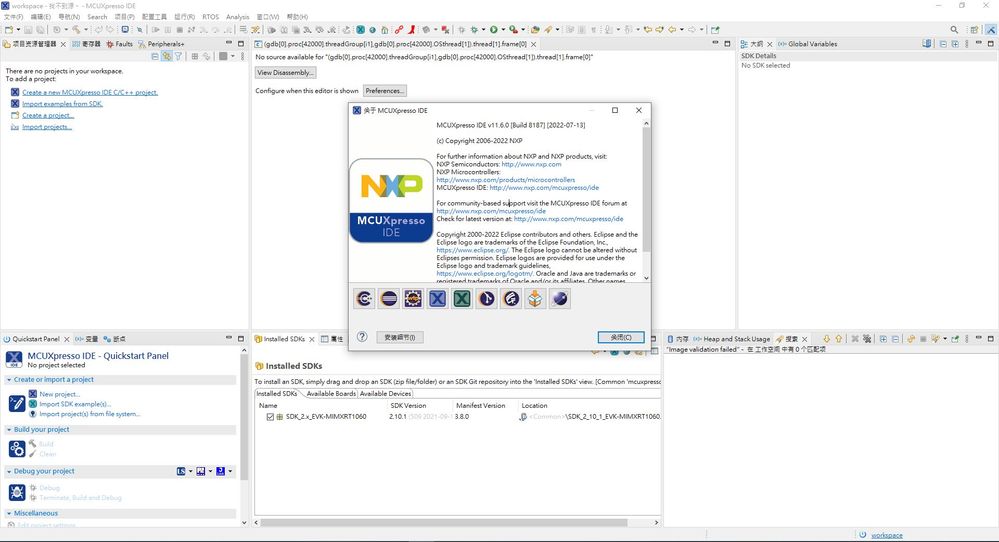
Step1. Install MCUXpresso IDE v11.6.0 and SDK 2.10.1
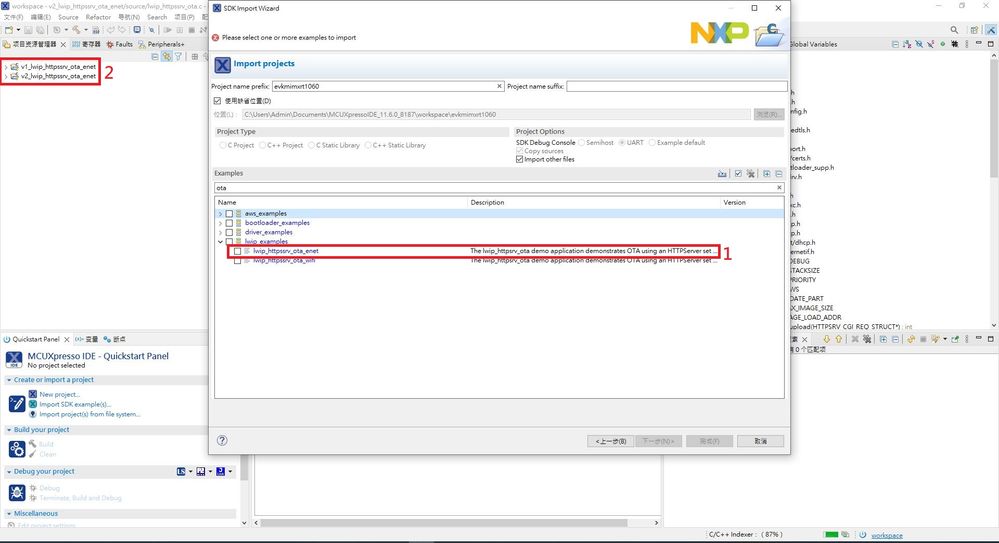
Step2. Import SDK examples "lwip_httpssrv_ota_enet" and named it "v1_lwip_httpssrv_ota_enet" and "v2_lwip_httpssrv_ota_enet"
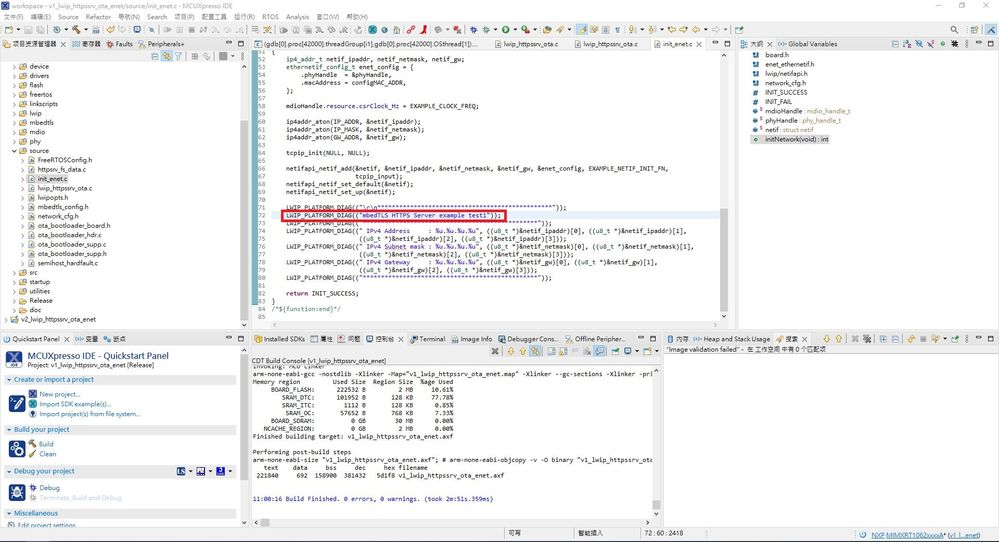
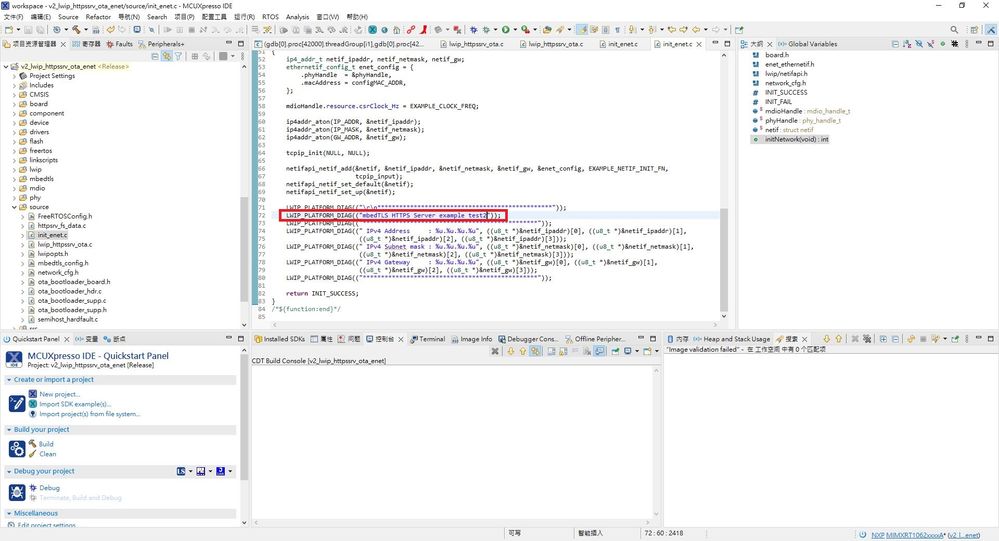
Step3. Modify the print message to identify the different image.
v1_lwip_httpssrv_ota_enet:
v2_lwip_httpssrv_ota_enet:
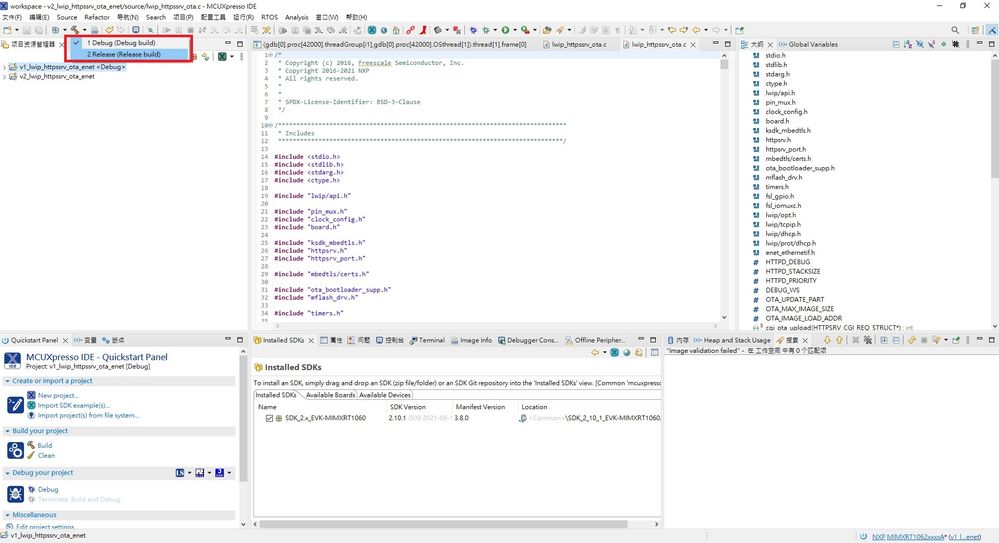
Step4. Release build the "v1_lwip_httpssrv_ota_enet" and "v2_lwip_httpssrv_ota_enet" project
Step 5. Create the binary file of "v1_lwip_httpssrv_ota_enet" and "v2_lwip_httpssrv_ota_enet"
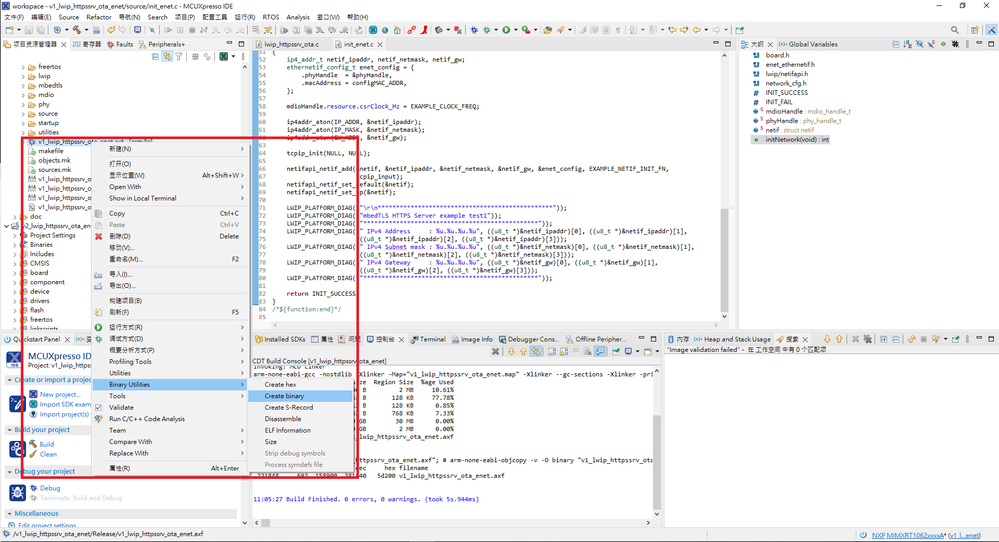
Step 6. Import SDK examples "ota_bootloader", release build and create binary file.


Step 7. Use the GUI flash tool to flash the binary file to RT1060 EVK board.
evkmimxrt1060_ota_bootloader.bin(0x60000000)
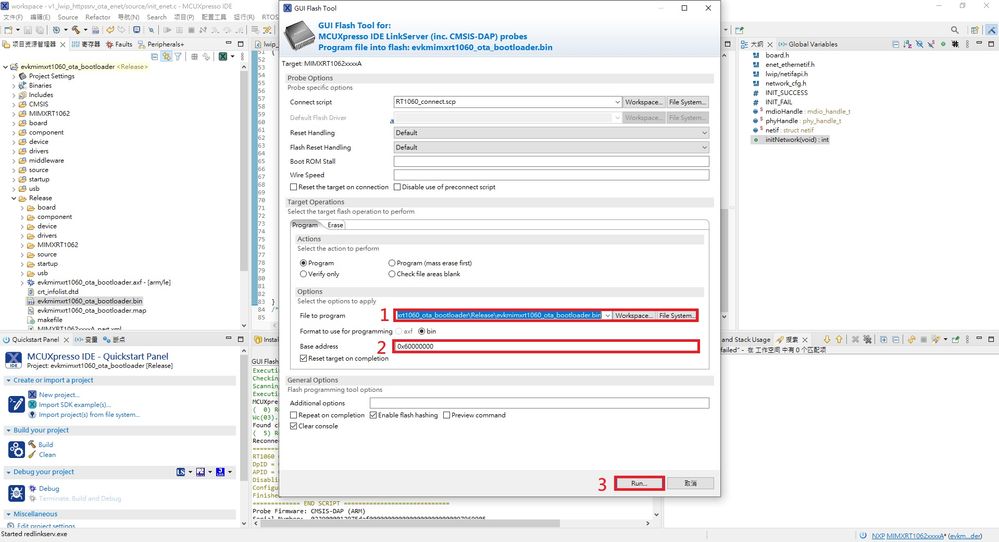
v1_lwip_httpssrv_ota_enet.bin(0x60040000)

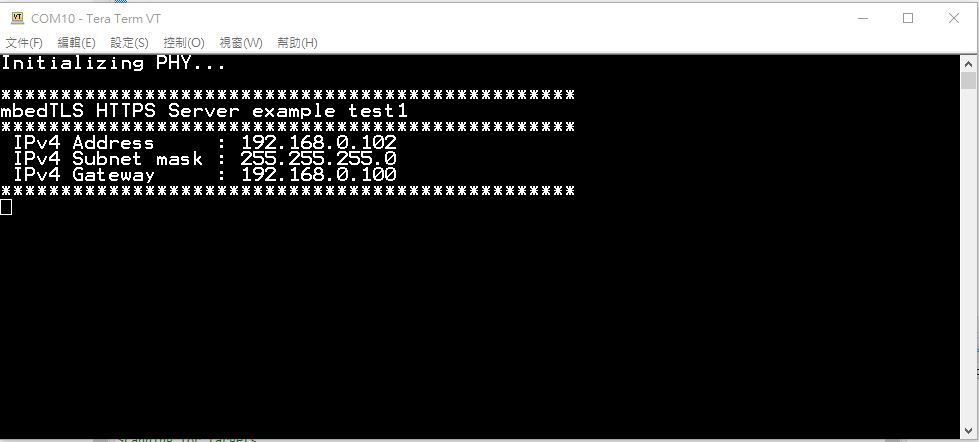
Step 8. Connect RT1060 EVK to COM10 and it will show the following messages.
Step 9. Upload "v2_lwip_httpssrv_ota_enet.bin" by GUI
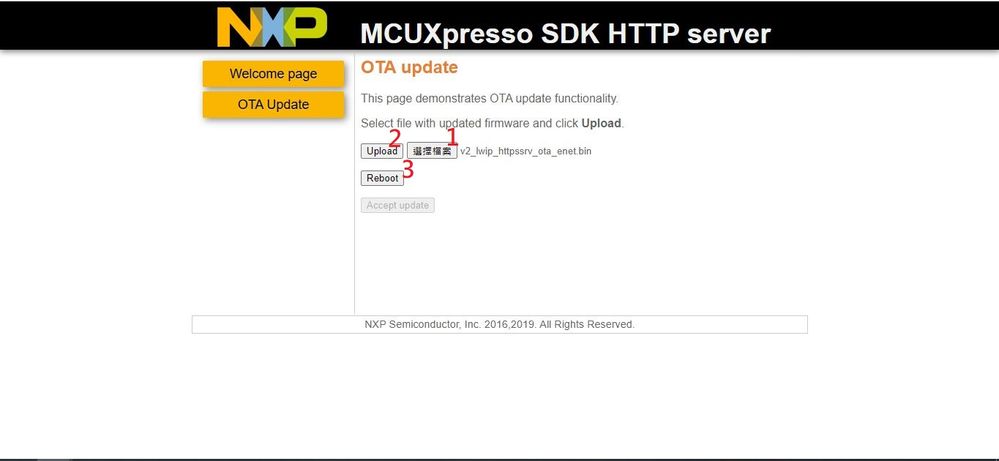
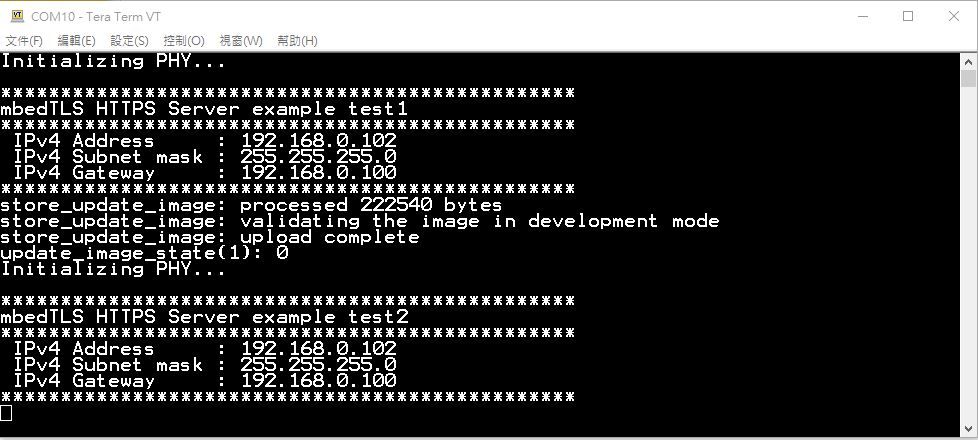
After Reboot, click "Accept Update"
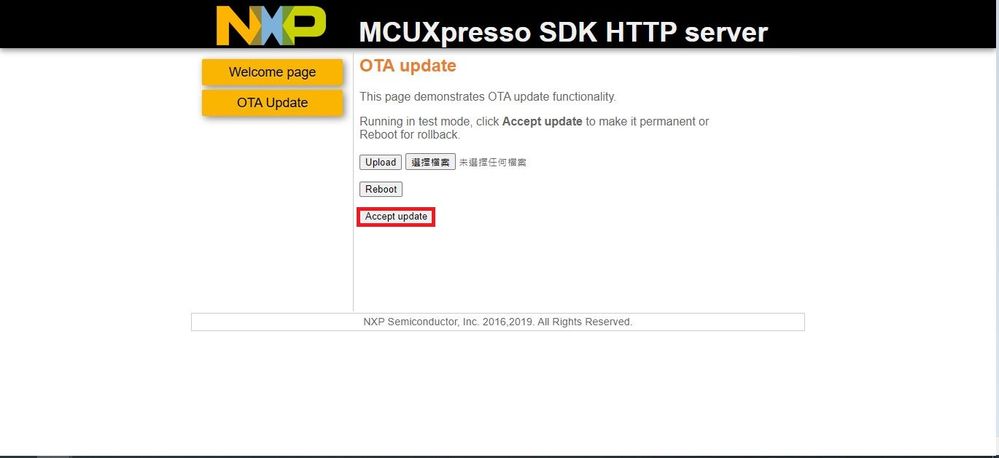
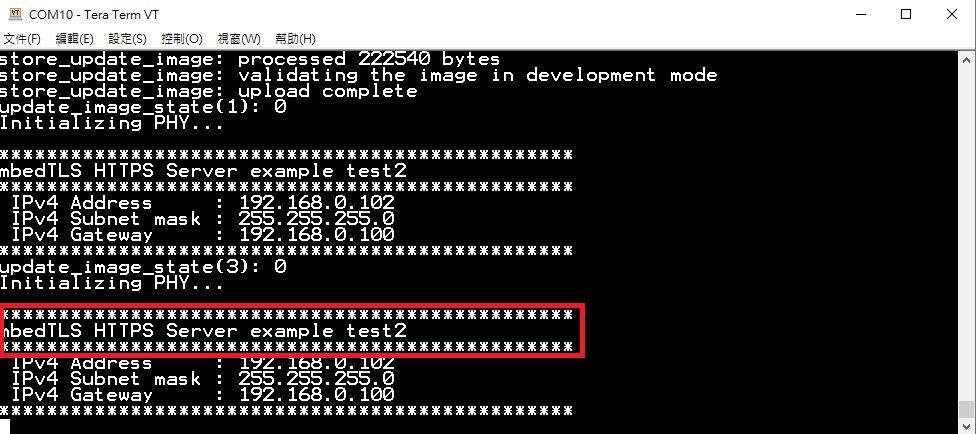
The console will show the "update_image_state(3): 0".

And Reboot again, we will show the application already change to v2 app.
Step 10. But if I would like to upload "v1_lwip_httpssrv_ota_enet.bin" bu web GUI again, it will shown the "Image validation failed".
Is there any steps uncorrect and caused this error?

I uploaded my binary file as attachment, could you help us to check this issue?
Thank you.
- Mark as New
- Bookmark
- Subscribe
- Mute
- Subscribe to RSS Feed
- Permalink
- Report Inappropriate Content
I found this issue was caused by I used different QSPI flash, how can I config for different size NOR flash to avoid this issue?
 PabloAvalos
- Mark as New
- Bookmark
- Subscribe
- Mute
- Subscribe to RSS Feed
- Permalink
- Report Inappropriate Content
Hi @KyleHsieh
Please accept my apologies for the delay on my response. I really appreciate your patience. Ann also, thanks a lot for your updates on the thread.
So, regarding your main issue, you have already hit the nail on the head, right? And also I will double-check with my teammates how to configurate it for a different NOR flash size, I will ask for you a little bit more time to reach you back with a proper answer. I apology for the issues that this might cause.
Hope you find well, please let me know any update or some more questions you have. We are to gladly assist you.
Sincerely,
Pablo Avalos.
- Mark as New
- Bookmark
- Subscribe
- Mute
- Subscribe to RSS Feed
- Permalink
- Report Inappropriate Content
Hi @PabloAvalos ,
Thanks for your reply.
May I ask you some questions?
We use Macronix MX25L25645GZ2I-08G instead of ISSI IS25WP064AJBLE for test.
1. MX25L25645GZ2I-08G NOR Flash size is different with ISSI IS25WP064AJBLE, how could I config flash size in ota bootloader and lwip_httpssrv_ota_enet application?
2. Is there any other configs I need to modify for different NOR flash?
Best Regards,
Kyle
PabloAvalos
- Mark as New
- Bookmark
- Subscribe
- Mute
- Subscribe to RSS Feed
- Permalink
- Report Inappropriate Content
Hi @KyleHsieh
Thanks a lot for your patience and I apology for the delay on my response and the inconvenience that this might cause.
Regarding your questions, I think you may load your image file through the MCU Boot Utility by configuring the NOR flash size that you are going to use.
You may go to the correspondent tab and select your Micronix Flash and configure it before loading the image:


Hope this helps you, please let me know if you have more questions or doubts about it.
Best Regards.
Pablo Avalos.
- Mark as New
- Bookmark
- Subscribe
- Mute
- Subscribe to RSS Feed
- Permalink
- Report Inappropriate Content
Hi,
After upgraded successful at step 9, I found that application check size of the image failed while running "bl_verify_image((void *)update_partition.start, stored" function at step10.

May I ask what's the difference after I first time upgraded the image?
Thank you.
