
- Forums
- Product Forums
- General Purpose MicrocontrollersGeneral Purpose Microcontrollers
- i.MX Forumsi.MX Forums
- QorIQ Processing PlatformsQorIQ Processing Platforms
- Identification and SecurityIdentification and Security
- Power ManagementPower Management
- Wireless ConnectivityWireless Connectivity
- RFID / NFCRFID / NFC
- Advanced AnalogAdvanced Analog
- Neural Processing UnitsNeural Processing Units
- MCX Microcontrollers
- S32G
- S32K
- S32V
- MPC5xxx
- Other NXP Products
- S12 / MagniV Microcontrollers
- Powertrain and Electrification Analog Drivers
- Sensors
- Vybrid Processors
- Digital Signal Controllers
- 8-bit Microcontrollers
- ColdFire/68K Microcontrollers and Processors
- PowerQUICC Processors
- OSBDM and TBDML
- S32M
- S32Z/E
-
- Solution Forums
- Software Forums
- MCUXpresso Software and ToolsMCUXpresso Software and Tools
- CodeWarriorCodeWarrior
- MQX Software SolutionsMQX Software Solutions
- Model-Based Design Toolbox (MBDT)Model-Based Design Toolbox (MBDT)
- FreeMASTER
- eIQ Machine Learning Software
- Embedded Software and Tools Clinic
- S32 SDK
- S32 Design Studio
- GUI Guider
- Zephyr Project
- Voice Technology
- Application Software Packs
- Secure Provisioning SDK (SPSDK)
- Processor Expert Software
- Generative AI & LLMs
-
- Topics
- Mobile Robotics - Drones and RoversMobile Robotics - Drones and Rovers
- NXP Training ContentNXP Training Content
- University ProgramsUniversity Programs
- Rapid IoT
- NXP Designs
- SafeAssure-Community
- OSS Security & Maintenance
- Using Our Community
-
- Cloud Lab Forums
-
- Knowledge Bases
- ARM Microcontrollers
- i.MX Processors
- Identification and Security
- Model-Based Design Toolbox (MBDT)
- QorIQ Processing Platforms
- S32 Automotive Processing Platform
- Wireless Connectivity
- CodeWarrior
- MCUXpresso Suite of Software and Tools
- MQX Software Solutions
- RFID / NFC
- Advanced Analog
- Neural Processing Units
-
- NXP Tech Blogs

I want to use a imx8mq customer board to communicate with FTDI usb3.0 chip "UMFT601A".
After I modified the local.conf with:
IMAGE_INSTALL_append = " libftdi"
and changed kernel config with:
CONFIG_USB_SERIAL=y
CONFIG_USB_SERIAL_FTDI_SIO=y
, I can see the console log as below.
[ 1.075673] usbcore: registered new interface driver ftdi_sio
[ 1.081459] usbserial: USB Serial support registered for FTDI USB Serial Device
After I plugged the ft601 chip by type C, I could see the usb was detected, but no ttyUSBx interface was created.
[ 48.274212] usb 1-1: new high-speed USB device number 2 using xhci-hcd
[ 48.528455] usb 1-1: New USB device found, idVendor=0403, idProduct=601f, bcdDevice= 0.00
[ 48.536645] usb 1-1: New USB device strings: Mfr=1, Product=2, SerialNumber=3
[ 48.543794] usb 1-1: Product: FTDI SuperSpeed-FIFO Bridge
[ 48.549208] usb 1-1: Manufacturer: FTDI
[ 48.553057] usb 1-1: SerialNumber: 000000000001
I followed to add new_id command "echo 0403 601f >/sys/bus/usb-serial/drivers/ftdi_sio/new_id", but the board detected FT2232C rather than FT601.
[ 2418.906255] ftdi_sio 1-1:1.0: FTDI USB Serial Device converter detected
[ 2418.957183] usb 1-1: Detected FT2232C
[ 2418.962063] ftdi_sio ttyUSB0: Unable to read latency timer: -32
[ 2418.969074] ftdi_sio ttyUSB0: Unable to write latency timer: -32
[ 2418.991628] usb 1-1: FTDI USB Serial Device converter now attached to ttyUSB0
[ 2419.009082] ftdi_sio 1-1:1.1: FTDI USB Serial Device converter detected
[ 2419.059718] usb 1-1: Detected FT2232C
[ 2419.064624] ftdi_sio ttyUSB1: Unable to read latency timer: -32
[ 2419.071074] ftdi_sio ttyUSB1: Unable to write latency timer: -32
[ 2419.094139] usb 1-1: FTDI USB Serial Device converter now attached to ttyUSB1
Could any one tell me what can I do?
Thank you for any help.
Minying
已解决! 转到解答。

 weidong_sun
Hi,
It seems that steps should be like below:
On ubuntu 18.04
(1) Getting ft60x driver source code
# cd ~/
# mkdir device-driver
# git clone https://github.com/lambdaconcept/ft60x_driver.git
(2) Exporting cross-compile tool chain from Yocto
According to chapter 4.5.12 of i.MX_Linux_Users_Guide.pdf, export cross-compile tool chain.
Then install it to path /opt
Below is what I export: fsl-imx-xwayland-glibc-x86_64-imx-image-full-aarch64-imx8mmevk-toolchain-5.4-zeus.sh
copy the file to /opt, then run :
# cd /opt
# ./fsl-imx-xwayland-glibc-x86_64-imx-image-full-aarch64-imx8mmevk-toolchain-5.4-zeus.sh
Then below is the path of toolchain: /opt/fsl-imx-xwayland/5.4-zeus/
(3) Download linux source code
# cd ~/
# mkdir linux-source
# cd linux-source
# git clone https://source.codeaurora.org/external/imx/linux-imx -b imx_5.4.47_2.2.0
(4) Compiling kernel
# cd linux-imx
# source /opt/fsl-imx-xwayland/5.4-zeus/environment-setup-aarch64-poky-linux
# export ARCH=arm64
# make imx_v8_defconfig
# make
(5) Compiling ft60x driver
--Modifying Makefile
# cd ~/device-driver/ft60x_driver
# gedit Makefile
---------------------------------
#KERNEL_VERSION:=$(shell uname -r)
#KERNEL_PATH:=/lib/modules/$(KERNEL_VERSION)/build
KERNEL_PATH:= /home/weidong/linux-source-code/L5.4.47_2.2.0/linux-imx
obj-m = ft60x.o
sdr-objs = ft60x.o
all: ft60x.ko
ft60x.ko: ft60x.c
make -C $(KERNEL_PATH) M=$(PWD) modules
clean:
make -C $(KERNEL_PATH) M=$(PWD) clean
rm -f *~
---------------------------------
Save and exit.
# make
Then we will get ft60x driver
------------

Then use "insmod" command to load the driver on your board.
Try it, please!
After loading the driver, it should be like this:
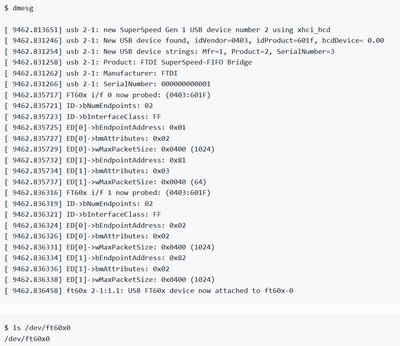
Hope the information is helpful to you.
Have a nice day!
B.R,
weidong
weidong_sun
Hi,
It seems that steps should be like below:
On ubuntu 18.04
(1) Getting ft60x driver source code
# cd ~/
# mkdir device-driver
# git clone https://github.com/lambdaconcept/ft60x_driver.git
(2) Exporting cross-compile tool chain from Yocto
According to chapter 4.5.12 of i.MX_Linux_Users_Guide.pdf, export cross-compile tool chain.
Then install it to path /opt
Below is what I export: fsl-imx-xwayland-glibc-x86_64-imx-image-full-aarch64-imx8mmevk-toolchain-5.4-zeus.sh
copy the file to /opt, then run :
# cd /opt
# ./fsl-imx-xwayland-glibc-x86_64-imx-image-full-aarch64-imx8mmevk-toolchain-5.4-zeus.sh
Then below is the path of toolchain: /opt/fsl-imx-xwayland/5.4-zeus/
(3) Download linux source code
# cd ~/
# mkdir linux-source
# cd linux-source
# git clone https://source.codeaurora.org/external/imx/linux-imx -b imx_5.4.47_2.2.0
(4) Compiling kernel
# cd linux-imx
# source /opt/fsl-imx-xwayland/5.4-zeus/environment-setup-aarch64-poky-linux
# export ARCH=arm64
# make imx_v8_defconfig
# make
(5) Compiling ft60x driver
--Modifying Makefile
# cd ~/device-driver/ft60x_driver
# gedit Makefile
---------------------------------
#KERNEL_VERSION:=$(shell uname -r)
#KERNEL_PATH:=/lib/modules/$(KERNEL_VERSION)/build
KERNEL_PATH:= /home/weidong/linux-source-code/L5.4.47_2.2.0/linux-imx
obj-m = ft60x.o
sdr-objs = ft60x.o
all: ft60x.ko
ft60x.ko: ft60x.c
make -C $(KERNEL_PATH) M=$(PWD) modules
clean:
make -C $(KERNEL_PATH) M=$(PWD) clean
rm -f *~
---------------------------------
Save and exit.
# make
Then we will get ft60x driver
------------
Then use "insmod" command to load the driver on your board.
Try it, please!
After loading the driver, it should be like this:
Hope the information is helpful to you.
Have a nice day!
B.R,
weidong
Hi Weidong,
Thank you for your reply. I can create interface /dev/ft60x0 now.
There is something confusing to console logs of the command "lsusb -t"
root@imx8mqevk:~# lsusb
Bus 002 Device 001: ID 1d6b:0003 Linux Foundation 3.0 root hub
Bus 001 Device 003: ID 0403:601f Future Technology Devices International, Ltd FTDI SuperSpeed-FIFO Bridge
Bus 001 Device 001: ID 1d6b:0002 Linux Foundation 2.0 root hub
root@imx8mqevk:~# lsusb -t
/: Bus 02.Port 1: Dev 1, Class=root_hub, Driver=xhci-hcd/1p, 5000M
/: Bus 01.Port 1: Dev 1, Class=root_hub, Driver=xhci-hcd/1p, 480M
|__ Port 1: Dev 3, If 0, Class=Vendor Specific Class, Driver=ft60x, 480M
|__ Port 1: Dev 3, If 1, Class=Vendor Specific Class, Driver=ft60x, 480M
Is the usb speed correct? I cannot understand the usb speed shows 480M instead of 5000M.
How can I test read/write between a imx8mq board and a ft601 chip? Is there some example code to support?
By the way, my yocto version is LF_L5.4.3_1.0.0.
Thank you.
Best regards,
minying
