
- Forums
- Product Forums
- General Purpose MicrocontrollersGeneral Purpose Microcontrollers
- i.MX Forumsi.MX Forums
- QorIQ Processing PlatformsQorIQ Processing Platforms
- Identification and SecurityIdentification and Security
- Power ManagementPower Management
- Wireless ConnectivityWireless Connectivity
- RFID / NFCRFID / NFC
- Advanced AnalogAdvanced Analog
- MCX Microcontrollers
- S32G
- S32K
- S32V
- MPC5xxx
- Other NXP Products
- S12 / MagniV Microcontrollers
- Powertrain and Electrification Analog Drivers
- Sensors
- Vybrid Processors
- Digital Signal Controllers
- 8-bit Microcontrollers
- ColdFire/68K Microcontrollers and Processors
- PowerQUICC Processors
- OSBDM and TBDML
- S32M
- S32Z/E
-
- Solution Forums
- Software Forums
- MCUXpresso Software and ToolsMCUXpresso Software and Tools
- CodeWarriorCodeWarrior
- MQX Software SolutionsMQX Software Solutions
- Model-Based Design Toolbox (MBDT)Model-Based Design Toolbox (MBDT)
- FreeMASTER
- eIQ Machine Learning Software
- Embedded Software and Tools Clinic
- S32 SDK
- S32 Design Studio
- GUI Guider
- Zephyr Project
- Voice Technology
- Application Software Packs
- Secure Provisioning SDK (SPSDK)
- Processor Expert Software
- Generative AI & LLMs
-
- Topics
- Mobile Robotics - Drones and RoversMobile Robotics - Drones and Rovers
- NXP Training ContentNXP Training Content
- University ProgramsUniversity Programs
- Rapid IoT
- NXP Designs
- SafeAssure-Community
- OSS Security & Maintenance
- Using Our Community
-
- Cloud Lab Forums
-
- Knowledge Bases
- ARM Microcontrollers
- i.MX Processors
- Identification and Security
- Model-Based Design Toolbox (MBDT)
- QorIQ Processing Platforms
- S32 Automotive Processing Platform
- Wireless Connectivity
- CodeWarrior
- MCUXpresso Suite of Software and Tools
- MQX Software Solutions
- RFID / NFC
- Advanced Analog
-
- NXP Tech Blogs
- Home
- :
- i.MX Forums
- :
- i.MX Processors
- :
- Re: how to configure parallel video interface for iMX6Q sabresd?
how to configure parallel video interface for iMX6Q sabresd?
- Subscribe to RSS Feed
- Mark Topic as New
- Mark Topic as Read
- Float this Topic for Current User
- Bookmark
- Subscribe
- Mute
- Printer Friendly Page
how to configure parallel video interface for iMX6Q sabresd?

- Mark as New
- Bookmark
- Subscribe
- Mute
- Subscribe to RSS Feed
- Permalink
- Report Inappropriate Content
The iMX6Q sabresd board comes with an android supported touch-screen display running at 800x480 (I think). The display is connected to the iMX6Q via the LVDS port (From the Simplified Block diagram, I'm guessing that its configured across the internal LDB bridge). We have a custom design using the iMX6D processor driving a display of 1920x1080 (24-bit RGB) via the parallel video interface.
I'm wondering if any special configuration needs to be done for this? Or can I assume that if I load up the same image, it will boot without issues?
The reference manual mentions that the resolution I'm targeting is supported by the iMX6, so I'm hoping to be lazy and just load the image I have for the reference board.
-Abraham V.
- Mark as New
- Bookmark
- Subscribe
- Mute
- Subscribe to RSS Feed
- Permalink
- Report Inappropriate Content
I'm happy to report that I've had some measure of success in configuring the parallel display port on the iMX6 processor. For sake of clarity allow me to re-iterate the steps taken so far.
1. Follow the build instructions in "Android_User_Guide.pdf" available on the iMX6 sabresd website. At the end of it you should have a folder called "myandroid" which contains all the source code needed to build uboot, linux kernel and android for the sabresd board. By default this will display output on the touchscreen display connected via the processor's LDB bridge.
2. To change display parameters you will need to make changes to the arguments passed to the linux kernel. By default these "configurations" are stored in the following file,
myandroid/device/fsl/sabresd_6dq/BoardConfig.mk
Look for a line that reads,
BOARD_KERNEL_CMDLINE := console=ttymxc0,115200 init=/init video=mxcfb0:dev=ldb,bpp=32 video=mxcfb1:off video=mxcfb2:off fbmem=10M fb0base=0x27b00000 vmalloc=400M androidboot.console=ttymxc0 androidboot.hardware=freescale
According to the "Android_Quick_Start_Guide.pdf" you need to make the following change to enable display on BOTH the touchscreen and HDMI output,
BOARD_KERNEL_CMDLINE := console=ttymxc0,115200 init=/init video=mxcfb0:dev=ldb,bpp=32 video=mxcfb1:dev=hdmi,1920x1080@60,bpp=32 video=mxcfb2:off fbmem=10M fb0base=0x27b00000 vmalloc=400M androidboot.console=ttymxc0 androidboot.hardware=freescale
3. Now here is where things get tricky. I want to enable the parallel display port and at the same time disable all the other video outputs. The following edit accomplishes this,
BOARD_KERNEL_CMDLINE := console=ttymxc0,115200 init=/init video=mxcfb0:dev=lcd,CLAA-WVGA@60,bpp=32,if=RGB24 video=mxcfb1:off video=mxcfb2:off fbmem=10M fb0base=0x27b00000 vmalloc=400M androidboot.console=ttymxc0 androidboot.hardware=freescale
Building the "boot.img" file with the above argument and loading it on the sabresd board shows that both the touchscreen display and HDMI output are disabled. There is (to my knowledge) no simple method to connect a panel to the parallel display port on the sabresd board. So after reading the schematics, I found points on the reference sabresd board from which I could pull the clock, vsync and hsync lines of the parallel display port. Using an oscilloscope, I was able to confirm that a signal was coming out.
Which, I will consider a success. With the earlier configurations, probing those points showed nothing on the oscilloscope. Next, I'm investigating on how the resolution can be set for the parallel display.
-Abraham V.

- Mark as New
- Bookmark
- Subscribe
- Mute
- Subscribe to RSS Feed
- Permalink
- Report Inappropriate Content
LCD display is initialized by the ldb kernel driver (drivers/video/mxc/ldb.c). Display dependent parameters are provided to this driver through the "fb_videomode" structure.. Try modifying this structure with the resolution that you need.
- Mark as New
- Bookmark
- Subscribe
- Mute
- Subscribe to RSS Feed
- Permalink
- Report Inappropriate Content
Thank you for replying Carlos. :smileyhappy:
I checked out the file you mentioned but am a bit skeptical if its what I'm looking for. Here is how the display looks like from the iMX6 (image taken from page 209 of processor reference manual),
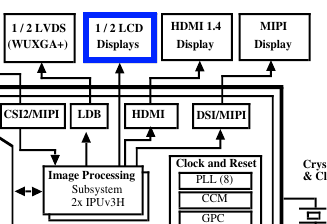
On the sabresd reference board we have a touch-screen display connected on the LDB bridge via the LVDS connection. But what I want to do is use the LCD interface directly - without configuring anything on the bridges. I've highlighted (in blue) the relevant section above. Scanning the source code in (drivers/video/mxc/ldb.c), it appears that a lot of configuration/initialization is done for the LDB bridge - are you sure this is the file I'm looking for? Or should I search elsewhere?
Puzzled,
Abraham V.
- Mark as New
- Bookmark
- Subscribe
- Mute
- Subscribe to RSS Feed
- Permalink
- Report Inappropriate Content
Initial testing confirms that the parallel video interface isn't read out-of-the-box. I'm having difficulty connecting a proper display to the parallel display interface, so I took a short-cut. Simply put, I probed the clock line of the parallel interface. Assuming that the interface is up, I *should* have seen a signal - instead I saw nothing.
Will continue to investigate and update.
-Abraham V.
