
- Forums
- Product Forums
- General Purpose MicrocontrollersGeneral Purpose Microcontrollers
- i.MX Forumsi.MX Forums
- QorIQ Processing PlatformsQorIQ Processing Platforms
- Identification and SecurityIdentification and Security
- Power ManagementPower Management
- Wireless ConnectivityWireless Connectivity
- RFID / NFCRFID / NFC
- Advanced AnalogAdvanced Analog
- Neural Processing UnitsNeural Processing Units
- MCX Microcontrollers
- S32G
- S32K
- S32V
- MPC5xxx
- Other NXP Products
- S12 / MagniV Microcontrollers
- Powertrain and Electrification Analog Drivers
- Sensors
- Vybrid Processors
- Digital Signal Controllers
- 8-bit Microcontrollers
- ColdFire/68K Microcontrollers and Processors
- PowerQUICC Processors
- OSBDM and TBDML
- S32M
- S32Z/E
-
- Solution Forums
- Software Forums
- MCUXpresso Software and ToolsMCUXpresso Software and Tools
- CodeWarriorCodeWarrior
- MQX Software SolutionsMQX Software Solutions
- Model-Based Design Toolbox (MBDT)Model-Based Design Toolbox (MBDT)
- FreeMASTER
- eIQ Machine Learning Software
- Embedded Software and Tools Clinic
- S32 SDK
- S32 Design Studio
- GUI Guider
- Zephyr Project
- Voice Technology
- Application Software Packs
- Secure Provisioning SDK (SPSDK)
- Processor Expert Software
- Generative AI & LLMs
-
- Topics
- Mobile Robotics - Drones and RoversMobile Robotics - Drones and Rovers
- NXP Training ContentNXP Training Content
- University ProgramsUniversity Programs
- Rapid IoT
- NXP Designs
- SafeAssure-Community
- OSS Security & Maintenance
- Using Our Community
-
- Cloud Lab Forums
-
- Knowledge Bases
- ARM Microcontrollers
- i.MX Processors
- Identification and Security
- Model-Based Design Toolbox (MBDT)
- QorIQ Processing Platforms
- S32 Automotive Processing Platform
- Wireless Connectivity
- CodeWarrior
- MCUXpresso Suite of Software and Tools
- MQX Software Solutions
- RFID / NFC
- Advanced Analog
- Neural Processing Units
-
- NXP Tech Blogs
- Home
- :
- i.MX Forums
- :
- i.MX Processors
- :
- Re: cfimager command for i.MX6
cfimager command for i.MX6
- Subscribe to RSS Feed
- Mark Topic as New
- Mark Topic as Read
- Float this Topic for Current User
- Bookmark
- Subscribe
- Mute
- Printer Friendly Page

- Mark as New
- Bookmark
- Subscribe
- Mute
- Subscribe to RSS Feed
- Permalink
- Report Inappropriate Content
Hello Freescale Community,
I am trying to use Freescale's cfimager utility to quickly burn U-Boot images to an SD card at offset 0x400. I am able to burn the U-Boot image through Linux; however, I am looking for a Windows application to do this and cfimager seems like it should be capable of doing this for the i.MX6.
More specifically, I am looking for a way to burn the image u-Boot.imx to the SD card and have a FAT partition on top of U-Boot so I can copy other files to the card using Windows. I've done this using Linux, but I am curious whether cfimager can do this for me in a more convenient fashion. I've been able to use the following command to get cfimager to successfully burn u-boot.imx to the card and have it boot on my board:
cfimager -raw -offset 0x400 –f u-boot.imx –d E [where E is my drive letter]
Does anyone know if there is a way to have this file reside on the same SD card as a FAT filesystem? The cfimager documentation doesn't list anything about the i.MX6 or how to use the utility for that processor. I am using cfimager 1.7.2.001.
Thank you for your time.
Scott
Solved! Go to Solution.

 Yuri
Yuri
- Mark as New
- Bookmark
- Subscribe
- Mute
- Subscribe to RSS Feed
- Permalink
- Report Inappropriate Content
Please use cfimager-imx as following :
cfimager-imx -a -offset 0x400 –f u-boot.imx –d E
(option -a is applied to format device always)
Have a great day,
Yuri
-----------------------------------------------------------------------------------------------------------------------
Note: If this post answers your question, please click the Correct Answer button. Thank you!
-----------------------------------------------------------------------------------------------------------------------
Yuri
- Mark as New
- Bookmark
- Subscribe
- Mute
- Subscribe to RSS Feed
- Permalink
- Report Inappropriate Content
Please use cfimager-imx as following :
cfimager-imx -a -offset 0x400 –f u-boot.imx –d E
(option -a is applied to format device always)
Have a great day,
Yuri
-----------------------------------------------------------------------------------------------------------------------
Note: If this post answers your question, please click the Correct Answer button. Thank you!
-----------------------------------------------------------------------------------------------------------------------
- Mark as New
- Bookmark
- Subscribe
- Mute
- Subscribe to RSS Feed
- Permalink
- Report Inappropriate Content
Hi Yuri,
Thank you for the quick response!
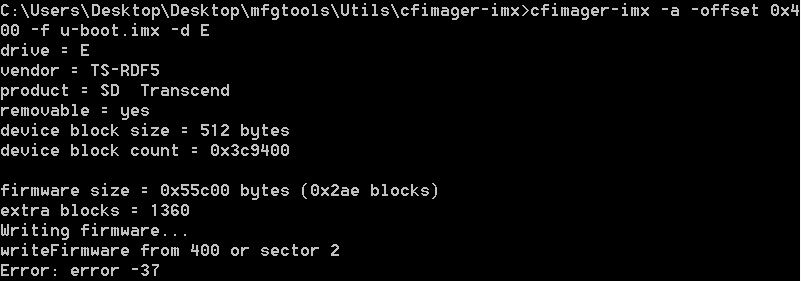
I believe cfimager-imx is a different utility than the cfimager I was using. I was able to obtain a copy of cfimager-imx 1.2 copyright 2005 SigmaTel. I tried executing the command you listed above and it returned an error code: error -37.
Do you know what might be causing this error? Perhaps I have an obsolete version of cfimager-imx?
I saw another post with this error code in this forum, but I didn't see any resolution for the error code itself within the conversation: cfimager-imx can't download .bin file to SD
Here is a screenshot of my output:
UPDATE:
I've been trying different things and if I use a 32GB SD card (instead of the 2GB card I was using) formatted as FAT32, I can use the cfimager application and the following command to achieve my result:
cfimager –raw –offset 0x400 –f u-boot.imx –d E –n
This allows me to put U-Boot at offset 0x400 and preserve the FAT32 filesystem so I can put additional files on the card using Windows.
I would still be curious to know what the "error -37" code means and whether there is a better way to do this. It would be helpful if I need to format a card and burn the image to the SD card using one command.
Thank you,
Scott
Yuri
- Mark as New
- Bookmark
- Subscribe
- Mute
- Subscribe to RSS Feed
- Permalink
- Report Inappropriate Content
I meant the cfimafer-imx for i.MX6. It may be found in Platform SDK
imx6_platform_sdk_v1.1.0.tar\iMX6_Platform_SDK\tools\windows\cfimager-imx.exe
Have a great day,
Yuri
-----------------------------------------------------------------------------------------------------------------------
Note: If this post answers your question, please click the Correct Answer button. Thank you!
-----------------------------------------------------------------------------------------------------------------------
- Mark as New
- Bookmark
- Subscribe
- Mute
- Subscribe to RSS Feed
- Permalink
- Report Inappropriate Content
Hi Yuri,
I downloaded the cfimager-imx utility from the link you provided and placed it in a folder containing u-boot.imx. When I try to execute the command you provided, I get error -34.
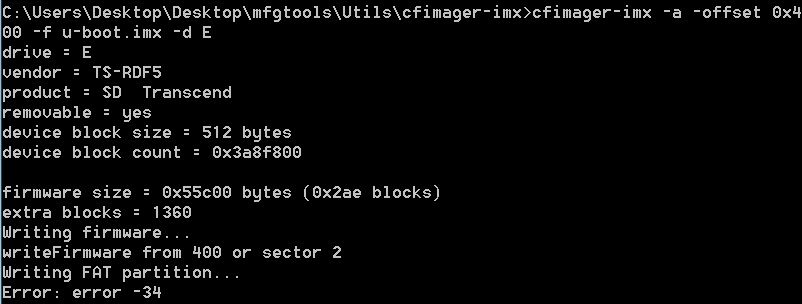
I know the SD card works because I am able to use the method stated in my previous comment using cfimager (not cfimager-imx) to burn the image to the SD card. This allows me to boot U-Boot on my target system.
I've been experimenting with different commands for the cfimager-imx utility and I can never get it to format the SD card and write to it. Do we know what error codes -34 and -37 mean? More importantly, do we know how to fix this issue?
I can always fall back to the method stated in my previous comment to achieve my desired result, but finding a solution to this issue would not only help me, but it may help others in the future too.
Thank you,
Scott
Yuri
- Mark as New
- Bookmark
- Subscribe
- Mute
- Subscribe to RSS Feed
- Permalink
- Report Inappropriate Content
Please try to clear the SD using Linux command dd, as shown below (an example)
$ sudo dd if=/dev/zero of=/dev/sda bs=512 count=1000
As for errors :
STERR_FAILED_TO_WRITE_SECTOR = -37
STERR_UNABLE_TO_CALCULATE_CHS = -34
~Yuri.
- Mark as New
- Bookmark
- Subscribe
- Mute
- Subscribe to RSS Feed
- Permalink
- Report Inappropriate Content
Thank you Yuri. The cfimager-imx application works after writing the zeroes to the card.
Scott

- Mark as New
- Bookmark
- Subscribe
- Mute
- Subscribe to RSS Feed
- Permalink
- Report Inappropriate Content
Scott, Yuri,
Can you guys help me with the command that can be used for CE.
We are using the following right now.
cfimager –f C:\CFIMAGER\nk.nb0 –d <sd card reader drive letter without colon> -imx53 –a
when it finishes issue the next command
cfimager –f C:\CFIMAGER\eboot.nb0 –d <sd card reader drive letter without colon> -imx53
So what will be the command for the above ce
cfimager –raw –offset 0x400 –f u-boot.imx –d E –n
will it be
cfimager –raw –offset 0x400 –f C:\CFIMAGER\nk.nb0 –d <sd card reader drive letter without colon> -imx53 –a –n
Thanks for your help.
Yuri
- Mark as New
- Bookmark
- Subscribe
- Mute
- Subscribe to RSS Feed
- Permalink
- Report Inappropriate Content
I have some doubts regarding cfimager parameter "offset". Usually nk.nb0
image does not require it, assuming nk.nb0 includes eboot image too and
should be written from the beginning of SD card.
Regards,
Yuri.
- Mark as New
- Bookmark
- Subscribe
- Mute
- Subscribe to RSS Feed
- Permalink
- Report Inappropriate Content
Thanks Yuri,
Our problem is : using cfimager we are able to write to SD ( upto 2 GBs) but we are not able to write it to SDHC cards (having 8 GB or 32 GB) memory cards, do we need to specify something differently for SDHC cards, and what is it?
Again thanks for your help.
Yuri
- Mark as New
- Bookmark
- Subscribe
- Mute
- Subscribe to RSS Feed
- Permalink
- Report Inappropriate Content
As I remeber WinCE in itself supports the SD High Capacity, but OEM (Freescale, for example,
or Adeneo for i.MX6) should also provide it in SD driver.
If such SD driver can work with High Capacity it is specially mentioned in
corresponding WinCE release notes.
Please look at section SD MMC and Windows CE of the next for more details.
Regards,
Yuri.
