
- Forums
- Product Forums
- General Purpose MicrocontrollersGeneral Purpose Microcontrollers
- i.MX Forumsi.MX Forums
- QorIQ Processing PlatformsQorIQ Processing Platforms
- Identification and SecurityIdentification and Security
- Power ManagementPower Management
- Wireless ConnectivityWireless Connectivity
- RFID / NFCRFID / NFC
- Advanced AnalogAdvanced Analog
- MCX Microcontrollers
- S32G
- S32K
- S32V
- MPC5xxx
- Other NXP Products
- S12 / MagniV Microcontrollers
- Powertrain and Electrification Analog Drivers
- Sensors
- Vybrid Processors
- Digital Signal Controllers
- 8-bit Microcontrollers
- ColdFire/68K Microcontrollers and Processors
- PowerQUICC Processors
- OSBDM and TBDML
- S32M
- S32Z/E
-
- Solution Forums
- Software Forums
- MCUXpresso Software and ToolsMCUXpresso Software and Tools
- CodeWarriorCodeWarrior
- MQX Software SolutionsMQX Software Solutions
- Model-Based Design Toolbox (MBDT)Model-Based Design Toolbox (MBDT)
- FreeMASTER
- eIQ Machine Learning Software
- Embedded Software and Tools Clinic
- S32 SDK
- S32 Design Studio
- GUI Guider
- Zephyr Project
- Voice Technology
- Application Software Packs
- Secure Provisioning SDK (SPSDK)
- Processor Expert Software
- Generative AI & LLMs
-
- Topics
- Mobile Robotics - Drones and RoversMobile Robotics - Drones and Rovers
- NXP Training ContentNXP Training Content
- University ProgramsUniversity Programs
- Rapid IoT
- NXP Designs
- SafeAssure-Community
- OSS Security & Maintenance
- Using Our Community
-
- Cloud Lab Forums
-
- Knowledge Bases
- ARM Microcontrollers
- i.MX Processors
- Identification and Security
- Model-Based Design Toolbox (MBDT)
- QorIQ Processing Platforms
- S32 Automotive Processing Platform
- Wireless Connectivity
- CodeWarrior
- MCUXpresso Suite of Software and Tools
- MQX Software Solutions
- RFID / NFC
- Advanced Analog
-
- NXP Tech Blogs
- Home
- :
- i.MX Forums
- :
- i.MX Processors
- :
- TP2850 de-interlace driver for iMX8MP boards
TP2850 de-interlace driver for iMX8MP boards
- Subscribe to RSS Feed
- Mark Topic as New
- Mark Topic as Read
- Float this Topic for Current User
- Bookmark
- Subscribe
- Mute
- Printer Friendly Page
TP2850 de-interlace driver for iMX8MP boards

- Mark as New
- Bookmark
- Subscribe
- Mute
- Subscribe to RSS Feed
- Permalink
- Report Inappropriate Content
Hi @qiang_li-mpu_se and @joanxie ,
After referring to the website you provided, there will be a problem that mx8_v4l2_cap_drm_64 cannot be recorded, please help analyze this issue, thank you.
Here is my environment:
HW platform: IMX8MP
Video-In: TP2850
Linux Version: 5.10.52
Android Version: 11
Refer to your previous article on de-interlace:
1. Refer to the Patch provided by your article (L5.4.0_2.3.0_ISL7998x_Patch.7z)

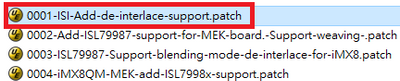
2. After unzip, I refer to 0001-ISI-Add-de-interlace-support.patch to Patch to my BSP
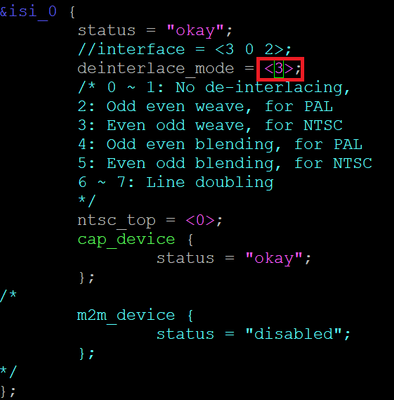
3. DTS isi_0 settings are as follows (NTSC weave mode):
4. After applying PATCH, use mx8_v4l2_cap_drm_64 to verify, the result cannot be recorded, it will always stop at (v4l2_device_streamon:1478): channel[0] v4l_dev=0x4 start capturing.
(command: mx8_v4l2_cap_drm_64 -cam 1 -d "/dev/video1" -fmt YUYV -ow 1280 -oh 720 –of)
5. The attached file is the LOG of the video recorded by mx8_v4l2_cap_drm_64, and the ISI0 register has been dumped.
Please help to analyze this issue, thank you.
Thanks
Fred
- Mark as New
- Bookmark
- Subscribe
- Mute
- Subscribe to RSS Feed
- Permalink
- Report Inappropriate Content
Hi,
Does this issue get resolved?
I am also facing similar issue for TP2860 Video decoder in iMX8MP MIPI CSI lines. I am using NTSC format (720x480) to stream the camera/test pattern but getting half screen solid green.
Kernel version is 6.6.36

Please anybody suggest how to overcome this issue.
Regards,
Prashanth Kumar K

 qiang_li-mpu_se
- Mark as New
- Bookmark
- Subscribe
- Mute
- Subscribe to RSS Feed
- Permalink
- Report Inappropriate Content
For TVin chip, it will generate VSYNC for each field, in this case, ISI will get the interrupt for each field, the default driver will just capture one field data as you found. If the TV in chip can remove the VSYNC between two field, you can reference to this ISI patch to support it with de-interlace.
- Mark as New
- Bookmark
- Subscribe
- Mute
- Subscribe to RSS Feed
- Permalink
- Report Inappropriate Content
Hi qiang li,
Thanks. But this patch is for older version of kernel like 5.4 series and for iMX8QXP platform. Will it compatible with Kernel 6.6 and iMX8MP platform? a
And also, I am using TP2860 video decoder, but the patch is for ISL79987 and adv7180 video decoders.
Regards,
Prashanth K
qiang_li-mpu_se
- Mark as New
- Bookmark
- Subscribe
- Mute
- Subscribe to RSS Feed
- Permalink
- Report Inappropriate Content
Since you are using PAL camera, the command line should be:
mx8_v4l2_cap_drm_64 -cam 1 -d "/dev/video1" -fmt YUYV -ow 720 -oh 576 –of
ISI can't do sw-interlace and scaling together. And If you are using Android, you should run the unit test application in storage card folder.
- Mark as New
- Bookmark
- Subscribe
- Mute
- Subscribe to RSS Feed
- Permalink
- Report Inappropriate Content
Hi @qiang_li-mpu_se ,
The resolution has been changed to 720x576, the command as follows:
mx8_v4l2_cap_drm_64 -cam 1 -d "/dev/video1" -fmt YUYV -ow 720 -oh 576 -of
But the situation is the same, still can't record video
Thanks
Fred
qiang_li-mpu_se
- Mark as New
- Bookmark
- Subscribe
- Mute
- Subscribe to RSS Feed
- Permalink
- Report Inappropriate Content
For 720x576 PAL camera, register "CHNL_IMG_CFG[0x0c]: 1e002d0" should be 0x012002d0.
qiang_li-mpu_se
- Mark as New
- Bookmark
- Subscribe
- Mute
- Subscribe to RSS Feed
- Permalink
- Report Inappropriate Content
If your camera is 720x576, in ISI register, it should set to this resolution too.
but from your ISI register dump: "CHNL_IMG_CFG[0x0c]: 1e002d0", it is 720x480.
- Mark as New
- Bookmark
- Subscribe
- Mute
- Subscribe to RSS Feed
- Permalink
- Report Inappropriate Content
Hi @qiang_li-mpu_se ,
Tested with mx8_v4l2_cap_drm_64, after setting 720*576, the CHNL_IMG_CFG reg is still 720*480, and the result is correct when using other resolutions.
Does BSP support this resolution? how to fix this issue?
mx8_v4l2_cap_drm_64 -cam 1 -d "/dev/video1" -fmt YUYV -ow 720 -oh 576 -of
CHNL_IMG_CFG[0x0c]: 1e002d0 (720*480)
mx8_v4l2_cap_drm_64 -cam 1 -d "/dev/video1" -fmt YUYV -ow 640 -oh 480 -of
CHNL_IMG_CFG[0x0c]: 1e00280 (640*480)
mx8_v4l2_cap_drm_64 -cam 1 -d "/dev/video1" -fmt YUYV -ow 720 -oh 480 -of
CHNL_IMG_CFG[0x0c]: 1e002d0 (720*480)
mx8_v4l2_cap_drm_64 -cam 1 -d "/dev/video1" -fmt YUYV -ow 1280 -oh 1440 -of
CHNL_IMG_CFG[0x0c]: 2d00500 (1280*720)
mx8_v4l2_cap_drm_64 -cam 1 -d "/dev/video1" -fmt YUYV -ow 1920 -oh 1080 -of
CHNL_IMG_CFG[0x0c]: 4380780 (1920*1080)
Thanks
Fred
qiang_li-mpu_se
- Mark as New
- Bookmark
- Subscribe
- Mute
- Subscribe to RSS Feed
- Permalink
- Report Inappropriate Content
The resolution is reported from your TP2850 driver then set into ISI register, so you should check what's the resolution reported from your TP2850 driver, and is there any hard coding that you had modified in ISI code.
- Mark as New
- Bookmark
- Subscribe
- Mute
- Subscribe to RSS Feed
- Permalink
- Report Inappropriate Content
Hi @qiang_li-mpu_se ,
I hardcoded the resolution in TP2850, set width = 720, height = 288,
After setting:
mx8_v4l2_cap_drm_64 -cam 1 -d "/dev/video1" -fmt YUYV -ow 720 -oh 576 -of
Results is correct:
CHNL_IMG_CFG[0x0c]: 12002d0
But there is still a stuck problem, unable to record video.
The attached file is the test LOG.
Thanks
Fred
qiang_li-mpu_se
- Mark as New
- Bookmark
- Subscribe
- Mute
- Subscribe to RSS Feed
- Permalink
- Report Inappropriate Content
If your driver can work with normal camera mode, 720x288@60fps, then without any change in TP2850 and application, just updated the ISI registers to de-interlace mode setting and set de-interlace to DISP_MIX_GASKET_0_CTRL, then de-interlace can work.
I don't have any more comments on this topic.
- Mark as New
- Bookmark
- Subscribe
- Mute
- Subscribe to RSS Feed
- Permalink
- Report Inappropriate Content
Hi @qiang_li-mpu_se ,
The result is as follows:
1.
non add nxp interlaced patch tp2850 reg set progressive mode 720x576: (non_nxp_patch.log)
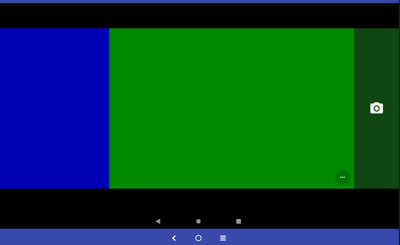
2.
add nxp interlaced patch tp2850 reg set progressive mode 720x576 (add_nxp_patch.log)
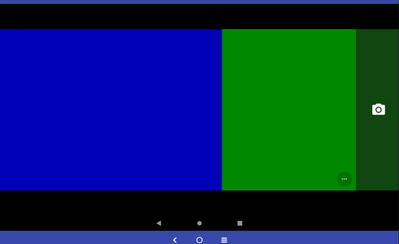
3.
add nxp interlaced patch tp2850 set reg interlced pal mode 720x576 (add_nxp_patch_pal.log)
Thanks
Fred
qiang_li-mpu_se
- Mark as New
- Bookmark
- Subscribe
- Mute
- Subscribe to RSS Feed
- Permalink
- Report Inappropriate Content
You don't need change the TP2850 mode, it should always work in interlaced PAL mode, and iMX8MP side can use different mode to capture it.
Case 1: For TP2850 PAL output, if there is Frame end and Frame start in two fields, then iMX8 side can capture it as 720*288@50 fps without de-interlace.
Case 2: For TP2850 PAL output, if there os no Frame end and Frame start in two fields, then iMX8 side can capture it as 720*576@25 fps without de-interlace.
After the above case works, then you can enable the iMX8 ISI de-interlace. For all these testing, TP2850 should always output same interlace PAL signals. If you use different TP2850 setting for test, that is no meaning.
And you need check with TP2850 side, is there Frame End and Frame Start bwtween two interlaces fields?
- Mark as New
- Bookmark
- Subscribe
- Mute
- Subscribe to RSS Feed
- Permalink
- Report Inappropriate Content
Hi @qiang_li-mpu_se ,
And you need check with TP2850 side, is there Frame End and Frame Start bwtween two interlaces fields?
According to TP2850 SPEC, it has Frame End and Frame Start, which is being confirmed with TP2850 vendor.
1.
From the observation of OV5640 driver, the PAL NTSC resolution defined by OV5640 Driver is correct, why the PATCH you provided is 1280*1440 instead of 1280*720 (720i), and the recorded video is not 1280*720, but 1280 *1440.
Record video with the following command:
mx8_v4l2_cap_drm_64 -cam 1 -d "/dev/video1" -fmt YUYV -ow 1280 -oh 1440 -of
The recorded video link is as follows:
https://drive.google.com/file/d/10ChIU77RoYyuqr3qfp_edWnqlQCI15Rv/view?usp=sharing
2.
Observing the PATCH provided by you, the register of the OV5640 is not changed, so can the OV5640 be set as an interlace output?
If this is ok, can I use 720*480 to verify de-interlace?
command:
mx8_v4l2_cap_drm_64 -cam 1 -d "/dev/video1" -fmt YUYV -ow 720 -oh 480 -of
3.
TP2850 Setting:
3-1 TP2850 Pixel PCLK calculation method: 2360 x 525/ 2 x 60 = 37.170 MHz (H-Total Pixel= 2360, line = 525/2, frame rate = 60Hz (not deinterlace yet))
3-2 Active needs to be changed to 1980 x 480, H-active becomes 1980 because it needs to correspond to H-total, normal H-total changes from 858 to 2360, multiplied by 2.75 times, so Active = 720x2.75 = 1980
3-3 Compare OV5640 PATCH, add TEST_MODE_1980_960 related code
3-4 The MIPI signal output by TP2850 is 60 pictures per second, and the SoC needs to do deinterlace to change it to 30 pictures
3-5 Not connected to NTSC input, directly output blue screen, blue screen (MIPI OUTPUT) is also output for the above settings
4.
Test Command: mx8_v4l2_cap_drm_64 -cam 1 -d "/dev/video0" -fmt YUYV -ow 1980 -oh 960 -of
CHNL_IMG_CFG[0x0c]: 1e007bc
STS( Channel Status Register (CHNL_STS) ) = 0x60020100
Please help to analyze why EARLY_VSYNC_ERR?
Thanks
Fred
- Mark as New
- Bookmark
- Subscribe
- Mute
- Subscribe to RSS Feed
- Permalink
- Report Inappropriate Content
We are using a TP2856 on a custom IMX8MP platform. We were told that the IMX8MP's ISI was relatively crippled and did not support de-interlacing and so we implemented a software de-interlacer gstreamer module.
Is it actually true that we could use the ISI to de-interlace a PAL CSI2 video stream ?
qiang_li-mpu_se
- Mark as New
- Bookmark
- Subscribe
- Mute
- Subscribe to RSS Feed
- Permalink
- Report Inappropriate Content
What's the camera's input resolution? If it is 1280*720, it should a progressive signal, no de-interlace is needed.
If it is not 1280*720, then in ISI, you must set the same resolution as the camera original resolution, de-interlace can't work with scaling or CSC.
- Mark as New
- Bookmark
- Subscribe
- Mute
- Subscribe to RSS Feed
- Permalink
- Report Inappropriate Content
Hi @qiang_li-mpu_se ,
Input resolution: CVBS (NTSC de-interlace)
The attached file is the LOG of the video recorded by mx8_v4l2_cap_drm_64, and the ISI0 CSI register has been dumped, resolution set to 720*480.
it will always stop at (v4l2_device_streamon:1478): channel[0] v4l_dev=0x4 start capturing.
Please help to analyze this issue, thank you.
Thanks
Fred
qiang_li-mpu_se
- Mark as New
- Bookmark
- Subscribe
- Mute
- Subscribe to RSS Feed
- Permalink
- Report Inappropriate Content
From "CSIS_INTSRC[14]: 0x00000010", there is no MIPI FRAME_START and FRAME_END bits appear, that means no valid MIPI packages received.
For different camera sensor, the "csis-hs-settle" value in device tree should be adjusted basded on MIPI CSI2 data rate.
And before debug the de-interlace mode, you need make sure the normal camera capture works first. If there are no FE(Frame End) and FS(Frame Start) between the two fields, then software can capture it as a normal 720*480@30fps camera. Two fields will be captured in to one buffer.
If there are FE and FS between the two fields, then software can capture it as a normal 720*240@60fps camera.
When no de-interlace mode works, then you can debug the de-interlace mode.
- Mark as New
- Bookmark
- Subscribe
- Mute
- Subscribe to RSS Feed
- Permalink
- Report Inappropriate Content
Hi @qiang_li-mpu_se ,
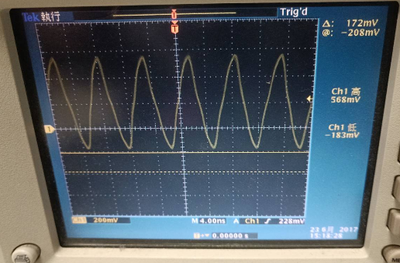
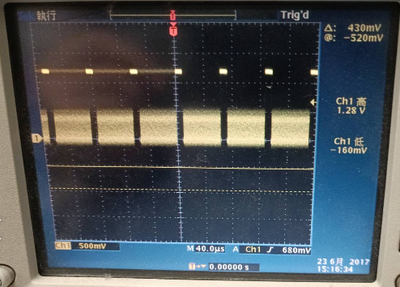
1. Through oscilloscope measurement, TP2850 has MIPI signal output, as shown in the figure below.
MIPI Clock
MIPI Data
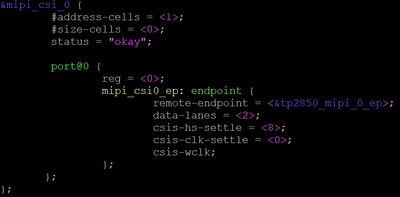
2. Below is the tp2850 mipi csi DTS setting.
When the TP2850 is set to progressive and remove de-interlaced patch, capture works.
3. Make sure the normal camera capture works first.
(Use mx8_v4l2_cap_drm_64 to verify the OV5640 camera)
Do you have any suggestions for DEBUG?
Thanks
Fred
qiang_li-mpu_se
- Mark as New
- Bookmark
- Subscribe
- Mute
- Subscribe to RSS Feed
- Permalink
- Report Inappropriate Content
For iMX8MP de-interlace, imx8-mipi-csi2-sam.c should be updated for de-interlace, this is different to iMX8QXP.
diff --git a/drivers/staging/media/imx/imx8-mipi-csi2-sam.c b/drivers/staging/media/imx/imx8-mipi-csi2-sam.c
index 1d12365520a6..ddfe30fb2a0a 100644
--- a/drivers/staging/media/imx/imx8-mipi-csi2-sam.c
+++ b/drivers/staging/media/imx/imx8-mipi-csi2-sam.c
@@ -228,6 +228,9 @@
/* display_mix_clk_en_csr */
#define DISP_MIX_GASKET_0_CTRL 0x00
+#define GASKET_0_CTRL_INTERLACE_MODE(x) (((x) & (0x3)) << 6)
+#define GASKET_0_CTRL_INTERLACE_MODE_MASK ((0x3UL) << (6))
+
#define GASKET_0_CTRL_DATA_TYPE(x) (((x) & (0x3F)) <<
#define GASKET_0_CTRL_DATA_TYPE_MASK ((0x3FUL) << (8))
@@ -988,6 +991,13 @@ static void disp_mix_gasket_config(struct csi_state *state)
if (fmt_val == GASKET_0_CTRL_DATA_TYPE_YUV422_8)
val |= GASKET_0_CTRL_DUAL_COMP_ENABLE;
val |= GASKET_0_CTRL_DATA_TYPE(fmt_val);
+
+ val &= ~GASKET_0_CTRL_INTERLACE_MODE_MASK;
+
+ printk("%s, field interlaced=%d\n", __func__, (state->format.field == V4L2_FIELD_INTERLACED? 1 : 0));
+ if (state->format.field == V4L2_FIELD_INTERLACED)
+ val |= GASKET_0_CTRL_INTERLACE_MODE(0x2);
+
regmap_write(gasket, DISP_MIX_GASKET_0_CTRL, val);
if (WARN_ON(!mf->width || !mf->height))
--
