
- Forums
- Product Forums
- General Purpose MicrocontrollersGeneral Purpose Microcontrollers
- i.MX Forumsi.MX Forums
- QorIQ Processing PlatformsQorIQ Processing Platforms
- Identification and SecurityIdentification and Security
- Power ManagementPower Management
- Wireless ConnectivityWireless Connectivity
- RFID / NFCRFID / NFC
- Advanced AnalogAdvanced Analog
- Neural Processing UnitsNeural Processing Units
- MCX Microcontrollers
- S32G
- S32K
- S32V
- MPC5xxx
- Other NXP Products
- S12 / MagniV Microcontrollers
- Powertrain and Electrification Analog Drivers
- Sensors
- Vybrid Processors
- Digital Signal Controllers
- 8-bit Microcontrollers
- ColdFire/68K Microcontrollers and Processors
- PowerQUICC Processors
- OSBDM and TBDML
- S32M
- S32Z/E
-
- Solution Forums
- Software Forums
- MCUXpresso Software and ToolsMCUXpresso Software and Tools
- CodeWarriorCodeWarrior
- MQX Software SolutionsMQX Software Solutions
- Model-Based Design Toolbox (MBDT)Model-Based Design Toolbox (MBDT)
- FreeMASTER
- eIQ Machine Learning Software
- Embedded Software and Tools Clinic
- S32 SDK
- S32 Design Studio
- GUI Guider
- Zephyr Project
- Voice Technology
- Application Software Packs
- Secure Provisioning SDK (SPSDK)
- Processor Expert Software
- Generative AI & LLMs
-
- Topics
- Mobile Robotics - Drones and RoversMobile Robotics - Drones and Rovers
- NXP Training ContentNXP Training Content
- University ProgramsUniversity Programs
- Rapid IoT
- NXP Designs
- SafeAssure-Community
- OSS Security & Maintenance
- Using Our Community
-
- Cloud Lab Forums
-
- Knowledge Bases
- ARM Microcontrollers
- i.MX Processors
- Identification and Security
- Model-Based Design Toolbox (MBDT)
- QorIQ Processing Platforms
- S32 Automotive Processing Platform
- Wireless Connectivity
- CodeWarrior
- MCUXpresso Suite of Software and Tools
- MQX Software Solutions
- RFID / NFC
- Advanced Analog
- Neural Processing Units
-
- NXP Tech Blogs
- Home
- :
- i.MX フォーラム
- :
- i.MXプロセッサ
- :
- How do I modify the i.MX 6SoloX FreeRTOS BSP Hello World example to make it work with my board?
How do I modify the i.MX 6SoloX FreeRTOS BSP Hello World example to make it work with my board?
- RSS フィードを購読する
- トピックを新着としてマーク
- トピックを既読としてマーク
- このトピックを現在のユーザーにフロートします
- ブックマーク
- 購読
- ミュート
- 印刷用ページ
How do I modify the i.MX 6SoloX FreeRTOS BSP Hello World example to make it work with my board?

- 新着としてマーク
- ブックマーク
- 購読
- ミュート
- RSS フィードを購読する
- ハイライト
- 印刷
- 不適切なコンテンツを報告
Hello everybody.
I was reading the Getting Started with FreeRTOSTM BSP for i.MX 6SoloX document and It just explains how to build the demo applications. I know that it is a starting guide and I can't expect much from it other that what it contains. Nevertheless any of the other documents included explain how to "adapt" or in other words, how to modify a demo for porting it to another board as a real starting point into creating custom M4 applications.
The getting started guide is just some explanations about what are the files and folder structure of the BSP but it doesn't explain what to change if needed. So I assumed that since I'm using the same i.MX 6SoloX processor and the only difference is the UART port I'm using vs the UART port that the "Hello World" demo uses, then by just simply changing the port it would work, but it doesn't 
Here is what I did:
First I changed in the board.h file from the following:
#define BOARD_DEBUG_UART_RDC_PDAP rdcPdapUart2
#define BOARD_DEBUG_UART_BASEADDR UART2
#define BOARD_DEBUG_UART_IRQ_NUM UART2_IRQn
#define BOARD_DEBUG_UART_HANDLER UART2_Handler
To the following:
#define BOARD_DEBUG_UART_RDC_PDAP rdcPdapUart4
#define BOARD_DEBUG_UART_BASEADDR UART4
#define BOARD_DEBUG_UART_IRQ_NUM UART4_IRQn
#define BOARD_DEBUG_UART_HANDLER UART4_Handler
And in the pin_mux.c file I added the following along with the already existing UART2 iomux config:
case UART4_BASE:
// UART4 iomux configuration
IOMUXC_SW_MUX_CTL_PAD_SD2_DATA0 = IOMUXC_SW_MUX_CTL_PAD_SD2_DATA0_MUX_MODE(7); /* Rx */
IOMUXC_SW_MUX_CTL_PAD_SD2_DATA1 = IOMUXC_SW_MUX_CTL_PAD_SD2_DATA1_MUX_MODE(7); /* Tx */
IOMUXC_SW_PAD_CTL_PAD_SD2_DATA0 = IOMUXC_SW_PAD_CTL_PAD_SD2_DATA0_PKE_MASK |
IOMUXC_SW_PAD_CTL_PAD_SD2_DATA0_PUE_MASK |
IOMUXC_SW_PAD_CTL_PAD_SD2_DATA0_PUS(2) |
IOMUXC_SW_PAD_CTL_PAD_SD2_DATA0_SPEED(2) |
IOMUXC_SW_PAD_CTL_PAD_SD2_DATA0_DSE(6) |
IOMUXC_SW_PAD_CTL_PAD_SD2_DATA0_SRE_MASK |
IOMUXC_SW_PAD_CTL_PAD_SD2_DATA0_HYS_MASK;
IOMUXC_SW_PAD_CTL_PAD_SD2_DATA1 = IOMUXC_SW_PAD_CTL_PAD_SD2_DATA1_PKE_MASK |
IOMUXC_SW_PAD_CTL_PAD_SD2_DATA1_PUE_MASK |
IOMUXC_SW_PAD_CTL_PAD_SD2_DATA1_PUS(2) |
IOMUXC_SW_PAD_CTL_PAD_SD2_DATA1_SPEED(2) |
IOMUXC_SW_PAD_CTL_PAD_SD2_DATA1_DSE(6) |
IOMUXC_SW_PAD_CTL_PAD_SD2_DATA1_SRE_MASK |
IOMUXC_SW_PAD_CTL_PAD_SD2_DATA1_HYS_MASK;
IOMUXC_UART4_IPP_UART_RXD_MUX_SELECT_INPUT = IOMUXC_UART4_IPP_UART_RXD_MUX_SELECT_INPUT_DAISY(4);
break;
These changes were made because I'm using port 4.
Then I executed the build.sh script for the "Hello World" demo.
~/FreeRTOS_BSP_1.0.0_iMX6SX/examples/imx6sx_sdb_m4/demo_apps/hello_world/armgcc $ ./build_release.sh
Then I took the .bin file, changed the name to m4-freertos.bin, and flashed it to my eMMC card via imx_usb_loader and utp_com because I don't have a sd card in the system.
Then I executed the steps in the 6.1 Running application on TCM with U-Boot section in the Getting Started with FreeRTOSTM BSP for i.MX 6SoloX document and I got the following:
=> fatload mmc 1:7 0x80000000 m4-freertos.bin
reading m4-freertos.bin
13584 bytes read in 12 ms (1.1 MiB/s)
=> dcache flush
=> cp.b 0x80000000 0x7F8000 0x8000
=> dcache flush
=> bootaux 0x7F8000
## Starting auxiliary core at 0x007F8000 ...
=>
But nothing happens in the CORTEX M4 serial terminal.
Also this post i.mx6 solox for dummies doesn't work for me since I'm not using bare metal nor QSPI.
Where can I find a tutorial or example or anything that helps to understand the necessary steps to take in order to create a cortex M4 application, or modify a demo, and "launch" it from u-boot?
I could try this change in the SABRESD board and it's working, I'm getting the "Hello world" string in UART4 so indeed these are the only changes required. What I don't understand is why this is not working on my custom board.
Thanks!!
Message was edited by: Manuel Malagon Update with the status of my tests.

- 新着としてマーク
- ブックマーク
- 購読
- ミュート
- RSS フィードを購読する
- ハイライト
- 印刷
- 不適切なコンテンツを報告
Hi Manuel,
I'm using the i.MX7S on a custom board and I have exactly the same problem. Have you found out a solution yet?
Thanks :smileyhappy:
- 新着としてマーク
- ブックマーク
- 購読
- ミュート
- RSS フィードを購読する
- ハイライト
- 印刷
- 不適切なコンテンツを報告
erikfriedel, unfortunately, I wasn't able to make it work. After struggling a lot with this and not getting the necessary help we decided to move on and not implementing what we were going to implement on the M4. So it is sitting there doing nothing.
- 新着としてマーク
- ブックマーク
- 購読
- ミュート
- RSS フィードを購読する
- ハイライト
- 印刷
- 不適切なコンテンツを報告
m4l490n, if I get you correct, than you modified the board.h and pin_mux.c files. Here is the problem: You also have to set the uart to 4 in the clock_freq.c file, otherwise the uart got no clock. That works for me.
I overlooked this entry a few times while using "grep -nir 'uart' ", because there are only 3 lines that contain the needed uart.

 jimmychan
- 新着としてマーク
- ブックマーク
- 購読
- ミュート
- RSS フィードを購読する
- ハイライト
- 印刷
- 不適切なコンテンツを報告
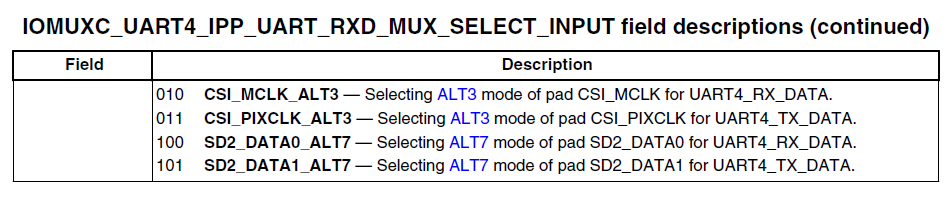
please check your daisy chain setting for the UART_RXD_MUX_SELECT_INPUT
- 新着としてマーク
- ブックマーク
- 購読
- ミュート
- RSS フィードを購読する
- ハイライト
- 印刷
- 不適切なコンテンツを報告
Thanks jimmychan for helping.
But that is only for the Rx pin right, I mean, I still would have to see something in my terminal because Tx is configured correctly. Please help me, this is being a nightmare, I just can't make it work :smileysad:. I've been on this for two weeks now and I'm starting to pull my hair out in despair.
Thank you for your time.

- 新着としてマーク
- ブックマーク
- 購読
- ミュート
- RSS フィードを購読する
- ハイライト
- 印刷
- 不適切なコンテンツを報告
I am not familiar with the document you are referencing, so perhaps my answer will miss the mark, or otherwise not be specific enough to your booting method, but there is some information on starting or adapting a FreeRTOS project on the following links:
FreeRTOS - Porting a FreeRTOS demo to a different hardware platform
- 新着としてマーク
- ブックマーク
- 購読
- ミュート
- RSS フィードを購読する
- ハイライト
- 印刷
- 不適切なコンテンツを報告
Richard thanks for helping.
The FreeRTOS port is already created, in fact there are multiple demos in the demos folder of the i.MX6 FreeRTOS BSP. The problem I have is that following the instructions provided in the documents is not enough to port those examples to another boards.
