
- Forums
- Product Forums
- General Purpose MicrocontrollersGeneral Purpose Microcontrollers
- i.MX Forumsi.MX Forums
- QorIQ Processing PlatformsQorIQ Processing Platforms
- Identification and SecurityIdentification and Security
- Power ManagementPower Management
- Wireless ConnectivityWireless Connectivity
- RFID / NFCRFID / NFC
- Advanced AnalogAdvanced Analog
- Neural Processing UnitsNeural Processing Units
- MCX Microcontrollers
- S32G
- S32K
- S32V
- MPC5xxx
- Other NXP Products
- S12 / MagniV Microcontrollers
- Powertrain and Electrification Analog Drivers
- Sensors
- Vybrid Processors
- Digital Signal Controllers
- 8-bit Microcontrollers
- ColdFire/68K Microcontrollers and Processors
- PowerQUICC Processors
- OSBDM and TBDML
- S32M
- S32Z/E
-
- Solution Forums
- Software Forums
- MCUXpresso Software and ToolsMCUXpresso Software and Tools
- CodeWarriorCodeWarrior
- MQX Software SolutionsMQX Software Solutions
- Model-Based Design Toolbox (MBDT)Model-Based Design Toolbox (MBDT)
- FreeMASTER
- eIQ Machine Learning Software
- Embedded Software and Tools Clinic
- S32 SDK
- S32 Design Studio
- GUI Guider
- Zephyr Project
- Voice Technology
- Application Software Packs
- Secure Provisioning SDK (SPSDK)
- Processor Expert Software
- Generative AI & LLMs
-
- Topics
- Mobile Robotics - Drones and RoversMobile Robotics - Drones and Rovers
- NXP Training ContentNXP Training Content
- University ProgramsUniversity Programs
- Rapid IoT
- NXP Designs
- SafeAssure-Community
- OSS Security & Maintenance
- Using Our Community
-
- Cloud Lab Forums
-
- Knowledge Bases
- ARM Microcontrollers
- i.MX Processors
- Identification and Security
- Model-Based Design Toolbox (MBDT)
- QorIQ Processing Platforms
- S32 Automotive Processing Platform
- Wireless Connectivity
- CodeWarrior
- MCUXpresso Suite of Software and Tools
- MQX Software Solutions
- RFID / NFC
- Advanced Analog
- Neural Processing Units
-
- NXP Tech Blogs
- Home
- :
- i.MX Forums
- :
- i.MX Processors
- :
- Hello World Application for imx8m mini evk
Hello World Application for imx8m mini evk
- Subscribe to RSS Feed
- Mark Topic as New
- Mark Topic as Read
- Float this Topic for Current User
- Bookmark
- Subscribe
- Mute
- Printer Friendly Page
Hello World Application for imx8m mini evk

- Mark as New
- Bookmark
- Subscribe
- Mute
- Subscribe to RSS Feed
- Permalink
- Report Inappropriate Content
Hi ,
I'm using an IMX8M MINI EVK i need to cross compile my helloworld application to the evk board

 weidong_sun
- Mark as New
- Bookmark
- Subscribe
- Mute
- Subscribe to RSS Feed
- Permalink
- Report Inappropriate Content
Hi,
Follow these steps, please!
Firstly you will have to prepare cross compile toolchain.
1. you can refer to i.MX_Yocto_Project_User's_Guide and i.MX_Linux_Users_Guide.pdf to export cross compile toolchain.
or.
2. the following steps are what I often uses, for you reference
# mkdir ~/bin (this step may not be needed if the bin folder already exists)
# curl https://storage.googleapis.com/git-repo-downloads/repo > ~/bin/repo
# chmod a+x ~/bin/repo
# export PATH=~/bin:$PATH
# mkdir imx-yocto-bsp-l5.4.24_2.31.0
# cd imx-yocto-bsp-l5.4.24_2.1.0
# repo init -u https://source.codeaurora.org/external/imx/imx-manifest -b imx-linux-zeus -
m imx-5.4.24-2.1.0.xml
# repo sync
# DISTRO=fsl-imx-xwayland MACHINE=imx8mmevk source imx-setup-release.sh -b build-fb
# cd ../
# DISTRO= fsl-imx-xwayland MACHINE=imx8mmevk bitbake core-image-minimal -c populate_sdk
After all tasks are done, a .sh file will be find in build_fb/tmp/deploy/sdk, it’s name is like
this:
fsl-imx-xwayland-glibc-x86_64-imx-image-full-aarch64-imx8mmevk-toolchain-5.4-zeus.sh
copy the file to /opt,
# cd build_fb/tmp/deploy/sdk
# sudo cp fsl-imx-xwayland-glibc-x86_64-imx-image-full-aarch64-imx8mmevk-toolchain-5.4-zeus.sh /opt
# cd /opt
# chmod a+x fsl-imx-xwayland-glibc-x86_64-imx-image-full-aarch64-imx8mmevk-toolchain-5.4-zeus.sh
# sudo ./ fsl-imx-xwayland-glibc-x86_64-imx-image-full-aarch64-imx8mmevk-toolchain-5.4-zeus.sh
Use the default directory to install it, and the toolchain installation will be done.
3. writing your hello_world.c and cross compiling it.
---example code , see attachment, please!
---before compiling it, run the command to configure cross compiling environment
(Below is my toolchain's path)
# source /opt/fsl-imx-xwayland/5.4-zeus/environment-setup-aarch64-poky-linux
# make hello
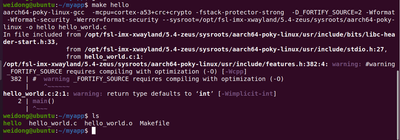
Hope above steps are helpful for you.
Have a nice day!
B.R,
weidong
- Mark as New
- Bookmark
- Subscribe
- Mute
- Subscribe to RSS Feed
- Permalink
- Report Inappropriate Content
While Entering the make hello it showing make: ****No rule to make target 'hello'. stop.
weidong_sun
- Mark as New
- Bookmark
- Subscribe
- Mute
- Subscribe to RSS Feed
- Permalink
- Report Inappropriate Content
Didn't you decompress Makefile.rar ?
