
- Forums
- Product Forums
- General Purpose MicrocontrollersGeneral Purpose Microcontrollers
- i.MX Forumsi.MX Forums
- QorIQ Processing PlatformsQorIQ Processing Platforms
- Identification and SecurityIdentification and Security
- Power ManagementPower Management
- Wireless ConnectivityWireless Connectivity
- RFID / NFCRFID / NFC
- Advanced AnalogAdvanced Analog
- Neural Processing UnitsNeural Processing Units
- MCX Microcontrollers
- S32G
- S32K
- S32V
- MPC5xxx
- Other NXP Products
- S12 / MagniV Microcontrollers
- Powertrain and Electrification Analog Drivers
- Sensors
- Vybrid Processors
- Digital Signal Controllers
- 8-bit Microcontrollers
- ColdFire/68K Microcontrollers and Processors
- PowerQUICC Processors
- OSBDM and TBDML
- S32M
- S32Z/E
-
- Solution Forums
- Software Forums
- MCUXpresso Software and ToolsMCUXpresso Software and Tools
- CodeWarriorCodeWarrior
- MQX Software SolutionsMQX Software Solutions
- Model-Based Design Toolbox (MBDT)Model-Based Design Toolbox (MBDT)
- FreeMASTER
- eIQ Machine Learning Software
- Embedded Software and Tools Clinic
- S32 SDK
- S32 Design Studio
- GUI Guider
- Zephyr Project
- Voice Technology
- Application Software Packs
- Secure Provisioning SDK (SPSDK)
- Processor Expert Software
- Generative AI & LLMs
-
- Topics
- Mobile Robotics - Drones and RoversMobile Robotics - Drones and Rovers
- NXP Training ContentNXP Training Content
- University ProgramsUniversity Programs
- Rapid IoT
- NXP Designs
- SafeAssure-Community
- OSS Security & Maintenance
- Using Our Community
-
- Cloud Lab Forums
-
- Knowledge Bases
- ARM Microcontrollers
- i.MX Processors
- Identification and Security
- Model-Based Design Toolbox (MBDT)
- QorIQ Processing Platforms
- S32 Automotive Processing Platform
- Wireless Connectivity
- CodeWarrior
- MCUXpresso Suite of Software and Tools
- MQX Software Solutions
- RFID / NFC
- Advanced Analog
- Neural Processing Units
-
- NXP Tech Blogs
- Home
- :
- i.MX フォーラム
- :
- i.MXプロセッサ
- :
- Cannot boot from SD card for IMX8MP board
Cannot boot from SD card for IMX8MP board
- RSS フィードを購読する
- トピックを新着としてマーク
- トピックを既読としてマーク
- このトピックを現在のユーザーにフロートします
- ブックマーク
- 購読
- ミュート
- 印刷用ページ
Cannot boot from SD card for IMX8MP board

- 新着としてマーク
- ブックマーク
- 購読
- ミュート
- RSS フィードを購読する
- ハイライト
- 印刷
- 不適切なコンテンツを報告
Dear Team,
i try to boot from SD card with IMX8 board
i followed the instruction for kit imx8mp evk
However, cannot success and received the log below:
“ U-Boot SPL 2023.04-lf_v2023.04+g1e5b6c6bf2 (Sep 05 2023 - 06:13:49 +0000)
DDRINFO: start DRAM init
DDRINFO: DRAM rate 4000MTS
Training FAILED “
Please help me check and advise
Brgs,
Thinh

 Manuel_Salas
- 新着としてマーク
- ブックマーク
- 購読
- ミュート
- RSS フィードを購読する
- ハイライト
- 印刷
- 不適切なコンテンツを報告
Hello @ThinhNguyen_FE
I guess you are using i.MX8MP EVK, so, please download a BSP from Embedded Linux for i.MX (you can try with L6.1.36_2.1.0_MX8MP) and please load the downloaded BSP to the board using UUU tool.
For download the BSP with UUU tool, please follow the below steps:
1. Put board in Serial Download mode changing SW1101 [D1-D4]

Connect trough USB your PC and the EVK.
Turn on the board.
To test if the board is in serial download mode you can write command:
If using Linux
$ sudo uuu -lsusbIf using Windows
> uuu -lsusbAnd the logs should describe the hardware that is connected to your PC, in this case i.MX8MP.
2. Assuming the SDcard is connected to EVK, go to the directory where you downloaded the BSP and run the below command:
If using Linux
$ sudo uuu -b sd_all imx-boot-imx8mp-lpddr4-evk-sd.bin-flash_evk imx-image-full-imx8mpevk.wicIf using Windows
> uuu -b sd_all imx-boot-imx8mp-lpddr4-evk-sd.bin-flash_evk imx-image-full-imx8mpevk.wic
That command will download the image in the SDcard of the i.MX8MP.
3.When the download ends, put the board to boot with SD:
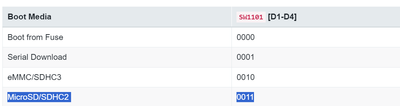
Then it can boot successfully.
Please let me know if any problem.
Best regards!
