
- Forums
- Product Forums
- General Purpose MicrocontrollersGeneral Purpose Microcontrollers
- i.MX Forumsi.MX Forums
- QorIQ Processing PlatformsQorIQ Processing Platforms
- Identification and SecurityIdentification and Security
- Power ManagementPower Management
- Wireless ConnectivityWireless Connectivity
- RFID / NFCRFID / NFC
- Advanced AnalogAdvanced Analog
- Neural Processing UnitsNeural Processing Units
- MCX Microcontrollers
- S32G
- S32K
- S32V
- MPC5xxx
- Other NXP Products
- S12 / MagniV Microcontrollers
- Powertrain and Electrification Analog Drivers
- Sensors
- Vybrid Processors
- Digital Signal Controllers
- 8-bit Microcontrollers
- ColdFire/68K Microcontrollers and Processors
- PowerQUICC Processors
- OSBDM and TBDML
- S32M
- S32Z/E
-
- Solution Forums
- Software Forums
- MCUXpresso Software and ToolsMCUXpresso Software and Tools
- CodeWarriorCodeWarrior
- MQX Software SolutionsMQX Software Solutions
- Model-Based Design Toolbox (MBDT)Model-Based Design Toolbox (MBDT)
- FreeMASTER
- eIQ Machine Learning Software
- Embedded Software and Tools Clinic
- S32 SDK
- S32 Design Studio
- GUI Guider
- Zephyr Project
- Voice Technology
- Application Software Packs
- Secure Provisioning SDK (SPSDK)
- Processor Expert Software
- Generative AI & LLMs
-
- Topics
- Mobile Robotics - Drones and RoversMobile Robotics - Drones and Rovers
- NXP Training ContentNXP Training Content
- University ProgramsUniversity Programs
- Rapid IoT
- NXP Designs
- SafeAssure-Community
- OSS Security & Maintenance
- Using Our Community
-
- Cloud Lab Forums
-
- Knowledge Bases
- ARM Microcontrollers
- i.MX Processors
- Identification and Security
- Model-Based Design Toolbox (MBDT)
- QorIQ Processing Platforms
- S32 Automotive Processing Platform
- Wireless Connectivity
- CodeWarrior
- MCUXpresso Suite of Software and Tools
- MQX Software Solutions
- RFID / NFC
- Advanced Analog
- Neural Processing Units
-
- NXP Tech Blogs
- Home
- :
- i.MX フォーラム
- :
- i.MXプロセッサ
- :
- After flash programming, board is not working,
After flash programming, board is not working,
- RSS フィードを購読する
- トピックを新着としてマーク
- トピックを既読としてマーク
- このトピックを現在のユーザーにフロートします
- ブックマーク
- 購読
- ミュート
- 印刷用ページ

- 新着としてマーク
- ブックマーク
- 購読
- ミュート
- RSS フィードを購読する
- ハイライト
- 印刷
- 不適切なコンテンツを報告
IMXRT1020 board
I added sdram initializing code and delete preprocessor XIP_BOOT_HEADER_DCD_ENABLE=1 in example lwip-echo-freertos,
After Example lwip_ipv4_ipv6_echo_freertos, flash programming board is not working,
and.. Flash programming is not impossible.
From this page https://community.nxp.com/t5/i-MX-RT-Knowledge-Base/RT-board-recovery-for-debugger-connect-issues/ta...
Recovery is complete , Anyway attached my project, Please test this project by programming this binary on Board flash, What is wrong.??


解決済! 解決策の投稿を見る。

 Hui_Ma
- 新着としてマーク
- ブックマーク
- 購読
- ミュート
- RSS フィードを購読する
- ハイライト
- 印刷
- 不適切なコンテンツを報告
Hi,
Thank you for the patience.
I did a test with RT1020 EVK board using attached code.
I could regenerate your mentioned issue (debugger lost connection).
While, I can follow this thread mentioned way to recover the board.
First of all, please make sure you set the board SW8 (on the board bottom side) with serial download mode:
1) SW8: 1-OFF,2-OFF,3-OFF,4-ON
2) Power off and power on again, or Press Reset button
Below is my test result:
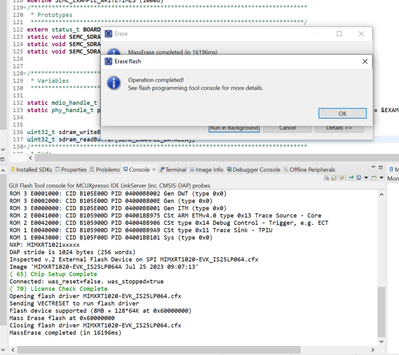
After that, change SW8 back to 1-OFF,2-OFF,3-ON,4-OFF, then you can debug another project as expected.
Wish it helps.
Mike
Hui_Ma
- 新着としてマーク
- ブックマーク
- 購読
- ミュート
- RSS フィードを購読する
- ハイライト
- 印刷
- 不適切なコンテンツを報告
Hi,
Thank you for the patience.
I did a test with RT1020 EVK board using attached code.
I could regenerate your mentioned issue (debugger lost connection).
While, I can follow this thread mentioned way to recover the board.
First of all, please make sure you set the board SW8 (on the board bottom side) with serial download mode:
1) SW8: 1-OFF,2-OFF,3-OFF,4-ON
2) Power off and power on again, or Press Reset button
Below is my test result:
After that, change SW8 back to 1-OFF,2-OFF,3-ON,4-OFF, then you can debug another project as expected.
Wish it helps.
Mike
