
- Forums
- Product Forums
- General Purpose MicrocontrollersGeneral Purpose Microcontrollers
- i.MX Forumsi.MX Forums
- QorIQ Processing PlatformsQorIQ Processing Platforms
- Identification and SecurityIdentification and Security
- Power ManagementPower Management
- Wireless ConnectivityWireless Connectivity
- RFID / NFCRFID / NFC
- Advanced AnalogAdvanced Analog
- Neural Processing UnitsNeural Processing Units
- MCX Microcontrollers
- S32G
- S32K
- S32V
- MPC5xxx
- Other NXP Products
- S12 / MagniV Microcontrollers
- Powertrain and Electrification Analog Drivers
- Sensors
- Vybrid Processors
- Digital Signal Controllers
- 8-bit Microcontrollers
- ColdFire/68K Microcontrollers and Processors
- PowerQUICC Processors
- OSBDM and TBDML
- S32M
- S32Z/E
-
- Solution Forums
- Software Forums
- MCUXpresso Software and ToolsMCUXpresso Software and Tools
- CodeWarriorCodeWarrior
- MQX Software SolutionsMQX Software Solutions
- Model-Based Design Toolbox (MBDT)Model-Based Design Toolbox (MBDT)
- FreeMASTER
- eIQ Machine Learning Software
- Embedded Software and Tools Clinic
- S32 SDK
- S32 Design Studio
- GUI Guider
- Zephyr Project
- Voice Technology
- Application Software Packs
- Secure Provisioning SDK (SPSDK)
- Processor Expert Software
- Generative AI & LLMs
-
- Topics
- Mobile Robotics - Drones and RoversMobile Robotics - Drones and Rovers
- NXP Training ContentNXP Training Content
- University ProgramsUniversity Programs
- Rapid IoT
- NXP Designs
- SafeAssure-Community
- OSS Security & Maintenance
- Using Our Community
-
- Cloud Lab Forums
-
- Knowledge Bases
- ARM Microcontrollers
- i.MX Processors
- Identification and Security
- Model-Based Design Toolbox (MBDT)
- QorIQ Processing Platforms
- S32 Automotive Processing Platform
- Wireless Connectivity
- CodeWarrior
- MCUXpresso Suite of Software and Tools
- MQX Software Solutions
- RFID / NFC
- Advanced Analog
- Neural Processing Units
-
- NXP Tech Blogs
- Home
- :
- i.MXプロセッサ
- :
- i.MXプロセッサ ナレッジベース
- :
- Manually build Boot binary for i.MX8M Mini
Manually build Boot binary for i.MX8M Mini
- RSS フィードを購読する
- 新着としてマーク
- 既読としてマーク
- ブックマーク
- 購読
- 印刷用ページ
- 不適切なコンテンツを報告
Manually build Boot binary for i.MX8M Mini
Manually build Boot binary for i.MX8M Mini
Sometimes it is helpful/faster to build a i.MX8MM boot binary outside of the Yocto environment.
There are instructions on how to accomplish this on different places, this document tries to provide an example for the i.MX8M Mini LPDDR4 EVK, whenever possible pointing how to build for other boards.
For the 8MM SoC a boot image is generated by imx-mkimage tool and requires:
- u-boot
- ARM trusted firmware image
- ddr training firmware
1. Download and Build u-boot:
mkdir imx-boot-bin
cdimx-boot-bin
git clone https://source.codeaurora.org/external/imx/uboot-imx.git
cd uboot-imx/
git checkout -b imx_v2019.04_4.19.35_1.1.0 origin/imx_v2019.04_4.19.35_1.1.0
(Optional) Here you can "git log -1" to check that the commit matches SRCREV on the recipe.
Next, use the BSP SDK script to setup the cross compilation environment, instructions on how to build it are here.
source /opt/fsl-imx-wayland/4.19-warrior/environment-setup-aarch64-poky-linux
export ARCH=arm
Build
make clean
Supported boards have configuration files on "configs". Using the LPDDR4 EVK here:
make imx8mm_evk_defconfig
make
2. Download and build the ARM Trusted Firmware
cd ..
git clone https://source.codeaurora.org/external/imx/imx-atf.git
cd imx-atf/
git checkout -b imx_4.19.35_1.1.0 origin/imx_4.19.35_1.1.0
(Optional) Again, you can "git log -1" to check that the commit matches SRCREV on the recipe.
https://source.codeaurora.org/external/imx/meta-fsl-bsp-release/tree/imx/meta-bsp/recipes-bsp/imx-at...
Build:
make PLAT=imx8mm bl31
If you run into this error:
aarch64-poky-linux-ld.bfd: unrecognized option '-Wl,-O1'
aarch64-poky-linux-ld.bfd: use the --help option for usage information
make: *** [Makefile:712: build/imx8mm/release/bl31/bl31.elf] Error 1
try:
unset LDFLAGS
make PLAT=imx8mm bl31
3. Download the LPDDR4 training binaries
It is on firmware-imx, recipe is here:
https://source.codeaurora.org/external/imx/meta-fsl-bsp-release/tree/imx/meta-bsp/recipes-bsp/firmwa...
cd ..
mkdir firmware-imx
cd firmware-imx
wget https://www.nxp.com/lgfiles/NMG/MAD/YOCTO/firmware-imx-8.5.bin
chmod a+x firmware-imx-8.5.bin
./firmware-imx-8.5.bin
4. Download imx-mkimage and build the boot image
cd ..
git clone https://source.codeaurora.org/external/imx/imx-mkimage.git
cd imx-mkimage/
git checkout -b imx_4.19.35_1.1.0 origin/imx_4.19.35_1.1.0
(Optional) "git log -1" matches SRCREV on:
Now, you can check the build targets and required binaries at iMX8M/soc.mak
For the flash_evk for the imx8mm we will need binaries:
u-boot: u-boot-spl.bin, u-boot-nodtb.bin, fsl-imx8mm-evk.dtb
ARM trusted firmware: bl31.bin
LPDDR4 files: lpddr4_pmu_train_1d_imem.bin lpddr4_pmu_train_1d_dmem.bin lpddr4_pmu_train_2d_imem.bin lpddr4_pmu_train_2d_dmem.bin
mkimage for mkimage_uboot
Copy all these to imx-mkimage/iMX8M/
cp ../uboot-imx/spl/u-boot-spl.bin iMX8M/
cp ../uboot-imx/u-boot-nodtb.bin iMX8M/
cp ../uboot-imx/arch/arm/dts/fsl-imx8mm-evk.dtb iMX8M/cp ../imx-atf/build/imx8mm/release/bl31.bin iMX8M/
cp ../firmware-imx/firmware-imx-8.5/firmware/ddr/synopsys/lpddr4_pmu_train_* iMX8M/
cp ../uboot-imx/tools/mkimage iMX8M/mkimage_uboot
Build:
make SOC=iMX8MM flash_evk
Output binary is on ./iMX8M/flash.bin
5. Program on the SD Card:
sudo dd if=iMX8M/flash.bin of=/dev/<path to your sd> bs=1024 seek=33

- 既読としてマーク
- 新着としてマーク
- ブックマーク
- ハイライト
- 印刷
- 不適切なコンテンツを報告
The image created and loaded to the sd card with flash.bin does not boot into uboot. My serial console output shows its last log as
"Normal boot"
"Trying to boot from MMC1"
These are the same prints I see when I have a working image running out of the micro-sd card on the nxp imx8mm evk.
The build output is below.
sudo make --makefile=soc.mak SOC=iMX8MM flash_evk
./../scripts/pad_image.sh bl31.bin
./../scripts/pad_image.sh u-boot-nodtb.bin fsl-imx8mm-evk.dtb
DEK_BLOB_LOAD_ADDR=0x40400000 TEE_LOAD_ADDR=0xbe000000 ATF_LOAD_ADDR=0x00920000 ./mkimage_fit_atf.sh fsl-imx8mm-evk.dtb > u-boot.its
bl31.bin size:
41984
u-boot-nodtb.bin size:
646096
fsl-imx8mm-evk.dtb size:
26768
./mkimage_uboot -E -p 0x3000 -f u-boot.its u-boot.itb
FIT description: Configuration to load ATF before U-Boot
Created: Wed Feb 26 12:02:30 2020
Image 0 (uboot@1)
Description: U-Boot (64-bit)
Created: Wed Feb 26 12:02:30 2020
Type: Standalone Program
Compression: uncompressed
Data Size: unavailable
Architecture: AArch64
Load Address: 0x40200000
Entry Point: unavailable
Image 1 (fdt@1)
Description: fsl-imx8mm-evk
Created: Wed Feb 26 12:02:30 2020
Type: Flat Device Tree
Compression: uncompressed
Data Size: unavailable
Architecture: Unknown Architecture
Image 2 (atf@1)
Description: ARM Trusted Firmware
Created: Wed Feb 26 12:02:30 2020
Type: Firmware
Compression: uncompressed
Data Size: unavailable
Architecture: AArch64
Load Address: 0x00920000
Default Configuration: 'config@1'
Configuration 0 (config@1)
Description: fsl-imx8mm-evk
Kernel: unavailable
FDT: fdt@1
Loadables: atf@1
./mkimage_imx8 -version v1 -fit -loader u-boot-spl-ddr.bin 0x7E1000 -second_loader u-boot.itb 0x40200000 0x60000 -out flash.bin
Platform: i.MX8M (mScale)
ROM VERSION: v1
Using FIT image
LOADER IMAGE: u-boot-spl-ddr.bin start addr: 0x007e1000
SECOND LOADER IMAGE: u-boot.itb start addr: 0x40200000 offset: 0x00060000
Output: flash.bin
========= IVT HEADER [HDMI FW] =========
header.tag: 0x0
header.length: 0x0
header.version: 0x0
entry: 0x0
reserved1: 0x0
dcd_ptr: 0x0
boot_data_ptr: 0x0
self: 0x0
csf: 0x0
reserved2: 0x0
boot_data.start: 0x0
boot_data.size: 0x0
boot_data.plugin: 0x0
========= IVT HEADER [PLUGIN] =========
header.tag: 0x0
header.length: 0x0
header.version: 0x0
entry: 0x0
reserved1: 0x0
dcd_ptr: 0x0
boot_data_ptr: 0x0
self: 0x0
csf: 0x0
reserved2: 0x0
boot_data.start: 0x0
boot_data.size: 0x0
boot_data.plugin: 0x0
========= IVT HEADER [LOADER IMAGE] =========
header.tag: 0xd1
header.length: 0x2000
header.version: 0x41
entry: 0x7e1000
reserved1: 0x57c00
dcd_ptr: 0x0
boot_data_ptr: 0x7e0fe0
self: 0x7e0fc0
csf: 0x80d7c0
reserved2: 0x0
boot_data.start: 0x7e0bc0
boot_data.size: 0x2ec60
boot_data.plugin: 0x0
========= OFFSET dump =========
Loader IMAGE:
header_image_off 0x0
dcd_off 0x0
image_off 0x40
csf_off 0x2c800
spl hab block: 0x7e0fc0 0x0 0x2c800
Second Loader IMAGE:
sld_header_off 0x57c00
sld_csf_off 0x58c20
sld hab block: 0x401fcdc0 0x57c00 0x1020
And here is what I have in the iMX8MM directory.
total 2284
drwxr-xr-x 3 root root 4096 Feb 26 11:34 ./
drwxr-xr-x 9 root root 4096 Feb 25 12:19 ../
-rwxr-xr-x 1 root root 41984 Feb 26 11:34 bl31.bin*
-rw-r--r-- 1 root root 26768 Feb 26 11:34 fsl-imx8mm-evk.dtb
drwxr-xr-x 2 root root 4096 Feb 25 12:19 lib/
-rw-r--r-- 1 root root 1668 Feb 26 11:29 lpddr4_pmu_train_1d_dmem.bin
-rw-r--r-- 1 root root 32244 Feb 26 11:29 lpddr4_pmu_train_1d_imem.bin
-rw-r--r-- 1 root root 1380 Feb 26 11:29 lpddr4_pmu_train_2d_dmem.bin
-rw-r--r-- 1 root root 23232 Feb 26 11:29 lpddr4_pmu_train_2d_imem.bin
-rwxr-xr-x 1 root root 3480 Feb 26 11:09 mkimage_fit_atf.sh*
-rwxr-xr-x 1 root root 964872 Feb 26 11:34 mkimage_imx8*
-rw-r--r-- 1 root root 52009 Feb 26 11:09 mkimage_imx8.c
-rwxr-xr-x 1 root root 197304 Feb 26 11:33 mkimage_uboot*
-rwxr-xr-x 1 root root 2332 Feb 26 11:09 print_fit_hab.sh*
-rw-r--r-- 1 root root 1259 Feb 25 12:19 README
-rw-r--r-- 1 root root 12374 Feb 26 11:09 soc.mak
-rw-r--r-- 1 root root 784 Feb 26 11:40 u-boot.its
-rwxr-xr-x 1 root root 646096 Feb 26 11:17 u-boot-nodtb.bin*
-rwxr-xr-x 1 root root 98736 Feb 26 11:15 u-boot-spl.bin*
-rw-r--r-- 1 root root 182036 Feb 26 11:34 u-boot-spl-ddr.bin
- 既読としてマーク
- 新着としてマーク
- ブックマーク
- ハイライト
- 印刷
- 不適切なコンテンツを報告
These are the same prints I see when I have a working image running out of the micro-sd card on the nxp imx8mm evk.
Are you trying this on a custom board or on the EVK? If on a custom board I suggest validating the build for the EVK first than try to build with the modifications for the custom board.
For the EVK some suggestions for things to check:
- Do you have a LPDDR4 or DDR4 EVK? For DDR you will need to modify the steps for the proper target...
- Using correct offset for the image on the SD Card?
- boot switches properly configured?
- 既読としてマーク
- 新着としてマーク
- ブックマーク
- ハイライト
- 印刷
- 不適切なコンテンツを報告
This is on the iMX8MM EVK with LPDDR4.
The offset I am using when I "dd" the image is 33 as stated by the reference for imx8m mini. The command I use to create the micro-sd is sudo dd if=flash.bin of=/dev/sdd bs=1024 seek=33
The imx8mm evk board dip switches are set to boot from the micro-sd card. An image I build using the android build environment with instructions from NXP works with the micro-sd slot. But building the uboot separately is giving me problems.
- 既読としてマーク
- 新着としてマーク
- ブックマーク
- ハイライト
- 印刷
- 不適切なコンテンツを報告
I attached above the working directory "imx-mkimage/iMX8M" of when I wrote this steps. You can try the flash.bin on your board to validate the flashing procedure and also compare other intermediate binaries... Hope this helps!
- 既読としてマーク
- 新着としてマーク
- ブックマーク
- ハイライト
- 印刷
- 不適切なコンテンツを報告
Is this flash.bin the one I should put in the CSF description file to be signed by the CST code signing tool for secure Boot?
In original document 4581.pdf they were speaking about u-boot.imx , is that now this flash.bin on the iMX8MM instead ?
Or should I add something else before signing it by the CST ?
- 既読としてマーク
- 新着としてマーク
- ブックマーク
- ハイライト
- 印刷
- 不適切なコンテンツを報告
Correct, flash.bin is the correct binary to be signed for 8MM.
- 既読としてマーク
- 新着としてマーク
- ブックマーク
- ハイライト
- 印刷
- 不適切なコンテンツを報告
Thank you. I see that mkimage_imx8 could add CSF information into the flash.bin, there is a CSF argument, a CSF plugin argument and a csf_hdmi plugin argument options when calling it. Are these info filling the same CSF section that is filled by the CST tool or do these mean different sections , different information ?
- 既読としてマーク
- 新着としてマーク
- ブックマーク
- ハイライト
- 印刷
- 不適切なコンテンツを報告
on AN4581.pdf doc , paragraph 3.5 I can read this :
"The authenticate data command blocks line contains three values and the file containing the data being
signed. The first value is the address on the target where HAB expects the signed image data to begin."
Is the first value they mention here equal to 33 in the case of your example above here ?
so, in the CSF that would be
# Address Offset Length Data File Path
Blocks = ( base_address+33) 0x000 fileLen “flash.bin”
where base_address is SDcard base address or eMMC base address.
Is this correct ?
- 既読としてマーク
- 新着としてマーク
- ブックマーク
- ハイライト
- 印刷
- 不適切なコンテンツを報告
Please start a new community question to discuss secure boot related topics, this way you are more likely to receive feedback from the security experts or others working on the same topic.
- 既読としてマーク
- 新着としてマーク
- ブックマーク
- ハイライト
- 印刷
- 不適切なコンテンツを報告
Ok, just a question makes sense to ask here , where does this seek=33 offset come from ? How is it calculated ? Or is it something fixed as target lookup address constant inside the HAB ?
- 既読としてマーク
- 新着としてマーク
- ブックマーク
- ハイライト
- 印刷
- 不適切なコンテンツを報告
Sure, it is a fixed offset where the ROM will look for the header of the image - but note that the offset is differs according to the boot media.
The reference manual:
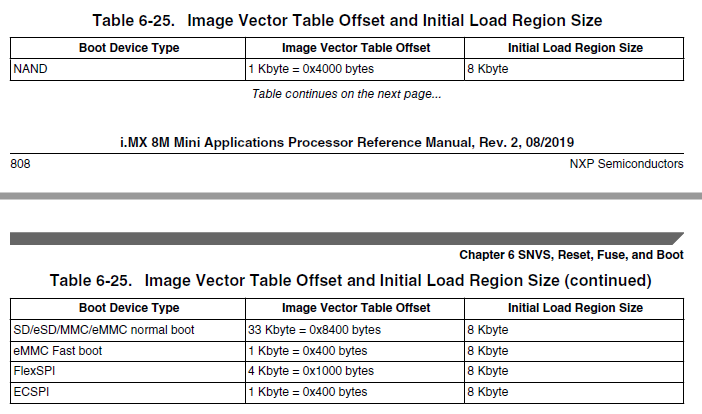
- 既読としてマーク
- 新着としてマーク
- ブックマーク
- ハイライト
- 印刷
- 不適切なコンテンツを報告
whatever your mentioned steps i have followed but there is an issue. it shows invalid partition 1. how do i resolve this issue?
BuildInfo:
- ATF 70fa7bc
- U-Boot 2019.04-04771-g4d377539a1
Run CMD11 1.8V switch
switch to partitions #0, OK
mmc1 is current device
flash target is MMC:1
Run CMD11 1.8V switch
Net:
Warning: ethernet@30be0000 using MAC address from ROM
eth0: ethernet@30be0000
Fastboot: Normal
Normal Boot
Hit any key to stop autoboot: 0
Run CMD11 1.8V switch
switch to partitions #0, OK
mmc1 is current device
Run CMD11 1.8V switch
** Invalid partition 1 **
** Invalid partition 1 **
Booting from net ...
- 既読としてマーク
- 新着としてマーク
- ブックマーク
- ハイライト
- 印刷
- 不適切なコンテンツを報告
@nxf56472 This article needs an update in order to be useful. All the links are broken.
