
- Forums
- Product Forums
- General Purpose MicrocontrollersGeneral Purpose Microcontrollers
- i.MX Forumsi.MX Forums
- QorIQ Processing PlatformsQorIQ Processing Platforms
- Identification and SecurityIdentification and Security
- Power ManagementPower Management
- Wireless ConnectivityWireless Connectivity
- RFID / NFCRFID / NFC
- Advanced AnalogAdvanced Analog
- Neural Processing UnitsNeural Processing Units
- MCX Microcontrollers
- S32G
- S32K
- S32V
- MPC5xxx
- Other NXP Products
- S12 / MagniV Microcontrollers
- Powertrain and Electrification Analog Drivers
- Sensors
- Vybrid Processors
- Digital Signal Controllers
- 8-bit Microcontrollers
- ColdFire/68K Microcontrollers and Processors
- PowerQUICC Processors
- OSBDM and TBDML
- S32M
- S32Z/E
-
- Solution Forums
- Software Forums
- MCUXpresso Software and ToolsMCUXpresso Software and Tools
- CodeWarriorCodeWarrior
- MQX Software SolutionsMQX Software Solutions
- Model-Based Design Toolbox (MBDT)Model-Based Design Toolbox (MBDT)
- FreeMASTER
- eIQ Machine Learning Software
- Embedded Software and Tools Clinic
- S32 SDK
- S32 Design Studio
- GUI Guider
- Zephyr Project
- Voice Technology
- Application Software Packs
- Secure Provisioning SDK (SPSDK)
- Processor Expert Software
- Generative AI & LLMs
-
- Topics
- Mobile Robotics - Drones and RoversMobile Robotics - Drones and Rovers
- NXP Training ContentNXP Training Content
- University ProgramsUniversity Programs
- Rapid IoT
- NXP Designs
- SafeAssure-Community
- OSS Security & Maintenance
- Using Our Community
-
- Cloud Lab Forums
-
- Knowledge Bases
- ARM Microcontrollers
- i.MX Processors
- Identification and Security
- Model-Based Design Toolbox (MBDT)
- QorIQ Processing Platforms
- S32 Automotive Processing Platform
- Wireless Connectivity
- CodeWarrior
- MCUXpresso Suite of Software and Tools
- MQX Software Solutions
- RFID / NFC
- Advanced Analog
- Neural Processing Units
-
- NXP Tech Blogs
- Home
- :
- Wireless Connectivity
- :
- Wireless MCU
- :
- Re: QN908X ISP HOWTO?
QN908X ISP HOWTO?
- Subscribe to RSS Feed
- Mark Topic as New
- Mark Topic as Read
- Float this Topic for Current User
- Bookmark
- Subscribe
- Mute
- Printer Friendly Page

- Mark as New
- Bookmark
- Subscribe
- Mute
- Subscribe to RSS Feed
- Permalink
- Report Inappropriate Content
I'm looking for an app note or HOWTO on how to successfully build a .bin file and upload to a QN908X chip.
I'm assuming the process is drag 'n' drop on a windows PC but I'm running into a few problems:
1. I have access to a QN908XDK board but am unable to flash it using the built in JLINK interface via IAR. I get a "failed to load flash loader" error. This happens with every example project I've tried from the SDK.

2. When I short JP15 and reset the board, I get an autoplay message:
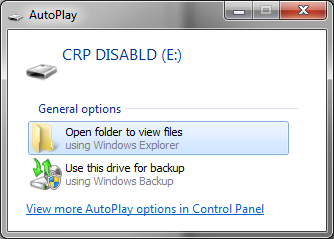
Any attempt to copy in a new firmware.bin (from the SDK sample projects) image fails:
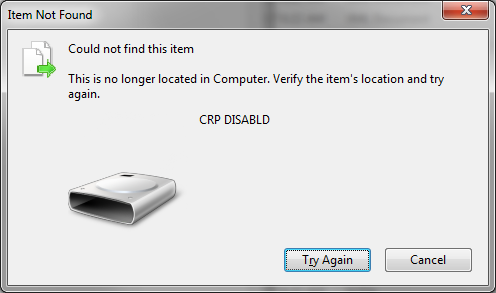
I'm not yet sure what CRP DISABLD means but I assume that it's not good and that my board is likely hosed somehow. Any suggestions on how to recover?
3. I am working on our own board with the same MCU. I can flash directly via an external JLINK and IAR. When I try to go into ISP mode, the device shows up as an unknown USB device. :
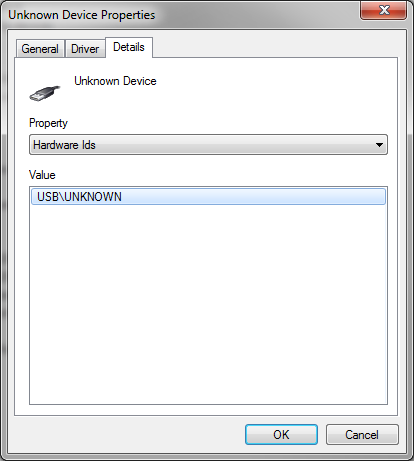
This implies that I'm missing some sort of setup step that configures the ISP mode to a particular vendor/id, no? I have found no documentation thus far on how to accomplish this.
4. I have not been able to find any documentation on how to set up an IAR project so that it produces a valid ISP .bin file.
Any help would be greatly appreciated!
Solved! Go to Solution.
- Mark as New
- Bookmark
- Subscribe
- Mute
- Subscribe to RSS Feed
- Permalink
- Report Inappropriate Content
Great Success!
My problem was due to the 16Mhz clock. I swapped it out for a 32Mhz and I was able to update the firmware as expected via the ISP USB interface. Hopefully somebody finds this soliloquy useful.
NXP - please provide some guidance on what to do for 'nonstandard' board configurations.
- Mark as New
- Bookmark
- Subscribe
- Mute
- Subscribe to RSS Feed
- Permalink
- Report Inappropriate Content
Don't you just love it when people ask and answer their own questions and then keep asking more? :smileyhappy:
So the system clock field in the USB ISP header appears to be none other than the SYSCON_CLK_CTRL register. I'm assuming that this is used to update the reset value so that the next time the system boots it uses it.
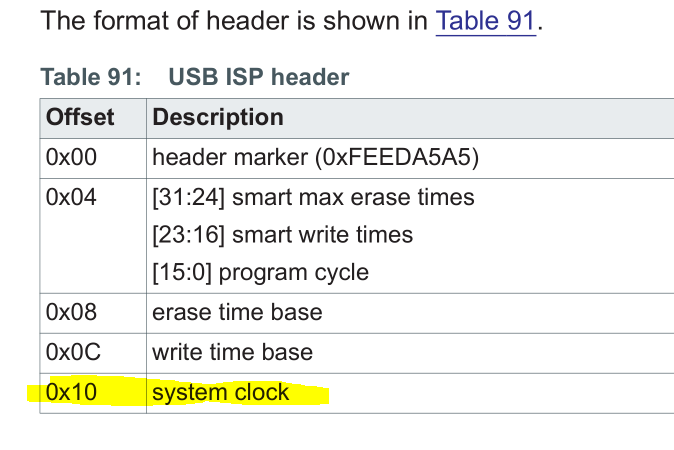
I now have a bootstrapping problem. How do I get the ISP to boot with my 16Mhz clock so I can write a firmware image that will configure the ISP to use the 16Mhz clock?
- Mark as New
- Bookmark
- Subscribe
- Mute
- Subscribe to RSS Feed
- Permalink
- Report Inappropriate Content
Great Success!
My problem was due to the 16Mhz clock. I swapped it out for a 32Mhz and I was able to update the firmware as expected via the ISP USB interface. Hopefully somebody finds this soliloquy useful.
NXP - please provide some guidance on what to do for 'nonstandard' board configurations.
- Mark as New
- Bookmark
- Subscribe
- Mute
- Subscribe to RSS Feed
- Permalink
- Report Inappropriate Content
I just discovered the system clock field in the USB ISP header. The DK is running a 32Mhz clock and I'm running at 16Mhz. This could explain my issues.
The Image editor tool doesn't allow me to change this setting and there's no docs on the format. The tool spits out a value of 0x403c0010 which is most certainly not 32m. I can jam a value into the image. Can someone tell me what this field should look like for a 16Mhz clock?
- Mark as New
- Bookmark
- Subscribe
- Mute
- Subscribe to RSS Feed
- Permalink
- Report Inappropriate Content
I need some help with this. My boards/IC's are not behaving like the DK and I need to figure out why. It doesn't seem like I need to do anything to get the USB ISP to come up out of the box but I only ever see misconfigured USB devices show up.
- Mark as New
- Bookmark
- Subscribe
- Mute
- Subscribe to RSS Feed
- Permalink
- Report Inappropriate Content
I've done a little more digging and verified that the CRP bits match the defaults and that all of the ISP modes are enabled:
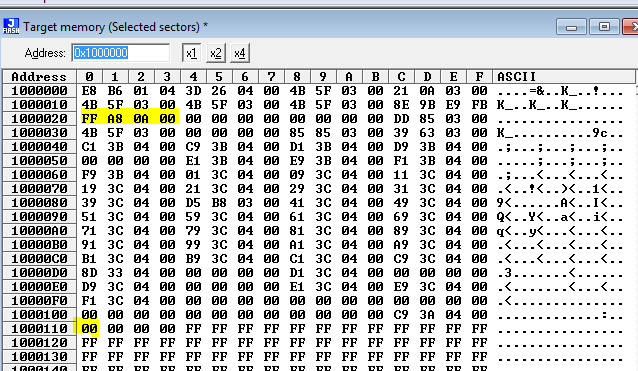
So, what's the bootloader doing after it jumps to ISP land and where is the USB enumeration stored?

 gerardo_rodrigu
- Mark as New
- Bookmark
- Subscribe
- Mute
- Subscribe to RSS Feed
- Permalink
- Report Inappropriate Content
Hello Jose,
The Image editor will do all the necessary things to the .bin file generated by IAR. There is no special configuration needed from IAR side.
Thanks for sharing the issue about the *.dll file, I will forward this issue to the corresponding team. As a workaround, please download the Connectivity QTool found in the same page as the Image Editor and install it. The installation folder for this tool will contain the libgcc_s_dw2-1.dll, so you can run the QN908x_Image_Editor_v1.0.0.exe from that location.
The QN9080 has the bootloader stored in ROM, so it should be the same process with the QN9080DK as with your custom board. Can you please verify that the QN9080 in your custom board is revision C or later? You can check your chip revision in the marking code. Refer to QN908x data sheet section 5. Marking.
Regards,
Gerardo
- Mark as New
- Bookmark
- Subscribe
- Mute
- Subscribe to RSS Feed
- Permalink
- Report Inappropriate Content
"The Image editor will do all the necessary things to the .bin file generated by IAR. There is no special configuration needed from IAR side."
Ok, so I should be able to take, say, the gpio driver example, send it through the tool and be able to drop it as firmware.bin on the DK dialog. That was what I had hoped for but I wanted to be sure.
- Mark as New
- Bookmark
- Subscribe
- Mute
- Subscribe to RSS Feed
- Permalink
- Report Inappropriate Content
The outlined firmware update path doesn't work for me. Here's what I did:
- Opened the led_output project from a freshly installed 2.2 SDK.
- Changed the output filename extension from .out to .bin
- Compiled project
- Copied QN908x_Image_Editor_v1.0.0.exe and libgcc_s_dw2-1.dll into the debug output folder
- Ran the image editor to create a valid .bin: QN908x_Image_Editor_v1.0.0.exe -i gpio_led_output.bin -u
- Applied power to my DK board with JP15 shorted
- Opened the CRP_DISABLD drive and erased the firmware.bin contained inside
- Copied the firmware.bin that was generated by the image editor into the CRP_DISABLD drive/folder
- Rebooted board 5 seconds after copy was done
After these steps the DK board is not only not blinking the LED but is also unresponsive to the CMSIS-DAP interface. I cannot flash, erase or otherwise talk to it from the debugger. It does reliably boot into ISP mode however. To get it back I had to resort to a standalone JLINK debugger. After a few attempts I was able to erase the chip. After that the CMSIS-DAP interface behaved as expected. I believe this is the state I initially described in this thread. I suspect that another developer had tried to flash in this manner and got to the same point I did before giving up.
Here's the output of the script and the associated files:
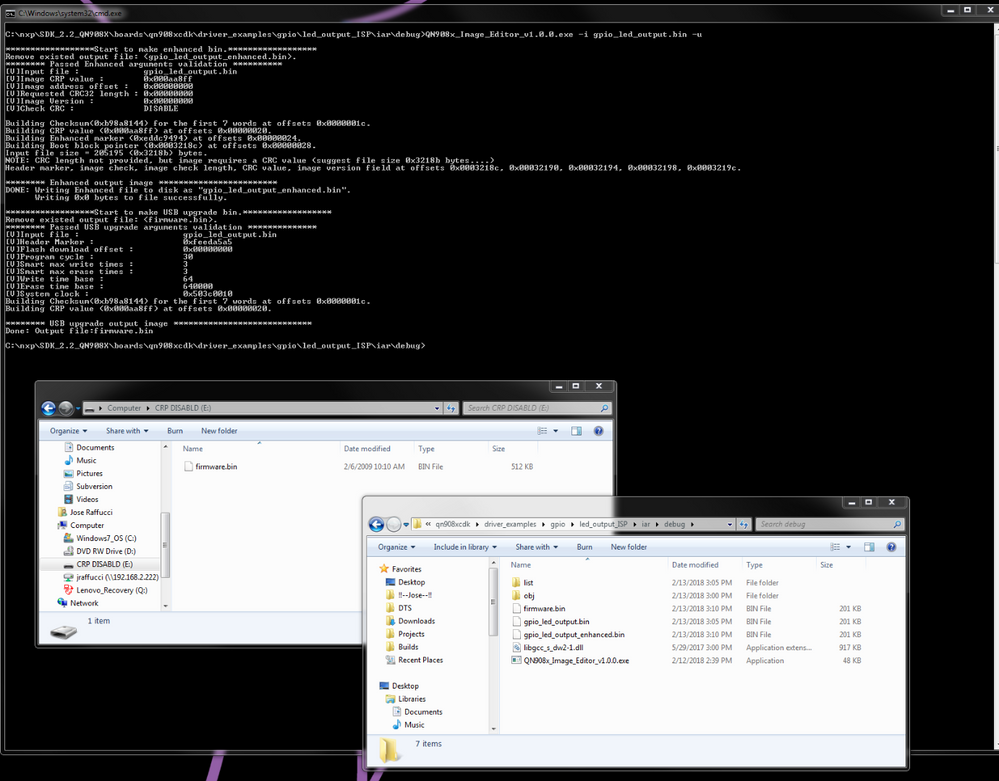 gerardo_rodrigu
- Mark as New
- Bookmark
- Subscribe
- Mute
- Subscribe to RSS Feed
- Permalink
- Report Inappropriate Content
Hello Jose,
The *.out file from IAR is not the application binary file. To generate the binary file from IAR you can do it from the project options:
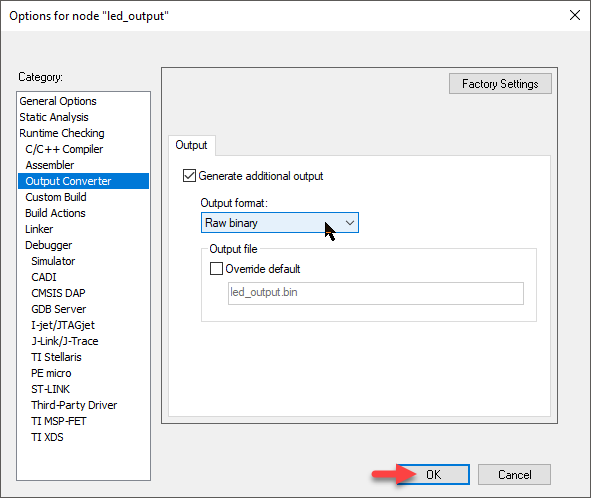
The bin file should now be generated in the Debug folder and should be around 15KB for the led_output example. Please try with this file instead and let me know if you were successful.
Best regards,
Gerardo
- Mark as New
- Bookmark
- Subscribe
- Mute
- Subscribe to RSS Feed
- Permalink
- Report Inappropriate Content
Bingo.
Small but important checkbox.
Ok, so now that I can flash my DK board, let's try to figure out why my custom one doesn't appear to be correctly configured for USB ISP.
- Mark as New
- Bookmark
- Subscribe
- Mute
- Subscribe to RSS Feed
- Permalink
- Report Inappropriate Content
Read those tiny things? HA! about the CHIP ID register instead?
CHIP ID: 0xFC009010
CID0: 0x0
CID1: 0x2
CID2: 0x0
CID3: 0x0
CID4: 0x2
MEM_OPTION: 0x1
ADC_OPTION: 0x1
FLASH_OPTION: 0x1
FPU_OPTION: 0x1
USB_OPTION: 0x1
FSP_OPTION: 0x1
So it look like I do indeed have a revision C chip. (CID2:CID4 = 0x02)
gerardo_rodrigu- Mark as New
- Bookmark
- Subscribe
- Mute
- Subscribe to RSS Feed
- Permalink
- Report Inappropriate Content
Hello Jose Raffucci,
The USB ISP bootloader expects a binary in a certain format described in section 7.6.1 USB firmware structure of the QN908x User Manual. You can use the QN908x Image Editor tool to convert a binary to the expected USP ISP format. This tool can be downloaded from the Lab and Test Software section of the SOFTWARE & TOOLS tab in the QN908x product page.
You can use this tool with the windows command prompt. For example:
>>C:\NXP\QN908x-Image-Editor>QN908x_Image_Editor_v1.0.0.exe -i qn908xcdk_driver_examples_gpio_led_output.bin -u
This will generate a new binary named firmware.bin, which is the converted binary in the USB ISP format. After this, follow the next steps to program the QN9080 with the USB ISP bootloader.
1. Short JP15 (ISP mode) in the QN9080DK and connect the board from the J1 connector (QN9080 USB port).
2. The device will enter in ISP bootloader mode and enumerate to the PC as a mass storage device with a file (firmware.bin) inside.
3. Delete the existing firmware.bin file from the CRP DISABLD drive and copy the new firmware.bin file generated with the Image Editor tool (Don't change the name of the file).
4. Remove the JP15 header and power cycle your board.
5. The new application should now start running.
Note:
CRP DISABLD means that the Code Read Protection security is disabled.
Let me know if you have any issue with this process.
Regards,
Gerardo
- Mark as New
- Bookmark
- Subscribe
- Mute
- Subscribe to RSS Feed
- Permalink
- Report Inappropriate Content
FYI -- the QN908x Image Editor binary isn't statically linked:
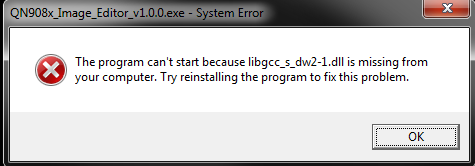
See: c++ - Program can't find libgcc_s_dw2-1.dll - Stack Overflow
Can you either re-link or provide the correct missing libgcc version?
- Mark as New
- Bookmark
- Subscribe
- Mute
- Subscribe to RSS Feed
- Permalink
- Report Inappropriate Content
The missing library can be found at C:\MinGW\bin\libgcc_s_dw2-1.dll by installing MinGW. I can't remember which component contained it. Either the base or the gcc/g++ one.
Copy the DLL in whatever folder you're trying to run the image editor from and you should be good to go until NXP relinks the binary.
now back to figuring out how the heck to generate a valid bin file from IAR...
- Mark as New
- Bookmark
- Subscribe
- Mute
- Subscribe to RSS Feed
- Permalink
- Report Inappropriate Content
Gerardo,
Does the image editor do all the necessary things (checksum, etc) to an IAR .bin file or do I need to configure the linker to do that? I'll play with the demo apps today and see what they do in the projects.
I figured out how to do the update on the DK board, it's our custom board that I'm having issues with. When I short the equivalent of JP15, I don't get a mass storage device but rather an USB/UKNOWN one. The DK board shows up as a mass storage device on the same computer.
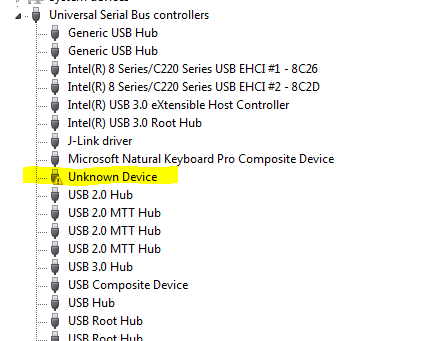
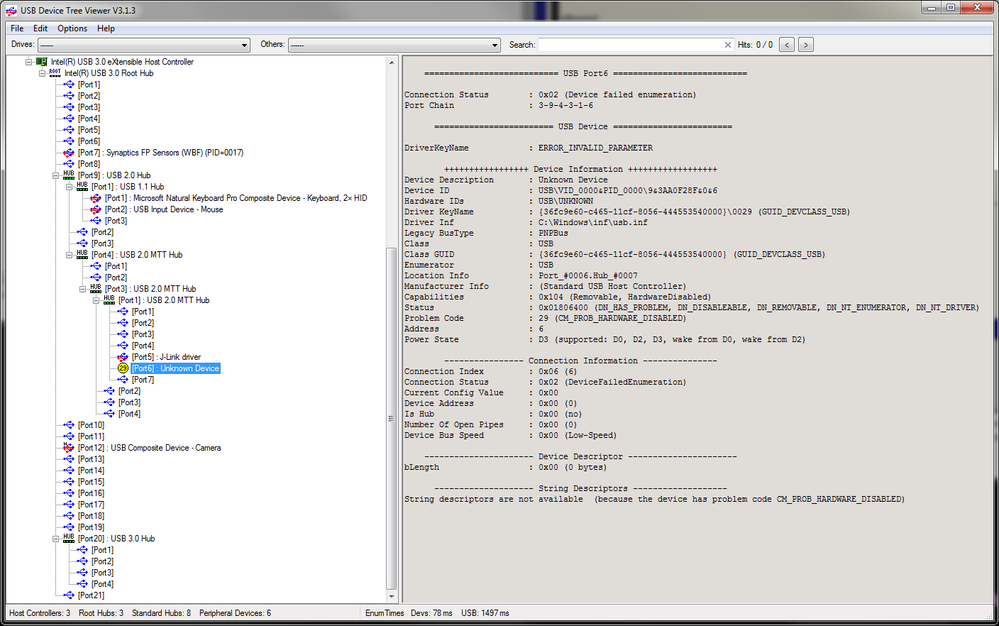
What I'm reading from your response and from the brief USB ISP section from the UM is that both the DK and the standalone IC handle updates in the same manner -- mass storage device/firmware.bin, etc. Correct?
How is the ISP USB descriptor configured and more importantly, who's responsible for that? Me or the factory? I can't find anything the UM to guide me on this or explain what the default settings are.
- Mark as New
- Bookmark
- Subscribe
- Mute
- Subscribe to RSS Feed
- Permalink
- Report Inappropriate Content
As usual, I was able to answer a few of my questions minutes after posting.
I was able to recover the DK board by hooking up an external JLINK and booting into ISP mode. The flash loader detected that the device was locked and was able to unlock it.
I'm still clueless about questions 3 and 4. Without the CMSIS-DAP how do I flash a device via usb using the built-in ISP and how do I build the correct file for that?
