
- Forums
- Product Forums
- General Purpose MicrocontrollersGeneral Purpose Microcontrollers
- i.MX Forumsi.MX Forums
- QorIQ Processing PlatformsQorIQ Processing Platforms
- Identification and SecurityIdentification and Security
- Power ManagementPower Management
- Wireless ConnectivityWireless Connectivity
- RFID / NFCRFID / NFC
- Advanced AnalogAdvanced Analog
- Neural Processing UnitsNeural Processing Units
- MCX Microcontrollers
- S32G
- S32K
- S32V
- MPC5xxx
- Other NXP Products
- S12 / MagniV Microcontrollers
- Powertrain and Electrification Analog Drivers
- Sensors
- Vybrid Processors
- Digital Signal Controllers
- 8-bit Microcontrollers
- ColdFire/68K Microcontrollers and Processors
- PowerQUICC Processors
- OSBDM and TBDML
- S32M
- S32Z/E
-
- Solution Forums
- Software Forums
- MCUXpresso Software and ToolsMCUXpresso Software and Tools
- CodeWarriorCodeWarrior
- MQX Software SolutionsMQX Software Solutions
- Model-Based Design Toolbox (MBDT)Model-Based Design Toolbox (MBDT)
- FreeMASTER
- eIQ Machine Learning Software
- Embedded Software and Tools Clinic
- S32 SDK
- S32 Design Studio
- GUI Guider
- Zephyr Project
- Voice Technology
- Application Software Packs
- Secure Provisioning SDK (SPSDK)
- Processor Expert Software
- Generative AI & LLMs
-
- Topics
- Mobile Robotics - Drones and RoversMobile Robotics - Drones and Rovers
- NXP Training ContentNXP Training Content
- University ProgramsUniversity Programs
- Rapid IoT
- NXP Designs
- SafeAssure-Community
- OSS Security & Maintenance
- Using Our Community
-
- Cloud Lab Forums
-
- Knowledge Bases
- ARM Microcontrollers
- i.MX Processors
- Identification and Security
- Model-Based Design Toolbox (MBDT)
- QorIQ Processing Platforms
- S32 Automotive Processing Platform
- Wireless Connectivity
- CodeWarrior
- MCUXpresso Suite of Software and Tools
- MQX Software Solutions
- RFID / NFC
- Advanced Analog
- Neural Processing Units
-
- NXP Tech Blogs
- Home
- :
- Product Forums
- :
- S32K
- :
- Re: S32K344 Mcu integration with AUTOSAR (Vector SIP) problem
S32K344 Mcu integration with AUTOSAR (Vector SIP) problem
- Subscribe to RSS Feed
- Mark Topic as New
- Mark Topic as Read
- Float this Topic for Current User
- Bookmark
- Subscribe
- Mute
- Printer Friendly Page
S32K344 Mcu integration with AUTOSAR (Vector SIP) problem

- Mark as New
- Bookmark
- Subscribe
- Mute
- Subscribe to RSS Feed
- Permalink
- Report Inappropriate Content
Hello,
I am struggling to bring-up AUTOSAR (Vector SIP delivery) on S32K344 eval-board using SW32K3_RTD_4.4_2.0.0, and I encoutered some problems with running peripherals (STM_0 and FlexCAN_0) properly.
The board hits unexpected exception during Gpt_Init, or Can_Init (if Gpt is deactivated in the first place) on accessing peripheral registers, since these peripherals are gated (corresponding values in MC_ME_PRTNx_COFBx_STATUS registers set to 0x0, instead of 0x1).
The problem is that these peripherals stay gated, although the checkbox 'Peripheral Clock Enable' is marked in DaVinci Configurator (so the registers MC_ME_PRTNx_COFBx_CLKEN[REQx] should be set properly).
I noticed that for PeripheralName and ModeEntrySlot there are some strange warnings, that these attributes are RO (and it looks so in Mcu.xdm file) and default values shall be used - but it seems that default values are the same as the one configured:
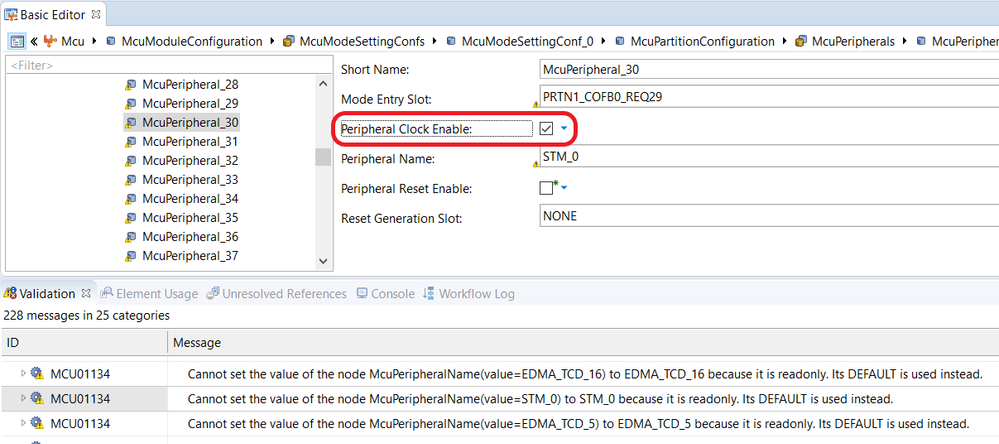
However, does it might have any impact on Peripheral Clock Enable setting? How to enforce Mcu to apply these settings? Is there any additional register/setting to be configured that I am not yet aware of?
First, I thought there might be some code that overrides these settings during vBRS (Vector Basic Runtime System) stage, but it doesn't seem to be the case after I took a closer look - when I hit the breakpoint on Gpt_Init entry which is right after execution of Mcu_Init, the MC_ME_PRTNx_COFBx_STATUS for STM_0 (used by Gpt) is still 0x0, not 0x1! The result is that when Gpt tries to configure STM_0 registers, I catch the exception. Exactly the same thing happens for FlexCAN0 (when I comment out Gpt_Init call).
I would be most grateful for any hints and feedback, since I don't know where do I make the mistake (or if there is any known issue with SW32K3_RTD_4.4_2.0.0 integration with AUTOSAR from Vector)
Best Regards,
Artur

 namnguyenviet
- Mark as New
- Bookmark
- Subscribe
- Mute
- Subscribe to RSS Feed
- Permalink
- Report Inappropriate Content
Hello,
Sorry for late reply, this thread hasn't been assigned correctly somehow.
This is an issue relating to the integrator itself rather than a RTD driver issue. The reason is quite complicated, however I will try to explain as simplest as it can. After configured all the stuff, the following arxml file will be generated in DaVinci:
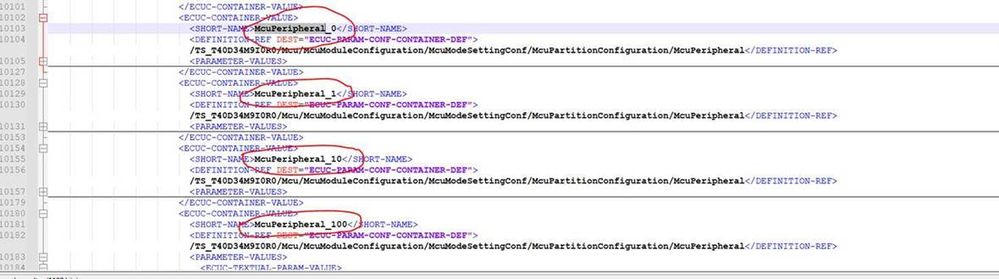
This file will be used as an input for a generation tool. As you can see, the order of the peripheral is McuPeripheral_0,1,10,100…, but the generation tool expect an order like McuPeripheral_0,1,2… As a result, the generated code will not matched with the configured values.
Please follow the below steps as workaround:
1. Start from EB Tresos, you create a project with S32K3xx platform and configure all of the MCU peripherals, enable the peripheral clocks that you want to use.
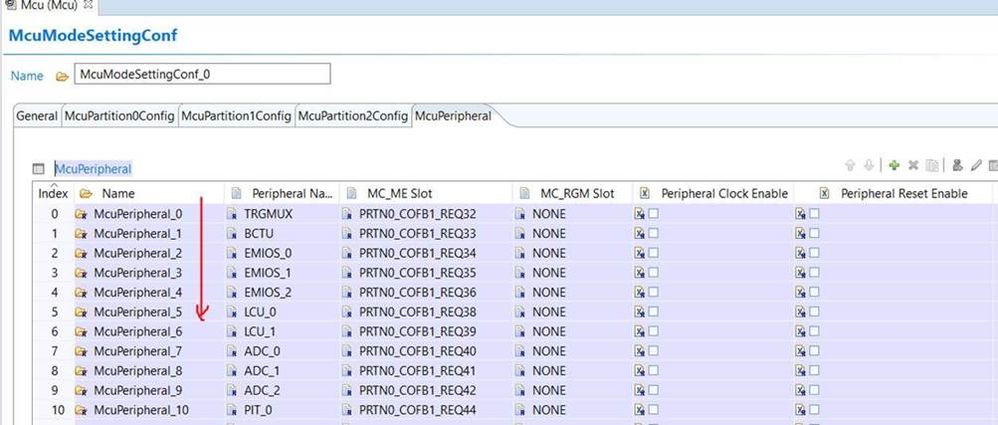
2. Change the Name field of the peripheral as below:
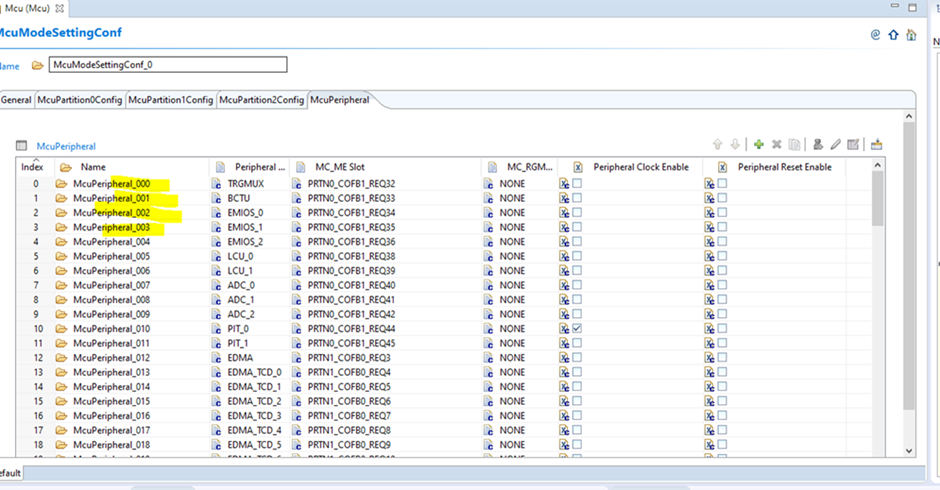
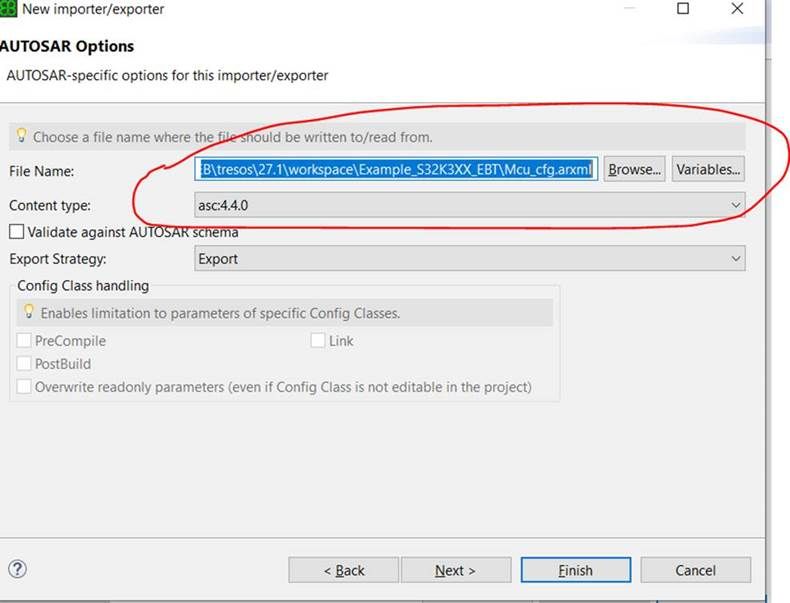
3. Export the project to arxml file, by Right click to the project -> select Im – and Exporters…. An Importer/Exporter window will be shown. Press the Plus button (the green one) to add a new im/exporter object. Select Export Only then press Next

4. Fill the exported arxml file with full path, select the AUTOSAR version (4.4.0), then Finish. After that, press Run Exporter to get the exported arxml file
5. Import the generated arxml file to DaVinci tool.
Hope it helps and sorry for any inconvenience.
Best Regards,
Nam
- Mark as New
- Bookmark
- Subscribe
- Mute
- Subscribe to RSS Feed
- Permalink
- Report Inappropriate Content
Problem solved.
Looks like the default values were incorrect and set for all peripherals as for McuPeripheral_0 (TRGMUX).
The solution was to remove Mcu driver completely and re-import it to the project from RTD again.
I had to configure it from the scratch, but in the same manner as previously configured and this time warnings were gone.
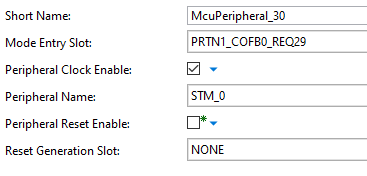
This way, the peripheral clock enable bit is now correctly set for all peripherals, without any warnings in DaVinci Configurator:
-----------------------------------------------------------------------------------------------------
UPDATE: Problem is NOT solved.
It works fine as long as project was open in DaVinci Configurator after manual configuration of Mcu (from scratch).
Once reloaded - problem appears again!
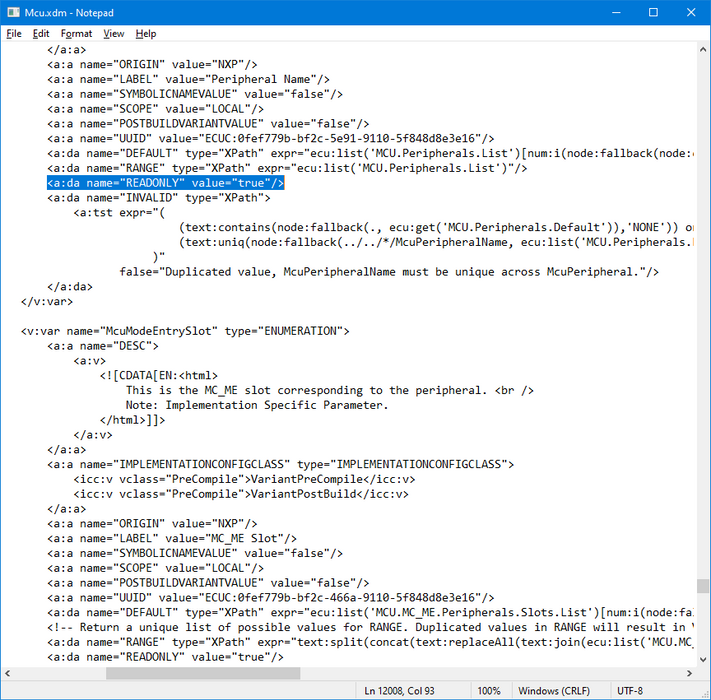
The root cause is the Mcu.xdm file provided with SW32K3_RTD_4.4_2.0.0. Why on earth so many containers are marked with flag READONLY = 'true' in this config file? Because of this flag it is impossible to enable/disable any peripheral clock in DaVinci CFG (you can't modify .xdm files on your own since they are signed)!
In the NXP examples it works nice, since there is provided .mex file with configuration that can be changed from S32 Design Studio. I don't know how it works, but looks like S32DS does not use EB Tresos generators and/or does not read its .xdm configurations.
But DaVinci CFG does, since it uses EB Tresos generator for MCAL drivers. Therefore, the whole SW32K3_RTD_4.4_2.0.0 is unusable as MCAL drivers integrated with Vector's toolchain.
Is there any chance to get a hotfix for this issue?
