
- Forums
- Product Forums
- General Purpose MicrocontrollersGeneral Purpose Microcontrollers
- i.MX Forumsi.MX Forums
- QorIQ Processing PlatformsQorIQ Processing Platforms
- Identification and SecurityIdentification and Security
- Power ManagementPower Management
- Wireless ConnectivityWireless Connectivity
- RFID / NFCRFID / NFC
- Advanced AnalogAdvanced Analog
- Neural Processing UnitsNeural Processing Units
- MCX Microcontrollers
- S32G
- S32K
- S32V
- MPC5xxx
- Other NXP Products
- S12 / MagniV Microcontrollers
- Powertrain and Electrification Analog Drivers
- Sensors
- Vybrid Processors
- Digital Signal Controllers
- 8-bit Microcontrollers
- ColdFire/68K Microcontrollers and Processors
- PowerQUICC Processors
- OSBDM and TBDML
- S32M
- S32Z/E
-
- Solution Forums
- Software Forums
- MCUXpresso Software and ToolsMCUXpresso Software and Tools
- CodeWarriorCodeWarrior
- MQX Software SolutionsMQX Software Solutions
- Model-Based Design Toolbox (MBDT)Model-Based Design Toolbox (MBDT)
- FreeMASTER
- eIQ Machine Learning Software
- Embedded Software and Tools Clinic
- S32 SDK
- S32 Design Studio
- GUI Guider
- Zephyr Project
- Voice Technology
- Application Software Packs
- Secure Provisioning SDK (SPSDK)
- Processor Expert Software
- Generative AI & LLMs
-
- Topics
- Mobile Robotics - Drones and RoversMobile Robotics - Drones and Rovers
- NXP Training ContentNXP Training Content
- University ProgramsUniversity Programs
- Rapid IoT
- NXP Designs
- SafeAssure-Community
- OSS Security & Maintenance
- Using Our Community
-
- Cloud Lab Forums
-
- Knowledge Bases
- ARM Microcontrollers
- i.MX Processors
- Identification and Security
- Model-Based Design Toolbox (MBDT)
- QorIQ Processing Platforms
- S32 Automotive Processing Platform
- Wireless Connectivity
- CodeWarrior
- MCUXpresso Suite of Software and Tools
- MQX Software Solutions
- RFID / NFC
- Advanced Analog
- Neural Processing Units
-
- NXP Tech Blogs
- Home
- :
- Product Forums
- :
- S32K
- :
- Re: S32K144 Stuck in reset loop
S32K144 Stuck in reset loop
- Subscribe to RSS Feed
- Mark Topic as New
- Mark Topic as Read
- Float this Topic for Current User
- Bookmark
- Subscribe
- Mute
- Printer Friendly Page
S32K144 Stuck in reset loop

- Mark as New
- Bookmark
- Subscribe
- Mute
- Subscribe to RSS Feed
- Permalink
- Report Inappropriate Content
Hello,
I just received a new board and am trying to troubleshoot an issue. On power on to the board, it seems that the processor is stuck repeating a reset. I have included a screenshot of what I am seeing on a scope trace of the reset pin (pin 97). I cannot figure out what could be causing this, and was hoping someone here would have any ideas.

Thanks in advance!

 Robin_Shen
- Mark as New
- Bookmark
- Subscribe
- Mute
- Subscribe to RSS Feed
- Permalink
- Report Inappropriate Content
Hi MattSki,
After mass erase through the Debug Interface(SWD/JTAG), you should be able to program the chip. If you are using S32DS, please check Emergency Kinetis Device Recovery by Full Chip Erase.
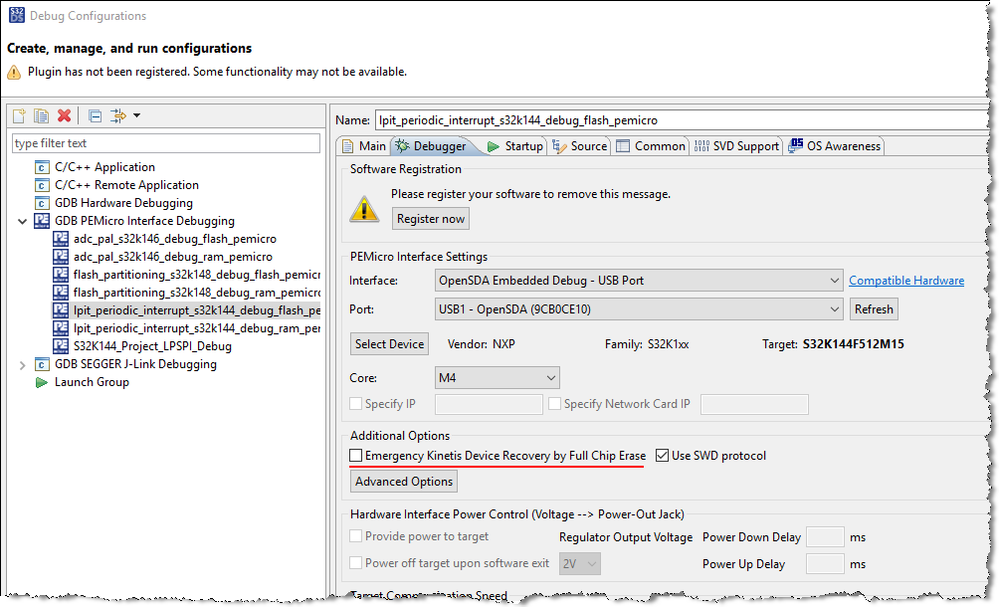
If still not able to connect MCU, then I am afraid you need to use the P&E Recovery Utility.
Best Regards,
Robin
-------------------------------------------------------------------------------
Note:
- If this post answers your question, please click the "Mark Correct" button. Thank you!
- We are following threads for 7 weeks after the last post, later replies are ignored
Please open a new thread and refer to the closed one, if you have a related question at a later point in time.
-------------------------------------------------------------------------------
- Mark as New
- Bookmark
- Subscribe
- Mute
- Subscribe to RSS Feed
- Permalink
- Report Inappropriate Content
Hi Robin,
Thank you. I am currently using the J-link Base Debugger, and I could not find this option for this device. I then used the PE Micro, and it flashed with no issues. I was wondering how I could make the J-link work? It has worked just fine on a previous board, so the configuration is the same. I also double checked the wiring, and it is also the same. Whenever I go to flash with the J-link, the J-link device LED stays red once it attempts to flash.
I followed this thread: Re: S32K144 Board does not boot/cannot connect SWD... - NXP Community but this did not work.
Thank you,
Matt
Robin_Shen
- Mark as New
- Bookmark
- Subscribe
- Mute
- Subscribe to RSS Feed
- Permalink
- Report Inappropriate Content
If the S32K144 stuck in reset loop, then the Bi-color indicator (J-Link V8 and later) should be ORANGE.

Would you please show me the screenshot of Segger J-Link Commander after you input those commands?
Did you type "connect" to establish a target connection?
- Mark as New
- Bookmark
- Subscribe
- Mute
- Subscribe to RSS Feed
- Permalink
- Report Inappropriate Content
Hi Robin,
I am unable to connect to the target when the reset pin and VDD are connected. I have included a screenshot of the commander window.

Thank you,
Matt
Robin_Shen
- Mark as New
- Bookmark
- Subscribe
- Mute
- Subscribe to RSS Feed
- Permalink
- Report Inappropriate Content
Connect to the target when the reset pin and GND(not VDD)are connected.
- Mark as New
- Bookmark
- Subscribe
- Mute
- Subscribe to RSS Feed
- Permalink
- Report Inappropriate Content
My mistake. Here are screenshots of Commander.


Thanks.
Robin_Shen
- Mark as New
- Bookmark
- Subscribe
- Mute
- Subscribe to RSS Feed
- Permalink
- Report Inappropriate Content
The values of MDM-AP Status Register and MDM-AP Control Register looks ok. And PEMicro can be used for program and debug normally. Strange. What is the version of SEGGER J-Link software? Have you consulted SEGGER's technical support?
- Mark as New
- Bookmark
- Subscribe
- Mute
- Subscribe to RSS Feed
- Permalink
- Report Inappropriate Content
The commander software is V7.88g . I have not contacted Segger support, as I have used this software on another device with no issues. Since my previous posts I have found another issue with the chip where it does not reset properly with a power reset or with a software reset through the PE Micro. When I do the software reset I get the following message:

When I do a power reset, the flashed software does not run.
Maybe these issues are related somehow?
Thanks.
- Mark as New
- Bookmark
- Subscribe
- Mute
- Subscribe to RSS Feed
- Permalink
- Report Inappropriate Content
Never mind about the reset issue, I believe that to be a software bug on my end.
