
- Forums
- Product Forums
- General Purpose MicrocontrollersGeneral Purpose Microcontrollers
- i.MX Forumsi.MX Forums
- QorIQ Processing PlatformsQorIQ Processing Platforms
- Identification and SecurityIdentification and Security
- Power ManagementPower Management
- Wireless ConnectivityWireless Connectivity
- RFID / NFCRFID / NFC
- Advanced AnalogAdvanced Analog
- Neural Processing UnitsNeural Processing Units
- MCX Microcontrollers
- S32G
- S32K
- S32V
- MPC5xxx
- Other NXP Products
- S12 / MagniV Microcontrollers
- Powertrain and Electrification Analog Drivers
- Sensors
- Vybrid Processors
- Digital Signal Controllers
- 8-bit Microcontrollers
- ColdFire/68K Microcontrollers and Processors
- PowerQUICC Processors
- OSBDM and TBDML
- S32M
- S32Z/E
-
- Solution Forums
- Software Forums
- MCUXpresso Software and ToolsMCUXpresso Software and Tools
- CodeWarriorCodeWarrior
- MQX Software SolutionsMQX Software Solutions
- Model-Based Design Toolbox (MBDT)Model-Based Design Toolbox (MBDT)
- FreeMASTER
- eIQ Machine Learning Software
- Embedded Software and Tools Clinic
- S32 SDK
- S32 Design Studio
- GUI Guider
- Zephyr Project
- Voice Technology
- Application Software Packs
- Secure Provisioning SDK (SPSDK)
- Processor Expert Software
- Generative AI & LLMs
-
- Topics
- Mobile Robotics - Drones and RoversMobile Robotics - Drones and Rovers
- NXP Training ContentNXP Training Content
- University ProgramsUniversity Programs
- Rapid IoT
- NXP Designs
- SafeAssure-Community
- OSS Security & Maintenance
- Using Our Community
-
- Cloud Lab Forums
-
- Knowledge Bases
- ARM Microcontrollers
- i.MX Processors
- Identification and Security
- Model-Based Design Toolbox (MBDT)
- QorIQ Processing Platforms
- S32 Automotive Processing Platform
- Wireless Connectivity
- CodeWarrior
- MCUXpresso Suite of Software and Tools
- MQX Software Solutions
- RFID / NFC
- Advanced Analog
- Neural Processing Units
-
- NXP Tech Blogs
- RSS フィードを購読する
- トピックを新着としてマーク
- トピックを既読としてマーク
- このトピックを現在のユーザーにフロートします
- ブックマーク
- 購読
- ミュート
- 印刷用ページ

- 新着としてマーク
- ブックマーク
- 購読
- ミュート
- RSS フィードを購読する
- ハイライト
- 印刷
- 不適切なコンテンツを報告
First of all, thank you for coming to my post to review my question. Let me introduce the background of my question:
1. I used the S32K144 MCU in a project
2. I need to use EB Tresos to configure the MCAL of this MCU to make it work
3. After completing the configuration in EB Tresos, I need to integrate it with the APP in S32DS
4. The version number of the RTD software package I am using is SW32K1_ RTD_ 4.4_ 1.0.1_ HF01_ D2209
5. The S32DS I am using is S32 Design Studio for ARM 2.2
The problem I am currently facing:
In order to achieve my goal, I created a new empty project in S32DS, copied the code generated by EB Tresos and the RTD code corresponding to the modules I used into this project, and then compiled it. However, I tried many times but couldn't succeed. I'm not sure where I did the wrong thing. Can anyone tell me how to integrate the MCAL configured by EB Tresos in S32DS?
解決済! 解決策の投稿を見る。
- 新着としてマーク
- ブックマーク
- 購読
- ミュート
- RSS フィードを購読する
- ハイライト
- 印刷
- 不適切なコンテンツを報告
Hi @DanNguyenDuy :
I am pleased to inform you that this issue has also been resolved. I suspect that my startup file and standard file were run simultaneously, resulting in duplicate definitions. This has been resolved through this option in the image. Thank you!

- 新着としてマーク
- ブックマーク
- 購読
- ミュート
- RSS フィードを購読する
- ハイライト
- 印刷
- 不適切なコンテンツを報告
Thank you for providing detailed information about your problem. It seems like you're having trouble integrating the MCAL configured by EB Tresos in S32DS. Here are some steps you can follow to troubleshoot this issue:
- First, ensure that you have correctly generated the MCAL code using EB Tresos. The generated code should include all the necessary files for your S32K144 MCU.
- Next, make sure you have correctly copied all the generated code and the RTD code into your S32DS project. This includes all source files, header files, and configuration files. It's important to maintain the same directory structure as in the original generated code.
- After copying the code, you need to add the paths to the source files in your S32DS project settings. To do this, go to Project -> Properties -> C/C++ Build -> Settings -> Cross ARM C Compiler -> Includes. Here, add the paths to your source files.
- Also, check your linker settings. Go to Project -> Properties -> C/C++ Build -> Settings -> Cross ARM C Linker -> Libraries. Here, add the paths to your libraries.
- Finally, try to build your project again. If there are any errors, they should give you a clue about what might be going wrong.
Remember, the process of integrating MCAL into S32DS involves several steps and it's easy to miss something. If you're still having trouble, you might find it helpful to review the How to integrate AUTOSAR MCAL for S32K1xx into S32DS guide on the NXP Community website. This guide provides a step-by-step process for integrating MCAL into S32DS, and it might help you identify any steps you might have missed.
- 新着としてマーク
- ブックマーク
- 購読
- ミュート
- RSS フィードを購読する
- ハイライト
- 印刷
- 不適切なコンテンツを報告
Thank you for your reply. In response to your reply, I have confirmed the following points:
1. I initially plan to configure 1 GPIO to light up an LED bead
2. The modules I use include MCU, Base, Dio, Port, and Resource
3. I ensure that I have generated the code for the module I am using in EB Tresos
4. The files I copied include the code generated by EB Tresos, as well as the RTD code of the modules used (this includes the include folder and src folder in the plugins of several modules mentioned in Article 2)
5. I confirm that all newly added code paths are included in S32DS
6. I think achieving my goal requires many steps, and every small detail operation error can lead to my inability to succeed. Therefore, I will first refer to the link you provided me and try again, self check if there are any issues with certain steps, and then consult you. However, the link you provided me seems to have some minor issues. After I click on it, No reference materials can be found for 'How to integrate AUTOSAR MCAL for S32K1xx into S32DS'

 DanNguyenDuy
- 新着としてマーク
- ブックマーク
- 購読
- ミュート
- RSS フィードを購読する
- ハイライト
- 印刷
- 不適切なコンテンツを報告
Hello @I_Ningcaichen,
The SW32K1_RTD_4.4_1.0.1 package was tested on the "S32 Design Studio v3.4 Update 3" and gcc compiler is NXP GCC 9.2.0 20190812 (Build 1649 Revision gaf57174).
From my point of view, you need to use S32DS and GCC compiler versions correctly.
Best regards,
Dan
- 新着としてマーク
- ブックマーク
- 購読
- ミュート
- RSS フィードを購読する
- ハイライト
- 印刷
- 不適切なコンテンツを報告
DanNguyenDuy
- 新着としてマーク
- ブックマーク
- 購読
- ミュート
- RSS フィードを購読する
- ハイライト
- 印刷
- 不適切なコンテンツを報告
Hi @I_Ningcaichen,
Unfortunately, I don't have any guidelines about that. But, I have some notes:
1. You must install the correct package on S32DS with generated files that you imported into S32DS.
2. Right-click on the name of the project and select "Build Configurations Explore" and add correct files of the modules needed to build.
If you work as above and still got errors, please show me the errors build log.
Best regards,
Dan
- 新着としてマーク
- ブックマーク
- 購読
- ミュート
- RSS フィードを購読する
- ハイライト
- 印刷
- 不適切なコンテンツを報告
Hello
I am using the EB Tresos example project in the following path, which includes several modules in the image.
SW32K1_RTD_4.4_1.0.1_HF01_D2209\SW32K1_RTD_4.4_1.0.1_HF01\eclipse\plugins\Port_TS_T40D2M10I1R0\examples\EBT\Port_Example_S32K144\TresosProject\Port_Example_S32K144

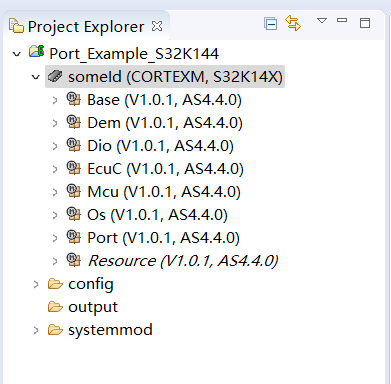
This example project is used for the "S32K144EVB_Q100" development board, and the main function of the matched application is to control LED flashing.
My goal:
Integrate the MCAL configuration generated by this EB Tresos example project with the application, and then compile and debug it in S32DS.
What I have already done:
1. Copy Code:
Copy the code generated by EB Tresos (as shown in Figure 1 below) into the project to be compiled;
Copy the code from each plugin in the AUTOSAR software package (as shown in Figure 2 below) into the project to be compiled;
Copy the startup code from the AUTOSAR software package (as shown in Figures 3 and 4 below) into the project to be compiled.
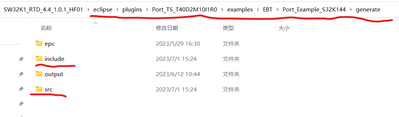
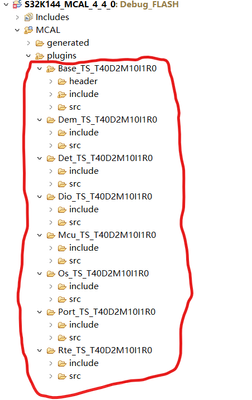


2. Copy Application Code
Copy an application code from the AUTOSAR software package example project, whose function is to control the LED on and off by adjusting the GPIO pin output level.


Compilation issues encountered:
There have been many errors during the compilation process, some of which I have already dealt with, and there are still a few errors in the pictures. I look forward to your help. If you need any further information, please feel free to contact me.

DanNguyenDuy
- 新着としてマーク
- ブックマーク
- 購読
- ミュート
- RSS フィードを購読する
- ハイライト
- 印刷
- 不適切なコンテンツを報告
Hello @I_Ningcaichen,
The first issue (symbols error) is related to the linker file, please check this file and the startup file in your project.
The OsIf_Timer_System.. error => please check this symbol in your EB configuration and code.
Best regards,
Dan
- 新着としてマーク
- ブックマーク
- 購読
- ミュート
- RSS フィードを購読する
- ハイライト
- 印刷
- 不適切なコンテンツを報告
Thank you very much. Most of the previous issues have been resolved, but there is still one issue that has not been resolved. I feel that there may be a problem with the settings, but I don't know exactly where the problem is. Do you know what caused this?


DanNguyenDuy
- 新着としてマーク
- ブックマーク
- 購読
- ミュート
- RSS フィードを購読する
- ハイライト
- 印刷
- 不適切なコンテンツを報告
Hello @I_Ningcaichen,
Could you try to replace it with this instruction?

And configure your project as same as the below picture.

If still fail, please show me the log detail error.
Best regards,
Dan
- 新着としてマーク
- ブックマーク
- 購読
- ミュート
- RSS フィードを購読する
- ハイライト
- 印刷
- 不適切なコンテンツを報告
I have modified the code and S32DS configuration according to your suggestion, but there is still an error


- 新着としてマーク
- ブックマーク
- 購読
- ミュート
- RSS フィードを購読する
- ハイライト
- 印刷
- 不適切なコンテンツを報告
Hi @DanNguyenDuy :
I am pleased to inform you that this issue has also been resolved. I suspect that my startup file and standard file were run simultaneously, resulting in duplicate definitions. This has been resolved through this option in the image. Thank you!
