
- Forums
- Product Forums
- General Purpose MicrocontrollersGeneral Purpose Microcontrollers
- i.MX Forumsi.MX Forums
- QorIQ Processing PlatformsQorIQ Processing Platforms
- Identification and SecurityIdentification and Security
- Power ManagementPower Management
- Wireless ConnectivityWireless Connectivity
- RFID / NFCRFID / NFC
- Advanced AnalogAdvanced Analog
- Neural Processing UnitsNeural Processing Units
- MCX Microcontrollers
- S32G
- S32K
- S32V
- MPC5xxx
- Other NXP Products
- S12 / MagniV Microcontrollers
- Powertrain and Electrification Analog Drivers
- Sensors
- Vybrid Processors
- Digital Signal Controllers
- 8-bit Microcontrollers
- ColdFire/68K Microcontrollers and Processors
- PowerQUICC Processors
- OSBDM and TBDML
- S32M
- S32Z/E
-
- Solution Forums
- Software Forums
- MCUXpresso Software and ToolsMCUXpresso Software and Tools
- CodeWarriorCodeWarrior
- MQX Software SolutionsMQX Software Solutions
- Model-Based Design Toolbox (MBDT)Model-Based Design Toolbox (MBDT)
- FreeMASTER
- eIQ Machine Learning Software
- Embedded Software and Tools Clinic
- S32 SDK
- S32 Design Studio
- GUI Guider
- Zephyr Project
- Voice Technology
- Application Software Packs
- Secure Provisioning SDK (SPSDK)
- Processor Expert Software
- Generative AI & LLMs
-
- Topics
- Mobile Robotics - Drones and RoversMobile Robotics - Drones and Rovers
- NXP Training ContentNXP Training Content
- University ProgramsUniversity Programs
- Rapid IoT
- NXP Designs
- SafeAssure-Community
- OSS Security & Maintenance
- Using Our Community
-
- Cloud Lab Forums
-
- Knowledge Bases
- ARM Microcontrollers
- i.MX Processors
- Identification and Security
- Model-Based Design Toolbox (MBDT)
- QorIQ Processing Platforms
- S32 Automotive Processing Platform
- Wireless Connectivity
- CodeWarrior
- MCUXpresso Suite of Software and Tools
- MQX Software Solutions
- RFID / NFC
- Advanced Analog
- Neural Processing Units
-
- NXP Tech Blogs
- Home
- :
- Product Forums
- :
- S32K
- :
- HSE firmware installation
HSE firmware installation
- Subscribe to RSS Feed
- Mark Topic as New
- Mark Topic as Read
- Float this Topic for Current User
- Bookmark
- Subscribe
- Mute
- Printer Friendly Page
HSE firmware installation

- Mark as New
- Bookmark
- Subscribe
- Mute
- Subscribe to RSS Feed
- Permalink
- Report Inappropriate Content
Hi,
I want to install the HSE firmware, but i am facing one error with the package given C:\NXP\S32K3_HSE_DemoExamples_1_0_0\S32K3_HSE_DemoExamples\Device_Configuration\S32K344_HSE_FW_INSTALL.
error
make: *** [makefile:38: S32K312_HSE_FW_INSTALL.elf] Error 1
Kindly let me know the solution.
is there any firmware available for s32k312 for HSE fw installation?
- Mark as New
- Bookmark
- Subscribe
- Mute
- Subscribe to RSS Feed
- Permalink
- Report Inappropriate Content
Hello guys are you able to solve the error.If yes please help us with this
- Mark as New
- Bookmark
- Subscribe
- Mute
- Subscribe to RSS Feed
- Permalink
- Report Inappropriate Content
Does someone solve the problem?
I am issuing same steps with you. I tried both full_mem and ab_swap. both failed..
- Mark as New
- Bookmark
- Subscribe
- Mute
- Subscribe to RSS Feed
- Permalink
- Report Inappropriate Content
Hi,
The "3.3.1 MU Installation steps by host in AB_SWAP configuration" chapter of HSE_B Firmware Reference Manual starts by the following lines:
"Write 0xA5 on register DCMRWP1 (0x402AC400, [24:31 bits]) followed by functional reset. This will set Bit 1 in HSE GPR (0x4039C028) indicating SBAF has activated MU0 for installation."
but it wasn't mentioned in this thread.
Is it necessary to set DCMRWP1 register or is it implemented somehow in the example?
Regards,
Sandor
- Mark as New
- Bookmark
- Subscribe
- Mute
- Subscribe to RSS Feed
- Permalink
- Report Inappropriate Content
Hi,
Has the problem been solved? What causes this? My side is also the status register can not be set "1", can you share how to solve?
- Mark as New
- Bookmark
- Subscribe
- Mute
- Subscribe to RSS Feed
- Permalink
- Report Inappropriate Content
- Mark as New
- Bookmark
- Subscribe
- Mute
- Subscribe to RSS Feed
- Permalink
- Report Inappropriate Content
Hi Lucas,
Can you please share your main program.
i have only one board with me and its new one.

 lukaszadrapa
- Mark as New
- Bookmark
- Subscribe
- Mute
- Subscribe to RSS Feed
- Permalink
- Report Inappropriate Content
- Mark as New
- Bookmark
- Subscribe
- Mute
- Subscribe to RSS Feed
- Permalink
- Report Inappropriate Content
HI,
the Firmware for the s32k312 is only the file like interface and host, it is not complete project which can flash the HSE firmware binary to controller like s32k344 hse demo example.
I am facing a issue to flash the HSE firmware binry to cntroller as NXP provided only .bin file, i have used the PE micro and eval board built in debugger which is unable to do so, it can support only .elf and .hex file. kindly help me to flash the .bin to controller.
lukaszadrapa
- Mark as New
- Bookmark
- Subscribe
- Mute
- Subscribe to RSS Feed
- Permalink
- Report Inappropriate Content
The firmware is provided in encrypted form as a binary file. Yes, HSE FW installation package contains only the binary (pink) file and corresponding API headers.
For Lauterbach users, there's also HSE DEMOAPP which helps to install the firmware and examine HSE features:
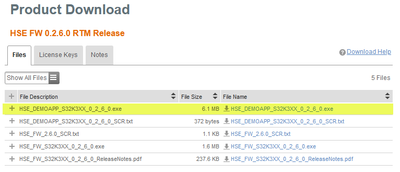
But notice that the demo works with Lauterbach debugger only. It won't work with Pemicro.
As you can read in the mentioned application note or in HSE FW RM, the firmware can be installed with or without IVT.
Installation without IVT is easier but you need a tool which is able to load raw binary file to the flash which is not the case of Pemicro debugger. In this case, "with IVT" method is more convenient.
We do not provide S32K344_HSE_FW_INSTALL for each derivative. This is just an example showing how it can be done and it's up to users to create own solution (each customer has different requirements and production tools/capabilities).
What to do:
You can create new application project directly for S32K312 in S32 Design Studio. Then copy the source files from S32K344_HSE_FW_INSTALL, update HseFwHeader_StartAddress in boot_header.c. Then modify the linker file - use linker file from S32K344_HSE_FW_INSTALL as a template. If you read the readme.md file as I suggested earlier, there must be a link to the bin/pink file, so it is linked to the project.
Then, the code will only enable HSE feature flag by programming any value different from 0xFFFFFFFFFFFFFFFF at address 0x1B000000. Then all the conditions for installation are satisfied - HSE feature flag is enabled, IVT points to valid pink image in flash, so SBAF will install the firmware after next reset.
Regards,
Lukas
- Mark as New
- Bookmark
- Subscribe
- Mute
- Subscribe to RSS Feed
- Permalink
- Report Inappropriate Content
Hi ,
If I am able to install the HSE firmware successfully, how to verify this firmware is installed in the secure memory correctly or successfully in the memory.
please let me know any method or check the memory?
Thank You
lukaszadrapa
- Mark as New
- Bookmark
- Subscribe
- Mute
- Subscribe to RSS Feed
- Permalink
- Report Inappropriate Content
You can check bit 0 in HSE GPR status register at 0x4039C028. If it is '1', it means that "HSE FW is present and SBAF Booted HSE Firmware".
You can find this in HSE_B Firmware Reference Manual rev 2.2.
Regards,
Lukas
- Mark as New
- Bookmark
- Subscribe
- Mute
- Subscribe to RSS Feed
- Permalink
- Report Inappropriate Content
Hi Lucas ,
I am not able to see this register in any peripheral window in S32DS, Can you please tell me exactly where i can see.
i can see the value 0xC1010000 at 0x4039C028 address.
lukaszadrapa
- Mark as New
- Bookmark
- Subscribe
- Mute
- Subscribe to RSS Feed
- Permalink
- Report Inappropriate Content
I don't think the HSE GPR is defined in peripheral structure, so it's necessary to check the memory directly. If you can see 0xC1010000 at 0x4039C028, the HSE FW is obviously not installed.
Is the HSE feature flash at 0x1B000000 programmed?
And one more thing - I can remember that that if you use "without IVT" method to install the firmware, there can't be valid IVT in the flash. Otherwise it does not work. If you loaded the pink/bin file together with some project, it's necessary to remove the IVT. Or "with IVT" method must be used.
Regards,
Lukas
- Mark as New
- Bookmark
- Subscribe
- Mute
- Subscribe to RSS Feed
- Permalink
- Report Inappropriate Content
Hi,
I am just following the example code given for the s32k344, so i created same project for the s32k312 and imported the binary from the linker file, i see the 0xAABBCCDD at 0x1B000000 location in memory window, what can be the problem. Every thing is same as per the example code as s32k344, only i changed the memory location in linker file. Can you please help on urgent basis, or can we connect online for debugging purpose on small call.
please find the snippet of the linker file and program.
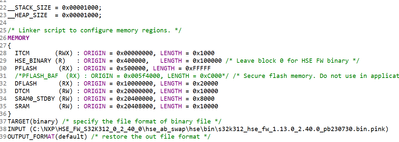
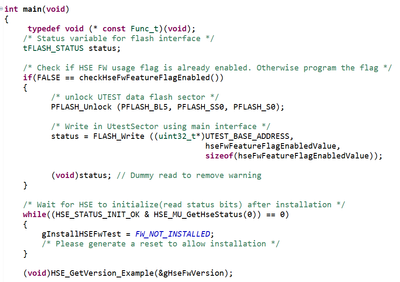
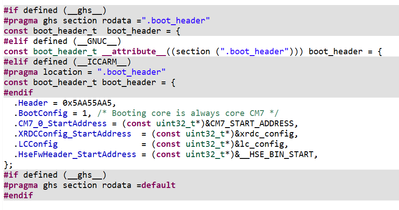
- Mark as New
- Bookmark
- Subscribe
- Mute
- Subscribe to RSS Feed
- Permalink
- Report Inappropriate Content
#hello@vikmonti7804 did u get the solution for the above problem that is programm getting stuck at below ..please hep us

if yes please please help us we are trying alot still we are not getting what to do ?
Thank u
- Mark as New
- Bookmark
- Subscribe
- Mute
- Subscribe to RSS Feed
- Permalink
- Report Inappropriate Content
Hi,
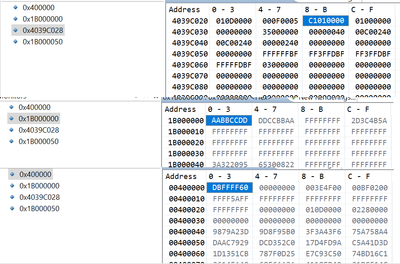
kindly check the image attached, the header of the AB_Swap is also there in the memory so it means the firmware is flashed in the memory, the utest area has value AABBCCDDDDCCBBAA it means utest is enabled, the HSE GPR register bit 0 is not getting set, i dont know why? it means after reset the SBAF is not installing the hse firmware in secure memory region.
kindly help on urgent basis.


lukaszadrapa
- Mark as New
- Bookmark
- Subscribe
- Mute
- Subscribe to RSS Feed
- Permalink
- Report Inappropriate Content
- Mark as New
- Bookmark
- Subscribe
- Mute
- Subscribe to RSS Feed
- Permalink
- Report Inappropriate Content
lukaszadrapa
- Mark as New
- Bookmark
- Subscribe
- Mute
- Subscribe to RSS Feed
- Permalink
- Report Inappropriate Content
Small problem on my side - I found that I already have firmware 2.6.0 on both my boards and it can't be erased (this feature was added in version 2.40.0). I will get brand new board on Monday and I will test it.
I checked the project anyway and I can see nothing wrong. I would just not program the HSE feature flag unconditionally after each reset.
I will let you know the results of my test on Monday.
Regards,
Lukas
- Mark as New
- Bookmark
- Subscribe
- Mute
- Subscribe to RSS Feed
- Permalink
- Report Inappropriate Content
