
- Forums
- Product Forums
- General Purpose MicrocontrollersGeneral Purpose Microcontrollers
- i.MX Forumsi.MX Forums
- QorIQ Processing PlatformsQorIQ Processing Platforms
- Identification and SecurityIdentification and Security
- Power ManagementPower Management
- Wireless ConnectivityWireless Connectivity
- RFID / NFCRFID / NFC
- Advanced AnalogAdvanced Analog
- Neural Processing UnitsNeural Processing Units
- MCX Microcontrollers
- S32G
- S32K
- S32V
- MPC5xxx
- Other NXP Products
- S12 / MagniV Microcontrollers
- Powertrain and Electrification Analog Drivers
- Sensors
- Vybrid Processors
- Digital Signal Controllers
- 8-bit Microcontrollers
- ColdFire/68K Microcontrollers and Processors
- PowerQUICC Processors
- OSBDM and TBDML
- S32M
- S32Z/E
-
- Solution Forums
- Software Forums
- MCUXpresso Software and ToolsMCUXpresso Software and Tools
- CodeWarriorCodeWarrior
- MQX Software SolutionsMQX Software Solutions
- Model-Based Design Toolbox (MBDT)Model-Based Design Toolbox (MBDT)
- FreeMASTER
- eIQ Machine Learning Software
- Embedded Software and Tools Clinic
- S32 SDK
- S32 Design Studio
- GUI Guider
- Zephyr Project
- Voice Technology
- Application Software Packs
- Secure Provisioning SDK (SPSDK)
- Processor Expert Software
- Generative AI & LLMs
-
- Topics
- Mobile Robotics - Drones and RoversMobile Robotics - Drones and Rovers
- NXP Training ContentNXP Training Content
- University ProgramsUniversity Programs
- Rapid IoT
- NXP Designs
- SafeAssure-Community
- OSS Security & Maintenance
- Using Our Community
-
- Cloud Lab Forums
-
- Knowledge Bases
- ARM Microcontrollers
- i.MX Processors
- Identification and Security
- Model-Based Design Toolbox (MBDT)
- QorIQ Processing Platforms
- S32 Automotive Processing Platform
- Wireless Connectivity
- CodeWarrior
- MCUXpresso Suite of Software and Tools
- MQX Software Solutions
- RFID / NFC
- Advanced Analog
- Neural Processing Units
-
- NXP Tech Blogs
- Home
- :
- Software Forums
- :
- S32 Design Studio
- :
- about *.ko into SD card
about *.ko into SD card
- Subscribe to RSS Feed
- Mark Topic as New
- Mark Topic as Read
- Float this Topic for Current User
- Bookmark
- Subscribe
- Mute
- Printer Friendly Page
about *.ko into SD card

- Mark as New
- Bookmark
- Subscribe
- Mute
- Subscribe to RSS Feed
- Permalink
- Report Inappropriate Content
Dear expert,
I have downloaded the linux source code BSP 17.0 and BSP 18.0 for S32V234, and I installed the VSDK version 1_1_0 and VSDK version 1_2_0. I disked the SD card and installed files into SD card, and it can work well.
but when I compiled the *.ko driver, there are following cases:
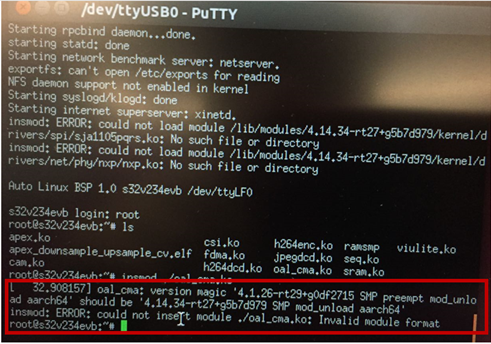
1, BSP 17.0 + s32v234_sdk_1_1_0, I compiled the *.ko with Ubuntu 14.04,and these *.ko files are copied int to root folder of SD card, but when I run commond: insmod oal_cma.ko, the error is shown as following fig_1:
[ 32.908157] oal_cma: version magic ‘4.1.26-rt29+g0df2715 SMP preempt mod_unload aarch64’ should be ‘4.14.34-rt27+g5b7d979 SMP mod_unload aarch64’
Insmod Error:could not insert module ./oal_cma.ko: Invalid module format.
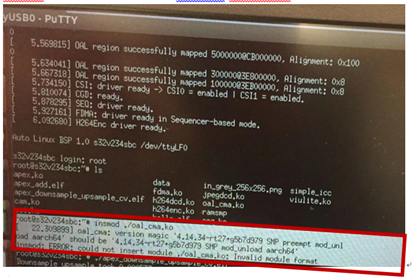
2, BSP 18.0 + s32v234_sdk_1_2_0, I compiled the *.ko with Ubuntu 14.04,and these *.ko files are copied int to root folder of SD card, but when I run commond: insmod oal_cma.ko, the error is shown as following fig_2:
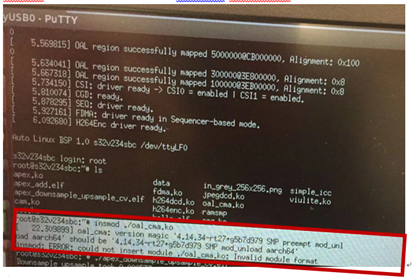
[ 22.309899] oal_cma: version magic ‘4.14.34-rt27+g5b7d979 SMP preempt mod_unload aarch64’ should be ‘4.14.34-rt27+g5b7d979 SMP mod_unload aarch64’
Insmod Error:could not insert module ./oal_cma.ko: Invalid module format.
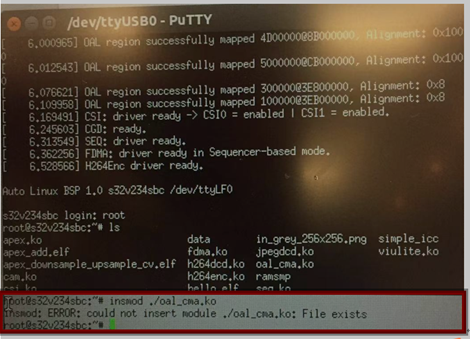
3, I use *.ko files which is included when s32v234_sdk_1_2_0 is installed, and these *.ko files are copied int to root folder of SD card, when I run commond: insmod oal_cma.ko, there is no error , only give the following hint:
Insmod: ERROR: could not insert module ./oal_cma.ko: File exists.
Could you help me again? How can I solve the error of item 1 and item 2? And about item 3, in SD card ,where is the oal_cma.ko which is automatically loaded?
Thank you very much for your kind help!

 jiri_kral
- Mark as New
- Bookmark
- Subscribe
- Mute
- Subscribe to RSS Feed
- Permalink
- Report Inappropriate Content
Hi,
1,2 - you built your kernel module with different kernel version than is on your EVB. That's why you got the version magic error.
3. the kernel module is already loaded. You can use rmod command. In case that rmod is not present on your system, just move oal_cma.ko to different folder and reboot your EVB.
Anyway, why you need the custom oal_cma.ko kernel module? It is not typical use case.
Jiri
- Mark as New
- Bookmark
- Subscribe
- Mute
- Subscribe to RSS Feed
- Permalink
- Report Inappropriate Content
Hello Jiri Kral,
Thanks very much for your reply.
My development board is s32v234_sbc, not s32v234_evb.
1、How can I know the kernel version of my DEV board?
2、How can I change the kernel version of my DEV board?
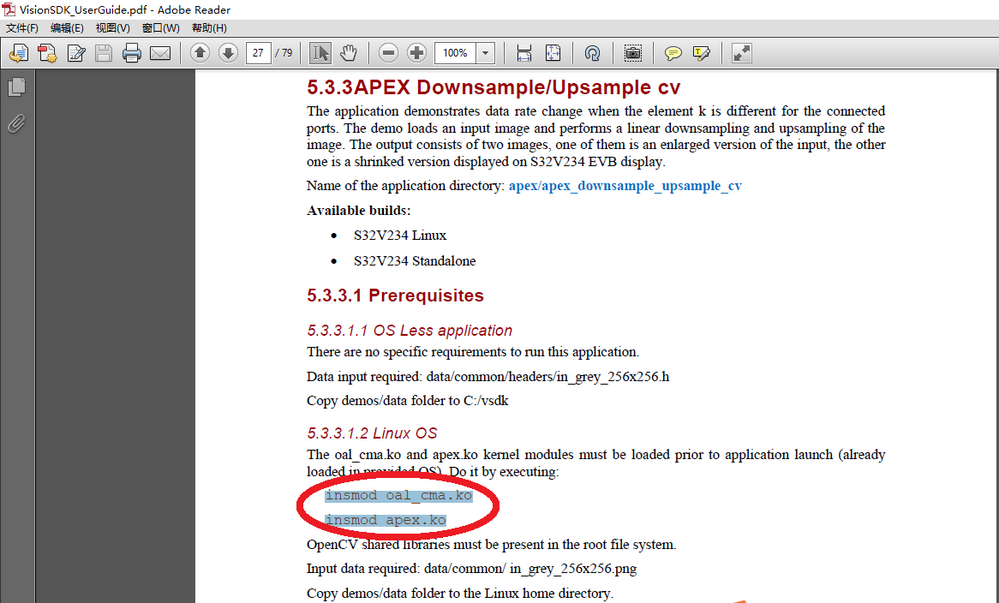
By the way, in SD card , I install the Linux file system with Linux source BSP 18.0 for s32v234.And I debug the demos as the docunment <VisionSDK_UserGuide.pdf>, which shows the oal_cma.ko is needed, the details are shown as following:


 jiri_kral
- Mark as New
- Bookmark
- Subscribe
- Mute
- Subscribe to RSS Feed
- Permalink
- Report Inappropriate Content
Hi,
uname -r command prints kernel version
Best way how to get started with your EVB and linux is use linux OS image provided by VSDK. I'm not sure if you are using it - here is way how to setup your SD card:
https://community.nxp.com/docs/DOC-335023
With the OS image from VSDK - there are all required modules already loaded. You can list modules with lsmod command. In VSDK OS image are modules stored in /s32v234 direcotory.
Jiri
- Mark as New
- Bookmark
- Subscribe
- Mute
- Subscribe to RSS Feed
- Permalink
- Report Inappropriate Content
Hi Jiri Kral,
I successfully prepared the SD card as the document:How to...
I try to run ICC codes on SD card.
After I compiled successfully and I got the following files:simple_icc_mod.ko, icc_sample, binary.img
I did as document: M4_boot(Icc_demo). But when I insert SD card into DEV board, and run:
#./insert_module.sh
there are some errors, shown as the following, I don’t understand what’s the different between “SMP preempt mod_unloade” and “SMP mod_unload”? and why is the simple_icc_mod.ko invalid module format? How can I fix the error?
By the way, simple_icc_mod.ko is not included in VSDK OS image automatically, so I have to insert it manually.And the kernel version of SD card is shown as following: 4.14.34-rt27+g5b7d979.

