
- Forums
- Product Forums
- General Purpose MicrocontrollersGeneral Purpose Microcontrollers
- i.MX Forumsi.MX Forums
- QorIQ Processing PlatformsQorIQ Processing Platforms
- Identification and SecurityIdentification and Security
- Power ManagementPower Management
- Wireless ConnectivityWireless Connectivity
- RFID / NFCRFID / NFC
- Advanced AnalogAdvanced Analog
- Neural Processing UnitsNeural Processing Units
- MCX Microcontrollers
- S32G
- S32K
- S32V
- MPC5xxx
- Other NXP Products
- S12 / MagniV Microcontrollers
- Powertrain and Electrification Analog Drivers
- Sensors
- Vybrid Processors
- Digital Signal Controllers
- 8-bit Microcontrollers
- ColdFire/68K Microcontrollers and Processors
- PowerQUICC Processors
- OSBDM and TBDML
- S32M
- S32Z/E
-
- Solution Forums
- Software Forums
- MCUXpresso Software and ToolsMCUXpresso Software and Tools
- CodeWarriorCodeWarrior
- MQX Software SolutionsMQX Software Solutions
- Model-Based Design Toolbox (MBDT)Model-Based Design Toolbox (MBDT)
- FreeMASTER
- eIQ Machine Learning Software
- Embedded Software and Tools Clinic
- S32 SDK
- S32 Design Studio
- GUI Guider
- Zephyr Project
- Voice Technology
- Application Software Packs
- Secure Provisioning SDK (SPSDK)
- Processor Expert Software
- Generative AI & LLMs
-
- Topics
- Mobile Robotics - Drones and RoversMobile Robotics - Drones and Rovers
- NXP Training ContentNXP Training Content
- University ProgramsUniversity Programs
- Rapid IoT
- NXP Designs
- SafeAssure-Community
- OSS Security & Maintenance
- Using Our Community
-
- Cloud Lab Forums
-
- Knowledge Bases
- ARM Microcontrollers
- i.MX Processors
- Identification and Security
- Model-Based Design Toolbox (MBDT)
- QorIQ Processing Platforms
- S32 Automotive Processing Platform
- Wireless Connectivity
- CodeWarrior
- MCUXpresso Suite of Software and Tools
- MQX Software Solutions
- RFID / NFC
- Advanced Analog
- Neural Processing Units
-
- NXP Tech Blogs
- Home
- :
- Software Forums
- :
- S32 Design Studio
- :
- Compilation problem after Green Hill project is migrated to S32
Compilation problem after Green Hill project is migrated to S32
- Subscribe to RSS Feed
- Mark Topic as New
- Mark Topic as Read
- Float this Topic for Current User
- Bookmark
- Subscribe
- Mute
- Printer Friendly Page
Compilation problem after Green Hill project is migrated to S32

- Mark as New
- Bookmark
- Subscribe
- Mute
- Subscribe to RSS Feed
- Permalink
- Report Inappropriate Content
Hi,
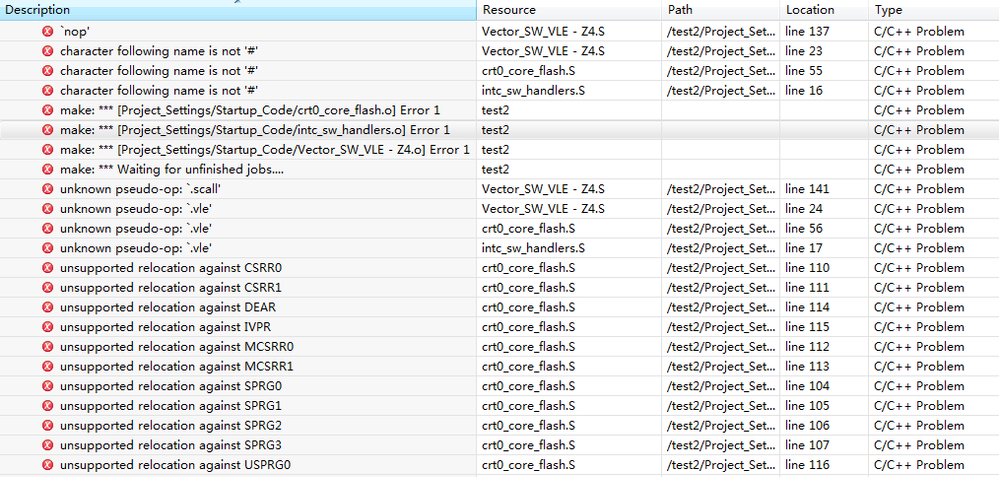
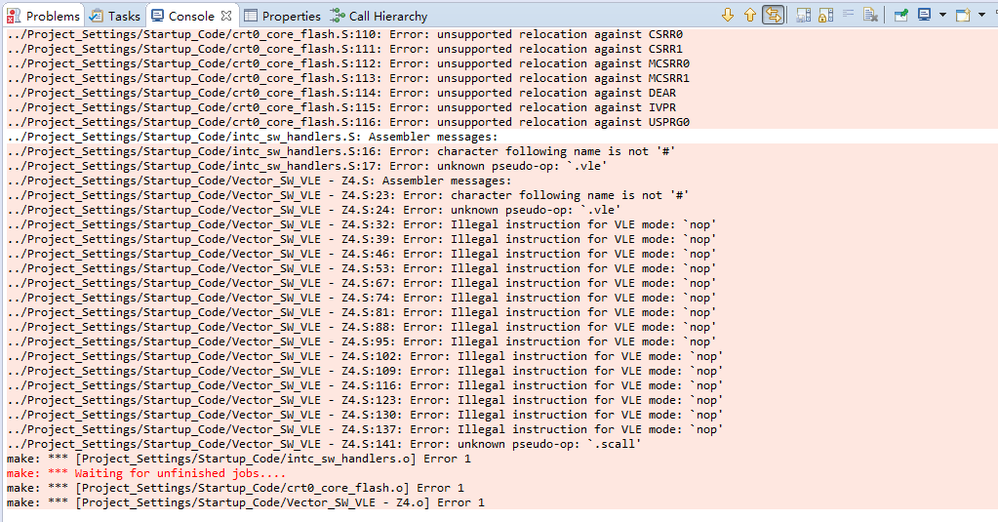
After I transplanted the Green Hill project to S32, I encountered some problems with the compilation. Please help us to answer this question.
Wenhui Wang

 martin_kovar
- Mark as New
- Bookmark
- Subscribe
- Mute
- Subscribe to RSS Feed
- Permalink
- Report Inappropriate Content
Hello,
instead of nop instruction, use e_nop. S32DS does not support register alias. So, you must use mtspr and mfspr with appropriate spr register number instead of DEAR, IVPR and so on.
Another issues I am not able to describe without the project. So, please share the project if it is possible.
Regards,
Martin
- Mark as New
- Bookmark
- Subscribe
- Mute
- Subscribe to RSS Feed
- Permalink
- Report Inappropriate Content
Hi,
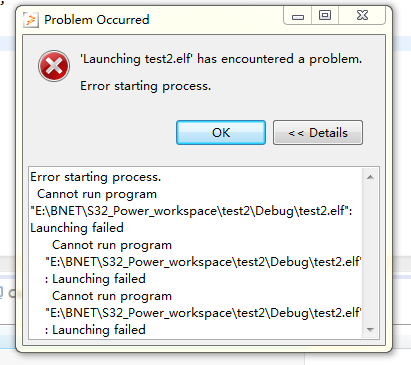
I've also created a new empty project for S32, added my source files, and compiled it, but I got an error when I ran Green Hills Probe emulation. After I click "Run" for a few seconds, an error message box appears.
Wenhui Wang
martin_kovar
- Mark as New
- Bookmark
- Subscribe
- Mute
- Subscribe to RSS Feed
- Permalink
- Report Inappropriate Content
Hello,
Run button is not implemented, so, please use Debug button instead of Run button.
But from my point of view, Green Hiils Probe debugger is not directly supported by S32 Design Studio. In release notes, there are following debuggers listed P&E Multilink/Cyclone/OpenSDA (with P&E GDB Server), Lauterbach, iSystem, and PLS debuggers support by new project wizard.
Regards,
Martin
- Mark as New
- Bookmark
- Subscribe
- Mute
- Subscribe to RSS Feed
- Permalink
- Report Inappropriate Content
Hi,
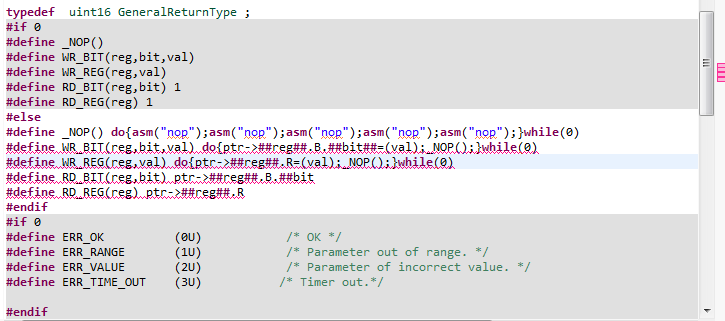
Thank you for your help, I use the Green Hills Probe simulation is wrong. I am now using PE simulation is possible, but I encountered a problem, I hope you can help me to answer it.
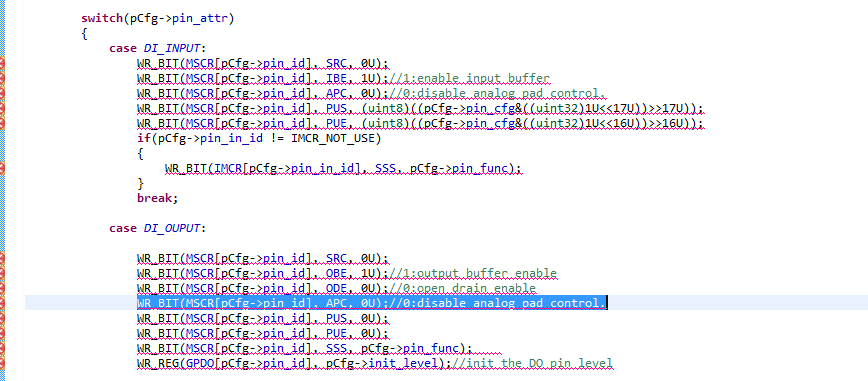
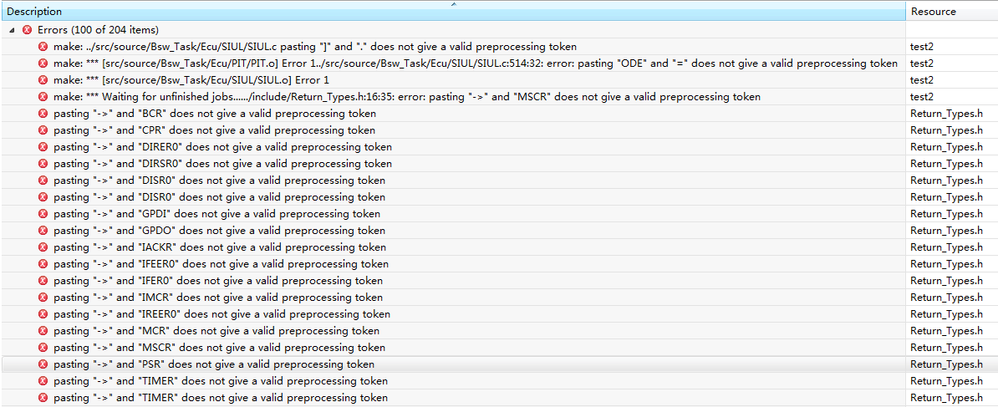
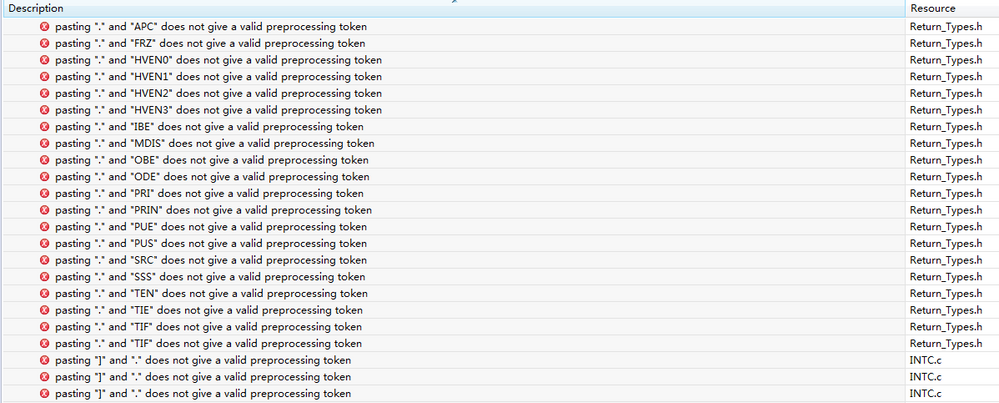
Regards,
Vern
 stanish
- Mark as New
- Bookmark
- Subscribe
- Mute
- Subscribe to RSS Feed
- Permalink
- Report Inappropriate Content
Vern,
There is an issue with preprocessing the code.
I don't think token concatenation is what is is expected here:
Could you try to replace you macro(s):
#define WR_BIT(reg,bit,val) do {ptr->##reg##.##bit##=(val); _NOP();}while(0)
with
#define WR_BIT(reg,bit,val) do {ptr->reg.bit=(val); _NOP();}while(0)NOTE:
I'd recommend you to use "Preprocess Selected File(s)" feature for debugging preprocessor related issues:
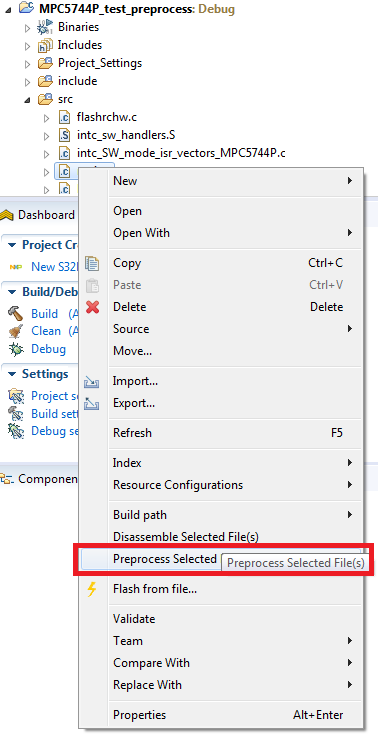

Hope it helps.
Stan
