
- Forums
- Product Forums
- General Purpose MicrocontrollersGeneral Purpose Microcontrollers
- i.MX Forumsi.MX Forums
- QorIQ Processing PlatformsQorIQ Processing Platforms
- Identification and SecurityIdentification and Security
- Power ManagementPower Management
- Wireless ConnectivityWireless Connectivity
- RFID / NFCRFID / NFC
- Advanced AnalogAdvanced Analog
- Neural Processing UnitsNeural Processing Units
- MCX Microcontrollers
- S32G
- S32K
- S32V
- MPC5xxx
- Other NXP Products
- S12 / MagniV Microcontrollers
- Powertrain and Electrification Analog Drivers
- Sensors
- Vybrid Processors
- Digital Signal Controllers
- 8-bit Microcontrollers
- ColdFire/68K Microcontrollers and Processors
- PowerQUICC Processors
- OSBDM and TBDML
- S32M
- S32Z/E
-
- Solution Forums
- Software Forums
- MCUXpresso Software and ToolsMCUXpresso Software and Tools
- CodeWarriorCodeWarrior
- MQX Software SolutionsMQX Software Solutions
- Model-Based Design Toolbox (MBDT)Model-Based Design Toolbox (MBDT)
- FreeMASTER
- eIQ Machine Learning Software
- Embedded Software and Tools Clinic
- S32 SDK
- S32 Design Studio
- GUI Guider
- Zephyr Project
- Voice Technology
- Application Software Packs
- Secure Provisioning SDK (SPSDK)
- Processor Expert Software
- Generative AI & LLMs
-
- Topics
- Mobile Robotics - Drones and RoversMobile Robotics - Drones and Rovers
- NXP Training ContentNXP Training Content
- University ProgramsUniversity Programs
- Rapid IoT
- NXP Designs
- SafeAssure-Community
- OSS Security & Maintenance
- Using Our Community
-
- Cloud Lab Forums
-
- Knowledge Bases
- ARM Microcontrollers
- i.MX Processors
- Identification and Security
- Model-Based Design Toolbox (MBDT)
- QorIQ Processing Platforms
- S32 Automotive Processing Platform
- Wireless Connectivity
- CodeWarrior
- MCUXpresso Suite of Software and Tools
- MQX Software Solutions
- RFID / NFC
- Advanced Analog
- Neural Processing Units
-
- NXP Tech Blogs
- Home
- :
- Product Forums
- :
- S12 / MagniV Microcontrollers
- :
- MC9S12C64 Flash Burner Question
MC9S12C64 Flash Burner Question
- Subscribe to RSS Feed
- Mark Topic as New
- Mark Topic as Read
- Float this Topic for Current User
- Bookmark
- Subscribe
- Mute
- Printer Friendly Page

- Mark as New
- Bookmark
- Subscribe
- Mute
- Subscribe to RSS Feed
- Permalink
- Report Inappropriate Content
MC9S12C64, CW V5.9.0, coding in assembler.
I'm trying to write code to erase and burn one sector in Flash but I don't seem to be able to figure it out. I've spent hours studying the MC9S12C128V1 reference manual but there are things that just are not clear to me. I'll start with the basics as I understand them:
RAM is from address $0400 to address $0FFF (3Kb).
Unpaged Flash is from $4000 to $7FFF (16Kb).
The Flash erase sector size is 1024 bytes (512 words)
I have less than 1024 bytes of configurable constants in my program. They are placed in Flash but copied to RAM on start up to be used from RAM. I want to be able to change some of these values in RAM and burn them back into Flash without having to erase everything and reload the whole program. I have more than enough room in RAM for all my variables plus the copies of the configurable constants, so RAM size is not an issue. My entire program is not all that large so I can dedicate one sector in Flash to these configurable constants and still have lots of room in the unpaged Flash area for my program.
Do the Flash sectors have specific addresses, or can they start and stop at any point within the unpaged Flash area?
Could I place my configurable constants in Flash from $4000 to $4400 and start my program from $4500 just to be safe?
Any suggestions would be greatly appreciated.
Thanks,
Robert
Solved! Go to Solution.
- Mark as New
- Bookmark
- Subscribe
- Mute
- Subscribe to RSS Feed
- Permalink
- Report Inappropriate Content
Hi Ladislav,
I did some more experimenting with DP51`2-FLASH-EW-ASM-CW47 and was eventually able to get it to work with my MC9S12C64. Then I was able to get it to work with the small program I wrote to test the erase and burn routine. Now I am quite confident that I will be able to integrate it into my main program.
I can't thank you enough for sending that zip file as well as your explanations. I doubt if I ever could have figured it out on my own
Regards,
Robert
- Mark as New
- Bookmark
- Subscribe
- Mute
- Subscribe to RSS Feed
- Permalink
- Report Inappropriate Content
Well, I'm not getting anywhere with this at all. I had no success with any of the code for the C32. I was able to load the C128-FLASH_ERW_4000-7FFF_+CW47 project into my controller. I changed the derivative to MC9S12C64 and it will run, but I have no idea what it's doing. I disassembled main.C and the assembler makes no sense to me either. Is there a code version of this in assembler so I can see if I can integrate it into my code?
I am running with an 8mHz oscillator with a bus speed of 24mHz using the PLL. I do have the divider settings calculated correctly.
Regards,
Robert
- Mark as New
- Bookmark
- Subscribe
- Mute
- Subscribe to RSS Feed
- Permalink
- Report Inappropriate Content
Hi Ladislav,
I did some more experimenting with DP51`2-FLASH-EW-ASM-CW47 and was eventually able to get it to work with my MC9S12C64. Then I was able to get it to work with the small program I wrote to test the erase and burn routine. Now I am quite confident that I will be able to integrate it into my main program.
I can't thank you enough for sending that zip file as well as your explanations. I doubt if I ever could have figured it out on my own
Regards,
Robert

 lama
lama
- Mark as New
- Bookmark
- Subscribe
- Mute
- Subscribe to RSS Feed
- Permalink
- Report Inappropriate Content
Hi,
One important note…
It is not allowed to be flash block E/W while it is read…also reading instruction is included.
Because of this, there are two approaches>
1) Routine in RAM
See C code flash.h file in SW-C32-FLASH-E_W-FunctionsInRAM-v1_0-CW47 where the routine in asm is placed into RAM and it is done automatically as variable initialization process in start12.c file. I think dissasseble or principle is clear from the C code.
Also DP512 (larger device) example does it in this way and I think it also considers critical section which disables interrupt, then waits for flash and finally returns CCR I-bit to the status before action. It is necessary to avoid flash access while EW and interrupt can also do it.
#pragma DATA_SEG DEFAULT
static UBYTE WaitForFlash[]={
0xC6, 0x80, // LDAB #$80 // command buffer empty = 0
0x7B, 0x01, 0x05, // STAB _FSTAT
0xC7, // CLRB // clear return value
0x1E, 0x01, 0x05, 0x20, 0x05, // BRSET _FSTAT,#32,*+10
0x1F, 0x01, 0x05, 0x10, 0x03, // BRCLR _FSTAT,#16,*+8
0xC6, 0x05, // LDAB #5 ;ERR_NOTAVAIL
0x3D, // RTS
0x1F, 0x01, 0x05, 0x40, 0xFB, // BRCLR _FSTAT,#64,*+0
0x3D // RTS
};
Or in the example … C32 - FLASH E_R_W - ASM -01 it is done to the special RAM space once and then called by
JSR $0800 ; call flash routine in RAM
2) Routine on stack … requires repeating writing the routine from flash to stack before each EW.
In the attached asm file it is done onto stack.
(There is also very old answer from past related to the mentioned SW-C32-FLASH-E_W-FunctionsInRAM-v1_0-CW47)
So it is up to you which way is more suitable for you.
Best regards,
Ladislav
- Mark as New
- Bookmark
- Subscribe
- Mute
- Subscribe to RSS Feed
- Permalink
- Report Inappropriate Content
Hi Ladislav,
Thanks so much for your reply.
I am programming in assembler and am not fluent in C, so I find it very difficult to translate any code written in C to assembler. Having said that, I really appreciate the zip file you sent. I'll study that and see if I can make sense of it.
Besides the MC9S12C64 reference manual I have a book called " The HCS12/9S12" by Huang. It covers a lot of subjects but his examples of erase/burn are not clear to me.
Specific to HC9S12C64, are the sector sizes 512 bytes (256 words) or are they 1024 bytes? Also, does the erase/burn routine do one byte, or one word at a time?
Regards,
Robert
lama
- Mark as New
- Bookmark
- Subscribe
- Mute
- Subscribe to RSS Feed
- Permalink
- Report Inappropriate Content
Hi,
I am a little bit confused. The C in the examples is like flow chart in the form I provide it. Moreover, you can use disassemble function. Mouse right button click at C code. Plus you can compare Figure 19-26. Example Program Command Flow from the data sheet with code. Yu can also use simulator for these MCUs or just load my example int the MCU you have and step it. Important note....Do not visualize in memory window of debugger the flash address which is currently E/W. Why? Because BDM reads it and it is also reading while writing. For tests, it is better to read the written word back to some variable....or you can move memory window up and down. Next good note is to set for flash "refresh memory when halting" in the debugger

select correct flash blocks...this is only example
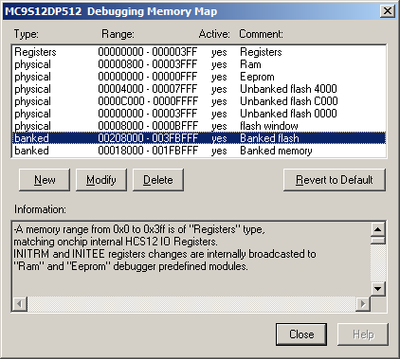
and match "refresh memory when halting"

Of course it is suitable if you also think about critical section and execution part of the code out of the flash…already described.
Few words about memory map.
If memories overlap then following priority scheme is valid. (page 127)
Highest - BDM (internal to core) firmware or register space
…..... Internal register space
…..... RAM memory block
…..... EEPROM memory block
…..... On-chip FLASH or ROM
Lowest - Remaining external space
Default value of the RAMHAL bit (INITRM) is 1 so the 4k RAM is mapped to higher part of the RAM block.
However, 4kRAM is mappable to 4k block so RAMHAL has no meaning in the case of this MCU.
Moreover, INITRM[7..3] is set to 0b00001 the RAM is placed to the 4k block where address 0b00001000 00000000 or 0x0800 belongs.
0000-0FFF 1st 4k block of RAM mapping possibility
1000-1FFF 2nd 4k block of RAM mapping possibility
2000-2FFF 3rd 4k block of RAM mapping possibility
3000-3FFF 4th 4k block of RAM mapping possibility
So, by default the RAM is mapped to the space 0000-FFFF which means
0000-0FFF 1st 4k block of RAM mapping possibility
If the Registers are mapped 0000~03FF and RAM is mapped 0000~0FFF then addresses:
- 0000~03FF – address the registers
- 0400~FFFF – address the RAM (1st kB is overlapped by Regs)
Near flash
- 4000~7FFF – non paged flash addressable also via paged "far" address 0x3E_(8000~BFFF)
- C000~FFFF – non paged flash addressable also via paged "far" address 0x3F_(8000~BFFF)
Far flash
- 0x3C_(8000~BFFF) - paged flash
- 0x3D_(8000~BFFF) - paged flash
- 0x3E_(8000~BFFF) - paged flash addressable also via no page "near" address 4000-7FFF
- 0x3F_(8000~BFFF) - paged flash addressable also via no page "near" address C000-FFFF
If you use default mapping then you have smaller RAM.
The flash… data sheet page 18…
Memory options:
— 64K, 96K, or 128Kbyte Flash EEPROM (erasable in 1024-byte sectors)

The word which is written must be in erased status. Cumulative programming is not allowed. So, writing to erased word is not problem anytime, but if you want to rewrite byte you have to erase entire sector and write back what was erased together with modified word. Now it is up to your SW how often you will erase sectors and what approach you will develop because the flash has given number of erase cycles for sector.
The examples always erase sector before it is written…just an example.
Best regards,
Ladislav
- Mark as New
- Bookmark
- Subscribe
- Mute
- Subscribe to RSS Feed
- Permalink
- Report Inappropriate Content
Hi Ladislav,
Thank you so much for that detailer response. CW is a very powerful program and I have only just touched on what it can do for debugging. I wasn't aware of the "disassemble" feature, or the refresh Flash either. I'll try those with your examples and see what happens.
Now that you have confirmed that the erase sector size is 1024 bytes, it makes things much simpler for me. The default RAM from $0400 to $0FFF is more than adequate for my program variables. I can fit all of my configurable constants, (the ones copy I to RAM at start up so I can modify them in RAM and burn back to Flash) into one sector.
My program can easily fit into either of the near Flash blocks ($4000 to $7FFF or $C000 to $FFFF). I would like to place my program, including your example E/W code into $4000 to $7FFF and my configurable constants into $C000 to $FFFF. Does this sound right?
Now, which of your example codes should I use?
I don't think I could use the C32-FLASH E_R-ASM because of the 512 byte sector erase size.
I could probably use either C128-FLASH_ERW-4000-7FFF-CW47 or C128-FLASH_ERW_CW47 if I can get them disassembled successfully.
What about DP512-FLASH_EW_ASM_CW47? I don't think I need that but could it be used for the 9S12XEP100?
Many Thanks,
Robert
