
- Forums
- Product Forums
- General Purpose MicrocontrollersGeneral Purpose Microcontrollers
- i.MX Forumsi.MX Forums
- QorIQ Processing PlatformsQorIQ Processing Platforms
- Identification and SecurityIdentification and Security
- Power ManagementPower Management
- Wireless ConnectivityWireless Connectivity
- RFID / NFCRFID / NFC
- Advanced AnalogAdvanced Analog
- Neural Processing UnitsNeural Processing Units
- MCX Microcontrollers
- S32G
- S32K
- S32V
- MPC5xxx
- Other NXP Products
- S12 / MagniV Microcontrollers
- Powertrain and Electrification Analog Drivers
- Sensors
- Vybrid Processors
- Digital Signal Controllers
- 8-bit Microcontrollers
- ColdFire/68K Microcontrollers and Processors
- PowerQUICC Processors
- OSBDM and TBDML
- S32M
- S32Z/E
-
- Solution Forums
- Software Forums
- MCUXpresso Software and ToolsMCUXpresso Software and Tools
- CodeWarriorCodeWarrior
- MQX Software SolutionsMQX Software Solutions
- Model-Based Design Toolbox (MBDT)Model-Based Design Toolbox (MBDT)
- FreeMASTER
- eIQ Machine Learning Software
- Embedded Software and Tools Clinic
- S32 SDK
- S32 Design Studio
- GUI Guider
- Zephyr Project
- Voice Technology
- Application Software Packs
- Secure Provisioning SDK (SPSDK)
- Processor Expert Software
- Generative AI & LLMs
-
- Topics
- Mobile Robotics - Drones and RoversMobile Robotics - Drones and Rovers
- NXP Training ContentNXP Training Content
- University ProgramsUniversity Programs
- Rapid IoT
- NXP Designs
- SafeAssure-Community
- OSS Security & Maintenance
- Using Our Community
-
- Cloud Lab Forums
-
- Knowledge Bases
- ARM Microcontrollers
- i.MX Processors
- Identification and Security
- Model-Based Design Toolbox (MBDT)
- QorIQ Processing Platforms
- S32 Automotive Processing Platform
- Wireless Connectivity
- CodeWarrior
- MCUXpresso Suite of Software and Tools
- MQX Software Solutions
- RFID / NFC
- Advanced Analog
- Neural Processing Units
-
- NXP Tech Blogs
- Home
- :
- Software Forums
- :
- Processor Expert Software
- :
- how to configure uart in k20d72m using processor expert in codewarrior10.4
how to configure uart in k20d72m using processor expert in codewarrior10.4
- Subscribe to RSS Feed
- Mark Topic as New
- Mark Topic as Read
- Float this Topic for Current User
- Bookmark
- Subscribe
- Mute
- Printer Friendly Page
how to configure uart in k20d72m using processor expert in codewarrior10.4

- Mark as New
- Bookmark
- Subscribe
- Mute
- Subscribe to RSS Feed
- Permalink
- Report Inappropriate Content
step by step instruction to configure processor expert for UART communication and code warrior code for UART communication.
Board TWR-K20D72M
IDE codewarrior 10.4

 marek_neuzil
- Mark as New
- Bookmark
- Subscribe
- Mute
- Subscribe to RSS Feed
- Permalink
- Report Inappropriate Content
Hello,
I am using the latest version of CodeWarrior 10.6.4 but the following instructions are the same as for CodeWarrior 10.4.
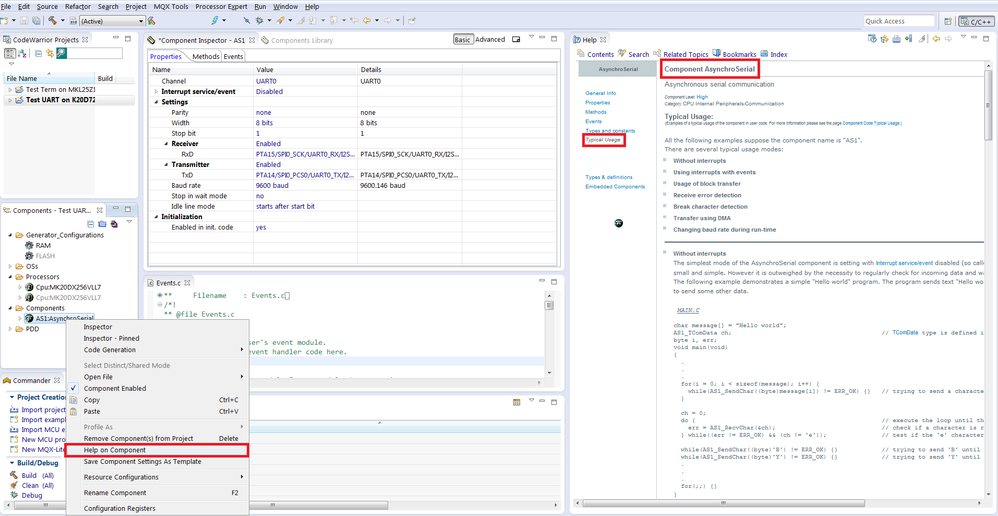
When you create a new Bareboard project for the K20DX256 (72MHz family) with Processor Expert enabled (select File > New > BareBoard project in the main menu and follow the wizard dialogs) . You can add UART driver by the following way:
- Open the Components Library window, Alphabetical tab and double click on AsynchroSerial component (add the component into your project).
- Double click on the component in the Components window (open the Component Inspector of the AsynchroSerial component).
- Select the Baud rate (e.g. write 9600 into the Baud rate property)
- Select the Channel (UART device) and RxD, TxD pins (if the default selection is not correct for your target board)
- Generate Processor Expert code, see below:

Open the context menu of the AsynchroSerial component and select "Help on Component", select link "Component AsynchroSerial Typical Usage", see the screenshot below.
The Typical Usage contains examples of code for this component (Send and Receive of data).
Best Regards,
Marek Neuzil
