
- Forums
- Product Forums
- General Purpose MicrocontrollersGeneral Purpose Microcontrollers
- i.MX Forumsi.MX Forums
- QorIQ Processing PlatformsQorIQ Processing Platforms
- Identification and SecurityIdentification and Security
- Power ManagementPower Management
- Wireless ConnectivityWireless Connectivity
- RFID / NFCRFID / NFC
- Advanced AnalogAdvanced Analog
- Neural Processing UnitsNeural Processing Units
- MCX Microcontrollers
- S32G
- S32K
- S32V
- MPC5xxx
- Other NXP Products
- S12 / MagniV Microcontrollers
- Powertrain and Electrification Analog Drivers
- Sensors
- Vybrid Processors
- Digital Signal Controllers
- 8-bit Microcontrollers
- ColdFire/68K Microcontrollers and Processors
- PowerQUICC Processors
- OSBDM and TBDML
- S32M
- S32Z/E
-
- Solution Forums
- Software Forums
- MCUXpresso Software and ToolsMCUXpresso Software and Tools
- CodeWarriorCodeWarrior
- MQX Software SolutionsMQX Software Solutions
- Model-Based Design Toolbox (MBDT)Model-Based Design Toolbox (MBDT)
- FreeMASTER
- eIQ Machine Learning Software
- Embedded Software and Tools Clinic
- S32 SDK
- S32 Design Studio
- GUI Guider
- Zephyr Project
- Voice Technology
- Application Software Packs
- Secure Provisioning SDK (SPSDK)
- Processor Expert Software
- Generative AI & LLMs
-
- Topics
- Mobile Robotics - Drones and RoversMobile Robotics - Drones and Rovers
- NXP Training ContentNXP Training Content
- University ProgramsUniversity Programs
- Rapid IoT
- NXP Designs
- SafeAssure-Community
- OSS Security & Maintenance
- Using Our Community
-
- Cloud Lab Forums
-
- Knowledge Bases
- ARM Microcontrollers
- i.MX Processors
- Identification and Security
- Model-Based Design Toolbox (MBDT)
- QorIQ Processing Platforms
- S32 Automotive Processing Platform
- Wireless Connectivity
- CodeWarrior
- MCUXpresso Suite of Software and Tools
- MQX Software Solutions
- RFID / NFC
- Advanced Analog
- Neural Processing Units
-
- NXP Tech Blogs
- Home
- :
- Software Forums
- :
- Processor Expert Software
- :
- Unable to receive Extended Message ID CAN frame
Unable to receive Extended Message ID CAN frame
- Subscribe to RSS Feed
- Mark Topic as New
- Mark Topic as Read
- Float this Topic for Current User
- Bookmark
- Subscribe
- Mute
- Printer Friendly Page

- Mark as New
- Bookmark
- Subscribe
- Mute
- Subscribe to RSS Feed
- Permalink
- Report Inappropriate Content
Hello all!
I'm trying to convert a project (based on the MK10DX65VLH7) that previously used CAN frames with a standard Message IDs to using extended Message IDs. Previously, I could send and receive standard frames properly. I currently have two devices on my CAN bus. One device can send and receive the extended frames and the other (the MK10DX64) can only send them. I'm using Busmaster to verify the traffic.
Currently, I have the working device sending a frame with the message ID of 0xC001 onto the network. I can see the frame using Busmaster, but my interrupt never triggers on the MK10DX64. I'm slightly confused by the CAN_LDD component properties, I'm not quite sure what Message ID under Buffer Type or Individual Acceptance Mask under Buffer type does. I tried looking under the component help but the descriptions didn't explain much.
Here is a screenshot of my CAN_LDD component.
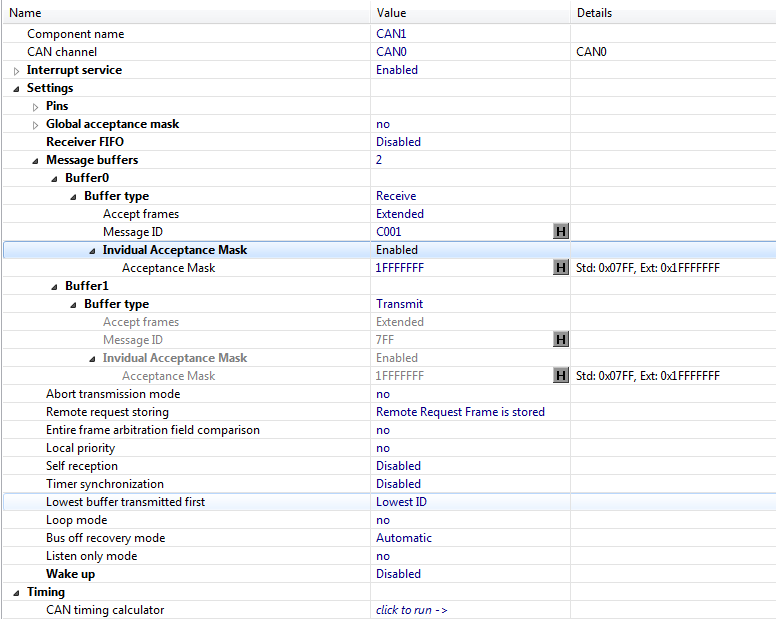
What I'm hoping for is to receive an interrupt for any extended message that is on the bus, not just 0xC001. Does anyone know how to configure this component to do that?
Thanks!
Solved! Go to Solution.

 Petr_H
- Mark as New
- Bookmark
- Subscribe
- Mute
- Subscribe to RSS Feed
- Permalink
- Report Inappropriate Content
Hi,
Please note that the Individual acceptance mask filters the bits that are to be checked aginst given message ID. If there is 0 in the acceptance mask, the buffer accepts messages with any bit valus on that position. If there is 1, the received ID must match with ID set for the buffer (Message ID property).
If you have global acceptance mask disabled (as on your screenshot) it works like this:
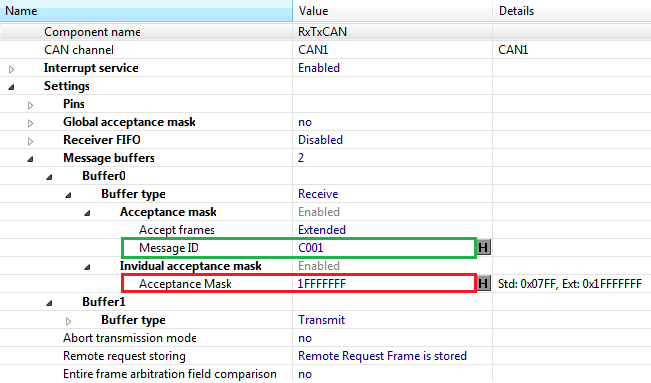
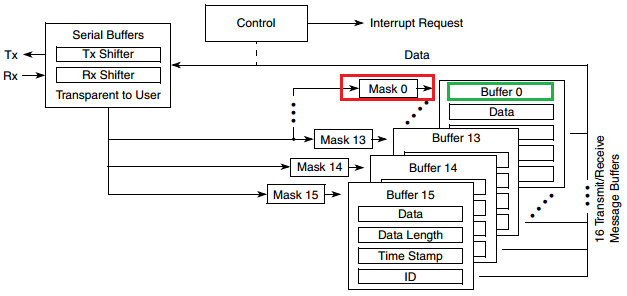
So if the acceptance mask is 1FFFFFFF, all bits are checked so only C001 message is received.
To receive any message you shuold put there 0 and all messages will be received.
Regarding sending extended frames, you can find the example of sending Extended frames in Typical Usage page of the component help (opened with "Help on component" pop-up menu):
. . .
Frame.MessageID = (0x123456U | LDD_CAN_MESSAGE_ID_EXT); /* Set Tx ID value - extended */
Frame.FrameType = LDD_CAN_DATA_FRAME; /* Specyfying type of Tx frame - Data frame */
Frame.Length = sizeof(OutData); /* Set number of bytes in data frame - 4B */
Frame.Data = OutData; /* Set pointer to OutData buffer */
DataFrameTxFlg = FALSE; /* Clear DataFrameTxFlg */
Error = CAN2_SendFrame(MyCANPtr, 0U, &Frame); /* Sends the data frame over buffer 0 */
while (!DataFrameTxFlg) { /* Wait until data frame is transmitted */
}
. . .
Please let us know if you've been able to resolve it. We are not aware of any problems with this code.
Best regards
Petr Hradsky
Processor Expert Support Team
Petr_H
- Mark as New
- Bookmark
- Subscribe
- Mute
- Subscribe to RSS Feed
- Permalink
- Report Inappropriate Content
Hi,
Please note that the Individual acceptance mask filters the bits that are to be checked aginst given message ID. If there is 0 in the acceptance mask, the buffer accepts messages with any bit valus on that position. If there is 1, the received ID must match with ID set for the buffer (Message ID property).
If you have global acceptance mask disabled (as on your screenshot) it works like this:
So if the acceptance mask is 1FFFFFFF, all bits are checked so only C001 message is received.
To receive any message you shuold put there 0 and all messages will be received.
Regarding sending extended frames, you can find the example of sending Extended frames in Typical Usage page of the component help (opened with "Help on component" pop-up menu):
. . .
Frame.MessageID = (0x123456U | LDD_CAN_MESSAGE_ID_EXT); /* Set Tx ID value - extended */
Frame.FrameType = LDD_CAN_DATA_FRAME; /* Specyfying type of Tx frame - Data frame */
Frame.Length = sizeof(OutData); /* Set number of bytes in data frame - 4B */
Frame.Data = OutData; /* Set pointer to OutData buffer */
DataFrameTxFlg = FALSE; /* Clear DataFrameTxFlg */
Error = CAN2_SendFrame(MyCANPtr, 0U, &Frame); /* Sends the data frame over buffer 0 */
while (!DataFrameTxFlg) { /* Wait until data frame is transmitted */
}
. . .
Please let us know if you've been able to resolve it. We are not aware of any problems with this code.
Best regards
Petr Hradsky
Processor Expert Support Team
- Mark as New
- Bookmark
- Subscribe
- Mute
- Subscribe to RSS Feed
- Permalink
- Report Inappropriate Content
Thank you Petr,
That makes sense (although opposite of what I originally assumed)! Could you tell me where this is documented foe future reference?
Thanks!
Petr_H
- Mark as New
- Bookmark
- Subscribe
- Mute
- Subscribe to RSS Feed
- Permalink
- Report Inappropriate Content
You are welcome, the diagrams I put in my previous post are from CAN part of the MCU reference manual and the code is from Typical usage page of the online component help in Processor Expert.
best regards
Petr Hradsky
Processor Expert Support Team
