
- Forums
- Product Forums
- General Purpose MicrocontrollersGeneral Purpose Microcontrollers
- i.MX Forumsi.MX Forums
- QorIQ Processing PlatformsQorIQ Processing Platforms
- Identification and SecurityIdentification and Security
- Power ManagementPower Management
- Wireless ConnectivityWireless Connectivity
- RFID / NFCRFID / NFC
- Advanced AnalogAdvanced Analog
- Neural Processing UnitsNeural Processing Units
- MCX Microcontrollers
- S32G
- S32K
- S32V
- MPC5xxx
- Other NXP Products
- S12 / MagniV Microcontrollers
- Powertrain and Electrification Analog Drivers
- Sensors
- Vybrid Processors
- Digital Signal Controllers
- 8-bit Microcontrollers
- ColdFire/68K Microcontrollers and Processors
- PowerQUICC Processors
- OSBDM and TBDML
- S32M
- S32Z/E
-
- Solution Forums
- Software Forums
- MCUXpresso Software and ToolsMCUXpresso Software and Tools
- CodeWarriorCodeWarrior
- MQX Software SolutionsMQX Software Solutions
- Model-Based Design Toolbox (MBDT)Model-Based Design Toolbox (MBDT)
- FreeMASTER
- eIQ Machine Learning Software
- Embedded Software and Tools Clinic
- S32 SDK
- S32 Design Studio
- GUI Guider
- Zephyr Project
- Voice Technology
- Application Software Packs
- Secure Provisioning SDK (SPSDK)
- Processor Expert Software
- Generative AI & LLMs
-
- Topics
- Mobile Robotics - Drones and RoversMobile Robotics - Drones and Rovers
- NXP Training ContentNXP Training Content
- University ProgramsUniversity Programs
- Rapid IoT
- NXP Designs
- SafeAssure-Community
- OSS Security & Maintenance
- Using Our Community
-
- Cloud Lab Forums
-
- Knowledge Bases
- ARM Microcontrollers
- i.MX Processors
- Identification and Security
- Model-Based Design Toolbox (MBDT)
- QorIQ Processing Platforms
- S32 Automotive Processing Platform
- Wireless Connectivity
- CodeWarrior
- MCUXpresso Suite of Software and Tools
- MQX Software Solutions
- RFID / NFC
- Advanced Analog
- Neural Processing Units
-
- NXP Tech Blogs
- Home
- :
- Software Forums
- :
- Processor Expert Software
- :
- TWR-K40X256 ADC-DAC system doubts
TWR-K40X256 ADC-DAC system doubts
- Subscribe to RSS Feed
- Mark Topic as New
- Mark Topic as Read
- Float this Topic for Current User
- Bookmark
- Subscribe
- Mute
- Printer Friendly Page

- Mark as New
- Bookmark
- Subscribe
- Mute
- Subscribe to RSS Feed
- Permalink
- Report Inappropriate Content
Hi everyone,
Basically for the past month I've been learning embedded programming while working with TWR-K40X256 (MK40DX256ZVMD10 micro-controller). Right now I'm tasked with converting a generic sinusoidal wave (like a sum of sines) via ADC, applying some basic digital signal processing to the data and then converting the processed digital data back to analog using DAC.
I've decided to use Processor Expert for this and so I've added the components DAC_LDD and ADC_LDD to the project (images of the configurations below).
Looking through the Typical Usage for both the components I've tried to implement a continuous measurement of a selected sample group (w/ interrupt service) without much success (measured values are always 0) and for the DAC part i am generally not sure about the way to implement the conversion.
Do you have some suggestions or code snippets on how to solve the problem/implement the system I explained?
I'm sure this is a basic task and all these doubts must be born on my inexperience.
Thank you for all the attention!
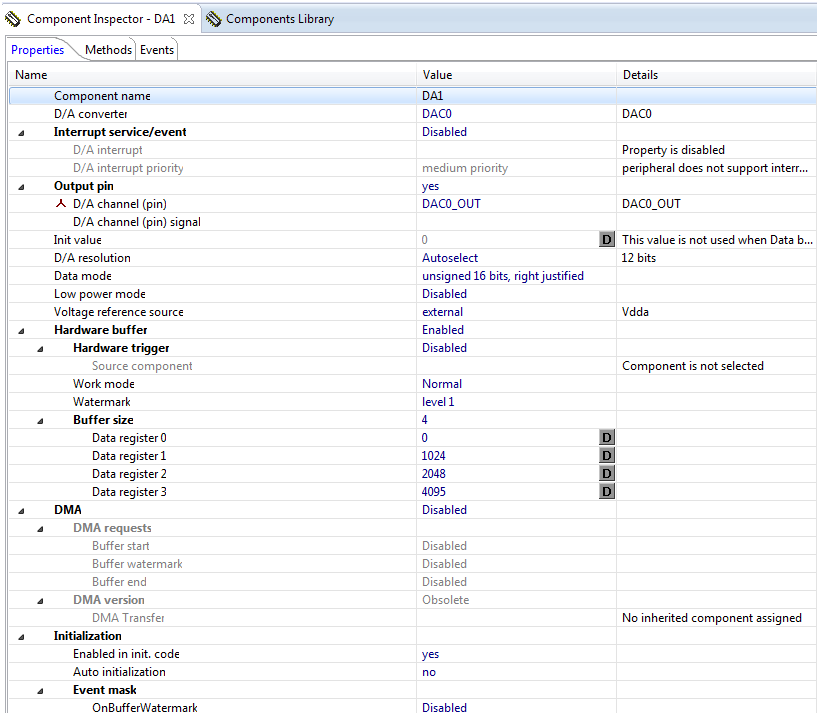
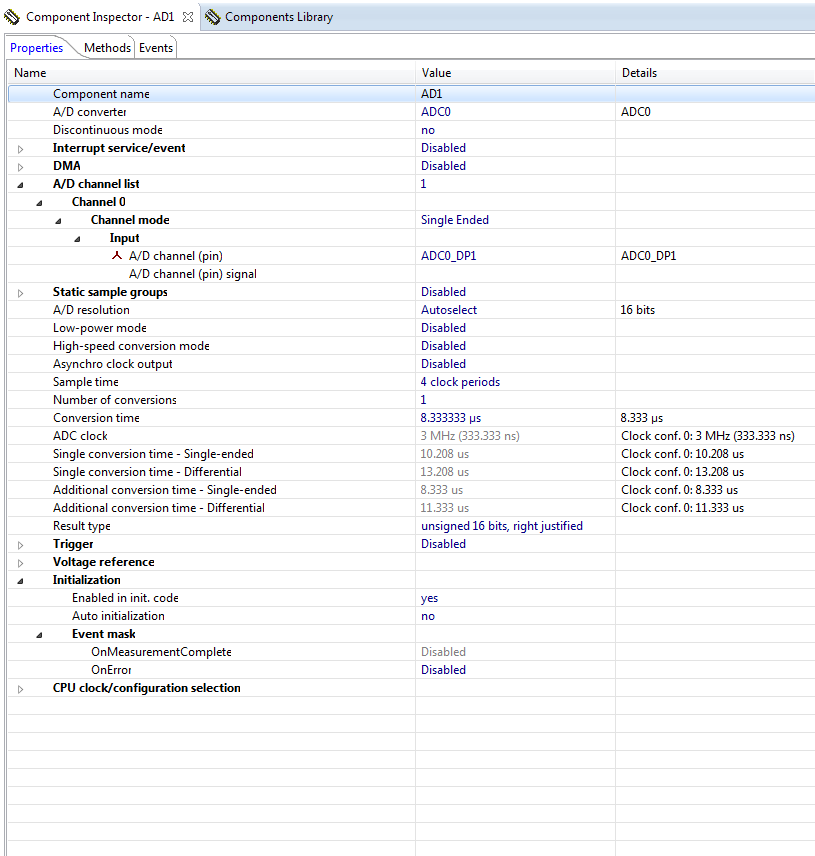
Solved! Go to Solution.

- Mark as New
- Bookmark
- Subscribe
- Mute
- Subscribe to RSS Feed
- Permalink
- Report Inappropriate Content
Francisco
I think that you are downloading using the Flash utility and this output looks to be OK. I don't know why there are details about nothing being programmed to restricted regions but I get the same so it looks "normal". If you load with the debugger there is no such message. In the case of the Flash utility download you need to unplug and replug the USB cable for the new SW to start.
I just checked the result after configuring as in the other post (I set the Cortex M4 target and used the linker script file K_256_64.ld and both methods worked correctly - on the TWR-K40X256 you will see that the DAC0 output (pin A32 on the primary backplane connector) has a voltage that follows the voltage on the potentiometer (ADC_DM1_SINGLE) but delayed by 1s due to the digital delay-line operation. I have attached the binary that I used which should be identical to yours if built with teh same settings and the same compiler version (in fact I see that your is 0x7118 bytes in size which is exactly the size of mine).
>>SPI and UART
If you connect to the serial interface you will see that the project is using this (115200Baud). Hit the enter key and it will return a menu:
Serial number: 00-00
Software version V1.4.007
Device identification: KINETIS
Main menu
===================
1 Configure LAN interface
2 Configure serial interface
3 Go to I/O menu
4 Go to administration menu
5 Go to overview/statistics menu
6 Go to USB menu
7 Go to I2C menu
8 Go to SD-Card disk interface
9 FTP client commands
a CAN commands
help Display menu specific help
quit Leave command mode
The UART support is documented in http://www.utasker.com/docs/uTasker/uTaskerUART.PDF It supports all UARTs (up to 6) in interrupt and/or DMA mode.
The SPI can be used with an SD card or with SPI Flash devices (ATMEL, ST or SST types are included) see http://www.utasker.com/docs/uTasker/uTaskerFileSystem_3.PDF and http://www.utasker.com/docs/uTasker/uTaskerFileSystemSPI_FLASH_003.PDF (SDCARD_SUPPORT will enable utFAT on teh SDHC but if you remove SD_CONTROLLER_AVAILABLE it will fall back to the SPI instead.
>>Also, just to facilitate adding the Digital Signal Processing parts of the project, do you recommend erasing the code parts/definitions that aren't used for the case or it is better to leave the project as a whole and just comment out the parts you don't want.
Generally I would recommend using the project as it is and just defining or undefining the parts that you want to use or don't need. Add your own code wherever you need it (possibly with a define for your project to help follow your changes). You will notice that the project will also be controlling the GLCD on the K40, you can enable USB support as required and move easily between processors - for example, if you move to teh K60 you just change the K40 define to K60 and all code will remain compatible but you can also activate Ethernet as required (TCP/IP stack and various servers are included in the same code).
In addition it is simpler to install project upgrades like this.
I did note that the ADC/DAC digital delay line is purely DMA based (no half-buffer interrupt) when operated on the K40 tower. To activate the half-buffer interrupt (which the K40 KwikStik woudl use as default to amplify its microphone signal) you simply need to change the following in fnConfigureADC() in ADC_Timers.h.
Instead of
adc_setup.int_handler = 0;
set
adc_setup.int_handler = half_buffer_interrupt;
and the interrupt handler half_buffer_interrupt() will be called at each half buffer and generate the "ping-pong" events ADC_TRIGGER_1 and ADC_TRIGGER_2 (informing which half of the buffer is ready) which are then handled in the task woken by these events. You will see that this code is amplifying the signal (after removing DC component) and this is where you can use any other processing required for your own specific application.
If I didn't give the link before, the ADC/DAC operation is documented in http://www.utasker.com/docs/uTasker/uTaskerADC.pdf
Regards
Mark
- Mark as New
- Bookmark
- Subscribe
- Mute
- Subscribe to RSS Feed
- Permalink
- Report Inappropriate Content
- Mark as New
- Bookmark
- Subscribe
- Mute
- Subscribe to RSS Feed
- Permalink
- Report Inappropriate Content
Hi Mark!
Thank you so much for your in-depth answer! I've downloaded the uTasker project and configured it just like you said in the post response.
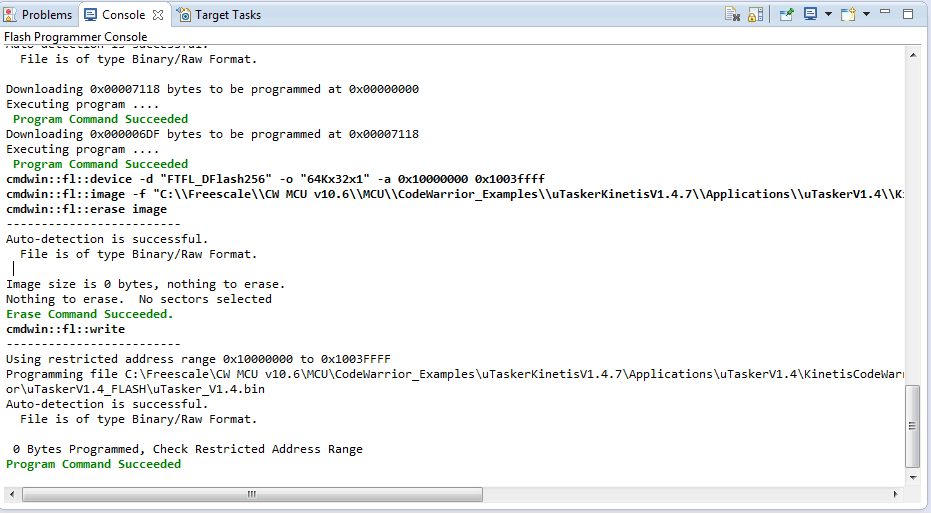
After that i tried to Flash Program it using the video tutorial in the KINETIS K Cortex M4 and KL Cortex M0+ uTasker webpage but I'm receiving some errors regarding the Restricted Adress Range (shown in the image below).
I would like to ask if this has something to do with some of the configurations on the project or just the configurations of the Flash Programming?
Besides that I've looked into other aspects of the project and I've found parts for SPI and UART coding! Are those as easy to configure as the ADC_DAC you indicated?
Also, just to facilitate adding the Digital Signal Processing parts of the project, do you recommend erasing the code parts/definitions that aren't used for the case or it is better to leave the project as a whole and just comment out the parts you don't want.
Sorry about all these questions! Have a good rest of week!
Francisco
- Mark as New
- Bookmark
- Subscribe
- Mute
- Subscribe to RSS Feed
- Permalink
- Report Inappropriate Content
Francisco
I think that you are downloading using the Flash utility and this output looks to be OK. I don't know why there are details about nothing being programmed to restricted regions but I get the same so it looks "normal". If you load with the debugger there is no such message. In the case of the Flash utility download you need to unplug and replug the USB cable for the new SW to start.
I just checked the result after configuring as in the other post (I set the Cortex M4 target and used the linker script file K_256_64.ld and both methods worked correctly - on the TWR-K40X256 you will see that the DAC0 output (pin A32 on the primary backplane connector) has a voltage that follows the voltage on the potentiometer (ADC_DM1_SINGLE) but delayed by 1s due to the digital delay-line operation. I have attached the binary that I used which should be identical to yours if built with teh same settings and the same compiler version (in fact I see that your is 0x7118 bytes in size which is exactly the size of mine).
>>SPI and UART
If you connect to the serial interface you will see that the project is using this (115200Baud). Hit the enter key and it will return a menu:
Serial number: 00-00
Software version V1.4.007
Device identification: KINETIS
Main menu
===================
1 Configure LAN interface
2 Configure serial interface
3 Go to I/O menu
4 Go to administration menu
5 Go to overview/statistics menu
6 Go to USB menu
7 Go to I2C menu
8 Go to SD-Card disk interface
9 FTP client commands
a CAN commands
help Display menu specific help
quit Leave command mode
The UART support is documented in http://www.utasker.com/docs/uTasker/uTaskerUART.PDF It supports all UARTs (up to 6) in interrupt and/or DMA mode.
The SPI can be used with an SD card or with SPI Flash devices (ATMEL, ST or SST types are included) see http://www.utasker.com/docs/uTasker/uTaskerFileSystem_3.PDF and http://www.utasker.com/docs/uTasker/uTaskerFileSystemSPI_FLASH_003.PDF (SDCARD_SUPPORT will enable utFAT on teh SDHC but if you remove SD_CONTROLLER_AVAILABLE it will fall back to the SPI instead.
>>Also, just to facilitate adding the Digital Signal Processing parts of the project, do you recommend erasing the code parts/definitions that aren't used for the case or it is better to leave the project as a whole and just comment out the parts you don't want.
Generally I would recommend using the project as it is and just defining or undefining the parts that you want to use or don't need. Add your own code wherever you need it (possibly with a define for your project to help follow your changes). You will notice that the project will also be controlling the GLCD on the K40, you can enable USB support as required and move easily between processors - for example, if you move to teh K60 you just change the K40 define to K60 and all code will remain compatible but you can also activate Ethernet as required (TCP/IP stack and various servers are included in the same code).
In addition it is simpler to install project upgrades like this.
I did note that the ADC/DAC digital delay line is purely DMA based (no half-buffer interrupt) when operated on the K40 tower. To activate the half-buffer interrupt (which the K40 KwikStik woudl use as default to amplify its microphone signal) you simply need to change the following in fnConfigureADC() in ADC_Timers.h.
Instead of
adc_setup.int_handler = 0;
set
adc_setup.int_handler = half_buffer_interrupt;
and the interrupt handler half_buffer_interrupt() will be called at each half buffer and generate the "ping-pong" events ADC_TRIGGER_1 and ADC_TRIGGER_2 (informing which half of the buffer is ready) which are then handled in the task woken by these events. You will see that this code is amplifying the signal (after removing DC component) and this is where you can use any other processing required for your own specific application.
If I didn't give the link before, the ADC/DAC operation is documented in http://www.utasker.com/docs/uTasker/uTaskerADC.pdf
Regards
Mark
- Mark as New
- Bookmark
- Subscribe
- Mute
- Subscribe to RSS Feed
- Permalink
- Report Inappropriate Content
Hey Mark,
Thank you for all the help provided!
Although I've extensively read through all the files provided, I'm still having some problems about some of the parts and I'm trying to solve them singularly.
For starters you were completely right about the Flash programming! After testing the code with an oscilloscope i saw no flaws and everything was working out perfectly! I guess the inexperience of working with micro controllers got the best of me there :smileyhappy:
>> DSP Filtering Algorithms
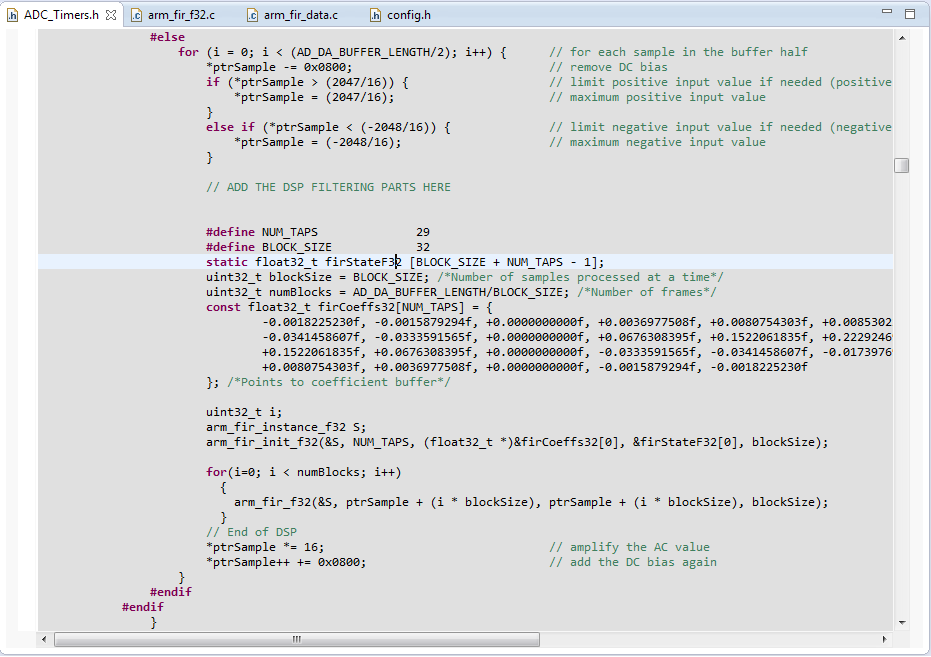
For the past few days I've been trying to get the DPS project ready to integrate with the uTasker project. By now I have everything set up but I'm unsure about some of the next steps. In the DPS project I'm using the CMSIS-DSP library ( CMSIS-DSP: CMSIS DSP Software Library - link just for reference ) and I've managed to set it up completely on the uTasker project. The code that I've been writing is being written as shown in the image (I apologize for attaching too many images!) is this the right place to do so? Right before the signal is amplified by *16 and the digital bias is added?
**Note that the code isn't fully working right now and there are somethings that don't make sense inserted in uTasker :smileyhappy:
>> UART and SPI
While i wasn't able to get the Serial Interface you showed to work i tried to search online for some solution and found one of your videos online that showed how to connect the board to pc via UART, FLASH drive and USB. I was thinking about using the UART communication protocol to pass the information that comes out of the DAC to the pc also using FTDI cables. The thing is i looked into the uTasker code and wasn't able to find any part i could easily change to do that. So i wanted to know if there is in fact any example or code snippets in the uTasker project i missed and that i could easily change for this purpose.
Thank you for all the help!!
Regards
Francisco
- Mark as New
- Bookmark
- Subscribe
- Mute
- Subscribe to RSS Feed
- Permalink
- Report Inappropriate Content
Francisco
I would remove the original signal multiplication and completely replace it with your own code. It looks like you have put your filter into the original loop which would mean that it is probably being performed too often (once for each sample in the buffer).
The thing to be aware of is that the code at the location is being executed each time half of the ADC samples are ready in the buffer and the pointer ptrSample will be alternating between the first half and the second half (with the new set of samples ready). I see that the samples are handled in blocks of 32 samplesd (BLOCK_SIZE) so you will need to ensure that the half buffer size is a multiple of this size and then you shouldn't have any problems with the filter algorithm operating on it.
UART
The code that I attached has the UART connected to the RS232 interface on the SER board. I verified that this was operatiung correctly so if it is not on your tower kit you may need to ensure that the jumpers are all correct on the SER board.
If you would like to send the data to the UART you can use the fnWrite() command. To send the contant of the half buffer this would work:
fnWrite(SerialPortID, (unsigned char *)ptrSample, (AD_DA_BUFFER_LENGTH/2));
This sends it as binary data - (the Baud rate would have to be adequately high to keep up with the sample content speed).
You may want to format the data and send it as ASCII HEX.
If you want to send it to the PC via a USB-CDC connection when it is connected simply replace SerialPortID by DebugHandle (DebugHandle will be the UART when there is no USB and will be the USB-CDC handle when it is connected).
Regards
Mark
- Mark as New
- Bookmark
- Subscribe
- Mute
- Subscribe to RSS Feed
- Permalink
- Report Inappropriate Content
Francisco
I have learned that you are using the tower board without the SER board.
With the SER board the UART connection is on UART 3 but you can use the Virtual COM connection (of the debugger interface) instead, which is on UART0.
to do this you simply need to change two things (both in app_hw_kintis.h):
- modify #define DEMO_UART 3 to 0 (causes UART 0 to be used as debug UART rather than UART 3)
- Add (or enable) #define UART0_ON_D (causes UART 0 pin muxing to be set to port D where the virtual COM is connected to.
Regards
Mark
