
- Forums
- Product Forums
- General Purpose MicrocontrollersGeneral Purpose Microcontrollers
- i.MX Forumsi.MX Forums
- QorIQ Processing PlatformsQorIQ Processing Platforms
- Identification and SecurityIdentification and Security
- Power ManagementPower Management
- Wireless ConnectivityWireless Connectivity
- RFID / NFCRFID / NFC
- Advanced AnalogAdvanced Analog
- Neural Processing UnitsNeural Processing Units
- MCX Microcontrollers
- S32G
- S32K
- S32V
- MPC5xxx
- Other NXP Products
- S12 / MagniV Microcontrollers
- Powertrain and Electrification Analog Drivers
- Sensors
- Vybrid Processors
- Digital Signal Controllers
- 8-bit Microcontrollers
- ColdFire/68K Microcontrollers and Processors
- PowerQUICC Processors
- OSBDM and TBDML
- S32M
- S32Z/E
-
- Solution Forums
- Software Forums
- MCUXpresso Software and ToolsMCUXpresso Software and Tools
- CodeWarriorCodeWarrior
- MQX Software SolutionsMQX Software Solutions
- Model-Based Design Toolbox (MBDT)Model-Based Design Toolbox (MBDT)
- FreeMASTER
- eIQ Machine Learning Software
- Embedded Software and Tools Clinic
- S32 SDK
- S32 Design Studio
- GUI Guider
- Zephyr Project
- Voice Technology
- Application Software Packs
- Secure Provisioning SDK (SPSDK)
- Processor Expert Software
- Generative AI & LLMs
-
- Topics
- Mobile Robotics - Drones and RoversMobile Robotics - Drones and Rovers
- NXP Training ContentNXP Training Content
- University ProgramsUniversity Programs
- Rapid IoT
- NXP Designs
- SafeAssure-Community
- OSS Security & Maintenance
- Using Our Community
-
- Cloud Lab Forums
-
- Knowledge Bases
- ARM Microcontrollers
- i.MX Processors
- Identification and Security
- Model-Based Design Toolbox (MBDT)
- QorIQ Processing Platforms
- S32 Automotive Processing Platform
- Wireless Connectivity
- CodeWarrior
- MCUXpresso Suite of Software and Tools
- MQX Software Solutions
- RFID / NFC
- Advanced Analog
- Neural Processing Units
-
- NXP Tech Blogs
- Home
- :
- Software Forums
- :
- Processor Expert Software
- :
- Processor Expert PWM Starting Pulse Width on MKL05Z
Processor Expert PWM Starting Pulse Width on MKL05Z
- Subscribe to RSS Feed
- Mark Topic as New
- Mark Topic as Read
- Float this Topic for Current User
- Bookmark
- Subscribe
- Mute
- Printer Friendly Page

- Mark as New
- Bookmark
- Subscribe
- Mute
- Subscribe to RSS Feed
- Permalink
- Report Inappropriate Content
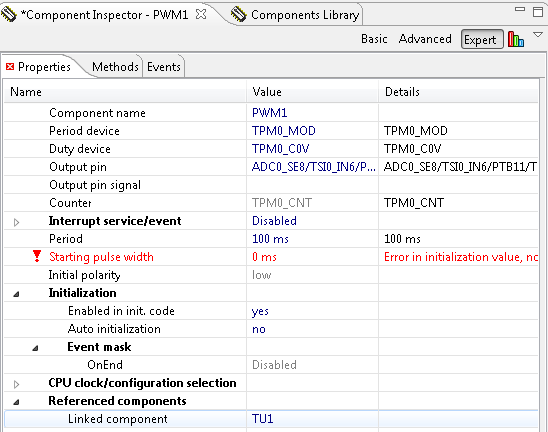
When setting the PWM component for the Kinetis MKL05Z in Codewarrior 10.3 I get an error when trying to set the "starting pulse width" to 0. "Error in initialization value, non zero expected". I want my signal to initialize with a 0% duty cycle like I have been able to with the HC08 series processors before switching to Kinetis. Is there a specific reason why processor expert refuses to set the starting pulse width to 0, or is this a bug/flaw in processor expert?
Thanks
Solved! Go to Solution.

 Petr_H
- Mark as New
- Bookmark
- Subscribe
- Mute
- Subscribe to RSS Feed
- Permalink
- Report Inappropriate Content
Hi,
Unfortunately, this is a limitation of Processor Expert timing computation model, that it cannot handle setting 0 duty in PWM_LDD component if the Counter frequency is set to "Auto select."
To workaround this situation, you can do the following steps:
1. Open the TimerUnit_LDD component referenced from the PWM_LDD component (visible in 'Expert' view mode, see the attached picture pwm1.png, there is TU1)
2. Open the inspector of the referenced TimerUnit_LDD component (e.g. TU1) and look for InputClock source / Counter frequency. There is by default "Auto select". Type in this field the same value shown in the third column of the row (see the picture pwm2.png, there is 655.360 kHz).
After setting the Counter frequency to the fixed value, the 0 ms pulse width stops reporting the error.
best regards
Petr Hradsky
Processor Expert Support Team

 Petr_H
- Mark as New
- Bookmark
- Subscribe
- Mute
- Subscribe to RSS Feed
- Permalink
- Report Inappropriate Content
Hi,
Unfortunately, this is a limitation of Processor Expert timing computation model, that it cannot handle setting 0 duty in PWM_LDD component if the Counter frequency is set to "Auto select."
To workaround this situation, you can do the following steps:
1. Open the TimerUnit_LDD component referenced from the PWM_LDD component (visible in 'Expert' view mode, see the attached picture pwm1.png, there is TU1)
2. Open the inspector of the referenced TimerUnit_LDD component (e.g. TU1) and look for InputClock source / Counter frequency. There is by default "Auto select". Type in this field the same value shown in the third column of the row (see the picture pwm2.png, there is 655.360 kHz).
After setting the Counter frequency to the fixed value, the 0 ms pulse width stops reporting the error.
best regards
Petr Hradsky
Processor Expert Support Team
