
- Forums
- Product Forums
- General Purpose MicrocontrollersGeneral Purpose Microcontrollers
- i.MX Forumsi.MX Forums
- QorIQ Processing PlatformsQorIQ Processing Platforms
- Identification and SecurityIdentification and Security
- Power ManagementPower Management
- Wireless ConnectivityWireless Connectivity
- RFID / NFCRFID / NFC
- Advanced AnalogAdvanced Analog
- Neural Processing UnitsNeural Processing Units
- MCX Microcontrollers
- S32G
- S32K
- S32V
- MPC5xxx
- Other NXP Products
- S12 / MagniV Microcontrollers
- Powertrain and Electrification Analog Drivers
- Sensors
- Vybrid Processors
- Digital Signal Controllers
- 8-bit Microcontrollers
- ColdFire/68K Microcontrollers and Processors
- PowerQUICC Processors
- OSBDM and TBDML
- S32M
- S32Z/E
-
- Solution Forums
- Software Forums
- MCUXpresso Software and ToolsMCUXpresso Software and Tools
- CodeWarriorCodeWarrior
- MQX Software SolutionsMQX Software Solutions
- Model-Based Design Toolbox (MBDT)Model-Based Design Toolbox (MBDT)
- FreeMASTER
- eIQ Machine Learning Software
- Embedded Software and Tools Clinic
- S32 SDK
- S32 Design Studio
- GUI Guider
- Zephyr Project
- Voice Technology
- Application Software Packs
- Secure Provisioning SDK (SPSDK)
- Processor Expert Software
- Generative AI & LLMs
-
- Topics
- Mobile Robotics - Drones and RoversMobile Robotics - Drones and Rovers
- NXP Training ContentNXP Training Content
- University ProgramsUniversity Programs
- Rapid IoT
- NXP Designs
- SafeAssure-Community
- OSS Security & Maintenance
- Using Our Community
-
- Cloud Lab Forums
-
- Knowledge Bases
- ARM Microcontrollers
- i.MX Processors
- Identification and Security
- Model-Based Design Toolbox (MBDT)
- QorIQ Processing Platforms
- S32 Automotive Processing Platform
- Wireless Connectivity
- CodeWarrior
- MCUXpresso Suite of Software and Tools
- MQX Software Solutions
- RFID / NFC
- Advanced Analog
- Neural Processing Units
-
- NXP Tech Blogs
- Home
- :
- Product Forums
- :
- Other NXP Products
- :
- Bootloader Code
Bootloader Code
- Subscribe to RSS Feed
- Mark Topic as New
- Mark Topic as Read
- Float this Topic for Current User
- Bookmark
- Subscribe
- Mute
- Printer Friendly Page
Bootloader Code

- Mark as New
- Bookmark
- Subscribe
- Mute
- Subscribe to RSS Feed
- Permalink
- Report Inappropriate Content
Hi,
I am using SDK bootloader example(evkbmimxrt1170_flashloader_cm7) for flashing new firmware into evkbmimxrt1170. I am new to this controller. Can you please give me some kind of documentation for this sdk example project or some kind of explanation of what this code basically does?
Regards
Abhisek
- Mark as New
- Bookmark
- Subscribe
- Mute
- Subscribe to RSS Feed
- Permalink
- Report Inappropriate Content
Hi Gavin,
Thanks for your inputs.
 Gavin_Jia
- Mark as New
- Bookmark
- Subscribe
- Mute
- Subscribe to RSS Feed
- Permalink
- Report Inappropriate Content
Hi @Abhisek20 ,
Thanks for your interest in NXP MIMXRT series!
Flashloader provides a way to download the Application into all external non-volatile memories supported by i.MXRT1xxx to prepare for subsequent booting from external memories. It can be a perfect complement to BootROM, and at the same time, there are customers who use it as a secondary bootloader to update their own images without having to develop their own bootloader and host PC software.
You can refer to this AN: https://www.nxp.com/docs/en/nxp/application-notes/AN12238.pdf
Also, there are two very good Chinese documents that provide detailed development steps that might help you as well:
1. https://www.cnblogs.com/henjay724/p/9098577.html
2. https://www.nxpic.org.cn/module/forum/thread-620172-1-1.html
Best regards,
Gavin
- Mark as New
- Bookmark
- Subscribe
- Mute
- Subscribe to RSS Feed
- Permalink
- Report Inappropriate Content
Hi,
I tried to send the application binary using UART1 through Tera Term. But still I am not able to update the firmware. If you can provide me with me steps on how to send the application binary and what type of file format it is expecting, so that we will be able to upgrade the firmware.
regards
abhisek
Gavin_Jia
- Mark as New
- Bookmark
- Subscribe
- Mute
- Subscribe to RSS Feed
- Permalink
- Report Inappropriate Content
Hi @Abhisek20 ,
Thanks for your feedback.
There are two more important concepts that I hope we can explain first:
1. First of all, the flashloader project is running in RAM;
2. If you need to put the image to be updated into flash, you have to configure external storage, which will run a bunch of blhost commands;
3. If we don't have a flashloader project and need to use blhost, then we can only change SW1 into serial download mode to do the work afterward.
Based on the above, we skipped step 3 by running the flashloader project in RAM first. Then, just update the new image in via blhost and finally reboot.
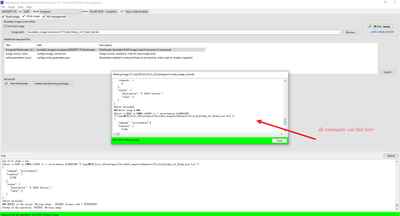
Execute the flashloader project in RAM and run the following command, which returns success, just to confirm that the flashloader has run successfully:
blhost.exe -p COM60 -- get-property 1
Finally, how to write the new image to flash via uart, you need to execute a lot of blhost commands, which are recorded by the software MCUXpresso Secure Provisioning Tool, you can use this software to execute it once, then record these commands, and then execute it by yourself in the command line terminal afterward, and the effect will be the same.
I attached the command recorded on my side for your reference.
Best regards,
Gavin
