
- Forums
- Product Forums
- General Purpose MicrocontrollersGeneral Purpose Microcontrollers
- i.MX Forumsi.MX Forums
- QorIQ Processing PlatformsQorIQ Processing Platforms
- Identification and SecurityIdentification and Security
- Power ManagementPower Management
- Wireless ConnectivityWireless Connectivity
- RFID / NFCRFID / NFC
- Advanced AnalogAdvanced Analog
- Neural Processing UnitsNeural Processing Units
- MCX Microcontrollers
- S32G
- S32K
- S32V
- MPC5xxx
- Other NXP Products
- S12 / MagniV Microcontrollers
- Powertrain and Electrification Analog Drivers
- Sensors
- Vybrid Processors
- Digital Signal Controllers
- 8-bit Microcontrollers
- ColdFire/68K Microcontrollers and Processors
- PowerQUICC Processors
- OSBDM and TBDML
- S32M
- S32Z/E
-
- Solution Forums
- Software Forums
- MCUXpresso Software and ToolsMCUXpresso Software and Tools
- CodeWarriorCodeWarrior
- MQX Software SolutionsMQX Software Solutions
- Model-Based Design Toolbox (MBDT)Model-Based Design Toolbox (MBDT)
- FreeMASTER
- eIQ Machine Learning Software
- Embedded Software and Tools Clinic
- S32 SDK
- S32 Design Studio
- GUI Guider
- Zephyr Project
- Voice Technology
- Application Software Packs
- Secure Provisioning SDK (SPSDK)
- Processor Expert Software
- Generative AI & LLMs
-
- Topics
- Mobile Robotics - Drones and RoversMobile Robotics - Drones and Rovers
- NXP Training ContentNXP Training Content
- University ProgramsUniversity Programs
- Rapid IoT
- NXP Designs
- SafeAssure-Community
- OSS Security & Maintenance
- Using Our Community
-
- Cloud Lab Forums
-
- Knowledge Bases
- ARM Microcontrollers
- i.MX Processors
- Identification and Security
- Model-Based Design Toolbox (MBDT)
- QorIQ Processing Platforms
- S32 Automotive Processing Platform
- Wireless Connectivity
- CodeWarrior
- MCUXpresso Suite of Software and Tools
- MQX Software Solutions
- RFID / NFC
- Advanced Analog
- Neural Processing Units
-
- NXP Tech Blogs
- Home
- :
- RFID / NFC
- :
- NFC知识库
- :
- Bluetooth Pairing example porting from KW41Z to KW36
Bluetooth Pairing example porting from KW41Z to KW36
Bluetooth Pairing example porting from KW41Z to KW36
Bluetooth Pairing example porting from KW41Z to KW36
Hello NFC community,
The purpose of this document is to show the steps to port the Bluetooth pairing example for NTAG I²C Plus from KW41Z to KW36.
Setup
For this, we will work with following boards:
1. Arduino NTAG I²C plus board (OM23221ARD) development kit.
2. KW36 Freedom board.
Download SDK as mentioned in chapter 2.1.3 of KW41Z User Manual and pay close attention to include NTAG I²C middleware.
Now, repeat the same procedure above for FRDM KW36, this will be the SDK on which we will be making the modifications for the porting.
NOTE: Unlike KW41Z, for KW36 there is no NTAG I²C plus middleware as shown in the image below:

Save changes and build the SDK. NTAG I²C middleware will have to be imported from KW41Z's SDK in MCUXPresso.
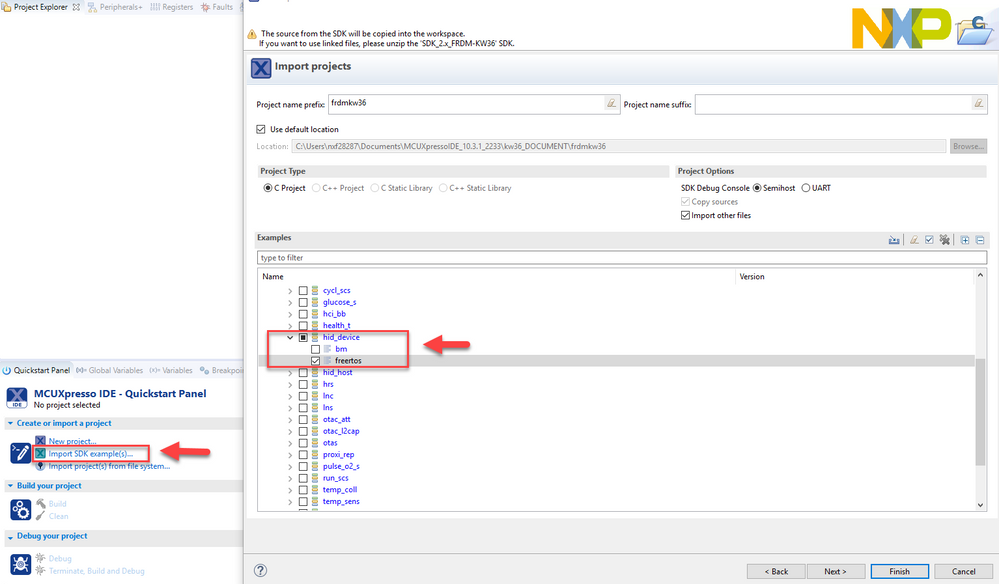
Install the SDK and import hid _device freertos example into the workspace:
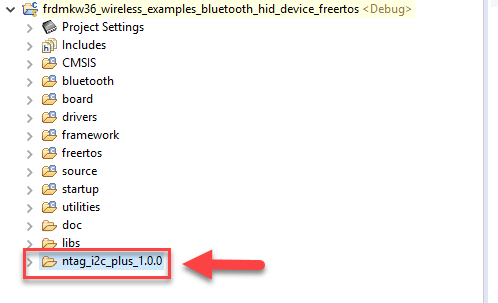
Copy ntag_i2c_plus_1.0.0 folder from KW41Z workspace to KW36's
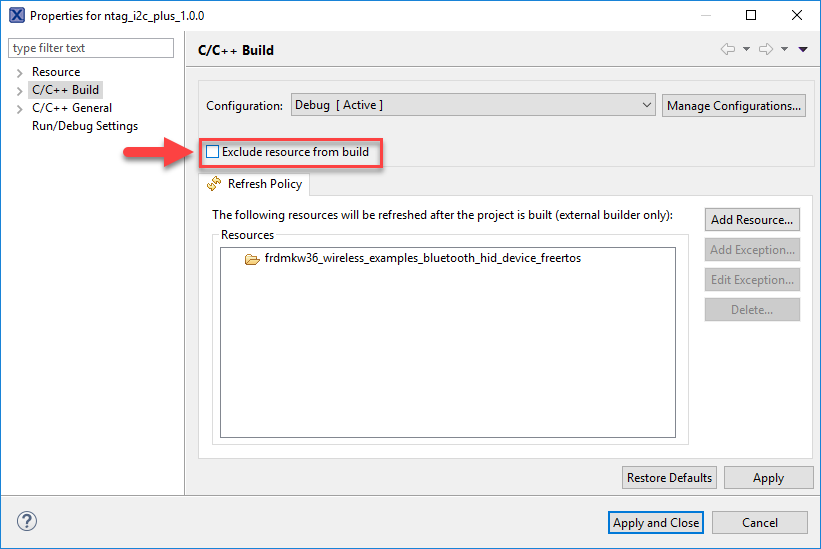
Open folder properties and uncheck Exclude resources from build, then apply and close.
In board.c file add the following code below BOARD_DCDCInit()
/* Init DCDC module */
BOARD_DCDCInit();
#ifdef NTAG_I2C
/* Init I2C pins for NTAG communication */
BOARD_InitI2C();
#endif // NTAG_I2CIn AppIMain.c add the following code in main_task before calling App_Thread()
#ifdef NTAG_I2C
/* Initialize I2C for NTAG communication */
HAL_I2C_InitDevice(HAL_I2C_INIT_DEFAULT, I2C_MASTER_CLK_SRC, NTAG_I2C_MASTER_BASEADDR);
SystemCoreClockUpdate();
/* Initialize the NTAG I2C components */
ntag_handle = NFC_InitDevice((NTAG_ID_T)0, NTAG_I2C_MASTER_BASEADDR);
// HAL_ISR_RegisterCallback((ISR_SOURCE_T)0, ISR_LEVEL_LO, NULL, NULL);
#endif // NTAG_I2CIn ApplMain.c add the following under Public memory declarations
/************************************************************************************
*************************************************************************************
* Public memory declarations
*************************************************************************************
************************************************************************************/
...
#ifdef NTAG_I2C
NFC_HANDLE_T ntag_handle; // NTAG handle
#endif // NTAG_I2CInclude new headers to the following:
In ApplMain.c include the following
#ifdef NTAG_I2C
/* NTAG middleware module */
#include "HAL_I2C_driver.h"
//#include "HAL_I2C_kinetis_fsl.h"
#include <app_ntag.h>
#endif //NTAG_I2CIn hid_device.c include the following
#ifdef NTAG_I2C
/* NTAG handler */
#include <app_ntag.h>
#endif // NTAG_I2CCopy app_ntag.c and app_ntag.h files from KW41Z workspace to KW36's.
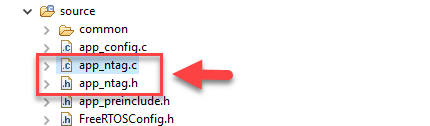
The app_ntag.c source file contains sample functions for working with NDEF messages. Function NFC_MsgWrite() creates and writes the NDEF message in the Type-2 Tag format to the NTAG I2C chip through the ntag_i2c_plus middleware. The write algorithm is NFC-Forum compliance. Function NDEF_Pairing_Write() contains a procedure to create a BTSSP record via using the NDEF library. The same is performing function NDEF_Demo_Write() function. Here is shown how to create NDEF multi-record that contains several types of NDEF records.
The app_ntag.h header file contains predefined blocks of constants (constant fields of data) that are written to the NTAG I2C chip by default during the communication which requires set the default content to the chip’s registers or erase the NTAG I2C chip user memory and registers of lock bytes.
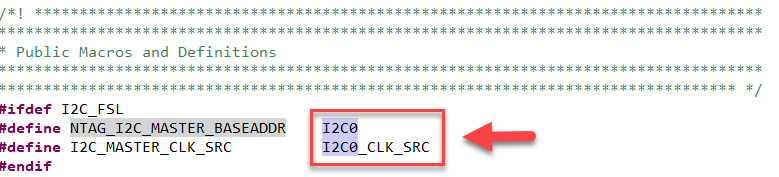
NOTE: Please change the I²C Master base address and I²C Master clock source from I2C1 to I2C0 as below in app_ntag.h:
In hid_device.c make the implementation in BleApp_HandleKeys() as below. This is an extension for BLE pairing and writing NDEF messages to NTAG I²C.
void BleApp_HandleKeys(key_event_t events)
{
#ifdef NTAG_I2C
uint32_t timeout = NDEF_WRITE_TIMEOUT;
// static uint8_t boApplStart = TRUE;
switch (events)
{
case gKBD_EventPressPB1_c: // short press of SW4
{
// if (boApplStart)
// {
/* first time startup */
BleApp_Start();
// boApplStart = FALSE;
// }
// boNDEFState = TRUE; // pairing via NDEF is allowed in case the apk. is running
TurnOffLeds();
/* added to copy the pairing NDEF message to NTAG_I2C chip */
if (NDEF_Demo_Write())
{
// report an error during creating and writing the NDEF message
LED_RED_ON;
}
else
{
// indication of success by orange color on the RGB LED
LED_RED_ON;
LED_GREEN_ON;
}
/* Start advertising timer */
TMR_StartLowPowerTimer(
mNDEFTimerId,
gTmrLowPowerSecondTimer_c,
TmrSeconds(timeout),
NDEFTimerCallback,
NULL);
break;
}
case gKBD_EventPressPB2_c: // short press of SW3
{
TurnOffLeds();
/* added to copy the pairing NDEF message to NTAG_I2C chip */
if (NDEF_Pairing_Write())
{
// report an error during creating and writing the NDEF message
LED_RED_ON;
}
else
{
// indication of success by green color on the RGB LED
LED_GREEN_ON;
}
/* Start advertising timer */
TMR_StartLowPowerTimer(
mNDEFTimerId,
gTmrLowPowerSecondTimer_c,
TmrSeconds(timeout),
NDEFTimerCallback,
NULL);
break;
}
case gKBD_EventLongPB1_c: // long press of SW4
{
if (mPeerDeviceId != gInvalidDeviceId_c)
{
Gap_Disconnect(mPeerDeviceId);
boNDEFState = FALSE;
}
break;
}
case gKBD_EventLongPB2_c: // long press of SW3
{
#if gAppUsePrivacy_d
if( mAdvState.advOn )
{
mAppPrivacyChangeReq = reqOff_c;
/* Stop Advertising Timer*/
TMR_StopTimer(mAdvTimerId);
Gap_StopAdvertising();
}
else if( gBleSuccess_c == BleConnManager_DisablePrivacy() )
{
TMR_StartLowPowerTimer(mPrivacyDisableTimerId, gTmrLowPowerSingleShotMillisTimer_c,
TmrSeconds(mPrivacyDisableDurationSec_c), PrivacyEnableTimerCallback, NULL);
}
#endif
break;
}
default:
break;
}
#else // NTAG_I2C
switch (events)
{
case gKBD_EventPressPB1_c:
{
BleApp_Start();
break;
}
case gKBD_EventPressPB2_c:
{
hidProtocolMode_t protocolMode;
/* Toggle Protocol Mode */
Hid_GetProtocolMode(service_hid, &protocolMode);
protocolMode = (protocolMode == gHid_BootProtocolMode_c)?gHid_ReportProtocolMode_c:gHid_BootProtocolMode_c;
Hid_SetProtocolMode(service_hid, protocolMode);
break;
}
case gKBD_EventLongPB1_c:
{
if (mPeerDeviceId != gInvalidDeviceId_c)
Gap_Disconnect(mPeerDeviceId);
break;
}
case gKBD_EventLongPB2_c:
{
#if gAppUsePrivacy_d
if( mAdvState.advOn )
{
mAppPrivacyChangeReq = reqOff_c;
/* Stop Advertising Timer*/
TMR_StopTimer(mAdvTimerId);
Gap_StopAdvertising();
}
else if( gBleSuccess_c == BleConnManager_DisablePrivacy() )
{
TMR_StartLowPowerTimer(mPrivacyDisableTimerId, gTmrLowPowerSingleShotMillisTimer_c,
TmrSeconds(mPrivacyDisableDurationSec_c), PrivacyEnableTimerCallback, NULL);
}
#endif
break;
}
default:
break;
}
#endif //NTAG_I2C
}Add the declaration of the timer handler in Private memory declarations section of hid_device.c
/************************************************************************************
*************************************************************************************
* Private memory declarations
*************************************************************************************
************************************************************************************/
...
#ifdef NTAG_I2C
static tmrTimerID_t mNDEFTimerId;
static bool boNDEFState = FALSE;
#endifAdd the declaration of the timer callback function in Private functions prototypes of hid_device.c
/************************************************************************************
*************************************************************************************
* Private functions prototypes
*************************************************************************************
************************************************************************************/
...
#ifdef NTAG_I2C
static void NDEFTimerCallback(void *);
#endifAllocate / Initialize the timer
There are 3 timers used within the HID_device demo application. The NDEF timer is also necessary to allocate in the function BleApp_Config() in the hid_device.c file, at the same place as the common timers are allocated. Function TMR_AllocateTimer() returns timer ID value which is stored in the variable mNDEFTimerId. The timer ID allocation must be added behind the other timer as it is done at following C-code printout
/* Allocate application timers */
mAdvTimerId = TMR_AllocateTimer();
mHidDemoTimerId = TMR_AllocateTimer();
mBatteryMeasurementTimerId = TMR_AllocateTimer();
#ifdef NTAG_I2C
mNDEFTimerId = TMR_AllocateTimer();
#endifAdd the timer callback function
It is necessary to add the NDEFTimerCallback() function at the end of the hid_device.c file. If NDEF timer counter expires timer is stopped. Then RGB LED is switched off. There is the printout of the call back function at the following lines.
#ifdef NTAG_I2C
/*! *********************************************************************************
* \brief Handles timer callback for writing NDEF messages
*
* \param[in] pParam Calback parameters.
********************************************************************************** */
static void NDEFTimerCallback(void * pParam)
{
/* Stop Advertising Timer*/
TMR_StopTimer(mNDEFTimerId);
/* switch off the LED indication */
TurnOffLeds();
}
#endif // NTAG_I2CNote: Change the size for timer task in app_preinclude.h file as follows:
/* Defines Size for Timer Task*/
#ifdef NTAG_I2C
#define gTmrTaskStackSize_c 1024 // changed for the NTAG integration
#else
#define gTmrTaskStackSize_c 500
#endifSecurity change
The sample project for adding NTAG I2C middleware is hid_device and is described in chapter 3.1.1. This project requires to enter the password “999999” during the Bluetooth pairing. From this reason is necessary to decrease the security level to remove the password sequence.
Security level is a part of the configuration and is set in the app_config.c file. In this file following parameter must be changed
gSecurityMode_1_Level_3_c
to the new parameter:
gSecurityMode_1_Level_1_c
Parameter gSecurityMode_1_Level_3_c is used on several places within the app_config.c file. Use the FIND function (short key is “CTRL+F”) of the IDE to find it and update.
There are last two parameters of the gPairingParameters structure which are necessary to change.
parameter:
.securityModeAndLevel = gSecurityMode_1_Level_3_c,
has to be changed to:
.securityModeAndLevel = gSecurityMode_1_Level_1_c,
parameter:
.localIoCapabilities = gIoDisplayOnly_c,
has to be changed to:
.localIoCapabilities = gIoNone_c,
parameter
.leSecureConnectionSupported = TRUE,
has to be changed to:
.leSecureConnectionSupported = FALSE,
Symbols
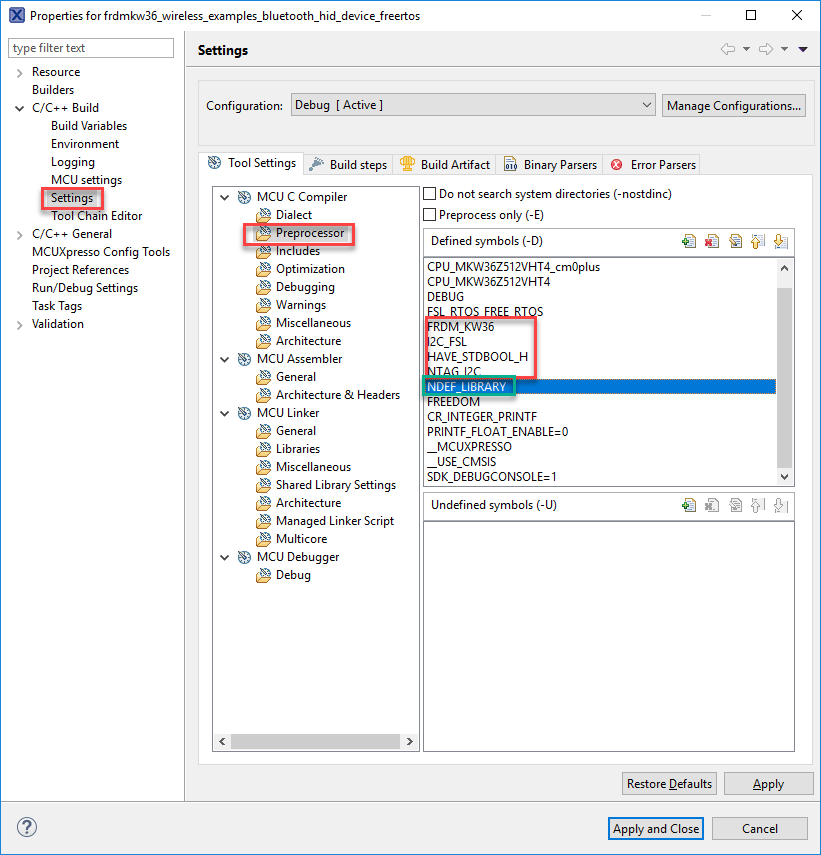
Add the following symbols to project settings -> Preprocessor. The ones in red are for integration of ntag_i2c_plus middleware and the one in green is for adding the NDEF library, please see below:
Include paths
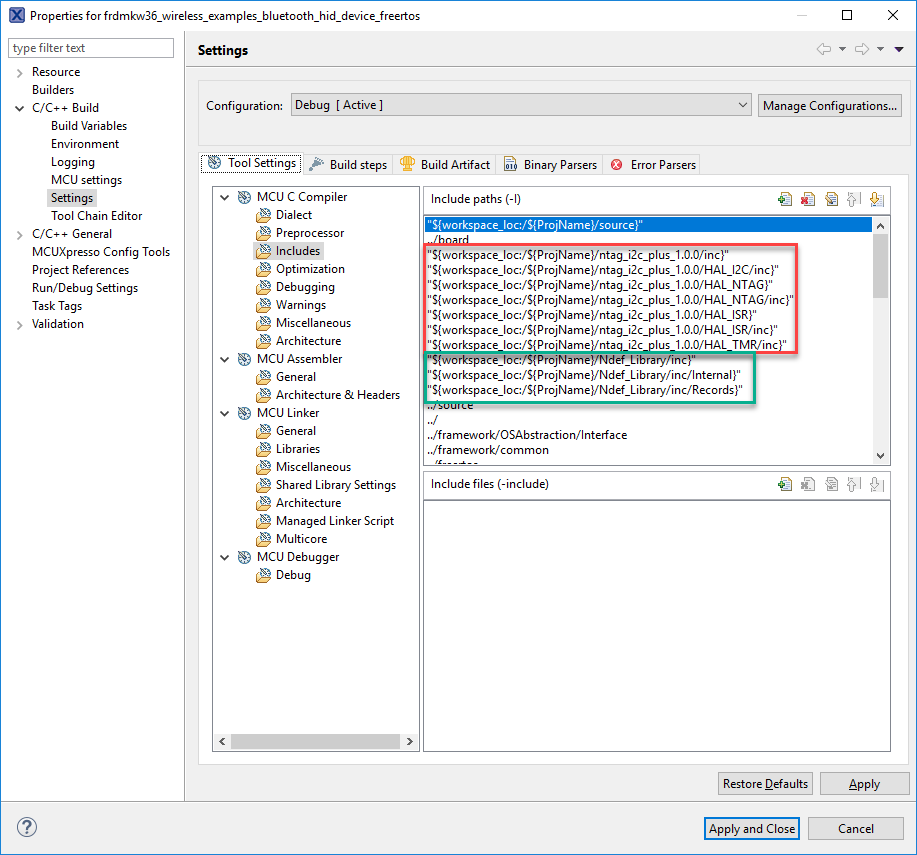
Please add the following includes in project settings. The ones in red are for NTAG I²C Plus middleware and the ones in green for the NDEF Library, please see below:
With the previous setup it shall be able to run Bluetooth pairing example as for FRDM-KW41Z.
Hope this helps!

This support article will demonstrate the differences and similarities between the pairing process for Bluetooth SPP (Serial Port Profile) and Bluetooth Low Energy (BLE). Although these two Bluetooth profiles are commonly used for a variety of applications.
