
- Forums
- Product Forums
- General Purpose MicrocontrollersGeneral Purpose Microcontrollers
- i.MX Forumsi.MX Forums
- QorIQ Processing PlatformsQorIQ Processing Platforms
- Identification and SecurityIdentification and Security
- Power ManagementPower Management
- Wireless ConnectivityWireless Connectivity
- RFID / NFCRFID / NFC
- Advanced AnalogAdvanced Analog
- Neural Processing UnitsNeural Processing Units
- MCX Microcontrollers
- S32G
- S32K
- S32V
- MPC5xxx
- Other NXP Products
- S12 / MagniV Microcontrollers
- Powertrain and Electrification Analog Drivers
- Sensors
- Vybrid Processors
- Digital Signal Controllers
- 8-bit Microcontrollers
- ColdFire/68K Microcontrollers and Processors
- PowerQUICC Processors
- OSBDM and TBDML
- S32M
- S32Z/E
-
- Solution Forums
- Software Forums
- MCUXpresso Software and ToolsMCUXpresso Software and Tools
- CodeWarriorCodeWarrior
- MQX Software SolutionsMQX Software Solutions
- Model-Based Design Toolbox (MBDT)Model-Based Design Toolbox (MBDT)
- FreeMASTER
- eIQ Machine Learning Software
- Embedded Software and Tools Clinic
- S32 SDK
- S32 Design Studio
- GUI Guider
- Zephyr Project
- Voice Technology
- Application Software Packs
- Secure Provisioning SDK (SPSDK)
- Processor Expert Software
- Generative AI & LLMs
-
- Topics
- Mobile Robotics - Drones and RoversMobile Robotics - Drones and Rovers
- NXP Training ContentNXP Training Content
- University ProgramsUniversity Programs
- Rapid IoT
- NXP Designs
- SafeAssure-Community
- OSS Security & Maintenance
- Using Our Community
-
- Cloud Lab Forums
-
- Knowledge Bases
- ARM Microcontrollers
- i.MX Processors
- Identification and Security
- Model-Based Design Toolbox (MBDT)
- QorIQ Processing Platforms
- S32 Automotive Processing Platform
- Wireless Connectivity
- CodeWarrior
- MCUXpresso Suite of Software and Tools
- MQX Software Solutions
- RFID / NFC
- Advanced Analog
- Neural Processing Units
-
- NXP Tech Blogs
- Home
- :
- Model-Based Design Toolbox (MBDT)
- :
- Model-Based Design Toolbox (MBDT)
- :
- Watchdog Error on S32CT (MBDT 1.4.0)
Watchdog Error on S32CT (MBDT 1.4.0)
- Subscribe to RSS Feed
- Mark Topic as New
- Mark Topic as Read
- Float this Topic for Current User
- Bookmark
- Subscribe
- Mute
- Printer Friendly Page
Watchdog Error on S32CT (MBDT 1.4.0)

- Mark as New
- Bookmark
- Subscribe
- Mute
- Subscribe to RSS Feed
- Permalink
- Report Inappropriate Content
Dear NXP,
I want to configure Watchdog via Simulink.
I refer to this article:
Following his suggestion, I used S32DS to open WDG's Example Project to complete the configuration on S32CT.
WDG Example Project location is: TOOLBOX_ROOT\S32K3_RTD\SW32K3_RTD_4.4_R21-11_3.0.0\eclipse\plugins\Wdg_TS_T40D34M30I0R0\examples\S32DS\S32K3XX\Swt_Ip_Example_S32K344
Although I don't get any error on the S32CT configuration, I get an error on the Build Code.

The error message indicates that I am missing the file "AeWdog_Ip_Cfg_Defines.h"
But I can found "AeWdog_Ip_Cfg_Defines.h" in the example project, the path is
TOOLBOX_ROOT\S32K3_RTD\SW32K3_RTD_4.4_R21-11_3.0.0\eclipse\plugins\Wdg_TS_T40D34M30I0R0\generate\include
Can you help me troubleshoot this error?
I attach here my setup steps and environment.My setup up step is:
1. Add Wdg tab:


2. GPT Configuration:


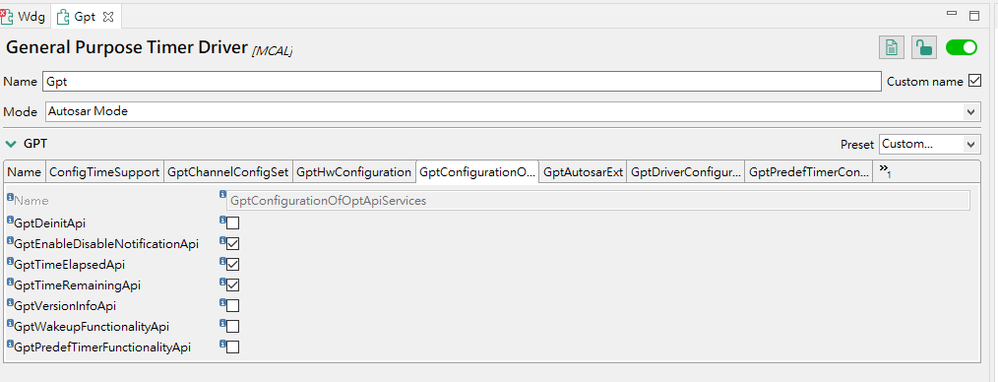

3. MCU Configuration

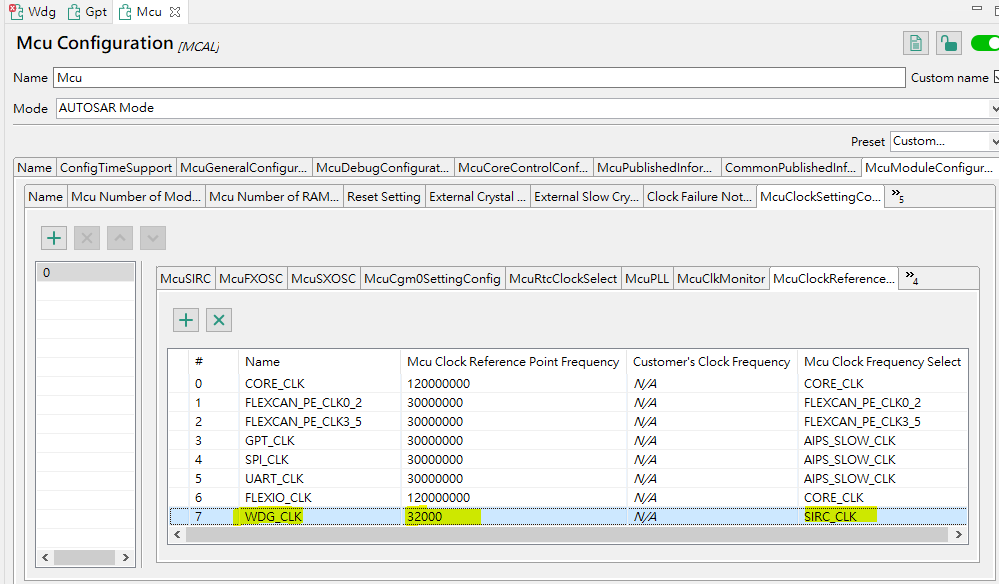


4. WDG Configuration

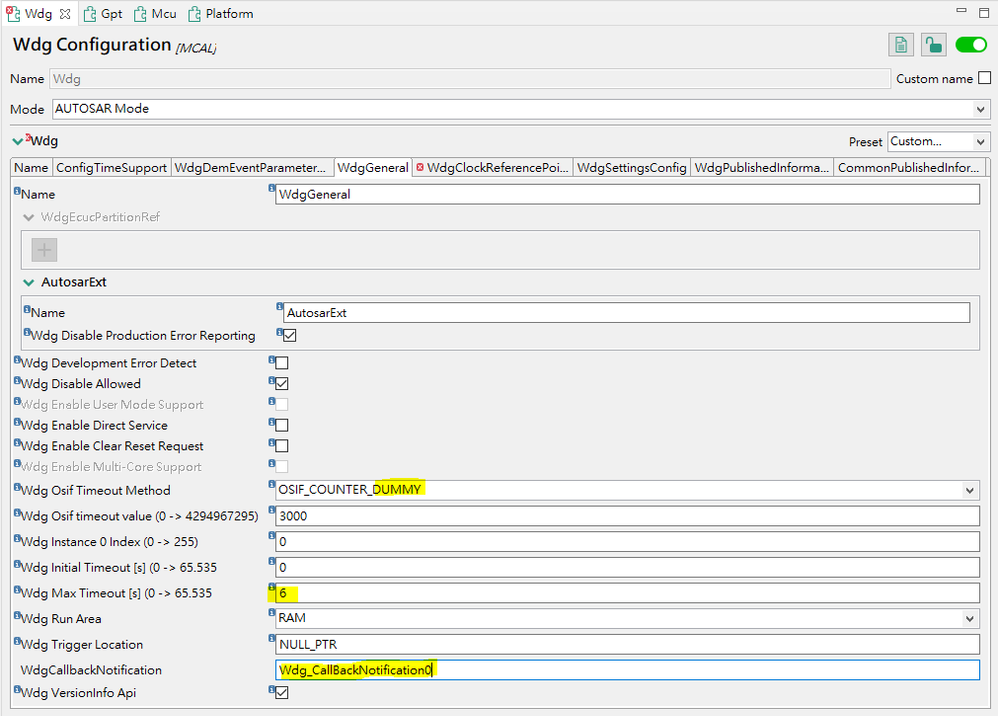
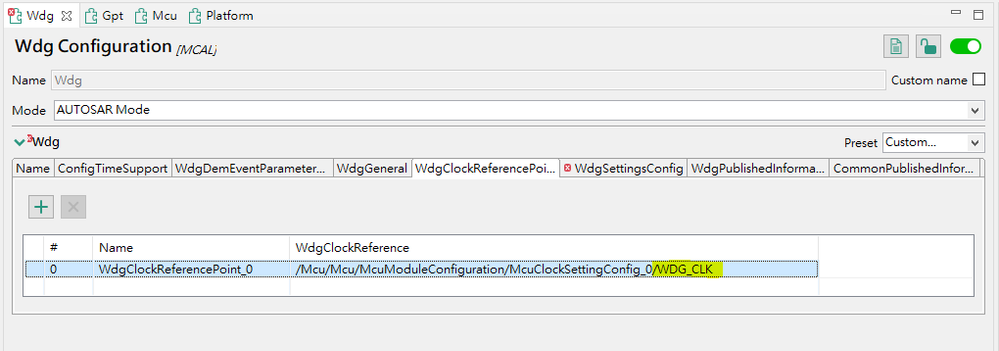


5. Update Code:

My environment is S32K312EVB-Q172, MBDT 1.4.0, Matlab R2021a.
Thanks in advance
- Mark as New
- Bookmark
- Subscribe
- Mute
- Subscribe to RSS Feed
- Permalink
- Report Inappropriate Content
In addition to the above error, I found that I also got the following error:

But the difference is that I checked the Example Project and didn't find "WdgIf_Types.h".
Could you help me to solve this problem, please?
Thanks in advance
- Mark as New
- Bookmark
- Subscribe
- Mute
- Subscribe to RSS Feed
- Permalink
- Report Inappropriate Content
Dear NXP,
Could you please provide any assistance?
