
- Forums
- Product Forums
- General Purpose MicrocontrollersGeneral Purpose Microcontrollers
- i.MX Forumsi.MX Forums
- QorIQ Processing PlatformsQorIQ Processing Platforms
- Identification and SecurityIdentification and Security
- Power ManagementPower Management
- Wireless ConnectivityWireless Connectivity
- RFID / NFCRFID / NFC
- Advanced AnalogAdvanced Analog
- Neural Processing UnitsNeural Processing Units
- MCX Microcontrollers
- S32G
- S32K
- S32V
- MPC5xxx
- Other NXP Products
- S12 / MagniV Microcontrollers
- Powertrain and Electrification Analog Drivers
- Sensors
- Vybrid Processors
- Digital Signal Controllers
- 8-bit Microcontrollers
- ColdFire/68K Microcontrollers and Processors
- PowerQUICC Processors
- OSBDM and TBDML
- S32M
- S32Z/E
-
- Solution Forums
- Software Forums
- MCUXpresso Software and ToolsMCUXpresso Software and Tools
- CodeWarriorCodeWarrior
- MQX Software SolutionsMQX Software Solutions
- Model-Based Design Toolbox (MBDT)Model-Based Design Toolbox (MBDT)
- FreeMASTER
- eIQ Machine Learning Software
- Embedded Software and Tools Clinic
- S32 SDK
- S32 Design Studio
- GUI Guider
- Zephyr Project
- Voice Technology
- Application Software Packs
- Secure Provisioning SDK (SPSDK)
- Processor Expert Software
- Generative AI & LLMs
-
- Topics
- Mobile Robotics - Drones and RoversMobile Robotics - Drones and Rovers
- NXP Training ContentNXP Training Content
- University ProgramsUniversity Programs
- Rapid IoT
- NXP Designs
- SafeAssure-Community
- OSS Security & Maintenance
- Using Our Community
-
- Cloud Lab Forums
-
- Knowledge Bases
- ARM Microcontrollers
- i.MX Processors
- Identification and Security
- Model-Based Design Toolbox (MBDT)
- QorIQ Processing Platforms
- S32 Automotive Processing Platform
- Wireless Connectivity
- CodeWarrior
- MCUXpresso Suite of Software and Tools
- MQX Software Solutions
- RFID / NFC
- Advanced Analog
- Neural Processing Units
-
- NXP Tech Blogs
- Home
- :
- モデルベース・デザイン・ツールボックス(MBDT)
- :
- モデルベース・デザイン・ツールボックス(MBDT)
- :
- Re: Problem with changing linker file for S32K118 (only)
Problem with changing linker file for S32K118 (only)
- RSS フィードを購読する
- トピックを新着としてマーク
- トピックを既読としてマーク
- このトピックを現在のユーザーにフロートします
- ブックマーク
- 購読
- ミュート
- 印刷用ページ

- 新着としてマーク
- ブックマーク
- 購読
- ミュート
- RSS フィードを購読する
- ハイライト
- 印刷
- 不適切なコンテンツを報告
Hi,
we are using S32K1xx MBDT version 4.3.0 (the latest) and Matlab R2022a.
We can't switch default linker file 'S32K118_25_flash.ld' to 'S32K118_25_flash_bam.ld' in 'User Defined Target Memory Definitions' (after unchecking 'Default Target Memory Definitions' option). The 'S32K118_25_flash_bam.ld' is located in the folder "...\MATLAB\Add-Ons\Toolboxes\NXP_MBDToolbox_S32K1xx\mbdtbx_s32k11x\src\linker\gcc" but is not visible by 'MBD_S32K1xx_Config_Information' block. There is no such problem with any other supported microcontroller (like S32K116, S32K144 etc...) ! It means that we can switch the linker files when using other microcontrollers.
How to switch the linker file for S32K118 ?
Please correct me if I'm wrong (below).
To be able to upgrade firmware (in the future), in-field, via UART, we need to
- flash 'S32K118_S32DS_UART1_CAN0.rbf' onto S32K118 MCU using 'S32 DS for Arm'
- prepare and build the model using 'S32K118_25_flash_bam.ld' linker file
- use RAppID Bootloader Tool (RAppID BL Tool) to flash the firmware
Am I right ?
What does 'UART1' and 'CAN0' mean in 'S32K118_S32DS_UART1_CAN0.rbf' file name ?
Does it mean that the bootloader is listening on the UART1 and CAN0 communication peripherals ?
What specific MCU pins should be set as UART RX and TX signals in such scenario (i.e. how to configure hardware to be able to use the bootloader; what specific pins for UART are used by bootloader) ?
Thanks for help
Maciek
解決済! 解決策の投稿を見る。

 stefancinipeanu
- 新着としてマーク
- ブックマーク
- 購読
- ミュート
- RSS フィードを購読する
- ハイライト
- 印刷
- 不適切なコンテンツを報告
Hello @Maciek
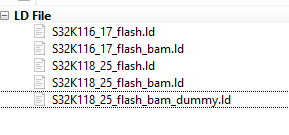
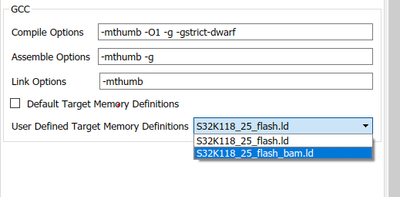
It looks like a bug on our side, we are going to fix it as soon as possible. As an workaround, try to add one more dummy linker file in the {toolbox_path}\mbdtbx_s32k11x\src\linker\gcc, like in the picture below:
It appears that the last file is ignored and the linker file list from dropdown inside the configuration block is not updated correctly.
But as a mention, when using Rappid Bootloader to flash the application on the target, you do not have to change manually the linker file. If you check that Default target memory definitions, then automatically the S32K118_25_flash_bam.ld linker file is going to be used, without any other modifications. In case you have your own custom linker file, then you must uncheck Default target memory definitions option and put your own custom linker file in the {toolbox_path}\mbdtbx_s32k11x\src\linker\gcc path. Also, your custom linker file name must have the following pattern: platformName_sramSize_memory_*.ld where platformName is the name of the MCU (in your case S32K118), sramSize is the memory size of your MCU(for S32K118 is 25) and memory represents the memory where the application is deployed, flash or ram. As an example: s32k118_25_ram_myOwnCustomLinker.ld
Yes, the steps that you`ve enumerated when using Rappid Bootloader are correct, with the upper mention. And indeed, UART1 and CAN0 are the communication instances used by the bootloader to listen on.
As for the last question, the pins for UART1 that are used for the bootloader, you could use PTC6 - J4[2] or PTC8 - J4[6] as RX and PTC7 - J4[4] or PTC9 - J4[9] as TX, but you have to use also an external USB2Serial converter because those pins are not routed to the microUSB port from the S32K118-EVK.

You can flash the S32K116_S32DS_UART0_CAN0.rbf file on the S32K118-EVK and you will be able to use the UART0 TX and RX pins that are routed to the microUSB from the EVK. That will work because both S32K116 and S32K118 have the same UART0 RX and TX pins.
Hope this helps!
Regards!
Stefan.
stefancinipeanu
- 新着としてマーク
- ブックマーク
- 購読
- ミュート
- RSS フィードを購読する
- ハイライト
- 印刷
- 不適切なコンテンツを報告
Hello @Maciek
It looks like a bug on our side, we are going to fix it as soon as possible. As an workaround, try to add one more dummy linker file in the {toolbox_path}\mbdtbx_s32k11x\src\linker\gcc, like in the picture below:
It appears that the last file is ignored and the linker file list from dropdown inside the configuration block is not updated correctly.
But as a mention, when using Rappid Bootloader to flash the application on the target, you do not have to change manually the linker file. If you check that Default target memory definitions, then automatically the S32K118_25_flash_bam.ld linker file is going to be used, without any other modifications. In case you have your own custom linker file, then you must uncheck Default target memory definitions option and put your own custom linker file in the {toolbox_path}\mbdtbx_s32k11x\src\linker\gcc path. Also, your custom linker file name must have the following pattern: platformName_sramSize_memory_*.ld where platformName is the name of the MCU (in your case S32K118), sramSize is the memory size of your MCU(for S32K118 is 25) and memory represents the memory where the application is deployed, flash or ram. As an example: s32k118_25_ram_myOwnCustomLinker.ld
Yes, the steps that you`ve enumerated when using Rappid Bootloader are correct, with the upper mention. And indeed, UART1 and CAN0 are the communication instances used by the bootloader to listen on.
As for the last question, the pins for UART1 that are used for the bootloader, you could use PTC6 - J4[2] or PTC8 - J4[6] as RX and PTC7 - J4[4] or PTC9 - J4[9] as TX, but you have to use also an external USB2Serial converter because those pins are not routed to the microUSB port from the S32K118-EVK.
You can flash the S32K116_S32DS_UART0_CAN0.rbf file on the S32K118-EVK and you will be able to use the UART0 TX and RX pins that are routed to the microUSB from the EVK. That will work because both S32K116 and S32K118 have the same UART0 RX and TX pins.
Hope this helps!
Regards!
Stefan.
- 新着としてマーク
- ブックマーク
- 購読
- ミュート
- RSS フィードを購読する
- ハイライト
- 印刷
- 不適切なコンテンツを報告
