
- Forums
- Product Forums
- General Purpose MicrocontrollersGeneral Purpose Microcontrollers
- i.MX Forumsi.MX Forums
- QorIQ Processing PlatformsQorIQ Processing Platforms
- Identification and SecurityIdentification and Security
- Power ManagementPower Management
- Wireless ConnectivityWireless Connectivity
- RFID / NFCRFID / NFC
- Advanced AnalogAdvanced Analog
- Neural Processing UnitsNeural Processing Units
- MCX Microcontrollers
- S32G
- S32K
- S32V
- MPC5xxx
- Other NXP Products
- S12 / MagniV Microcontrollers
- Powertrain and Electrification Analog Drivers
- Sensors
- Vybrid Processors
- Digital Signal Controllers
- 8-bit Microcontrollers
- ColdFire/68K Microcontrollers and Processors
- PowerQUICC Processors
- OSBDM and TBDML
- S32M
- S32Z/E
-
- Solution Forums
- Software Forums
- MCUXpresso Software and ToolsMCUXpresso Software and Tools
- CodeWarriorCodeWarrior
- MQX Software SolutionsMQX Software Solutions
- Model-Based Design Toolbox (MBDT)Model-Based Design Toolbox (MBDT)
- FreeMASTER
- eIQ Machine Learning Software
- Embedded Software and Tools Clinic
- S32 SDK
- S32 Design Studio
- GUI Guider
- Zephyr Project
- Voice Technology
- Application Software Packs
- Secure Provisioning SDK (SPSDK)
- Processor Expert Software
- Generative AI & LLMs
-
- Topics
- Mobile Robotics - Drones and RoversMobile Robotics - Drones and Rovers
- NXP Training ContentNXP Training Content
- University ProgramsUniversity Programs
- Rapid IoT
- NXP Designs
- SafeAssure-Community
- OSS Security & Maintenance
- Using Our Community
-
- Cloud Lab Forums
-
- Knowledge Bases
- ARM Microcontrollers
- i.MX Processors
- Identification and Security
- Model-Based Design Toolbox (MBDT)
- QorIQ Processing Platforms
- S32 Automotive Processing Platform
- Wireless Connectivity
- CodeWarrior
- MCUXpresso Suite of Software and Tools
- MQX Software Solutions
- RFID / NFC
- Advanced Analog
- Neural Processing Units
-
- NXP Tech Blogs
- Home
- :
- モデルベース・デザイン・ツールボックス(MBDT)
- :
- モデルベース・デザイン・ツールボックス(MBDT)
- :
- Re: No data after SPI slave read sequence in S32K344T172 EVB
No data after SPI slave read sequence in S32K344T172 EVB
- RSS フィードを購読する
- トピックを新着としてマーク
- トピックを既読としてマーク
- このトピックを現在のユーザーにフロートします
- ブックマーク
- 購読
- ミュート
- 印刷用ページ
No data after SPI slave read sequence in S32K344T172 EVB

- 新着としてマーク
- ブックマーク
- 購読
- ミュート
- RSS フィードを購読する
- ハイライト
- 印刷
- 不適切なコンテンツを報告
I am trying to communicate with a IsoSPI transciever using two SPI modules - LPSPI4 as master and LPSPI1 as slave. The master manages to send the data and the device responds by sending data to the slave, yet after saving the read data to a variable the variable seems to be empty (equal to 0). I tried to make an example project without the transciever, just between a S32K344 and S32K144 boards and everything seems to work well, I could see all the data transfered in FreeMaster, but when it comes to communicating with the isoSPI transciever, all of the data variables in FreeMaster are equal to 0x00 without any change through time. I am attaching the project and the configuration since I am unable to find the reason why the read variable is empty when tested on the communication with another device. As mentioned before, the device sends a 48 bit response, the s32k344 evb does not manage to write it to the variable..

 stefanvlad
- 新着としてマーク
- ブックマーク
- 購読
- ミュート
- RSS フィードを購読する
- ハイライト
- 印刷
- 不適切なコンテンツを報告
Hi @ErwinR ,
From last time we discussed Solved: Re: SPI no data transfer in S32K344_T172 MBDT example project - NXP Community
What isolated SPI transceiver or board are you using? The complete setup that you have, maybe a connection diagram ?
NXP does have some isolation transceivers: MC33664 and MC33665A PDF file: Isolated network high-speed transceiver .
Mainly i have seen them being used in the BMS domain,
Stefan V.
- 新着としてマーク
- ブックマーク
- 購読
- ミュート
- RSS フィードを購読する
- ハイライト
- 印刷
- 不適切なコンテンツを報告
Hi @stefanvlad ,
I am using a MC33664 transciever evalboard which is connected to a board with a BCC MC33771C.
I can provide a connection table between the S32K344T172 EVB and the FRDM33664BEVBUG:
| S32K344T172 EVB | FRDM33664BEVBUG | |||
| LPSPI1_SCK | PTB14 | J4-11 | SCLK_TX | J1-9 |
| LPSPI1_PCS3 | PTB17 | J4-5 | CSB_TX | J1-14 |
| LPSPI1_SOUT | PTB16 | J4-7 | DATA_TX | J2-8 |
| LPSPI4_SCK | PTB10 | J4-12 | SCLK_RX | J9-7 |
| LPSPI4_PCS0 | PTC10 | J4-3 | CSB_RX | J9-5 |
| LPSPI4_SIN | PTB11 | J39-11 | DATA_RX | J2-19 |
| INTB | PTB13 | J2-4 | INTB | J1-8 |
| EN | PTB12 | J2-1 | EN | J2-18 |
| 5V | J39-13 | VCC | J9-10 | |
3V3 | J39-10 | VCCIO | J9-8 | |
| GND | GND | J2-14;J9-12;J9-14 |
LPSPI1 is set as Master and LPSPI4 is set as Slave.
The baudrate for both LPSPI peripherals is set to 2MHz.
The master send command works well and the BCC device is able to read the data and send a reply. The problem I've encoutered is with the Slave recieve command, it seems that either the timing of the recieve command is bad or maybe I've missed something while setting up the slave based on the example I was doing from the previous post.
Recently I've tried running the slave recieve block during a hardware interrupt which is triggered after the master send transmission ends. I've added a Led enable block to debug the interrupt.
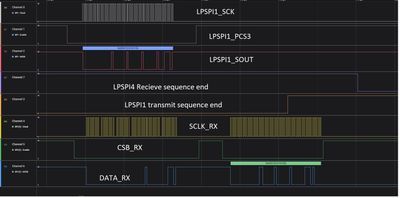
From the logic analysis it seems that the transmit sequence ends in the middle of the recieve sequence, thus LSPSPI4 cannot recieve the whole message. Though I am not entirely sure about that. From the SPI_GetSequenceResult block for LPSPI1 recieve the result is written as 2 which means that the sequence ended in failure.
stefanvlad
- 新着としてマーク
- ブックマーク
- 購読
- ミュート
- RSS フィードを購読する
- ハイライト
- 印刷
- 不適切なコンテンツを報告
Hi @ErwinR ,
After talking with my colleagues from the BMS toolbox, they recommended you install:
MBDT battery management system 1.2.0
NXP Model-Based Design Toolbox for S32K3xx - version 1.4.0
and then use the example inside the BMS toolbox: s32k344_664_774_s32ct
Also please check the Interrupt controller priorities, and check if the SPI priority is lower than the PIT0 step_timer of the model:

Scrolling down the page we can see the LPSPI interrupt priorities:

in this case the PIT_0_ISR interrupt Priority must be higher than the LPSPI_IRQ.
Best regards,
Stefan V.
- 新着としてマーク
- ブックマーク
- 購読
- ミュート
- RSS フィードを購読する
- ハイライト
- 印刷
- 不適切なコンテンツを報告
Hi @stefanvlad ,
Thank you for the suggestion — I’ll try installing those toolboxes. However, MathWorks is currently experiencing an outage due to a ransomware attack. As a result, I’m unable to download the "NXP Support Package for BMS" and the "Support Package for S32K3xx," and it’s unclear how long the MATLAB Add-On servers will be unavailable.
Would it be possible for you to share those packages with me, if you have them available?
Thanks in advance,
Erwin R
stefanvlad
- 新着としてマーク
- ブックマーク
- 購読
- ミュート
- RSS フィードを購読する
- ハイライト
- 印刷
- 不適切なコンテンツを報告
Hi @ErwinR ,
You can download the packages from NXP directly by login into: https://www.nxp.com/webapp/swlicensing/urlRedirect.sp?nextURL=switchaccount
then you can download:
Model-Based Design Toolbox for Battery Management System version 1.2.0 RFP
and
Model-Based Design Toolbox for S32K3xx version 1.4.0
then you need to rename the SW32_MBDT_BMS_1.2.0_D2411.zip to SW32_MBDT_BMS_1.2.0_D2411.mltbx and open it with Matlab to install it.

And for the license file, you need to generate it on the above links, in the tab License Keys:

then you generate the corresponding license.dat by clicking Save All.
And then copy license.dat file in the lic folder:

Last step, go to patches folder, unzip the archive inside, and run the NXP_MBDToolbox_S32K3xx_patch.m script:

Then you can open the s32k344_664_774_s32ct.mdl:

Best regards,
Stefan V.
- 新着としてマーク
- ブックマーク
- 購読
- ミュート
- RSS フィードを購読する
- ハイライト
- 印刷
- 不適切なコンテンツを報告
Hi @stefanvlad ,
I've downloaded the toolboxes a few weeks ago and launched the s32k344_664_774_s32ct.mdl yet I keep having problems with this example. The original project is designed for a BCC 744 device which means it has a different length of TPL data and different commands. I tried modifying the project and configuration tool for the BCC 772C with the C1P1AE core which is similar to the BCC 771C to some point yet the project does not seem to be able to build and upload and gives an error of "Code generation information file does not exist". I tried to find ways on how to modify the configuration tool for the BCC771C yet I can't seem to find the possibilities to launch a succesfull build.
