
- Forums
- Product Forums
- General Purpose MicrocontrollersGeneral Purpose Microcontrollers
- i.MX Forumsi.MX Forums
- QorIQ Processing PlatformsQorIQ Processing Platforms
- Identification and SecurityIdentification and Security
- Power ManagementPower Management
- Wireless ConnectivityWireless Connectivity
- RFID / NFCRFID / NFC
- Advanced AnalogAdvanced Analog
- Neural Processing UnitsNeural Processing Units
- MCX Microcontrollers
- S32G
- S32K
- S32V
- MPC5xxx
- Other NXP Products
- S12 / MagniV Microcontrollers
- Powertrain and Electrification Analog Drivers
- Sensors
- Vybrid Processors
- Digital Signal Controllers
- 8-bit Microcontrollers
- ColdFire/68K Microcontrollers and Processors
- PowerQUICC Processors
- OSBDM and TBDML
- S32M
- S32Z/E
-
- Solution Forums
- Software Forums
- MCUXpresso Software and ToolsMCUXpresso Software and Tools
- CodeWarriorCodeWarrior
- MQX Software SolutionsMQX Software Solutions
- Model-Based Design Toolbox (MBDT)Model-Based Design Toolbox (MBDT)
- FreeMASTER
- eIQ Machine Learning Software
- Embedded Software and Tools Clinic
- S32 SDK
- S32 Design Studio
- GUI Guider
- Zephyr Project
- Voice Technology
- Application Software Packs
- Secure Provisioning SDK (SPSDK)
- Processor Expert Software
- Generative AI & LLMs
-
- Topics
- Mobile Robotics - Drones and RoversMobile Robotics - Drones and Rovers
- NXP Training ContentNXP Training Content
- University ProgramsUniversity Programs
- Rapid IoT
- NXP Designs
- SafeAssure-Community
- OSS Security & Maintenance
- Using Our Community
-
- Cloud Lab Forums
-
- Knowledge Bases
- ARM Microcontrollers
- i.MX Processors
- Identification and Security
- Model-Based Design Toolbox (MBDT)
- QorIQ Processing Platforms
- S32 Automotive Processing Platform
- Wireless Connectivity
- CodeWarrior
- MCUXpresso Suite of Software and Tools
- MQX Software Solutions
- RFID / NFC
- Advanced Analog
- Neural Processing Units
-
- NXP Tech Blogs
- Home
- :
- モデルベース・デザイン・ツールボックス(MBDT)
- :
- モデルベース・デザイン・ツールボックス(MBDT)
- :
- Re: Multiple CAN ID via CAN0 MPC5744P
Multiple CAN ID via CAN0 MPC5744P
- RSS フィードを購読する
- トピックを新着としてマーク
- トピックを既読としてマーク
- このトピックを現在のユーザーにフロートします
- ブックマーク
- 購読
- ミュート
- 印刷用ページ
Multiple CAN ID via CAN0 MPC5744P

- 新着としてマーク
- ブックマーク
- 購読
- ミュート
- RSS フィードを購読する
- ハイライト
- 印刷
- 不適切なコンテンツを報告
Hi,
How can I configure model based toolbox of MPC5744P to be able to receive multiple CAN message on a single channel(CAN0)? I am planning to toggle red LED if I receive one CAN ID and toggle green LED if I receive another CAN ID. I could only receive a single message so far. I have attached my simulink model which is the modified version of the example which came with the toolbox.
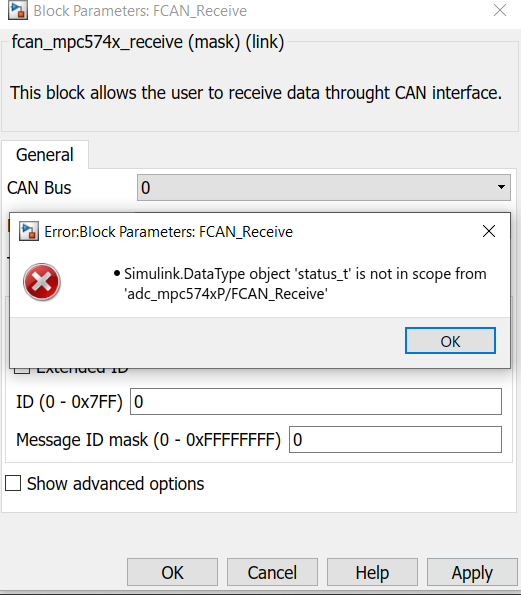
Moreover, I could not select blocking mode in the send or receive block. The following message pops up whenever the blocking mode is chosen.
Thanks!
Joe

 constantinrazva
- 新着としてマーク
- ブックマーク
- 購読
- ミュート
- RSS フィードを購読する
- ハイライト
- 印刷
- 不適切なコンテンツを報告
Hello [email protected],
I have attached here a working model of what you are trying to do. I'll make a list of what I've modified from your version of the model:
- message buffer used - you were using MB15 for both messages; if you want to use the 0xffffffff mask (thus only accepting 1 ID), you need to use 2 separate message buffers (in the model attached, I'm using MB14 for 0x3FE and MB15 for 0x4FE). You could use only 1 message buffer, but using a separate mask (you'll need to accept at least all IDs from 0x3FE to 0x4FE). The masking process is done by AND operator between the ID of the incoming CAN frame and the mask. The result must match the ID set in the CAN receive block. In my analysis of this topic I've noticed that we're using by default the global mask, and I'm attaching a fix for setting the individual mask, so further flexibility is offered.
- the RX ISR - you'll have one ISR block that will give you the following info:
- MB index - on which message buffer the acceptance was made (frame&mask == id)
- ID - the ID of the incoming CAN frame
- Data - the data from the incoming CAN frame
- Length - length of data from the incoming CAN frame
- Timestamp - the time at the arrival in the CAN MB
Using all of these, you can make a switch/case so you can order messages by MB index or actual ID. Usually, you'll configure a few MB to accept a small range of different IDs, all of which are forming some type of class (messages of same type, but from different parts in the system, messages of same importance, etc.). This is up to the user to decide the network topology. First you'll have a switch/case using the MB index - so you can quickly sort out from which 'class' the frame came from, and then, inside each such class, you can filter for ID.
Please update the following file - you can run the attached example even without this update, but in the future you might need this fix. I will be also updating it on the MPC hot fixes page.
{ROOT_DIR}\mbdtbx_mpc574x\mbdtbx_mpc574x\blocks\fcan\fcan_mpc574x_receive.tlc
Please let us know if you are having other issues.
Hope this helps,
Razvan.
- 新着としてマーク
- ブックマーク
- 購読
- ミュート
- RSS フィードを購読する
- ハイライト
- 印刷
- 不適切なコンテンツを報告
Your model was created with 2019a and unfortunately, I am using 2018b now. Could you kindly help me convert the file to be 2018 compatible?
Thanks and best regards,
Joe
constantinrazva
- 新着としてマーク
- ブックマーク
- 購読
- ミュート
- RSS フィードを購読する
- ハイライト
- 印刷
- 不適切なコンテンツを報告
Hello [email protected],
Sorry, I have attached the exported 2018b model here (in .mdl version, so you can change the version if you open it as text (if needed) - although I think this is not recommended by mathworks).
Kind regards,
Razvan.
constantinrazva
- 新着としてマーク
- ブックマーク
- 購読
- ミュート
- RSS フィードを購読する
- ハイライト
- 印刷
- 不適切なコンテンツを報告
Hello [email protected],
I will take a look at your model and get back to you on this topic. But first I'd like to address the other issue - do you have multiple toolboxes from NXP installed? I'd like to get an idea regarding your current setup. Can you run the following MATLAB command and share with me it's output?
ver
I'll get back soon with the other issue.
Kind regards,
Razvan.
- 新着としてマーク
- ブックマーク
- 購読
- ミュート
- RSS フィードを購読する
- ハイライト
- 印刷
- 不適切なコンテンツを報告
Hi Razvan,
Below is the output from my MATLAB.
-----------------------------------------------------------------------------------------------------
MATLAB Version: 9.5.0.944444 (R2018b)
MATLAB License Number: 968398
Operating System: Microsoft Windows 10 Home Single Language Version 10.0 (Build 17763)
Java Version: Java 1.8.0_152-b16 with Oracle Corporation Java HotSpot(TM) 64-Bit Server VM mixed mode
-----------------------------------------------------------------------------------------------------
MATLAB Version 9.5 (R2018b)
Simulink Version 9.2 (R2018b)
Aerospace Blockset Version 4.0 (R2018b)
Aerospace Toolbox Version 3.0 (R2018b)
Antenna Toolbox Version 3.2 (R2018b)
Audio System Toolbox Version 1.5 (R2018b)
Automated Driving System Toolbox Version 1.3 (R2018b)
Bioinformatics Toolbox Version 4.11 (R2018b)
Communications Toolbox Version 7.0 (R2018b)
Computer Vision System Toolbox Version 8.2 (R2018b)
Control System Toolbox Version 10.5 (R2018b)
Curve Fitting Toolbox Version 3.5.8 (R2018b)
DSP System Toolbox Version 9.7 (R2018b)
Data Acquisition Toolbox Version 3.14 (R2018b)
Database Toolbox Version 9.0 (R2018b)
Datafeed Toolbox Version 5.8 (R2018b)
Deep Learning Toolbox Version 12.0 (R2018b)
Econometrics Toolbox Version 5.1 (R2018b)
Embedded Coder Version 7.1 (R2018b)
Filter Design HDL Coder Version 3.1.4 (R2018b)
Financial Instruments Toolbox Version 2.8 (R2018b)
Financial Toolbox Version 5.12 (R2018b)
Fixed-Point Designer Version 6.2 (R2018b)
Fuzzy Logic Toolbox Version 2.4 (R2018b)
GPU Coder Version 1.2 (R2018b)
Global Optimization Toolbox Version 4.0 (R2018b)
HDL Coder Version 3.13 (R2018b)
HDL Verifier Version 5.5 (R2018b)
Image Acquisition Toolbox Version 5.5 (R2018b)
Image Processing Toolbox Version 10.3 (R2018b)
Instrument Control Toolbox Version 3.14 (R2018b)
LTE Toolbox Version 3.0 (R2018b)
MATLAB Coder Version 4.1 (R2018b)
MATLAB Compiler Version 7.0 (R2018b)
MATLAB Compiler SDK Version 6.6 (R2018b)
MATLAB Report Generator Version 5.5 (R2018b)
Mapping Toolbox Version 4.7 (R2018b)
Model Predictive Control Toolbox Version 6.2 (R2018b)
Model-Based Calibration Toolbox Version 5.5 (R2018b)
Model-Based Design Toolbox for MPC57xx Series Version 3.0.0 (R2017a-R2018b)
OPC Toolbox Version 4.0.6 (R2018b)
Optimization Toolbox Version 8.2 (R2018b)
Parallel Computing Toolbox Version 6.13 (R2018b)
Partial Differential Equation Toolbox Version 3.1 (R2018b)
Phased Array System Toolbox Version 4.0 (R2018b)
Polyspace Bug Finder Version 2.6 (R2018b)
Polyspace Code Prover Version 9.10 (R2018b)
Powertrain Blockset Version 1.4 (R2018b)
Predictive Maintenance Toolbox Version 1.1 (R2018b)
RF Toolbox Version 3.5 (R2018b)
Robotics System Toolbox Version 2.1 (R2018b)
Robust Control Toolbox Version 6.5 (R2018b)
Sensor Fusion and Tracking Toolbox Version 1.0 (R2018b)
Signal Processing Toolbox Version 8.1 (R2018b)
SimBiology Version 5.8.1 (R2018b)
SimEvents Version 5.5 (R2018b)
Simscape Version 4.5 (R2018b)
Simscape Driveline Version 2.15 (R2018b)
Simscape Electrical Version 7.0 (R2018b)
Simscape Fluids Version 2.5 (R2018b)
Simscape Multibody Version 6.0 (R2018b)
Simulink 3D Animation Version 8.1 (R2018b)
Simulink Check Version 4.2 (R2018b)
Simulink Code Inspector Version 3.3 (R2018b)
Simulink Coder Version 9.0 (R2018b)
Simulink Control Design Version 5.2 (R2018b)
Simulink Coverage Version 4.2 (R2018b)
Simulink Design Optimization Version 3.5 (R2018b)
Simulink Design Verifier Version 4.0 (R2018b)
Simulink Desktop Real-Time Version 5.7 (R2018b)
Simulink PLC Coder Version 2.6 (R2018b)
Simulink Real-Time Version 6.9 (R2018b)
Simulink Report Generator Version 5.5 (R2018b)
Simulink Requirements Version 1.2 (R2018b)
Simulink Test Version 2.5 (R2018b)
Spreadsheet Link Version 3.4 (R2018b)
Stateflow Version 9.2 (R2018b)
Statistics and Machine Learning Toolbox Version 11.4 (R2018b)
Symbolic Math Toolbox Version 8.2 (R2018b)
System Identification Toolbox Version 9.9 (R2018b)
Vehicle Dynamics Blockset Version 1.1 (R2018b)
Vehicle Network Toolbox Version 4.1 (R2018b)
Vision HDL Toolbox Version 1.7 (R2018b)
WLAN Toolbox Version 2.0 (R2018b)
Wavelet Toolbox Version 5.1 (R2018b)
Best Regards,
Joe
constantinrazva
- 新着としてマーク
- ブックマーク
- 購読
- ミュート
- RSS フィードを購読する
- ハイライト
- 印刷
- 不適切なコンテンツを報告
Hello [email protected],
I am not able to reproduce your problem using your MATLAB version and that version of the toolbox.
Can you try and reset the MATLAB path? For that you should go to MATLAB Home tab -> Set Path -> Click on Default -> Then click on Save.

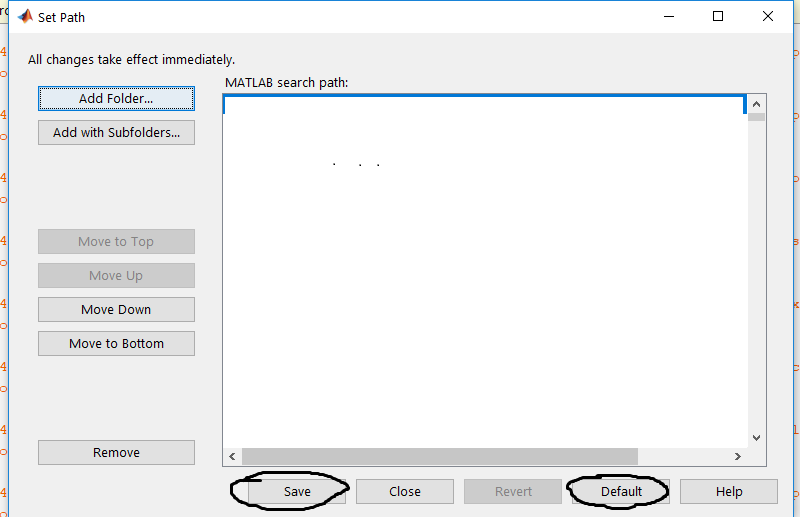
and then run the mbd_s32k_path mbd_mpc_path script so you install the path for the toolbox over a fresh, default MATLAB path.
Note: you will lose other paths other than the default + S32K MPC57xx toolbox paths by doing this. Consider saving the current contents of your MATLAB path (you can get it by typing matlabpath in the MATLAB terminal for instance).
Note: this file is located in {INSTALL_ROOT}/src.
Kind regards,
Razvan.
- 新着としてマーク
- ブックマーク
- 購読
- ミュート
- RSS フィードを購読する
- ハイライト
- 印刷
- 不適切なコンテンツを報告
I could only find mbd_mpc_path.m in the directory and I have run this script after restoring to the default MATLAB path.
But, I still have the same problem.
Best regards,
Joe
constantinrazva
- 新着としてマーク
- ブックマーク
- 購読
- ミュート
- RSS フィードを購読する
- ハイライト
- 印刷
- 不適切なコンテンツを報告
Hello [email protected],
You are correct - the script is mbd_mpc_path - the one I mentioned is for S32K toolbox [I've edited my previous answer to be correct].
I will keep trying to reproduce this issue, but until I can not do that, I don't know how to fix it. But the model I've sent you works as expected? And is it clear what I've explained below (MBs, IDs, filtering, etc.)?
Will get back to you once I've reproduced the issue.
Kind regards,
Razvan.
- 新着としてマーク
- ブックマーク
- 購読
- ミュート
- RSS フィードを購読する
- ハイライト
- 印刷
- 不適切なコンテンツを報告
Thank you for your support. I could receive the messages when I used different buffer with same mask, but I could only receive one CAN message when I used the same buffer with a different mask.
I am having trouble understanding the following message from your reply. Do you have some sort of example to show how it works?
" Using all of these, you can make a switch/case so you can order messages by MB index or actual ID. Usually, you'll configure a few MB to accept a small range of different IDs, all of which are forming some type of class (messages of same type, but from different parts in the system, messages of same importance, etc.). This is up to the user to decide the network topology. First you'll have a switch/case using the MB index - so you can quickly sort out from which 'class' the frame came from, and then, inside each such class, you can filter for ID."
Thanks again and best regards,
Joe
constantinrazva
- 新着としてマーク
- ブックマーク
- 購読
- ミュート
- RSS フィードを購読する
- ハイライト
- 印刷
- 不適切なコンテンツを報告
Hello [email protected],
I'll answer your questions, one by one:
Thank you for your support. I could receive the messages when I used different buffer with same mask, but I could only receive only one CAN message when I used the same buffer with a different mask.
Did you use 2 blocks setting up the same MB? That is what I understand, and that is not what I meant. I was trying to say to input a mask which will accept more IDs. Lets take the following example: set the mask to 0xFFFFF0FF, and the ID to 0xFE. This way, you can get the following range of IDs: [0x0FE; 0xFFE]. This is because 0x0FE & 0xFFFFF0FF will give the same result as 0xFFE & 0xFFFFF0FF (=0xFE, the ID you've set for the specified MB). This is just an example. You can narrow the mask to narrow the acceptance interval if you'd like.
Furthermore, when I replaced the old .tlc file with the one you provided, I keep receiving an error saying that the new .tlc could not be opened for reading. Is there any update I need to do before replacing the .tlc file?
There is nothing more to be done after replacing the tlc I've sent. This is a bit strange. Could you restart MATLAB or check if something is locking that file? Could you try restarting the computer if nothing else works?
Lastly, I am having trouble understanding the following message from your reply. Do you have some sort of example to show how it works?
" Using all of these, you can make a switch/case so you can order messages by MB index or actual ID. Usually, you'll configure a few MB to accept a small range of different IDs, all of which are forming some type of class (messages of same type, but from different parts in the system, messages of same importance, etc.). This is up to the user to decide the network topology. First you'll have a switch/case using the MB index - so you can quickly sort out from which 'class' the frame came from, and then, inside each such class, you can filter for ID."
I will leave you some pseudocode example to make my idea more clear.
So we have several outputs from the CAN ISR block, among which we have:
- MB index - the index of the MB that has triggered this ISR
- ID - the ID inside the CAN frame for this specific message (that triggered this ISR)
With this information, we can do the following:
switch(MB index):
case 1:
handle_mb1_messages
case 2:
handle_mb2_messages
[etc]
end
Keep in mind that for MB1 we have decided to accept more IDs (let's take for example [0x0FE; 0xFFE] as in the previous example. Lets say that we have important messages from safety components here (lower IDs have higher importance, lower MBs have higher importance).
And in the handle_mb1_message function we have:
handle_mb1_messages:
switch(ID):
case 0x0FE:
/* got safety message 1; react */
case 0x4FE:
/* got safety message 2; react */
end
end
This is another approach to only having 1 big switch(ID), without looking at the MB index, which would look like this:
switch(ID):
case 0x0FE:
[..]
case 0x4FE:
[..]
case 0xF3F4:
/* code that would otherwise be ran only on handle_mb2_messages() */
case 0xF4F4:
/* code that would otherwise be ran only on handle_mb3_message() */
[etc]
end
Please let me know if things are more clear now.
Kind regards,
Razvan.
