
- Forums
- Product Forums
- General Purpose MicrocontrollersGeneral Purpose Microcontrollers
- i.MX Forumsi.MX Forums
- QorIQ Processing PlatformsQorIQ Processing Platforms
- Identification and SecurityIdentification and Security
- Power ManagementPower Management
- Wireless ConnectivityWireless Connectivity
- RFID / NFCRFID / NFC
- Advanced AnalogAdvanced Analog
- Neural Processing UnitsNeural Processing Units
- MCX Microcontrollers
- S32G
- S32K
- S32V
- MPC5xxx
- Other NXP Products
- S12 / MagniV Microcontrollers
- Powertrain and Electrification Analog Drivers
- Sensors
- Vybrid Processors
- Digital Signal Controllers
- 8-bit Microcontrollers
- ColdFire/68K Microcontrollers and Processors
- PowerQUICC Processors
- OSBDM and TBDML
- S32M
- S32Z/E
-
- Solution Forums
- Software Forums
- MCUXpresso Software and ToolsMCUXpresso Software and Tools
- CodeWarriorCodeWarrior
- MQX Software SolutionsMQX Software Solutions
- Model-Based Design Toolbox (MBDT)Model-Based Design Toolbox (MBDT)
- FreeMASTER
- eIQ Machine Learning Software
- Embedded Software and Tools Clinic
- S32 SDK
- S32 Design Studio
- GUI Guider
- Zephyr Project
- Voice Technology
- Application Software Packs
- Secure Provisioning SDK (SPSDK)
- Processor Expert Software
- Generative AI & LLMs
-
- Topics
- Mobile Robotics - Drones and RoversMobile Robotics - Drones and Rovers
- NXP Training ContentNXP Training Content
- University ProgramsUniversity Programs
- Rapid IoT
- NXP Designs
- SafeAssure-Community
- OSS Security & Maintenance
- Using Our Community
-
- Cloud Lab Forums
-
- Knowledge Bases
- ARM Microcontrollers
- i.MX Processors
- Identification and Security
- Model-Based Design Toolbox (MBDT)
- QorIQ Processing Platforms
- S32 Automotive Processing Platform
- Wireless Connectivity
- CodeWarrior
- MCUXpresso Suite of Software and Tools
- MQX Software Solutions
- RFID / NFC
- Advanced Analog
- Neural Processing Units
-
- NXP Tech Blogs
- Home
- :
- Model-Based Design Toolbox (MBDT)
- :
- Model-Based Design Toolbox (MBDT)
- :
- MPC5775E - Generate PWM and Evaluate Resolver in MBDT without eTPU
MPC5775E - Generate PWM and Evaluate Resolver in MBDT without eTPU
- Subscribe to RSS Feed
- Mark Topic as New
- Mark Topic as Read
- Float this Topic for Current User
- Bookmark
- Subscribe
- Mute
- Printer Friendly Page
MPC5775E - Generate PWM and Evaluate Resolver in MBDT without eTPU

- Mark as New
- Bookmark
- Subscribe
- Mute
- Subscribe to RSS Feed
- Permalink
- Report Inappropriate Content
Hello Community,
I want to develop motor control application software for a MCSPTR2A5775E motor kit with MPC5775E board using the MBDT. Unfortunately, the MBDT is missing critical functions for a standard motor control application. Specifically, I am facing the following problem:
Two essential functions, the evaluation of resolver/speed feedback and generation of the three phase PWM output signals, are realized using the eTPU peripheral. The MBDT does not feature blocks/functions set up the eTPU related functions. This was confirmed by NXP, see answer in an earlier topic:
Hence, I am trying to find a way to create the above functions without eTPU. I want to share with you my approach and to kindly ask the support to answer my questions.
Alternative Solution for Resolver Feedback:
The resolver COS and SIN feedback is normally evaluated through SDADC, as stated in the application note:
- Sine --> SDADC 1: M_ANA0_SDA0 ANA0 /SDA0
- Cosine --> SDADC 4 M_ANB0_SDD0 ANB0 /SDD0
Since SDACD is not available, EQADC might be used instead. I would configure the EQADC as follows (example for COS evaluation on channel ANB0):
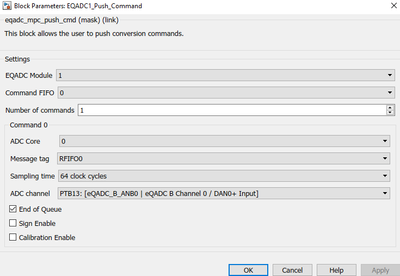
Question for support:
- In general: is this possible?
- Can you confirm the followin: With this approach I "loose" two EQADC channels, which are normally needed to read the current and voltage measurements. I understood, that this board does only have a max. of 4 EQADC channels.
Alternative Solution for Resolver Excitation:
Resolver excitation is done using ETPUA6 /GPIO120. To bypass the eTPU I intend to write a 10kHz square wave signal directly to the GPIO120 pin (PTD24):
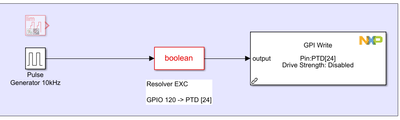
Question for support:
- Is this approach feasible?
- If not, what else can I use?
Alternative Solution for Three Phase PWM:
According to the application note the kit uses the following eTPU channels and pins (GPIOM 130...135) for the PWM generation/output:
- ETPUA16 /GPIO130 PWMM Phase A High
- ETPUA17 /GPIO131 PWMM Phase A Low
- ETPUA18 /GPIO132 PWMM Phase B High
- ETPUA19 /GPIO133 PWMM Phase B Low
- ETPUA20 /GPIO134 PWMM Phase C High
- ETPUA21 /GPIO135 PWMM Phase C Low
Since eTPU cannot be used, I scanned the documentation and communities for alternative solutions:
- FlexPWM: The motor control demo examples for MPC5774 use flexpwm blocks, which (from my understanding) are not available for MPC5775E. --> not an option
- eMIOS: this thread https://community.nxp.com/t5/Model-Based-Design-Toolbox-MBDT/MPC5777-MBD-ADC-Module/m-p/1212272 proposes to use eMIOS channels for PWM creation. I had a look and I found that neither eMIOS channel is connected to the correct pins (GPIOM 130...135).
My questions @mariuslucianand:
- How can I access the right GPIOM pins with eMIOS?
- Can the pin-Assignment be rearranged?
- If this is not possible, what else can I do? Write to GPIOM pins directly?
Thank you so much for reading such a long text and many thanks in advance for help.
Nils
- Mark as New
- Bookmark
- Subscribe
- Mute
- Subscribe to RSS Feed
- Permalink
- Report Inappropriate Content
Hi @NilsTro and Community,
I am in trying to figure out how it works - measuring the resolver and PWM signals.
Would you be able to advise how it work and its principle please?
Thanks
Chi
- Mark as New
- Bookmark
- Subscribe
- Mute
- Subscribe to RSS Feed
- Permalink
- Report Inappropriate Content
Hello TLin3,
It is great to hear from a peer. Unfortunately, we never succeeded with this and ended up using the C-Code firmware. However, recently we switched to Texas Instruments motor drivers which work excellent with Simulink.
Sorry that I cant help you. We were more than disappointed by the wrong advertisement for this kit and the poor / not existing support.
Best regards
Nils

- Mark as New
- Bookmark
- Subscribe
- Mute
- Subscribe to RSS Feed
- Permalink
- Report Inappropriate Content
Can you share the motor driver you use?
- Mark as New
- Bookmark
- Subscribe
- Mute
- Subscribe to RSS Feed
- Permalink
- Report Inappropriate Content
Hi
I am working on the same DevKit, and wondering that has this topic been fixed?
Would you please advise the way to work in the simulink model, please?
- Mark as New
- Bookmark
- Subscribe
- Mute
- Subscribe to RSS Feed
- Permalink
- Report Inappropriate Content
Hello Community,
I am really wondering, if I am the only person around here that tries to use the MCSPTR2A5775E motor kit with MBDT. I would really appreciate any help.
Nils
