
- Forums
- Product Forums
- General Purpose MicrocontrollersGeneral Purpose Microcontrollers
- i.MX Forumsi.MX Forums
- QorIQ Processing PlatformsQorIQ Processing Platforms
- Identification and SecurityIdentification and Security
- Power ManagementPower Management
- Wireless ConnectivityWireless Connectivity
- RFID / NFCRFID / NFC
- Advanced AnalogAdvanced Analog
- MCX Microcontrollers
- S32G
- S32K
- S32V
- MPC5xxx
- Other NXP Products
- S12 / MagniV Microcontrollers
- Powertrain and Electrification Analog Drivers
- Sensors
- Vybrid Processors
- Digital Signal Controllers
- 8-bit Microcontrollers
- ColdFire/68K Microcontrollers and Processors
- PowerQUICC Processors
- OSBDM and TBDML
- S32M
- S32Z/E
-
- Solution Forums
- Software Forums
- MCUXpresso Software and ToolsMCUXpresso Software and Tools
- CodeWarriorCodeWarrior
- MQX Software SolutionsMQX Software Solutions
- Model-Based Design Toolbox (MBDT)Model-Based Design Toolbox (MBDT)
- FreeMASTER
- eIQ Machine Learning Software
- Embedded Software and Tools Clinic
- S32 SDK
- S32 Design Studio
- GUI Guider
- Zephyr Project
- Voice Technology
- Application Software Packs
- Secure Provisioning SDK (SPSDK)
- Processor Expert Software
- Generative AI & LLMs
-
- Topics
- Mobile Robotics - Drones and RoversMobile Robotics - Drones and Rovers
- NXP Training ContentNXP Training Content
- University ProgramsUniversity Programs
- Rapid IoT
- NXP Designs
- SafeAssure-Community
- OSS Security & Maintenance
- Using Our Community
-
- Cloud Lab Forums
-
- Knowledge Bases
- ARM Microcontrollers
- i.MX Processors
- Identification and Security
- Model-Based Design Toolbox (MBDT)
- QorIQ Processing Platforms
- S32 Automotive Processing Platform
- Wireless Connectivity
- CodeWarrior
- MCUXpresso Suite of Software and Tools
- MQX Software Solutions
- RFID / NFC
- Advanced Analog
-
- NXP Tech Blogs
- Home
- :
- Model-Based Design Toolbox (MBDT)
- :
- Model-Based Design Toolbox (MBDT)
- :
- Download code created with MBDT for S32K to UM11310 HV Battery management system?
Download code created with MBDT for S32K to UM11310 HV Battery management system?
- Subscribe to RSS Feed
- Mark Topic as New
- Mark Topic as Read
- Float this Topic for Current User
- Bookmark
- Subscribe
- Mute
- Printer Friendly Page
Download code created with MBDT for S32K to UM11310 HV Battery management system?

- Mark as New
- Bookmark
- Subscribe
- Mute
- Subscribe to RSS Feed
- Permalink
- Report Inappropriate Content
- System: Windows 10
- MATLAB Version: 2020a
- NXP Model-Based Design Toolbox for S32K1xx MCUs, version 4.2.0
- UM11310 HV Battery management system
I'm trying to download code created with Simulink to the UM11310 HV Battery management system. This has a JTAG port but no serial port. So far, I haven't been successful. Are there any procedures on this?

 mariuslucianand
- Mark as New
- Bookmark
- Subscribe
- Mute
- Subscribe to RSS Feed
- Permalink
- Report Inappropriate Content
Hello @cjjohnson ,
Unfortunately, from the Simulink environment, you can only download the code either via USB and OpenSDA. So for now, you have to manually download the generated elf using the S32DS for ARM.
To do that, please install the S32DS for ARM alongside with the S32SDK for S32K1xx. You don't have to import the whole generated code in the S32DS. You can follow these steps:
1. Open S32DS for ARM
2. File -> New -> S32DS project from example. Choose hello_world_s32k144
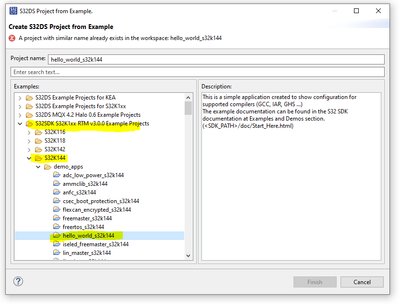
3. once the project has been imported, go to flash button, Browse for the generated .elf, check Disable autobuild
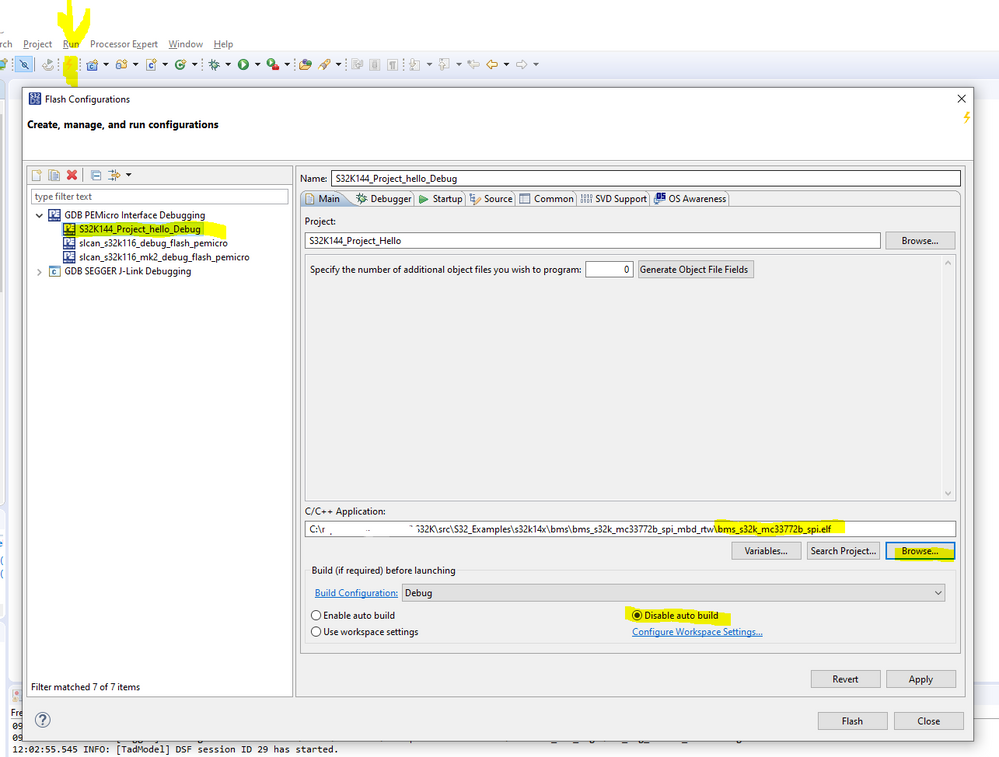
4. Go to the next tab, Debugger, make sure you have a JTAG probe connected to the S32K and detected( I am using the OpenSDA).
5. Press the Flash button, and now the code should run on the S32K.
Hope this helps,
Marius
- Mark as New
- Bookmark
- Subscribe
- Mute
- Subscribe to RSS Feed
- Permalink
- Report Inappropriate Content
@mariuslucianandThank you for your help. I got an error on step 5, after pressing Flash. Unfortunately, the information in the error message was not very helpful. I am using the USB Multilink.
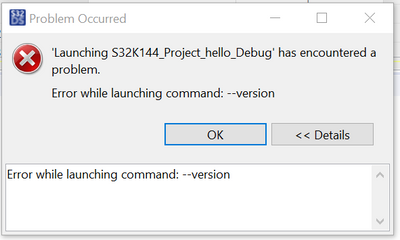
I tried to flash a few times after changing different options. I got the same error message after every attempt. There were 2 device options for the S32K144 and I tried them both.

- Mark as New
- Bookmark
- Subscribe
- Mute
- Subscribe to RSS Feed
- Permalink
- Report Inappropriate Content
@mariuslucianandAn internet search got me to the following NXP community answer. https://community.nxp.com/t5/S32K/Error-while-launching-command-version/m-p/689231/highlight/true
That seemed to change something and now I get a different error message.
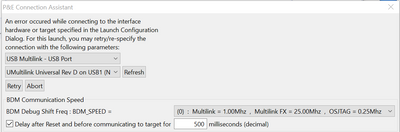
mariuslucianand
- Mark as New
- Bookmark
- Subscribe
- Mute
- Subscribe to RSS Feed
- Permalink
- Report Inappropriate Content
Hello @ranulf ,
I usually get this error when the controller is not powered up or the JTAG probe is connected reversed. In any case, the probe can not access the controller. So please check first the power. Also, Multilink has two LEDs, I think both of them has to be powered up when the connections are fine.
From the screenshots attached, the controller selection seems to be fine.
I had a look at the HV BMS User manual here https://www.nxp.com/docs/en/user-guide/UM11310.pdf
Chapters 4 and 5 describe how to configure the hardware and also how to test a C code example. Can you please give this a try? If this code example works, we can start flashing the generated code from Simulink.
Hope this helps,
Marius
- Mark as New
- Bookmark
- Subscribe
- Mute
- Subscribe to RSS Feed
- Permalink
- Report Inappropriate Content
Thank you @mariuslucianand
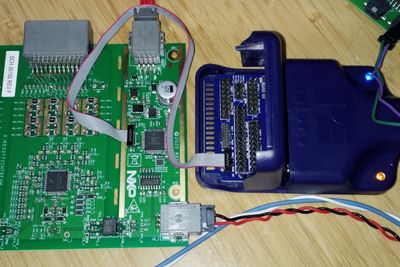
It turns out that the orientation of one of the plugs for the cable connecting the board to the Multilink was reversed. Good suggestion. The correct orientation is shown in the photo. I have now loaded simple Simulink code that flashes the LED. It works!
mariuslucianand
- Mark as New
- Bookmark
- Subscribe
- Mute
- Subscribe to RSS Feed
- Permalink
- Report Inappropriate Content
Hello @ranulf
I am so glad it works and my suggestion got to you so fast!
For this setup, I hope this article can be a good starting point. It explains how to perform data acquisition on the TPL bus. You only have to check (and change them, if needs be) the two SPI peripherals pins that connect S32K with the MC33664 and should work.
Regards,
Marius
