
- Forums
- Product Forums
- General Purpose MicrocontrollersGeneral Purpose Microcontrollers
- i.MX Forumsi.MX Forums
- QorIQ Processing PlatformsQorIQ Processing Platforms
- Identification and SecurityIdentification and Security
- Power ManagementPower Management
- Wireless ConnectivityWireless Connectivity
- RFID / NFCRFID / NFC
- Advanced AnalogAdvanced Analog
- Neural Processing UnitsNeural Processing Units
- MCX Microcontrollers
- S32G
- S32K
- S32V
- MPC5xxx
- Other NXP Products
- S12 / MagniV Microcontrollers
- Powertrain and Electrification Analog Drivers
- Sensors
- Vybrid Processors
- Digital Signal Controllers
- 8-bit Microcontrollers
- ColdFire/68K Microcontrollers and Processors
- PowerQUICC Processors
- OSBDM and TBDML
- S32M
- S32Z/E
-
- Solution Forums
- Software Forums
- MCUXpresso Software and ToolsMCUXpresso Software and Tools
- CodeWarriorCodeWarrior
- MQX Software SolutionsMQX Software Solutions
- Model-Based Design Toolbox (MBDT)Model-Based Design Toolbox (MBDT)
- FreeMASTER
- eIQ Machine Learning Software
- Embedded Software and Tools Clinic
- S32 SDK
- S32 Design Studio
- GUI Guider
- Zephyr Project
- Voice Technology
- Application Software Packs
- Secure Provisioning SDK (SPSDK)
- Processor Expert Software
- Generative AI & LLMs
-
- Topics
- Mobile Robotics - Drones and RoversMobile Robotics - Drones and Rovers
- NXP Training ContentNXP Training Content
- University ProgramsUniversity Programs
- Rapid IoT
- NXP Designs
- SafeAssure-Community
- OSS Security & Maintenance
- Using Our Community
-
- Cloud Lab Forums
-
- Knowledge Bases
- ARM Microcontrollers
- i.MX Processors
- Identification and Security
- Model-Based Design Toolbox (MBDT)
- QorIQ Processing Platforms
- S32 Automotive Processing Platform
- Wireless Connectivity
- CodeWarrior
- MCUXpresso Suite of Software and Tools
- MQX Software Solutions
- RFID / NFC
- Advanced Analog
- Neural Processing Units
-
- NXP Tech Blogs
- Home
- :
- モデルベース・デザイン・ツールボックス(MBDT)
- :
- モデルベース・デザイン・ツールボックス(MBDT)
- :
- Re: Difference btw SIL and PIL due to an error
Difference btw SIL and PIL due to an error
- RSS フィードを購読する
- トピックを新着としてマーク
- トピックを既読としてマーク
- このトピックを現在のユーザーにフロートします
- ブックマーク
- 購読
- ミュート
- 印刷用ページ
Difference btw SIL and PIL due to an error

- 新着としてマーク
- ブックマーク
- 購読
- ミュート
- RSS フィードを購読する
- ハイライト
- 印刷
- 不適切なコンテンツを報告
Hello everyone,
I have a complex Simulink model on my computer. When I want to use SIL, i can make it operate. It works great.
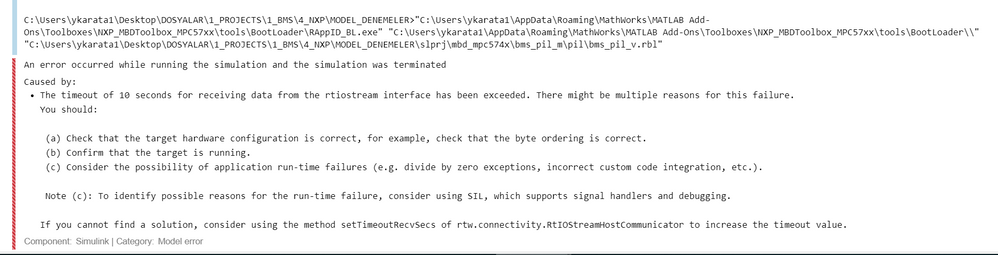
When I convert it to PIL, it gives me, error that I have shared related image below. By having in my mind that I can make a simple PIL model in the same processor and using same configuration in both simple and complex model, I do not think that Causes a and b is not the problem.
I think Cause c is the real problem here. If so,
Since C code is generated in SIL also, What is the problem with PIL? Both generates C code and implement it. SIL operates C code on my computer, PIL operates C code on Processor.
For detecting subsystems that prevent PIL from operating, I created a blank model and added subsystem of complex model one by one and tried PIL method for each step. My goal was detecting subsystems that is not suitable with PIL. But I have an enormous model and that takes a lot of time. Also since PIL has it own rules, it takes great effort at each step.
My Questions here are:
1. Why PIL do not operate while same model operate succesfully at SIL ?
2. How can I learn, debug easily which subsytem causes PIL to not work ?
Thanks.

 constantinrazva
- 新着としてマーク
- ブックマーク
- 購読
- ミュート
- RSS フィードを購読する
- ハイライト
- 印刷
- 不適切なコンテンツを報告
Hello [email protected] ,
I understand your frustration, but there is no simple answer I can give on why it is not working in PIL mode. The timeout can be caused by more factors so it would be helpful if you could give us more details regarding the model: are you using any peripheral blocks? Are you using blocks for interrupts? Do you know if the application has crashed? (here it might be helpful if you had an LED blinking just to let you know if it's still working).
While SIL is code generated on your computer, when it comes to PIL there are other factors that come in play - such as the connection between the MCU and the PC where you are running Simulink. Sometimes this causes an issue; other times, interrupts are getting in the way of this or better yet, sometimes interrupts are enabled on a certain peripheral that was not yet configured, and that causes the application to crash. This are just a few things that come to mind when talking about PIL issues.
paulvlase has a lot more expertise on this subject, so he can assist you further. I know that I have not answered fully your question, I just tried to let you know a few factors that may lead to this.
Kind regards,
Razvan.
- 新着としてマーク
- ブックマーク
- 購読
- ミュート
- RSS フィードを購読する
- ハイライト
- 印刷
- 不適切なコンテンツを報告
Dear constantinrazvan.chivu paulvlase,
Thanks for your effort. I am trying to solve the problem still.
I also focused on timeout. I tried to change timeout by changing ConnectivityConfig. But despite of changing it, I got the error and error still says that timeout is still 10 seconds.


From that, I understand that I could not change timeout. Also I have looked for local project file to find that timeout value to change.
Thanks.
constantinrazva
- 新着としてマーク
- ブックマーク
- 購読
- ミュート
- RSS フィードを購読する
- ハイライト
- 印刷
- 不適切なコンテンツを報告
Hello [email protected] ,
I suspect the timeout is just an effect, not the cause. There might be something that crashes the application; 10s should be enough to start the connection between Simulink and the target.
Maybe you could share your model so we can test it on our end - if you have proprietary code, either strip it down to a bare minimum to reproduce the error, either you can send it in a private email. It makes it easier for us to get to the bottom of things if we can test it on our end.
Kind regards,
Razvan.
- 新着としてマーク
- ブックマーク
- 購読
- ミュート
- RSS フィードを購読する
- ハイライト
- 印刷
- 不適切なコンテンツを報告
Dear constantinrazvan.chivu,
We have talked the issue with MATLAB personals.
They have mentioned that they had solved the problem by increasing timeout value in the past. So It think it worth to try at least. If that does not solve out problem we may evaluate sharing our model with you.
My question here:
1. Why when I increase timeout in ConnectivityConfig, timeout still stays at 10 second?
2. How can I change timeout value?
Matlab personal has told us that we can increase timeout by changing line that is written in the Processor xml from 10 to something more. But there is not any line on MPC processor xml. I guess NXP follow a different structure on that.
<externalmodelinfo preconnectfcn="pause(10)">
Thanks.
 paulvlase
- 新着としてマーク
- ブックマーク
- 購読
- ミュート
- RSS フィードを購読する
- ハイライト
- 印刷
- 不適切なコンテンツを報告
Hi [email protected],
You changed the PIL communication timeout in the AUTOSAR PIL ConnectivityConfig.m file.
If you are not developing an AUTOSAR application, you have to change that timeout in
fullfile(mbd_find_mpc_root(), 'mbdtbx_mpc574x', 'mbdtbx_mpc574x', '+mpc574x_pil', 'ConnectivityConfig.m')
Run this command in the Matlab console to get the full path.
Are you able to run our simple PIL simulation example, sim_pil_top_mpc574x.mdlsim_pil_top_mpc574x.mdl, found in fullfile(mbd_find_mpc_root(), 'MPC_Examples', 'common', 'pil')?
Were you able to run PIL simulation for the blank model with only the MBD_MPC574x_Config_Information block in the model?
Can you post a screenshot of the Target Connection tab from the MBD_MPC574x_Config_Information block from your model?
Do you have referenced models in your application?
The Matlab guys are referring to the custom target approach to tell Simulink for which target it is generating the code, how to build it and run it in the board using xml files. We are planning to move to this approach, but right now we are using another one, so there are no xml files to change. You can change the PIL communication timeout only from ConnecitivityConfig.m files.
Regards,
Paul
- 新着としてマーク
- ブックマーク
- 購読
- ミュート
- RSS フィードを購読する
- ハイライト
- 印刷
- 不適切なコンテンツを報告
Dear paulvlase and constantinrazvan.chivu,
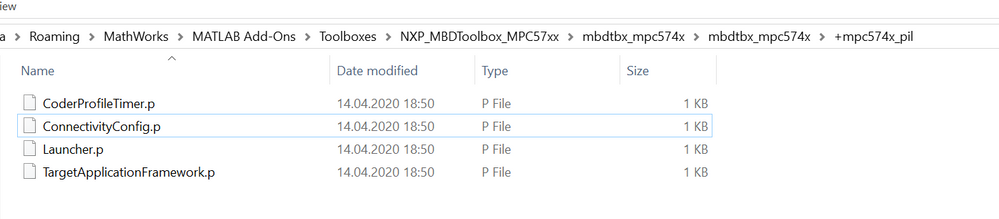
1. I only have .p files which I can not see its inside and change it. As far as I understood they are coded and can not be decoded.
2. I can succesfully run sim_pil_top_mpc574x.mdl.
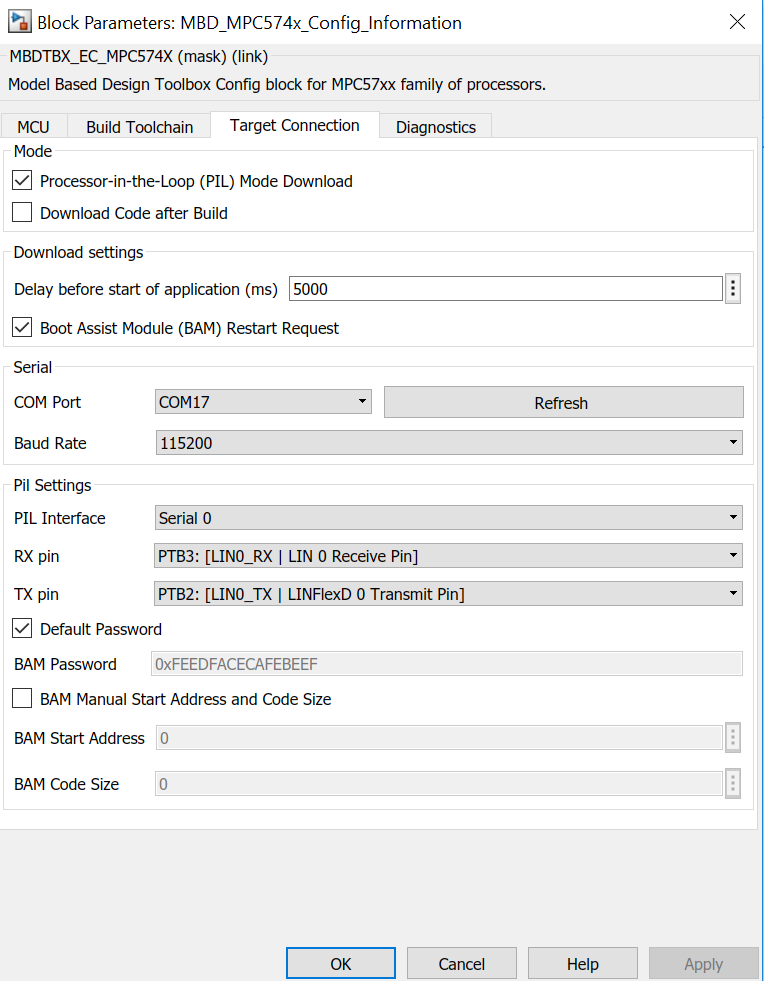
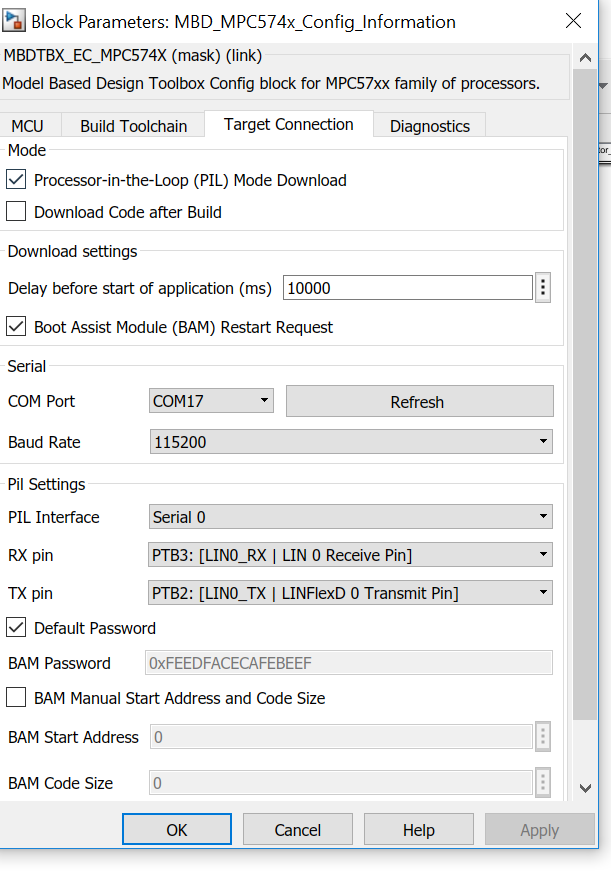
Figure 3: Target Communication of my model
Thansk.
paulvlase
- 新着としてマーク
- ブックマーク
- 購読
- ミュート
- RSS フィードを購読する
- ハイライト
- 印刷
- 不適切なコンテンツを報告
Hi [email protected],
Oops! I forgot to check if non-autosar ConnectivityConfig is pcode in the mltbx. Delete ConnectivityConfig.p and use the attached ConnectivityConfig.m instead.
The settings from the Target Connection look good. Can you try to lower the Baud Rate to 57600?
As constantinrazvan.chivu told you already, it would be easier and faster if you could send us a simplified version of your model to us as a reply to the e-mail that I sent to you.
.
Regards,
Paul
- 新着としてマーク
- ブックマーク
- 購読
- ミュート
- RSS フィードを購読する
- ハイライト
- 印刷
- 不適切なコンテンツを報告
Dear All paulvlase and constantinrazvan.chivu,
Thanks for your great effort.
We have changed timeout by ConnetivityConfig.m file that you have sent but problem exists still. Hopefully we have eliminated one possible cause.
We do not know why PIL does not work while SIL works.
Thanks again.
constantinrazva
- 新着としてマーク
- ブックマーク
- 購読
- ミュート
- RSS フィードを購読する
- ハイライト
- 印刷
- 不適切なコンテンツを報告
Hello [email protected] ,
The line you changed in the ConnectivityConfig.m file was the correct one - maybe there are issues with the message being displayed -- let me check it out and I'll get back on this.
EDIT: the file name is correct, but you changed it for AUTOSAR -- you can find the correct one in {TOOLBOX_ROOT}\mbdtbx_mpc574x\mbdtbx_mpc574x\+mpc574x_pil
[Thank you paulvlase for pointing it out]
Kind regards,
Razvan.

- 新着としてマーク
- ブックマーク
- 購読
- ミュート
- RSS フィードを購読する
- ハイライト
- 印刷
- 不適切なコンテンツを報告
