
- Forums
- Product Forums
- General Purpose MicrocontrollersGeneral Purpose Microcontrollers
- i.MX Forumsi.MX Forums
- QorIQ Processing PlatformsQorIQ Processing Platforms
- Identification and SecurityIdentification and Security
- Power ManagementPower Management
- Wireless ConnectivityWireless Connectivity
- RFID / NFCRFID / NFC
- Advanced AnalogAdvanced Analog
- Neural Processing UnitsNeural Processing Units
- MCX Microcontrollers
- S32G
- S32K
- S32V
- MPC5xxx
- Other NXP Products
- S12 / MagniV Microcontrollers
- Powertrain and Electrification Analog Drivers
- Sensors
- Vybrid Processors
- Digital Signal Controllers
- 8-bit Microcontrollers
- ColdFire/68K Microcontrollers and Processors
- PowerQUICC Processors
- OSBDM and TBDML
- S32M
- S32Z/E
-
- Solution Forums
- Software Forums
- MCUXpresso Software and ToolsMCUXpresso Software and Tools
- CodeWarriorCodeWarrior
- MQX Software SolutionsMQX Software Solutions
- Model-Based Design Toolbox (MBDT)Model-Based Design Toolbox (MBDT)
- FreeMASTER
- eIQ Machine Learning Software
- Embedded Software and Tools Clinic
- S32 SDK
- S32 Design Studio
- GUI Guider
- Zephyr Project
- Voice Technology
- Application Software Packs
- Secure Provisioning SDK (SPSDK)
- Processor Expert Software
- Generative AI & LLMs
-
- Topics
- Mobile Robotics - Drones and RoversMobile Robotics - Drones and Rovers
- NXP Training ContentNXP Training Content
- University ProgramsUniversity Programs
- Rapid IoT
- NXP Designs
- SafeAssure-Community
- OSS Security & Maintenance
- Using Our Community
-
- Cloud Lab Forums
-
- Knowledge Bases
- ARM Microcontrollers
- i.MX Processors
- Identification and Security
- Model-Based Design Toolbox (MBDT)
- QorIQ Processing Platforms
- S32 Automotive Processing Platform
- Wireless Connectivity
- CodeWarrior
- MCUXpresso Suite of Software and Tools
- MQX Software Solutions
- RFID / NFC
- Advanced Analog
- Neural Processing Units
-
- NXP Tech Blogs
- Home
- :
- 基于模型的设计工具箱(MBDT)
- :
- 基于模型的设计工具箱(MBDT)
- :
- CAN FD in S32k14x EVB
CAN FD in S32k14x EVB

Hello community,
After trying and trying to get the CAN FD to work in the MBD Toolbox for my S32k144 and s32k146 boards, I noticed that in the MBD there's no way to get the CAN FD to work.
In the Reference Manual, the section 55.4.2.34 states that the registers for the CAN FD are not the same as the ones for Standard CAN, which makes sense. But here's the issue. When I activate the CAN FD option in my configuration block (besides all the other blocks that I have to activate the option as well), and I try to configure the Bit Timing for my configuration of CAN FD, there's no way I can access the registers that I need to in order to make the CAN FD to really work.
As I see and understand (correct me if I am wrong please) what you guys call CAN FD is only giving the option to the designer to select the CAN FD check box, not providing the option of a functional bigger payload nor different times for the messages transmission, so I don't understand how this would be useful for a real CAN FD application. (Unless I am missing something)
I would really like to know what options do I have here. Are you going to provide an update for a real CAN FD bit timing configuration? Should I try another tool?
Any comment or suggestions would be appreciated.
Kind regards.
已解决! 转到解答。


Hi @juliana_rojas30 ,
I fixed this build issue in MBDToolbox_S32K1xx_4.2.0_can_fd_patch_2.zip patch attached to my answer from here.
Regards,
Paul
Hi @juliana_rojas30 ,
Indeed, the CAN FD bit rate configuration is wrong.
I attached a self-extracting archive that adds the following changes:
1. Fixes the values available for Nominal bit rate registers when CAN FD is enabled.
2. Before the selected value was the same one written to NXP FlexCAN timing registers, which is incremented by 1 in the hardware. This meant that you had to select TIMING_VALUE-1. Now you select TIMING_VALUE, and a 1 is subtract before writing to FlexCAN Timing registers.
2. Adds different bit rate and sampling point edit boxes to specify the Nominal and Data bit rates.
3. Adds TDC (Transceiver Delay Compensation) configuration.
The steps to apply the patch:
1. Download the attached zip file and unzip it.
2. Run mbd_find_s32k_root() to get the root folder there the S32K toolbox is installed.
3. Close Matlab.
4. Open the MBDToolbox_S32K1xx_4.2.0_can_fd_patch.exe file and extract it's contents to the root folder of the toolbox.
To use CAN FD you have to disable the Rx FIFO (if it isn't already disabled) in the Rx FIFO tab, from FlexCAN Config block, and enable the CAN FD in the CAN FD tab, by selecting the Enable CAN FD option.
Once you do that, new options will we enabled in the CAN FD tab: selection of a different maximum payload size and configuration of TDC (Transceiver Delay Compensation).
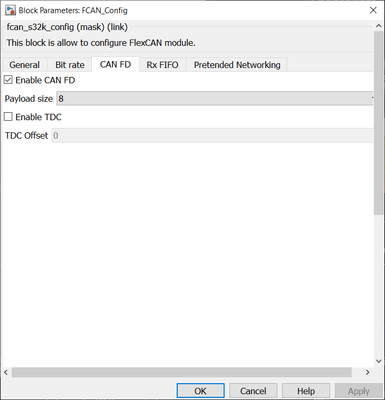
Also in the Bit rate tab you will be able to configure Data Bit Rate, used when the BRS (Bit Rate Switch) option is select in the FlexCAN send block. By default, Bitrate to time segments option is selected, which will compute automatically the value of the timing registers from a given Bitrate and Sampling Point. For CAN FD I recommend to uncheck it and set the values of the timing registers to the same values used in the CAN Analyzer/probe.
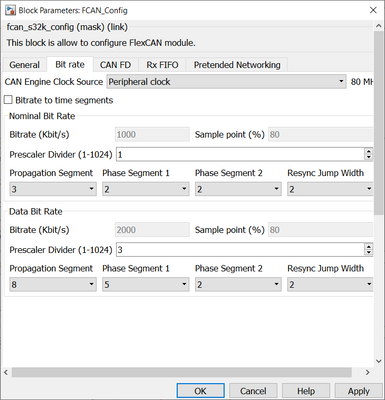
Regards,
Paul
Hello @paulvlase ,
I did the procedure as you said, and now I am able to see what you showed in the images attached. But, something odd is happening:
Each time I open (even if it is not to modify anything, just by opening it) the FCAN_config box, I get 5 failure messages on my commands window (Meaning that if I open it for a second time, I get 5 more messages and so on). These messages are the ones showed below:

I tried ignoring this and configuring it for testing anyways, but when I try to build my model, I get this error:

I attached the diagnostics report in a .txt so it's easier to check.
I swiped the 4.1 version of the toolbox and installed the 4.2 and still no success.
Is there any suggestion for this issue?
Hi @juliana_rojas30 ,
I forgot to add the missing function mbd_s32k_check_textbox_input_number to this patch.
I attached a new patch that has that function inside. I also tested on my side and now all examples from S32K 4.2 toolbox with this patch applied are building successfully.
Hello @paulvlase ,
Thank you very much for inquire into my issue. I have downloaded the zip that you attached. I followed the steps you mention and now something different happens.
I don't get the failure messages on the commands window which is something good, but when I try to build a model (even if I am not using the CAN FD function) I get this error message:

Again, I attached the result of the compilation in a .txt for you to see it more easily.
I tested the version of the toolbox without the patch and it builds correctly so it is not a license or downloading of the version issue.
I don't know if this is of any help but just by opening any model (after adding the patch) I get a warning:

I'll post a picture of the configuration of the bitrate of the model that I am testing (which is basically the same that the example has), because I don't understand the issue, how it gets to build it without the patch but with the patch it can't find the bitrate?
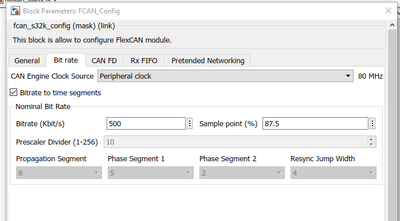
As you can see I don't even have the CAN FD box active. This leads to the issue that it doesn't work with CAN FD activated either.
Thanks again to you and your team for working into this.
Edit: I got rid of the error! I added the functions that were missing into the masks of the config block and now it works.
