
- Forums
- Product Forums
- General Purpose MicrocontrollersGeneral Purpose Microcontrollers
- i.MX Forumsi.MX Forums
- QorIQ Processing PlatformsQorIQ Processing Platforms
- Identification and SecurityIdentification and Security
- Power ManagementPower Management
- Wireless ConnectivityWireless Connectivity
- RFID / NFCRFID / NFC
- Advanced AnalogAdvanced Analog
- Neural Processing UnitsNeural Processing Units
- MCX Microcontrollers
- S32G
- S32K
- S32V
- MPC5xxx
- Other NXP Products
- S12 / MagniV Microcontrollers
- Powertrain and Electrification Analog Drivers
- Sensors
- Vybrid Processors
- Digital Signal Controllers
- 8-bit Microcontrollers
- ColdFire/68K Microcontrollers and Processors
- PowerQUICC Processors
- OSBDM and TBDML
- S32M
- S32Z/E
-
- Solution Forums
- Software Forums
- MCUXpresso Software and ToolsMCUXpresso Software and Tools
- CodeWarriorCodeWarrior
- MQX Software SolutionsMQX Software Solutions
- Model-Based Design Toolbox (MBDT)Model-Based Design Toolbox (MBDT)
- FreeMASTER
- eIQ Machine Learning Software
- Embedded Software and Tools Clinic
- S32 SDK
- S32 Design Studio
- GUI Guider
- Zephyr Project
- Voice Technology
- Application Software Packs
- Secure Provisioning SDK (SPSDK)
- Processor Expert Software
- Generative AI & LLMs
-
- Topics
- Mobile Robotics - Drones and RoversMobile Robotics - Drones and Rovers
- NXP Training ContentNXP Training Content
- University ProgramsUniversity Programs
- Rapid IoT
- NXP Designs
- SafeAssure-Community
- OSS Security & Maintenance
- Using Our Community
-
- Cloud Lab Forums
-
- Knowledge Bases
- ARM Microcontrollers
- i.MX Processors
- Identification and Security
- Model-Based Design Toolbox (MBDT)
- QorIQ Processing Platforms
- S32 Automotive Processing Platform
- Wireless Connectivity
- CodeWarrior
- MCUXpresso Suite of Software and Tools
- MQX Software Solutions
- RFID / NFC
- Advanced Analog
- Neural Processing Units
-
- NXP Tech Blogs
- Home
- :
- 基于模型的设计工具箱(MBDT)
- :
- 基于模型的设计工具箱(MBDT)
- :
- Re: Blinky LED Hello World DEMO to test Hardware Communication and Peripherals
Blinky LED Hello World DEMO to test Hardware Communication and Peripherals
Blinky LED Hello World DEMO to test Hardware Communication and Peripherals

Hello,
i am having trouble to run the Blinky LED example on the Board with the MBDT.
I have the following Board: S32K3-T-Box
with the chip: S32K344HMS
In the hardware configuration there is no option to select this chip.
I can only select the following boards:

I have selected both S32K344-Q172 and S32K344-Q257, but they are not the chips on my board. What do i have to do to get this running? Is it possible? I have read something about custom chips/boards or is there some default settings that work? Is there a step by step documentation to set this up?
I also noticed the DIO's have names on the Board and there is a possibility to configure this in the S32 Configuration Tool. But i have not undertood where i can get the Information to select/configure the corresponding LED's. I have f.ex. the Diodes: D21 D2 and the SW3 button. The configuration for the DIO's looks like this:

But i can see no such DIO on the Board neither AL or PTA?
Can someone explain this and lead me towards the required information to be able to set this up? Or is this issue due to the issue above? If i had a configuration for my specific Board i would get the corresponding DIO's as named on the Board? Or is there a list linking the DIO's to specific names? I am not sure how to proceed.
Kind Regards,
Ramon

 Irina_Costaches
Hello @monchito911
The first suggestion I would have, related to the information you have detailed in this thread, would be to migrate your setup to the latest MBDT for S32K3 v1.6.0 - which was released at the end of January. The latest toolbox version will allow you to benefit of the latest framework improvements we have made, and also access the enhanced set of peripherals, drivers, and application examples that we deliver.
Now, for addressing your specific encountered issue, I would like to mention the following:
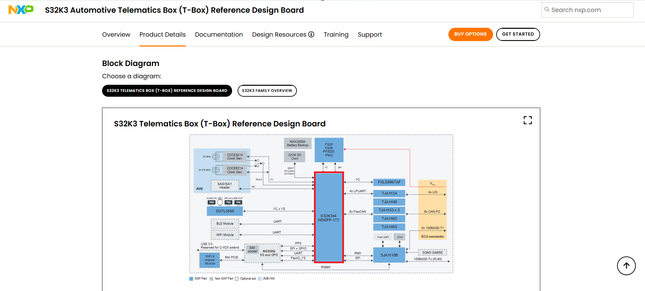
As far as I can see from the NXP website, the T-Box comes with an S32K344-Q172 processor, so I am not completely sure if this is the board that you have, and if the Q172 package is the one targeted by your hardware setup.
Inside the MBDT for S32K3 1.6.0, the Hardware Part is populated by default, based on the selection of a Default Configuration Template - this represents a configuration project, enabling the peripherals, pins, and clocks, that targets the processor you are aiming to use. Selecting such a Default Configuration Template will enable you to use this configuration with the application you are developing.

This default configuration is designed to address, in the case of the S32K344-Q172 processor, a different evaluation board, more specifically the S32K3x4-Q172 (https://www.nxp.com/design/design-center/development-boards-and-designs/S32K3X4EVB-Q172). Hence, all the settings, pins routing, and peripheral instances enablement are not enabled to match the hardware configurations of the S32K3 T-Box.
However, this does not provide any limitations, as we indeed enable the option of creating custom hardware configurations, to address hardware designs that we are not providing out-of-the-box support for (like the case of S32K3 T-Box), and the process to be followed for manipulating such custom templates is in details described inside the Release Notes document delivered together with our toolbox - please check Chapter 3.6 Support for Custom Default Project.
For creating such a Custom Configuration, you could start from the default one we provide for the processor you are targeting.
For creating such a configuration, for a specific hardware board, indeed you might need to change the pins routing (according to the board's schematic). A detailed guide covering how to create a DIO configuration for manipulating I/Os on a custom hardware is available here, in this article we have posted on the MBDT Community.
To conclude:
You would need to create your own configuration for the S32K3 T-Box, following the processes described in the Release Notes referenced chapter + the article demonstrating DIO configuration.
As a personal recommendation, I would start by creating a Custom Project Template starting from the one provided as default for the S32K344-Q172 processor, and save it somewhere separately. Then, based on the steps described in the article, I would modify it to match the T-Box. After the configuration is completed, I would use this new file as the Configuration Project Template for my model, and try and run it on the target.
Please let us know if the provided references are useful for your use case, if you encounter any issues in following these workflows, or if more information is required from our side.
Thank you,
Irina
Hi irina,
thank you for your extended Reply. As in reality i am not interested in the Peripherals right now i tried to skip this step to have to configure the peripherals and selected the S32K344-Q172 Microcontroller. I am now trying to test the communication with the s32k3xx_model_pil_block_ebt example but without using EBT.
I am not really advancing regarding this matter as the communication fails.
I am getting the following error message:

As this is a MATLAB example i am certain that the Model itself should be correct.
Is there some possibility in obtaining a quick live support somehow, as the matter is pressing and needs to be finished until Februray. This would truly be appreciated and i believe this would be most effective in finding the issue.
Kind Regards,
Ramon
Irina_CostachesHello @monchito911
Could you please share with us what are your hardware connections for testing this setup?
The PIL simulation uses a serial communication with the target - Data is sent via UART from the Simulink model to the algorithm running on the target, and results are sent back from the target to the Simulink environment for display and analysis. Hence, for your model you will have to properly configure, according to your hardware setup, the PIL tab.

The COM port will be the one displayed in Device Manager when the board is connected to your PC via an USB2Serial port. However, as far as I can see from the T-Box schematics, it does not come with an USB2Serial converter - so my guess would be that you would need to use an external device for ensuring this serial connection.
Please note that in the default configuration project we provide for S32K344-Q172, UartChannel0 corresponds to the LPUART6 hardware instance. Hence, you would need to create a custom configuration for your board, where UartChannel0 would be mapped to the LPUART instance you are aiming to use, having its TX and RX pins configured accordingly to the physical connections on the board.
Hope this helps,
Irina
Hello @Irina_Costachescu,
Is there maybe some reference Project for setting up the configuration of the Peripherals. In the Release notes it just says it is possible but i'm not sure how to find out the requirements to perform such a configuration. Especially for example for configuring a external USB2Serial converter.
What i am missing a liittle bit is there some sort of tutorial for learning how to set up the configuration for the Peripherals.
For
1) standard Peripherals
2) Usb2Serial Converter
And what USB2Serial Converter is required to do this kind of setup with the S32K3 Board T-Box?
Kind Regards,
Ramon
stefanvlad
Hi @monchito911 ,
The S32K3 Automotive Telematics Box (T-Box) is a special board designed for telematics, it requires a special configuration to work with our latest NXP Model-Based Design Toolbox for S32K3 version 1.6.0.
To use a USB to Serial converter, we must take a look into schematics https://www.nxp.com/webapp/Download?colCode=SCH-50735 and connect it to the T-Box on one of the following headers:

- J61 - SKT_1x4 - has LPUART9
- J79 - SKT_1x6 - has LPUART0
We can locate the J61 and J79 in the Getting Started with the S32K3 Automotive Telematics Box (T-Box):

As my colleague @Irina_Costachescu said in this post Re: Blinky LED Hello World DEMO to test Hardware
You must then select the proper COM port on your PC and make sure your USB2Serial adapter is connected to the instance UartChannel_1 - LPUART0- J79
You can also use a HC-08 or HC-05 Bluetooth board to connect it to UartChannel_0 - LPUART9 - J61 header:

In order to help you, i have created a custom configuration for the S32K344-T-Box, named s32k3xx_model_pil_block_s32ctConfig.mex, located in the s32k3xx_model_pil_block_s32ct.zip, this archive you must replace in your local folder.
Best regards,
Stefan V.
Hi @stefanvlad and @Irina_Costachescu ,
Thank you for your reply! As our Project is evolving quick and there is no Serial2USB port on the T-Box we have decided to set up the toolchain for the S32K344-WB Board. For this Board there is a Custom configuration Template on the MBDT NXP Toolchain.
I setup the power supply installed the S32 DS 3.4 as adviced and the Real Time Drivers.
I connected the Board powered it on and established the COM Port. This settings i set in the Hardware Configurations for PIL
The Build process is succesfull but icannot download on Board.
I am trying to tun the S32K344_wb_dio_s32ct Example
and get the following error message:

I wonder because i configured it to use the serial UART connection in the settings:

For PIL and External Mode. From my understanding TCP would be a ethernet connection. Although this is not configured nor connected. In the Example Setup the default connection is setup as the USB connection:

We would appreciate help regarding this matter to be able to download on the Board and establish connection.
Kind Regards,
Ramon
stefanvlad
Hi @monchito911 ,
Here is the guide: Getting Started with the S32K344-WB Evaluation Board for Automotive General Purpose.

For this board you will need an external JTAG debugger, might be any of:
Multilink Debug Probes : Debug Probes for many ARM and 8-/16-/32-bit devices
We also have an article on how to connect J-Link to flash the S32K344 board:
1.5. Connecting the J-Link Debug Probe
Interacting with Digital Inputs/Outputs on MR-CANHUBK344 - NXP Community
Let me know if this is clear,
Stefan V.
Hi @stefanvlad and @Irina_Costachescu,
i mooved on to the PIL-Testing Example provided by NXP and Mathworks.
The Board is connected through USB, Multilink Debugger and a 12V Power cable through the Port J3.
The Example i am trying to run is: s32k3xx_model_pil_block_s32ct
Using Matlab 2023b and the newest MBDT for S32K3 so version 1.6.
On the S32K344-WB Board.
I Opened the Subsystem "CounterA" as a TOP Model and set the configurations as follows:


And the same for External Mode.
I checked in the Device Manager, that the COM port is correct and i refreshed to show me the available Ports.

I set the Subsystem CounterA to PIL Mode and on the TOP-Model opened the PIL/SIL APP and ran verification.
I read in a feed, that sometimes there are Problems because the Toolchain is installed under a path "C:\Users\______\AppData\Roaming\MathWorks\MATLAB Add-Ons" containing a space. So i created a new folder without the space, went to Preferences, set this new folder as the default Add-On installation folder and reinstalled the Toolchain.
I get the following message:

And the DIO D15 blinks really short so i assume flashing on the Board is not the issue.
As of right now i am getting the following error message:

I ran the Example in SIL Mode without problems so (c) should be decarted. Also this is a Matlab example so i don`t believe this is the issue. (b) shouldn't be the problem either because Proper Board connection has been checked through the BlinkyLED example.
But within this Example we don't need the Serial connection so this could be a issue.
The message appears after:
### Connectivity configuration for component "s32k3xx_counter_s32ct": NXP S32K3xx ###
### COM port: COM9
### Baud rate: 115200
### Preparing to start PIL simulation ...
Building with 'MinGW64 Compiler (C)'.
MEX completed successfully.
### Updating code generation report with PIL files ...
### Starting application: 'slprj\ert\s32k3xx_counter_s32ct\pil\s32k3xx_counter_s32ct.elf'
I need assistance to resolve this Problem.
Kind Regards,
Ramon
stefanvlad
Hi @monchito911 ,
I think I've found the issue your are facing with s32k3xx_model_pil_block_s32ct in PIL.
For the S32K344-WB you must connect the following:
- Micro-USB cable to J18 connector on the board,
- JTAG with PE micro Multilink on J13 or J14,
- 12V DC power on J3 connector, after move SW10 to ON position:

Then check Device manager for COM port, remember that COMxx number, in my case it is COM26:

Then go to the s32k3xx_model_pil_block_s32ct -> s32k3xx_counter_s32ct.slx inside the Referenced Model Configuration parameters, and go to Hardware board settings -> PIL:

There you must press Refresh button, and then select Serial Port, the COM port previous found in Device manager, in my case it is COM26.
Click apply , close the window , and go back to top model and press Run Verification:

After all the process is complete, the board will be flashed and the Simulation Data Inspector will display the following graph:

Hope this solves your problem,
Stefan V.
Hi @stefanvlad ,
Thank you for your support. I was used to work with another Board and didn't need a Debugger to flash on it, so i thought it would also be possible to do so through the USB-connection, as i was used too. As also the Debug Probe was not stated in the Example Documentation, so this led to further solidifying the misconception.
I was able to establish connection to the Board, flash on the device and get the Blinky LED Example going. Thank you both for your support @Irina_Costachescu.
Now i hope to get the PIL-Testing Pipeline up and running.
Kind Regards,
Ramon
