
- Forums
- Product Forums
- General Purpose MicrocontrollersGeneral Purpose Microcontrollers
- i.MX Forumsi.MX Forums
- QorIQ Processing PlatformsQorIQ Processing Platforms
- Identification and SecurityIdentification and Security
- Power ManagementPower Management
- Wireless ConnectivityWireless Connectivity
- RFID / NFCRFID / NFC
- Advanced AnalogAdvanced Analog
- MCX Microcontrollers
- S32G
- S32K
- S32V
- MPC5xxx
- Other NXP Products
- S12 / MagniV Microcontrollers
- Powertrain and Electrification Analog Drivers
- Sensors
- Vybrid Processors
- Digital Signal Controllers
- 8-bit Microcontrollers
- ColdFire/68K Microcontrollers and Processors
- PowerQUICC Processors
- OSBDM and TBDML
- S32M
- S32Z/E
-
- Solution Forums
- Software Forums
- MCUXpresso Software and ToolsMCUXpresso Software and Tools
- CodeWarriorCodeWarrior
- MQX Software SolutionsMQX Software Solutions
- Model-Based Design Toolbox (MBDT)Model-Based Design Toolbox (MBDT)
- FreeMASTER
- eIQ Machine Learning Software
- Embedded Software and Tools Clinic
- S32 SDK
- S32 Design Studio
- GUI Guider
- Zephyr Project
- Voice Technology
- Application Software Packs
- Secure Provisioning SDK (SPSDK)
- Processor Expert Software
- Generative AI & LLMs
-
- Topics
- Mobile Robotics - Drones and RoversMobile Robotics - Drones and Rovers
- NXP Training ContentNXP Training Content
- University ProgramsUniversity Programs
- Rapid IoT
- NXP Designs
- SafeAssure-Community
- OSS Security & Maintenance
- Using Our Community
-
- Cloud Lab Forums
-
- Knowledge Bases
- ARM Microcontrollers
- i.MX Processors
- Identification and Security
- Model-Based Design Toolbox (MBDT)
- QorIQ Processing Platforms
- S32 Automotive Processing Platform
- Wireless Connectivity
- CodeWarrior
- MCUXpresso Suite of Software and Tools
- MQX Software Solutions
- RFID / NFC
- Advanced Analog
-
- NXP Tech Blogs
- Home
- :
- 基于模型的设计工具箱(MBDT)
- :
- 基于模型的设计工具箱(MBDT)
- :
- BCC_S32K144_Monitoring "lite" UM11346 example project: Include path not found for sbc_uja1169
BCC_S32K144_Monitoring "lite" UM11346 example project: Include path not found for sbc_uja1169
BCC_S32K144_Monitoring "lite" UM11346 example project: Include path not found for sbc_uja1169

For the S32DS ARM 2.2 UM11346 example project BCC_S32K144_Monitoring from:
https://www.nxp.com/docs/en/user-guide/UM11346.pdf
We get the following warning which looks concerning:
Description Resource Path Location Type
Invalid project path: Include path not found (C:\NXP\S32DS_ARM_v2.2\S32DS\software\S32SDK_S32K1xx_RTM_3.0.0\middleware\sbc\sbc_uja1169\include). BCC_S32K144_Monitoring pathentry Path Entry Problem
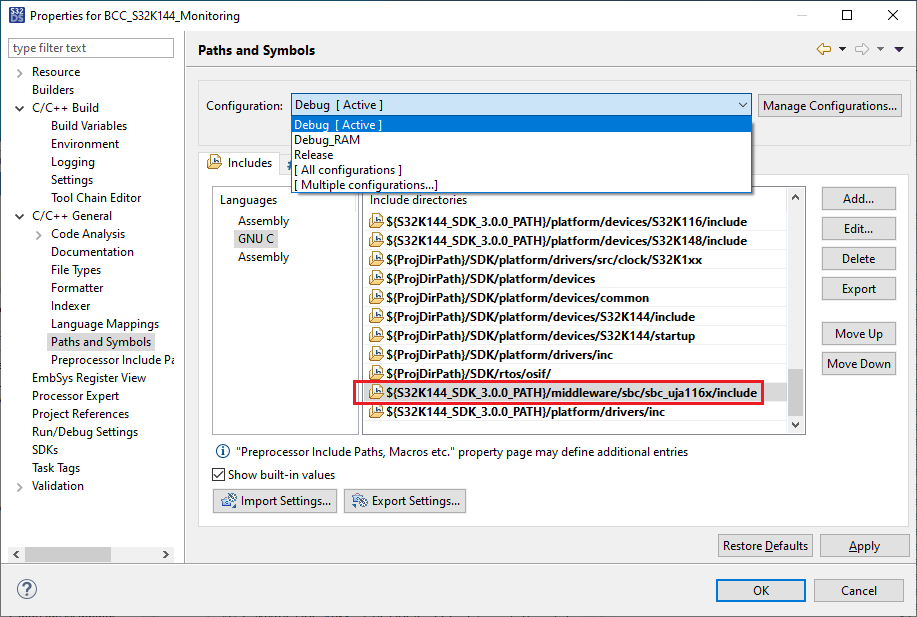
It can be fixed the following change in project properties (C/C++ General --> Paths and Symbols) GNU for both the C and Assembly languages as shown in the screenshot below.
From:
${S32K144_SDK_3.0.0_PATH}/middleware/sbc/sbc_uja1169/include
To:
${S32K144_SDK_3.0.0_PATH}/middleware/sbc/sbc_uja116x/include
Select and edit the item in the list of include directories to make this change.
It turns out that after resolving the above other problems (Kinetis SDK is invalid) follow.
The project was created with S32DS for ARM 2.0 and is not compatible with S32DS for ARM 2.2.
Kinetis SDK (SDK_S32K14x_08) request to load and build the S32K144_EVB_JumpStart_Firmware
https://community.nxp.com/t5/S32-Design-Studio/Kinetis-SDK-SDK-S32K14x-08-request-to-load-and-build-...
