
- Forums
- Product Forums
- General Purpose MicrocontrollersGeneral Purpose Microcontrollers
- i.MX Forumsi.MX Forums
- QorIQ Processing PlatformsQorIQ Processing Platforms
- Identification and SecurityIdentification and Security
- Power ManagementPower Management
- Wireless ConnectivityWireless Connectivity
- RFID / NFCRFID / NFC
- Advanced AnalogAdvanced Analog
- Neural Processing UnitsNeural Processing Units
- MCX Microcontrollers
- S32G
- S32K
- S32V
- MPC5xxx
- Other NXP Products
- S12 / MagniV Microcontrollers
- Powertrain and Electrification Analog Drivers
- Sensors
- Vybrid Processors
- Digital Signal Controllers
- 8-bit Microcontrollers
- ColdFire/68K Microcontrollers and Processors
- PowerQUICC Processors
- OSBDM and TBDML
- S32M
- S32Z/E
-
- Solution Forums
- Software Forums
- MCUXpresso Software and ToolsMCUXpresso Software and Tools
- CodeWarriorCodeWarrior
- MQX Software SolutionsMQX Software Solutions
- Model-Based Design Toolbox (MBDT)Model-Based Design Toolbox (MBDT)
- FreeMASTER
- eIQ Machine Learning Software
- Embedded Software and Tools Clinic
- S32 SDK
- S32 Design Studio
- GUI Guider
- Zephyr Project
- Voice Technology
- Application Software Packs
- Secure Provisioning SDK (SPSDK)
- Processor Expert Software
- Generative AI & LLMs
-
- Topics
- Mobile Robotics - Drones and RoversMobile Robotics - Drones and Rovers
- NXP Training ContentNXP Training Content
- University ProgramsUniversity Programs
- Rapid IoT
- NXP Designs
- SafeAssure-Community
- OSS Security & Maintenance
- Using Our Community
-
- Cloud Lab Forums
-
- Knowledge Bases
- ARM Microcontrollers
- i.MX Processors
- Identification and Security
- Model-Based Design Toolbox (MBDT)
- QorIQ Processing Platforms
- S32 Automotive Processing Platform
- Wireless Connectivity
- CodeWarrior
- MCUXpresso Suite of Software and Tools
- MQX Software Solutions
- RFID / NFC
- Advanced Analog
- Neural Processing Units
-
- NXP Tech Blogs
- Home
- :
- MQXソフトウェアソリューション
- :
- MQXソフトウェアソリューション
- :
- bsp cloning wizard MQX 4.2
bsp cloning wizard MQX 4.2
- RSS フィードを購読する
- トピックを新着としてマーク
- トピックを既読としてマーク
- このトピックを現在のユーザーにフロートします
- ブックマーク
- 購読
- ミュート
- 印刷用ページ
bsp cloning wizard MQX 4.2

- 新着としてマーク
- ブックマーク
- 購読
- ミュート
- RSS フィードを購読する
- ハイライト
- 印刷
- 不適切なコンテンツを報告
Hi,
Is BSP cloning wizard used to generate the source files of example projects? I followed the steps mentioned in the MQX_BSP_Cloning_wizard getting started guide and ended up generating the source files of mqx examples. Am I missing something or is my understanding about BSP cloning wizard wrong?
- Why aren't the projects getting generated as per IDE?
- Some files and folders are missing even after generating source tree. Is it so?
- The user_config and other configuration related files won't be generated?
Please correct me , if my understanding is wrong. I was hoping to reuse mqx related files from the clone when the working copy gets corrupted. How do people generally use and work with MQX. Usually I work from the installation directory itself and when compilation of either BSP/PSP fail go for a re-installation. Is this the normal approach?

 soledad
- 新着としてマーク
- ブックマーク
- 購読
- ミュート
- RSS フィードを購読する
- ハイライト
- 印刷
- 不適切なコンテンツを報告
Hello,
A general recommendation for starting a new MQX RTOS project in any IDE environment is to clone one of the existing example applications, save it under a custom name, and modify it to meet your specific needs. In this case, be aware that there may be relative paths to support files referred to in the project. This may apply to search paths, linker command files, debugger, configuration files, etc. Make sure that you update the relative paths in the new “clone” of the project.
Could you please follow the below steps:
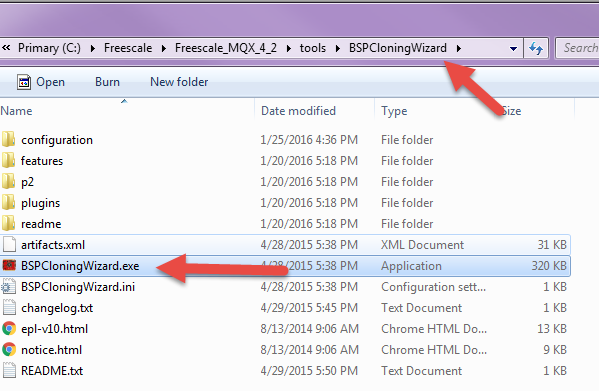
1. Run the “BSPCloningWizard.exe” executable, which is located in: <install_dir>/tools/BSPCloningWizard.
2. Select a new BSP Clone..
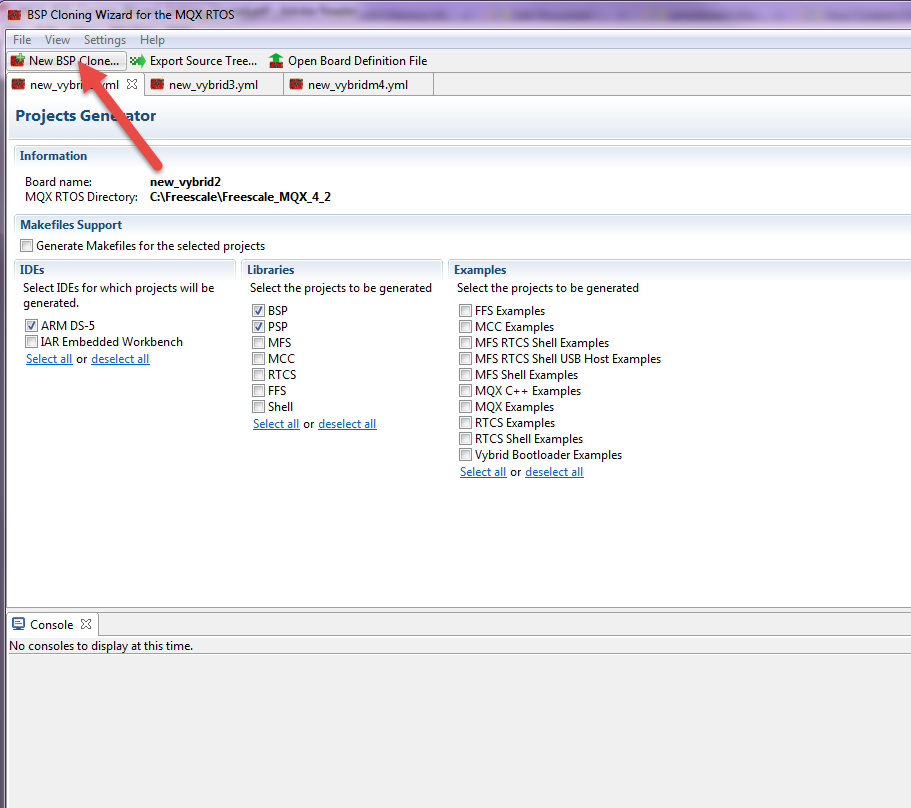
3. Enter the custom BSP name and select the BSP board base according the device you are using.

4. Select the IDE, libraries and example codes you need.

5. Select "Generate projects"
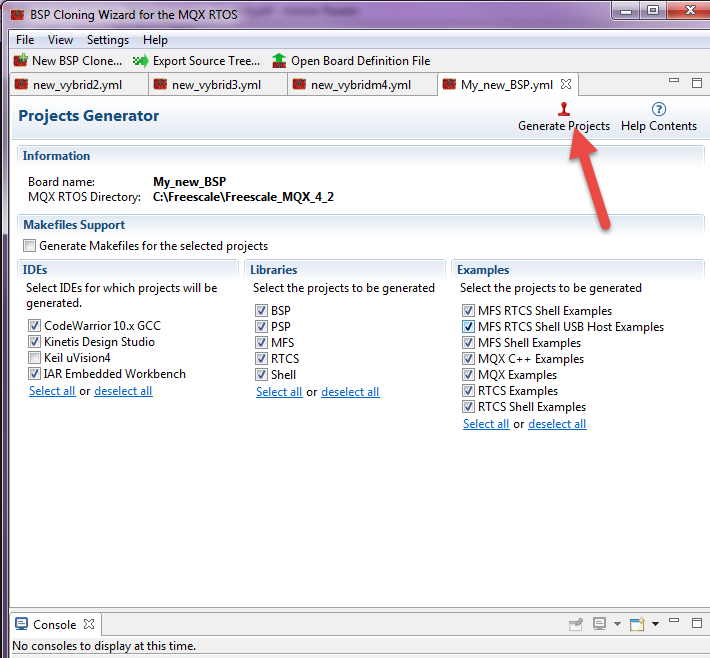
6. At this point you can use the new MQX bsp.
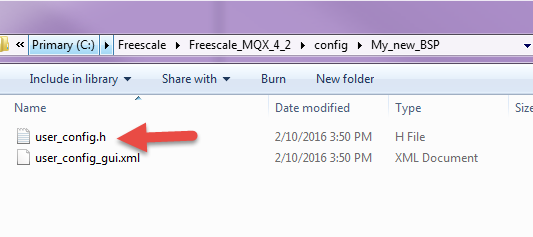
For example the user-config is located at the path:C:\Freescale\Freescale_MQX_4_2\config\My_new_BSP

7. You can open and build the libraries according the IDE used. For example using CodeWarrior and hello code: go to C:\Freescale\Freescale_MQX_4_2\mqx\examples\hello\build\cw10gcc drag and drop to Codewarrior the .wsd file build and run the project.
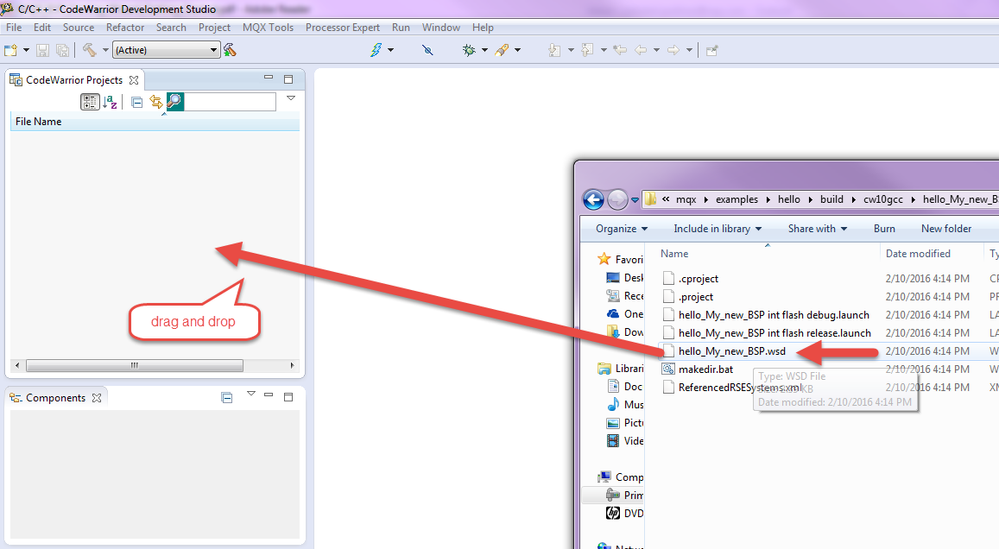
8. If you want to crate a new project application using the new BSP, check the below thread, this explains how to add a new board to the CodeWarrior Project Wizard after clone or create new MQX libraries (BSP, PSP, RTCS, MFS, Shell, USB, etc.)
How to add a new board to the CodeWarrior Project Wizard
Have a great day,
Sol
-----------------------------------------------------------------------------------------------------------------------
Note: If this post answers your question, please click the Correct Answer button. Thank you!
-----------------------------------------------------------------------------------------------------------------------

- 新着としてマーク
- ブックマーク
- 購読
- ミュート
- RSS フィードを購読する
- ハイライト
- 印刷
- 不適切なコンテンツを報告
I noticed that KDS was not listed as a compiler option...
I'm in similar situation for twrk60f120m, slightly older chip, and I'm simply trying to do a port of the bsp along with using processor expert to make minor changes to the clock settings for my MK60 derivative. Will doing what you said produce a clone that will contain a processor expert project that I can use in KDS v3.0? I'm asking this cuz MQX 4.2.0 doesn't include any *.pe files that I can use with KDS v3.0, also I can't really use that the online sdk builder cuz TWRK60F120M is not included in that. I was perhaps going to try out using the online sdk builder for TWR-K60D100M and seeing if I could use that processor expert project as my super set that i can derive from although I'm not sure if that is the right path for getting my custom bsp for my mk60f target.
soledad
- 新着としてマーク
- ブックマーク
- 購読
- ミュート
- RSS フィードを購読する
- ハイライト
- 印刷
- 不適切なコンテンツを報告
Hello Daniel,
KDS3.0 supports MQX RTOS 4.2 and you can use BSPCloningWizard tool.
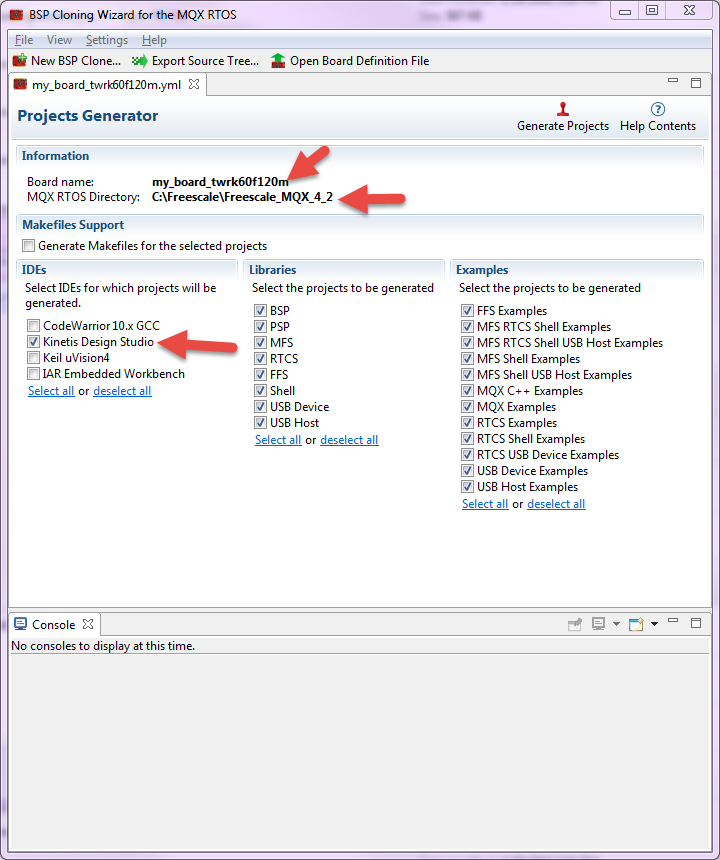
For MQX RTOS, all Kinetis BSPs can host the Processor Expert components. For MQX RTOS version 3.8.1 and later, the special Processor Expert versions of the BSPs were removed and the functionality made available in the standard BSP projects.
The BSP projects have the ProcessorExpert.pe file which contains this:
• Pre-configured CPU component
• MQX RTOS Adapter component
• Set of peripheral components needed by the pe_demo example application
Other components may be added to the BSP project as needed.
However unfortunately, the MQX 4.2 doesn't have bsp projects with PE enabled for the KDS. I suggest to use the PE standalone tool in order to generate code and copy the needed functions.
Have a great day,
Sol
-----------------------------------------------------------------------------------------------------------------------
Note: If this post answers your question, please click the Correct Answer button. Thank you!
-----------------------------------------------------------------------------------------------------------------------

- 新着としてマーク
- ブックマーク
- 購読
- ミュート
- RSS フィードを購読する
- ハイライト
- 印刷
- 不適切なコンテンツを報告
Soledad,
Unfortunately, MQX is still missing a few drivers (PWM comes to mind) that in the past I've had to use PE in conjunction with MQX. Or, in the case of CAN, I could never get the MQX driver running properly with multiple CAN buses, and had to use the PE driver. Is there a plan to add PE functionality to these BSPs, or a tool to convert them?
I could copy the generated code from PE, but that seems to have a lot of dependencies on other PE code running on start up, and various other PE libraries. Seems like it'd be a short nightmare to try to get that running in MQX properly.
How do we handle this? Is there a guide to migrating PE code to run stand-alone in MQX?
