
- Forums
- Product Forums
- General Purpose MicrocontrollersGeneral Purpose Microcontrollers
- i.MX Forumsi.MX Forums
- QorIQ Processing PlatformsQorIQ Processing Platforms
- Identification and SecurityIdentification and Security
- Power ManagementPower Management
- Wireless ConnectivityWireless Connectivity
- RFID / NFCRFID / NFC
- Advanced AnalogAdvanced Analog
- Neural Processing UnitsNeural Processing Units
- MCX Microcontrollers
- S32G
- S32K
- S32V
- MPC5xxx
- Other NXP Products
- S12 / MagniV Microcontrollers
- Powertrain and Electrification Analog Drivers
- Sensors
- Vybrid Processors
- Digital Signal Controllers
- 8-bit Microcontrollers
- ColdFire/68K Microcontrollers and Processors
- PowerQUICC Processors
- OSBDM and TBDML
- S32M
- S32Z/E
-
- Solution Forums
- Software Forums
- MCUXpresso Software and ToolsMCUXpresso Software and Tools
- CodeWarriorCodeWarrior
- MQX Software SolutionsMQX Software Solutions
- Model-Based Design Toolbox (MBDT)Model-Based Design Toolbox (MBDT)
- FreeMASTER
- eIQ Machine Learning Software
- Embedded Software and Tools Clinic
- S32 SDK
- S32 Design Studio
- GUI Guider
- Zephyr Project
- Voice Technology
- Application Software Packs
- Secure Provisioning SDK (SPSDK)
- Processor Expert Software
- Generative AI & LLMs
-
- Topics
- Mobile Robotics - Drones and RoversMobile Robotics - Drones and Rovers
- NXP Training ContentNXP Training Content
- University ProgramsUniversity Programs
- Rapid IoT
- NXP Designs
- SafeAssure-Community
- OSS Security & Maintenance
- Using Our Community
-
- Cloud Lab Forums
-
- Knowledge Bases
- ARM Microcontrollers
- i.MX Processors
- Identification and Security
- Model-Based Design Toolbox (MBDT)
- QorIQ Processing Platforms
- S32 Automotive Processing Platform
- Wireless Connectivity
- CodeWarrior
- MCUXpresso Suite of Software and Tools
- MQX Software Solutions
- RFID / NFC
- Advanced Analog
- Neural Processing Units
-
- NXP Tech Blogs
- Home
- :
- MQXソフトウェアソリューション
- :
- MQXソフトウェアソリューション
- :
- MQX TAD call stack in KDS 3
MQX TAD call stack in KDS 3
- RSS フィードを購読する
- トピックを新着としてマーク
- トピックを既読としてマーク
- このトピックを現在のユーザーにフロートします
- ブックマーク
- 購読
- ミュート
- 印刷用ページ

- 新着としてマーク
- ブックマーク
- 購読
- ミュート
- RSS フィードを購読する
- ハイライト
- 印刷
- 不適切なコンテンツを報告
Hello all,
As I have mentioned in other threads here in the forum, we decided to port our application from K60 to K66.
With that, we were forced to stop using Code Warrior (Because the USB stack for K66 is only available for KDS).
The task of porting our code, Bootloader and MQX application, was a tedious one. I have finally been able to start debugging the MQX application.
I am unable to find a way to see the MQX task call stacks. I can only see the task that is currently running when I pause the application (It is always the Idle task...).
How can I see all the tasks at once and jump to the needed task to see where it's at and debug?
Thanks
解決済! 解決策の投稿を見る。
- 新着としてマーク
- ブックマーク
- 購読
- ミュート
- RSS フィードを購読する
- ハイライト
- 印刷
- 不適切なコンテンツを報告
So in other words the one feature I was asking about isn't available in KDS.
How do you expect the KDS users to debug a specific task?
Up until now we used CodeWarrior for our projects.
The only reason we want to use KDS is to get the USB_v2 working on the K66.
KDS isn't in production level yet as this is a basic feature for debugging.
Can Freescale provide a working MQX USB_v2 project for CodeWarrior and spare the community the hassle of porting working projects into an IDE that is not yet suitable for real use?

 soledad
- 新着としてマーク
- ブックマーク
- 購読
- ミュート
- RSS フィードを購読する
- ハイライト
- 印刷
- 不適切なコンテンツを報告
Hello Ohad,
Could you please attach a screenshot?
Regards
Sol
- 新着としてマーク
- ブックマーク
- 購読
- ミュート
- RSS フィードを購読する
- ハイライト
- 印刷
- 不適切なコンテンツを報告
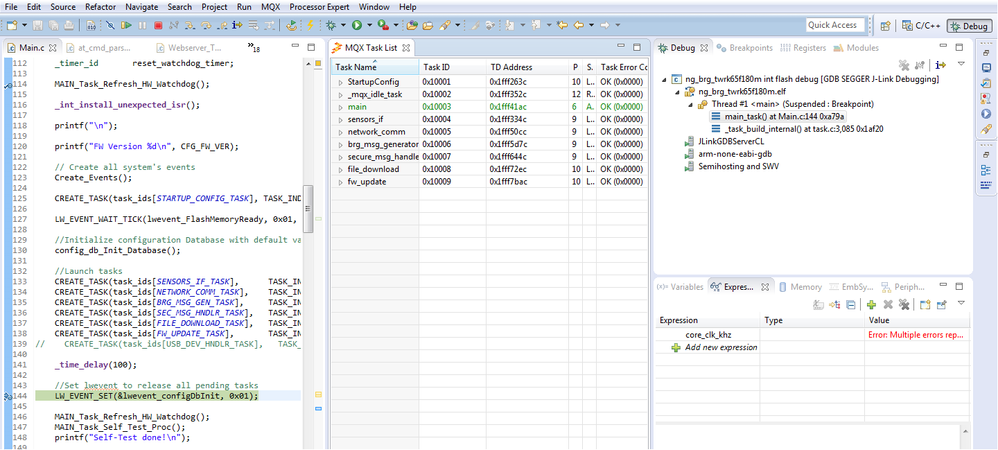
Here is a screenshot showing the task list but no stack trace.
 soledad
- 新着としてマーク
- ブックマーク
- 購読
- ミュート
- RSS フィードを購読する
- ハイライト
- 印刷
- 不適切なコンテンツを報告
Hello Ohad,
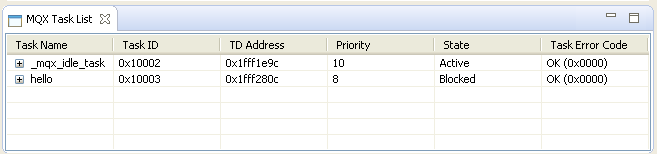
Using KDS you should be able to check MQX Task List, this is an overview about all tasks created in the MQX RTOS application, for example:
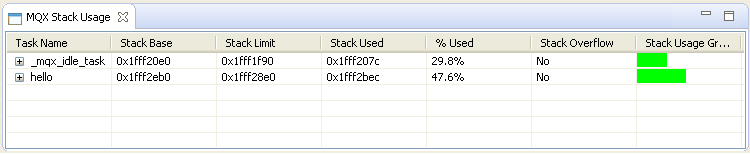
Stack Usage, this screen displays information about interrupt and task stacks. Typically, a stack overflow is the root cause for vast majority of problems in MQX RTOS user applications.
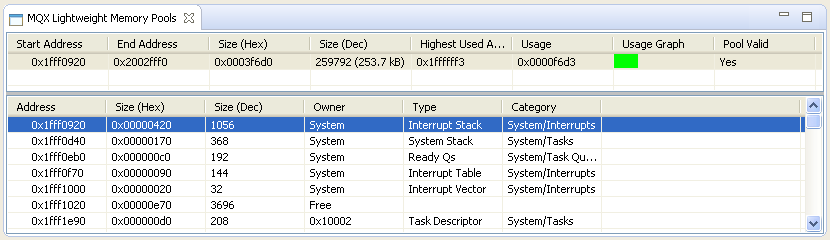
Lightweight Memory Pools displays address, size, and type information about each memory block allocated in the selected memory pool by the MQX RTOS system or applications.
I/O Devices displays name, type and address of I/O Devices used by MQX RTOS application.
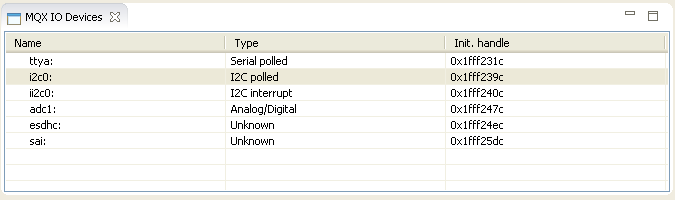
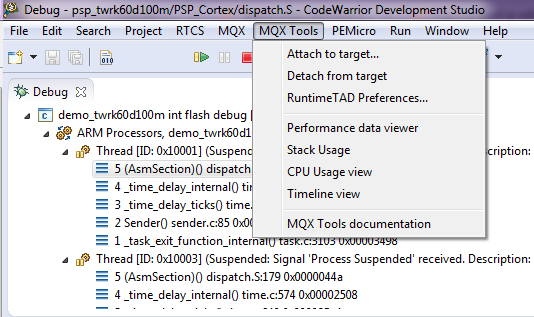
Do you need to use the MQX Performance Tool like the below image? Unfortunately the MQX Performance Tool is available only in the CodeWarrior IDE.
Have a great day,
Sol
-----------------------------------------------------------------------------------------------------------------------
Note: If this post answers your question, please click the Correct Answer button. Thank you!
-----------------------------------------------------------------------------------------------------------------------
- 新着としてマーク
- ブックマーク
- 購読
- ミュート
- RSS フィードを購読する
- ハイライト
- 印刷
- 不適切なコンテンツを報告
So in other words the one feature I was asking about isn't available in KDS.
How do you expect the KDS users to debug a specific task?
Up until now we used CodeWarrior for our projects.
The only reason we want to use KDS is to get the USB_v2 working on the K66.
KDS isn't in production level yet as this is a basic feature for debugging.
Can Freescale provide a working MQX USB_v2 project for CodeWarrior and spare the community the hassle of porting working projects into an IDE that is not yet suitable for real use?
