
- Forums
- Product Forums
- General Purpose MicrocontrollersGeneral Purpose Microcontrollers
- i.MX Forumsi.MX Forums
- QorIQ Processing PlatformsQorIQ Processing Platforms
- Identification and SecurityIdentification and Security
- Power ManagementPower Management
- Wireless ConnectivityWireless Connectivity
- RFID / NFCRFID / NFC
- Advanced AnalogAdvanced Analog
- Neural Processing UnitsNeural Processing Units
- MCX Microcontrollers
- S32G
- S32K
- S32V
- MPC5xxx
- Other NXP Products
- S12 / MagniV Microcontrollers
- Powertrain and Electrification Analog Drivers
- Sensors
- Vybrid Processors
- Digital Signal Controllers
- 8-bit Microcontrollers
- ColdFire/68K Microcontrollers and Processors
- PowerQUICC Processors
- OSBDM and TBDML
- S32M
- S32Z/E
-
- Solution Forums
- Software Forums
- MCUXpresso Software and ToolsMCUXpresso Software and Tools
- CodeWarriorCodeWarrior
- MQX Software SolutionsMQX Software Solutions
- Model-Based Design Toolbox (MBDT)Model-Based Design Toolbox (MBDT)
- FreeMASTER
- eIQ Machine Learning Software
- Embedded Software and Tools Clinic
- S32 SDK
- S32 Design Studio
- GUI Guider
- Zephyr Project
- Voice Technology
- Application Software Packs
- Secure Provisioning SDK (SPSDK)
- Processor Expert Software
- Generative AI & LLMs
-
- Topics
- Mobile Robotics - Drones and RoversMobile Robotics - Drones and Rovers
- NXP Training ContentNXP Training Content
- University ProgramsUniversity Programs
- Rapid IoT
- NXP Designs
- SafeAssure-Community
- OSS Security & Maintenance
- Using Our Community
-
- Cloud Lab Forums
-
- Knowledge Bases
- ARM Microcontrollers
- i.MX Processors
- Identification and Security
- Model-Based Design Toolbox (MBDT)
- QorIQ Processing Platforms
- S32 Automotive Processing Platform
- Wireless Connectivity
- CodeWarrior
- MCUXpresso Suite of Software and Tools
- MQX Software Solutions
- RFID / NFC
- Advanced Analog
- Neural Processing Units
-
- NXP Tech Blogs
- Home
- :
- MQXソフトウェアソリューション
- :
- MQXソフトウェアソリューション
- :
- Building MQX libraries in Code Warrior 10.x
Building MQX libraries in Code Warrior 10.x
- RSS フィードを購読する
- トピックを新着としてマーク
- トピックを既読としてマーク
- このトピックを現在のユーザーにフロートします
- ブックマーク
- 購読
- ミュート
- 印刷用ページ

- 新着としてマーク
- ブックマーク
- 購読
- ミュート
- RSS フィードを購読する
- ハイライト
- 印刷
- 不適切なコンテンツを報告
I'm a novice at most of this. I'm trying to get an MQX project to compile on CW10.2. The instructions in the MQX documentation describe the path where the "build Libs.mcp project is in order to build the libraries, but when I go there, I see two folders: one for CWC7 which contains "build_m52235evb_libs.mcp which will not import into CW10.2 and the CW10 folder only has a .wsd file in it.
How do I build the MQX libraries in CW10.2
解決済! 解決策の投稿を見る。

 Martin_
- 新着としてマーク
- ブックマーク
- 購読
- ミュート
- RSS フィードを購読する
- ハイライト
- 印刷
- 不適切なコンテンツを報告
Starting from Freescale MQX 3.8, there is an easy way with the .wsd file. The actual release version due Oct/2012 is Freescale MQX 3.8.1. The way I usually build MQX 3.8.1 library files in CW 10.2 is described below:
1. I find the .wsd file for my board in the Freescale MQX config directory. For example, for m52235evb that would be:
"c:\Freescale\Freescale MQX 3.8\config\m52235evb\cw10\m52235evb.wsd"
2. I drag and drop this .wsd file into CodeWarrior MCU 10.2 "CodeWarrior Projects" window.
At this point, the Eclipse opens all projects specified by the .wsd file: psp, bsp, mfs, rtcs, shell, (and usb host, usb device libraries in case there is USB hardware module on an MCU).
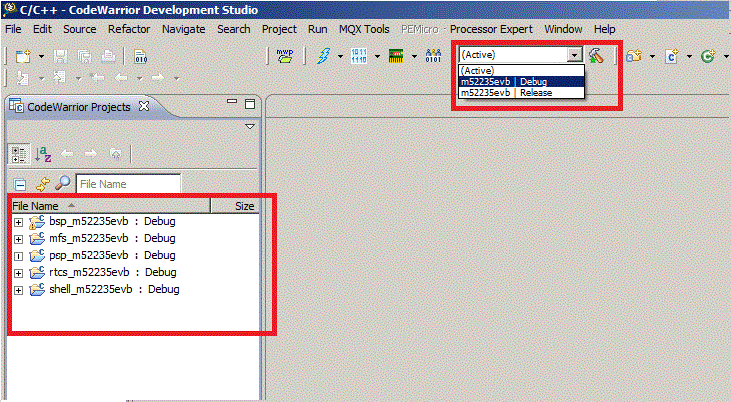
3. now select the Debug or Release build target in the combo box on toolbar and click on the hammer icon.
The build process starts.
The steps are described in the document "FSL MQX Getting Started" that you can find in Documentation folder of your Freescale MQX installation directory, in the chapter 2 Building the MQX Libraries.
Martin_
- 新着としてマーク
- ブックマーク
- 購読
- ミュート
- RSS フィードを購読する
- ハイライト
- 印刷
- 不適切なコンテンツを報告
Starting from Freescale MQX 3.8, there is an easy way with the .wsd file. The actual release version due Oct/2012 is Freescale MQX 3.8.1. The way I usually build MQX 3.8.1 library files in CW 10.2 is described below:
1. I find the .wsd file for my board in the Freescale MQX config directory. For example, for m52235evb that would be:
"c:\Freescale\Freescale MQX 3.8\config\m52235evb\cw10\m52235evb.wsd"
2. I drag and drop this .wsd file into CodeWarrior MCU 10.2 "CodeWarrior Projects" window.
At this point, the Eclipse opens all projects specified by the .wsd file: psp, bsp, mfs, rtcs, shell, (and usb host, usb device libraries in case there is USB hardware module on an MCU).
3. now select the Debug or Release build target in the combo box on toolbar and click on the hammer icon.
The build process starts.
The steps are described in the document "FSL MQX Getting Started" that you can find in Documentation folder of your Freescale MQX installation directory, in the chapter 2 Building the MQX Libraries.
