
- Forums
- Product Forums
- General Purpose MicrocontrollersGeneral Purpose Microcontrollers
- i.MX Forumsi.MX Forums
- QorIQ Processing PlatformsQorIQ Processing Platforms
- Identification and SecurityIdentification and Security
- Power ManagementPower Management
- Wireless ConnectivityWireless Connectivity
- RFID / NFCRFID / NFC
- Advanced AnalogAdvanced Analog
- Neural Processing UnitsNeural Processing Units
- MCX Microcontrollers
- S32G
- S32K
- S32V
- MPC5xxx
- Other NXP Products
- S12 / MagniV Microcontrollers
- Powertrain and Electrification Analog Drivers
- Sensors
- Vybrid Processors
- Digital Signal Controllers
- 8-bit Microcontrollers
- ColdFire/68K Microcontrollers and Processors
- PowerQUICC Processors
- OSBDM and TBDML
- S32M
- S32Z/E
-
- Solution Forums
- Software Forums
- MCUXpresso Software and ToolsMCUXpresso Software and Tools
- CodeWarriorCodeWarrior
- MQX Software SolutionsMQX Software Solutions
- Model-Based Design Toolbox (MBDT)Model-Based Design Toolbox (MBDT)
- FreeMASTER
- eIQ Machine Learning Software
- Embedded Software and Tools Clinic
- S32 SDK
- S32 Design Studio
- GUI Guider
- Zephyr Project
- Voice Technology
- Application Software Packs
- Secure Provisioning SDK (SPSDK)
- Processor Expert Software
- Generative AI & LLMs
-
- Topics
- Mobile Robotics - Drones and RoversMobile Robotics - Drones and Rovers
- NXP Training ContentNXP Training Content
- University ProgramsUniversity Programs
- Rapid IoT
- NXP Designs
- SafeAssure-Community
- OSS Security & Maintenance
- Using Our Community
-
- Cloud Lab Forums
-
- Knowledge Bases
- ARM Microcontrollers
- i.MX Processors
- Identification and Security
- Model-Based Design Toolbox (MBDT)
- QorIQ Processing Platforms
- S32 Automotive Processing Platform
- Wireless Connectivity
- CodeWarrior
- MCUXpresso Suite of Software and Tools
- MQX Software Solutions
- RFID / NFC
- Advanced Analog
- Neural Processing Units
-
- NXP Tech Blogs
- RSS フィードを購読する
- トピックを新着としてマーク
- トピックを既読としてマーク
- このトピックを現在のユーザーにフロートします
- ブックマーク
- 購読
- ミュート
- 印刷用ページ
AUTOSAR MCAL Configuration

- 新着としてマーク
- ブックマーク
- 購読
- ミュート
- RSS フィードを購読する
- ハイライト
- 印刷
- 不適切なコンテンツを報告
Hi! I am using EB tresos to configure MCAL for MPC5744P. Now the requirement is to use the same version of MCAL configuration for two projects. Both projects use MPC5744P as the main control chip, most of functions are identical in the projects, only some functions are different, and these functions have conflicts on the corresponding pins. So the question is how to cut different functions of the same pin through one version of settings in EB tresos, or is it possible to switch some setting files through system constants in EB tresos?
 cuongnguyenphu
- 新着としてマーク
- ブックマーク
- 購読
- ミュート
- RSS フィードを購読する
- ハイライト
- 印刷
- 不適切なコンテンツを報告
Hi @ShuxinHuang ,
If my understanding is correct, you're requesting using multi variant config in EB Tresos.
Please refer this thread to setup variants for Port module in your config:
Solved: MCAL Variant Handling in EB Tresos - NXP Community
After configured, you will see on the top of each module, the variant parameter can be selectable:

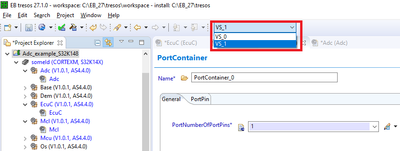
Select each variant and config Port module as per variant.
Then after generated, you will get different config set generated in separate file:


Using these config corresponding with for projects

- 新着としてマーク
- ブックマーク
- 購読
- ミュート
- RSS フィードを購読する
- ハイライト
- 印刷
- 不適切なコンテンツを報告
Thank you for your reply@cuongnguyenphu,I refer this thread to setup variants for Port module in my config: Solved: MCAL Variant Handling in EB Tresos - NXP Community
but I found there is no EcuC module in the MCAL pulgins installation path of MPC5744P, so the pulgins file of EB tresos installation path also have no EcuC module. And finally, I can't using multi variant config in EB Tresos.
 cuongnguyenphu
- 新着としてマーク
- ブックマーク
- 購読
- ミュート
- RSS フィードを購読する
- ハイライト
- 印刷
- 不適切なコンテンツを報告
Which version MCAL for MPC5744 that you're using ?
- 新着としてマーク
- ブックマーク
- 購読
- ミュート
- RSS フィードを購読する
- ハイライト
- 印刷
- 不適切なコンテンツを報告
This Version
 cuongnguyenphu
- 新着としてマーク
- ブックマーク
- 購読
- ミュート
- RSS フィードを購読する
- ハイライト
- 印刷
- 不適切なコンテンツを報告
This package for MPC57xP series didn't support for multi variant.
In this case I think you should do it manually:
1. Generate 1 config set of Port module, then change all the file name (e.g add postfix to them)
2. Config another config set for Port module, in this case you must change name of all parameter (e.g PortConfigSet, PortContainer, PortPin.. differently with previous config in step 1). Then generate this config set.
3. Add output files from these 2 step into your project makefile. Then you can use the config sets whenever you need.
