
- Forums
- Product Forums
- General Purpose MicrocontrollersGeneral Purpose Microcontrollers
- i.MX Forumsi.MX Forums
- QorIQ Processing PlatformsQorIQ Processing Platforms
- Identification and SecurityIdentification and Security
- Power ManagementPower Management
- Wireless ConnectivityWireless Connectivity
- RFID / NFCRFID / NFC
- Advanced AnalogAdvanced Analog
- Neural Processing UnitsNeural Processing Units
- MCX Microcontrollers
- S32G
- S32K
- S32V
- MPC5xxx
- Other NXP Products
- S12 / MagniV Microcontrollers
- Powertrain and Electrification Analog Drivers
- Sensors
- Vybrid Processors
- Digital Signal Controllers
- 8-bit Microcontrollers
- ColdFire/68K Microcontrollers and Processors
- PowerQUICC Processors
- OSBDM and TBDML
- S32M
- S32Z/E
-
- Solution Forums
- Software Forums
- MCUXpresso Software and ToolsMCUXpresso Software and Tools
- CodeWarriorCodeWarrior
- MQX Software SolutionsMQX Software Solutions
- Model-Based Design Toolbox (MBDT)Model-Based Design Toolbox (MBDT)
- FreeMASTER
- eIQ Machine Learning Software
- Embedded Software and Tools Clinic
- S32 SDK
- S32 Design Studio
- GUI Guider
- Zephyr Project
- Voice Technology
- Application Software Packs
- Secure Provisioning SDK (SPSDK)
- Processor Expert Software
- Generative AI & LLMs
-
- Topics
- Mobile Robotics - Drones and RoversMobile Robotics - Drones and Rovers
- NXP Training ContentNXP Training Content
- University ProgramsUniversity Programs
- Rapid IoT
- NXP Designs
- SafeAssure-Community
- OSS Security & Maintenance
- Using Our Community
-
- Cloud Lab Forums
-
- Knowledge Bases
- ARM Microcontrollers
- i.MX Processors
- Identification and Security
- Model-Based Design Toolbox (MBDT)
- QorIQ Processing Platforms
- S32 Automotive Processing Platform
- Wireless Connectivity
- CodeWarrior
- MCUXpresso Suite of Software and Tools
- MQX Software Solutions
- RFID / NFC
- Advanced Analog
- Neural Processing Units
-
- NXP Tech Blogs
- Home
- :
- Product Forums
- :
- MCX Microcontrollers
- :
- MCXA156 pinout in readable format?
MCXA156 pinout in readable format?
- Subscribe to RSS Feed
- Mark Topic as New
- Mark Topic as Read
- Float this Topic for Current User
- Bookmark
- Subscribe
- Mute
- Printer Friendly Page
MCXA156 pinout in readable format?

- Mark as New
- Bookmark
- Subscribe
- Mute
- Subscribe to RSS Feed
- Permalink
- Report Inappropriate Content
I just started evaluating the MCXA156VFT and one of the first things I like to do with any new MCU is to make a spreadsheet of the pin mux configuration - it makes it a lot easier to plan my pin allocation and make sure that I can use all of the peripherals I need with the package I've selected. The MCXA datasheets seem to have taken a big step backwards for readability, though:

It'd be hard to come up with a less readable layout. The MCUXpresso 'Pins' tool is better, but I can't find where that's pulling its data from.
Before I retype the whole thing myself, can someone tell me either where to find the MCUX pins data so I can import that, or tell me where I might find a more usable listing?
Thanks,
Scott

 EdwinHz
- Mark as New
- Bookmark
- Subscribe
- Mute
- Subscribe to RSS Feed
- Permalink
- Report Inappropriate Content
Hi @scottm,
MCUXpresso IDE can create a .csv file that displays all of the pins and their respective muxing options on an organized manner. To get this file:
1. Create a new project making sure you select the part number that you are using.
2. Open Pins Tool to create the .mex file.
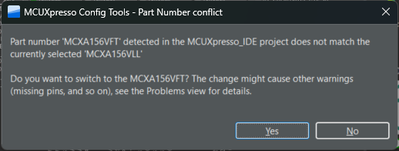
3. For the an MCXA156 project, by default, ConfigTools will try to make the .mex file with the MCXA156VLL. Make sure to change the part number to VFT by clicking "Yes" on the following prompt:
4. Go to File > Export... > Pins Tool > Export the Pins in CSV.
The resulting file will show all of the pins and their respective pin muxing of that package, as well as the pins that you have routed on each Functional Group of Pins Tool.
BR,
Edwin.
- Mark as New
- Bookmark
- Subscribe
- Mute
- Subscribe to RSS Feed
- Permalink
- Report Inappropriate Content
Thanks. It's not the most readable spreadsheet, but at least it's in a from I can manipulate with a script. Should save some time.
Scott
