
- Forums
- Product Forums
- General Purpose MicrocontrollersGeneral Purpose Microcontrollers
- i.MX Forumsi.MX Forums
- QorIQ Processing PlatformsQorIQ Processing Platforms
- Identification and SecurityIdentification and Security
- Power ManagementPower Management
- Wireless ConnectivityWireless Connectivity
- RFID / NFCRFID / NFC
- Advanced AnalogAdvanced Analog
- Neural Processing UnitsNeural Processing Units
- MCX Microcontrollers
- S32G
- S32K
- S32V
- MPC5xxx
- Other NXP Products
- S12 / MagniV Microcontrollers
- Powertrain and Electrification Analog Drivers
- Sensors
- Vybrid Processors
- Digital Signal Controllers
- 8-bit Microcontrollers
- ColdFire/68K Microcontrollers and Processors
- PowerQUICC Processors
- OSBDM and TBDML
- S32M
- S32Z/E
-
- Solution Forums
- Software Forums
- MCUXpresso Software and ToolsMCUXpresso Software and Tools
- CodeWarriorCodeWarrior
- MQX Software SolutionsMQX Software Solutions
- Model-Based Design Toolbox (MBDT)Model-Based Design Toolbox (MBDT)
- FreeMASTER
- eIQ Machine Learning Software
- Embedded Software and Tools Clinic
- S32 SDK
- S32 Design Studio
- GUI Guider
- Zephyr Project
- Voice Technology
- Application Software Packs
- Secure Provisioning SDK (SPSDK)
- Processor Expert Software
- Generative AI & LLMs
-
- Topics
- Mobile Robotics - Drones and RoversMobile Robotics - Drones and Rovers
- NXP Training ContentNXP Training Content
- University ProgramsUniversity Programs
- Rapid IoT
- NXP Designs
- SafeAssure-Community
- OSS Security & Maintenance
- Using Our Community
-
- Cloud Lab Forums
-
- Knowledge Bases
- ARM Microcontrollers
- i.MX Processors
- Identification and Security
- Model-Based Design Toolbox (MBDT)
- QorIQ Processing Platforms
- S32 Automotive Processing Platform
- Wireless Connectivity
- CodeWarrior
- MCUXpresso Suite of Software and Tools
- MQX Software Solutions
- RFID / NFC
- Advanced Analog
- Neural Processing Units
-
- NXP Tech Blogs
- Home
- :
- MCUXpressoソフトウェアとツール
- :
- MCUXpresso IDE
- :
- Re: MCUXpresso Memory placement Error
MCUXpresso Memory placement Error
- RSS フィードを購読する
- トピックを新着としてマーク
- トピックを既読としてマーク
- このトピックを現在のユーザーにフロートします
- ブックマーク
- 購読
- ミュート
- 印刷用ページ
MCUXpresso Memory placement Error

- 新着としてマーク
- ブックマーク
- 購読
- ミュート
- RSS フィードを購読する
- ハイライト
- 印刷
- 不適切なコンテンツを報告
Hi All
I am having an issue with the memory mapping in MCUXpresso. I am using an LPC4088 and external flash and external RAM.
I am following the instructions of the MCUXPresso manual :
Setting the memory allocation and flash drivers


I declare my RAM using __DATA(RAM3)

And my External flash using __TEXT(EXT_FLASH)

Somehow when I compile the program the linker puts the data of the external RAM in the external RAM AND in the internal flash...

I am out of ideas on why it happens... Is this a bug? is this memory allocation actually working in the first place?
Thanks for your help
Remi

 Habib_MS
- 新着としてマーク
- ブックマーク
- 購読
- ミュート
- RSS フィードを購読する
- ハイライト
- 印刷
- 不適切なコンテンツを報告
Hello @remibusseuil,
I still working in this issue, but I cannot solve it. However, if you import an LPCopen example you can configure more memory sections without problems.
BR
Habib
Habib_MS
- 新着としてマーク
- ブックマーク
- 購読
- ミュート
- RSS フィードを購読する
- ハイライト
- 印刷
- 不適切なコンテンツを報告
Hello @remibusseuil,
Could you try open MCUxpresso as admin in order to see if it solves the issue?
BR
Habib
- 新着としてマーク
- ブックマーク
- 購読
- ミュート
- RSS フィードを購読する
- ハイライト
- 印刷
- 不適切なコンテンツを報告
Habib_MS
- 新着としてマーク
- ブックマーク
- 購読
- ミュート
- RSS フィードを購読する
- ハイライト
- 印刷
- 不適切なコンテンツを報告
Hello @remibusseuil,
Did you solve the issue?
BR
Habib
- 新着としてマーク
- ブックマーク
- 購読
- ミュート
- RSS フィードを購読する
- ハイライト
- 印刷
- 不適切なコンテンツを報告
Habib_MS
- 新着としてマーク
- ブックマーク
- 購読
- ミュート
- RSS フィードを購読する
- ハイライト
- 印刷
- 不適切なコンテンツを報告
Hello @remibusseuil,
In order to add new FLASH, you can follow two ways:
1. Via MCU settings:
Create a new RAM/FLASH in MCU settings, properties->C/C++ build->MCU settings:
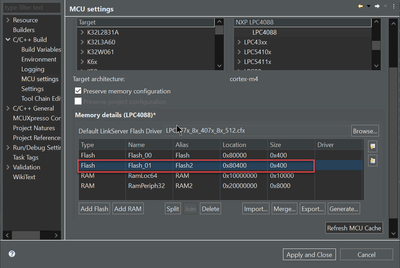
Click on Refresh MCU cache:

Click on apply and close:

2. Click on Edit memory in Project settings->memory->Edit memory:
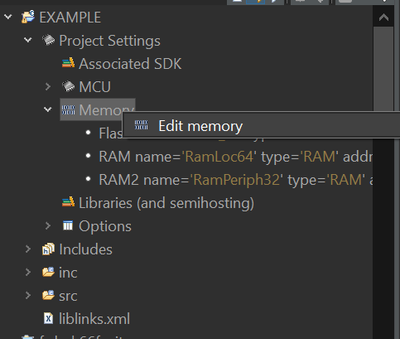
Add a new FLASH and press OK :
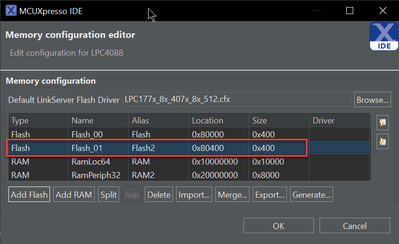
Finally, are you currently experiencing any other problems?
If the response is yes, do not hesitate to let me know
BR
Habib.
- 新着としてマーク
- ブックマーク
- 購読
- ミュート
- RSS フィードを購読する
- ハイライト
- 印刷
- 不適切なコンテンツを報告
additionnally I run into the problem of the memory allocation does not persist after a restart of MCUxpresso:

Really what is happening? is this a pre pre alpha release?
Habib_MS
- 新着としてマーク
- ブックマーク
- 購読
- ミュート
- RSS フィードを購読する
- ハイライト
- 印刷
- 不適切なコンテンツを報告
Hello @remibusseuil,
I followed the chapter 7 called "Creating New Projects using Pre-Installed Part Support" in the MCUXpresso IDE User Guide, and It works correctly, however I get the same error, when I close the project the memory regions defined disappears, this is because the linker file is not configured with the new regions. I will ask internally in order to obtain more information. Please take in mind that it could be a few days, thank you for your patience.
BR
Habib.
- 新着としてマーク
- ブックマーク
- 購読
- ミュート
- RSS フィードを購読する
- ハイライト
- 印刷
- 不適切なコンテンツを報告
To make it clear here i set an array bigger than the flash memory but smaller than the external RAM and the program cannot compile because it copies the memory of the RAM in the flash.........

