
- Forums
- Product Forums
- General Purpose MicrocontrollersGeneral Purpose Microcontrollers
- i.MX Forumsi.MX Forums
- QorIQ Processing PlatformsQorIQ Processing Platforms
- Identification and SecurityIdentification and Security
- Power ManagementPower Management
- Wireless ConnectivityWireless Connectivity
- RFID / NFCRFID / NFC
- Advanced AnalogAdvanced Analog
- Neural Processing UnitsNeural Processing Units
- MCX Microcontrollers
- S32G
- S32K
- S32V
- MPC5xxx
- Other NXP Products
- S12 / MagniV Microcontrollers
- Powertrain and Electrification Analog Drivers
- Sensors
- Vybrid Processors
- Digital Signal Controllers
- 8-bit Microcontrollers
- ColdFire/68K Microcontrollers and Processors
- PowerQUICC Processors
- OSBDM and TBDML
- S32M
- S32Z/E
-
- Solution Forums
- Software Forums
- MCUXpresso Software and ToolsMCUXpresso Software and Tools
- CodeWarriorCodeWarrior
- MQX Software SolutionsMQX Software Solutions
- Model-Based Design Toolbox (MBDT)Model-Based Design Toolbox (MBDT)
- FreeMASTER
- eIQ Machine Learning Software
- Embedded Software and Tools Clinic
- S32 SDK
- S32 Design Studio
- GUI Guider
- Zephyr Project
- Voice Technology
- Application Software Packs
- Secure Provisioning SDK (SPSDK)
- Processor Expert Software
- Generative AI & LLMs
-
- Topics
- Mobile Robotics - Drones and RoversMobile Robotics - Drones and Rovers
- NXP Training ContentNXP Training Content
- University ProgramsUniversity Programs
- Rapid IoT
- NXP Designs
- SafeAssure-Community
- OSS Security & Maintenance
- Using Our Community
-
- Cloud Lab Forums
-
- Knowledge Bases
- ARM Microcontrollers
- i.MX Processors
- Identification and Security
- Model-Based Design Toolbox (MBDT)
- QorIQ Processing Platforms
- S32 Automotive Processing Platform
- Wireless Connectivity
- CodeWarrior
- MCUXpresso Suite of Software and Tools
- MQX Software Solutions
- RFID / NFC
- Advanced Analog
- Neural Processing Units
-
- NXP Tech Blogs
- Home
- :
- MCUXpressoソフトウェアとツール
- :
- MCUXpresso IDE
- :
- Re: Debugger losing connection
Debugger losing connection
- RSS フィードを購読する
- トピックを新着としてマーク
- トピックを既読としてマーク
- このトピックを現在のユーザーにフロートします
- ブックマーク
- 購読
- ミュート
- 印刷用ページ
Debugger losing connection

- 新着としてマーク
- ブックマーク
- 購読
- ミュート
- RSS フィードを購読する
- ハイライト
- 印刷
- 不適切なコンテンツを報告
I had this problem prior to the MCUX 10.2.0 upgrade but it seems to be cropping up more now.
I'm using a P&E Cyclone ACP as my primary debug interface. P&E recently made some updates that really helped the stability - it no longer hangs if you just reset the target board or disconnect the cable, for example - but it's still failing sometimes and they're blaming it on the gdb side.
On four different boards today, of two very different designs (all based on the MK22FN1M0AVLH12) I've had the debugger just stop doing anything. I'll launch the application and if I let it run and hit pause, the debugger is no longer responding. I have to kill the pegdbgserver_console.exe process before I can launch it again, and until then none of the debugger controls in the IDE do anything, including the terminate button.
If I put it in instruction stepping mode, I can step through until the WDOG unlock and then it jumps back to the entry point. That's not really surprising since it's a two-part update, but if I put a breakpoint on the other side of the WDOG setup it never gets there. For that matter, if I put a breakpoint at the second instruction it never stops there, either.
I removed the WDOG setup entirely and then it doesn't seem to be getting past the MCG initialization. That could mean an oscillator problem, but I don't understand why the debugger just stops working when left to run.
Last time this came up the problem seemed to resolve, for that particular board, when I replaced the MCU. I've done that now with no change. I've got two identical boards here (barring any assembly errors - they're prototypes) and both were doing it initially, now one is starting OK. I dug up a TWR-K21F120M board and that seemed to start up OK.
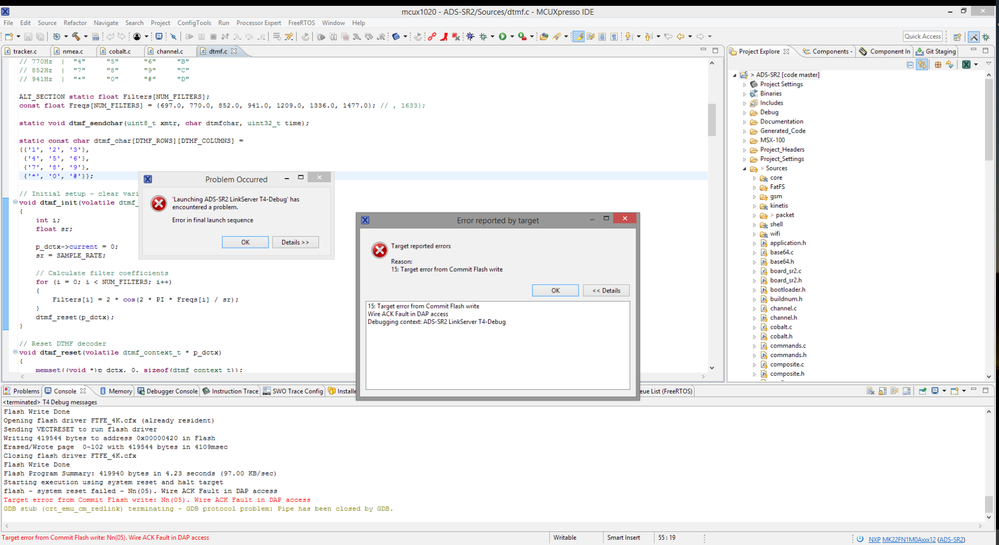
I decided to give my LPC-Link2 a try. I'd never been able to get it to cooperate with earlier versions of MCUX - it seemed to have a conflict with the P&E setup - but 10.2.0 does a much better job of managing the interfaces. I fired it up and it programmed OK but got 'Wire ACK Fault in DAP access'. See the screenshot below. I get this with the TWR board as well, so it's not my hardware.
It's 10 PM and I'm giving up for the day. Any suggestions for tomorrow?
Scott

 lpcxpresso_supp
- 新着としてマーク
- ブックマーク
- 購読
- ミュート
- RSS フィードを購読する
- ハイライト
- 印刷
- 不適切なコンテンツを報告
LinkServer debug connections have extra functionality in various areas compared to P&E / SEGGER connections. And this includes things like extra registers in the Register views (which are currently provided up to the front end IDE by the lower level LinkServer debug executables).
For instance, vectpc is basically just the IDE detecting the cpu has halted in a fault condition and reading the registers and addresses in a very similar way to the gdb script described by the MCUonEclipse blog. [We are intending to extend and enhance this functionality to also work with P&E / SEGGER debug connections in future release]
One other thing that the LinkServer connection will do though is automatically halt the cpu when a fault is encountered
What the PC value you are seeing really depends upon what the exact trigger for the fault was.
I'm wondering whether, given that you say this happens after your application has been running for some time, that you are actually running out of stack space - and the stack pointer falling through to a memory address that doesn't actually exist physically. And that attempted memory access could possibly block the ability of the debugger to access the target (depending upon the chip implementation).
It might be worth using the technique described in section 11.5.1, "Using Watchpoints to monitor stack depth", of the MCUXpresso IDE v10.2 User Guide to see if your stack pointer is getting close to the end (i.e start) of the memory block being used?
Regards,
MCUXpresso IDE Support
- 新着としてマーク
- ブックマーク
- 購読
- ミュート
- RSS フィードを購読する
- ハイライト
- 印刷
- 不適切なコンテンツを報告
New developments - this keeps getting more frustrating. When the system hangs, I'm able to start a new debug session in attach-only mode, and for just an instant I get the stack trace!
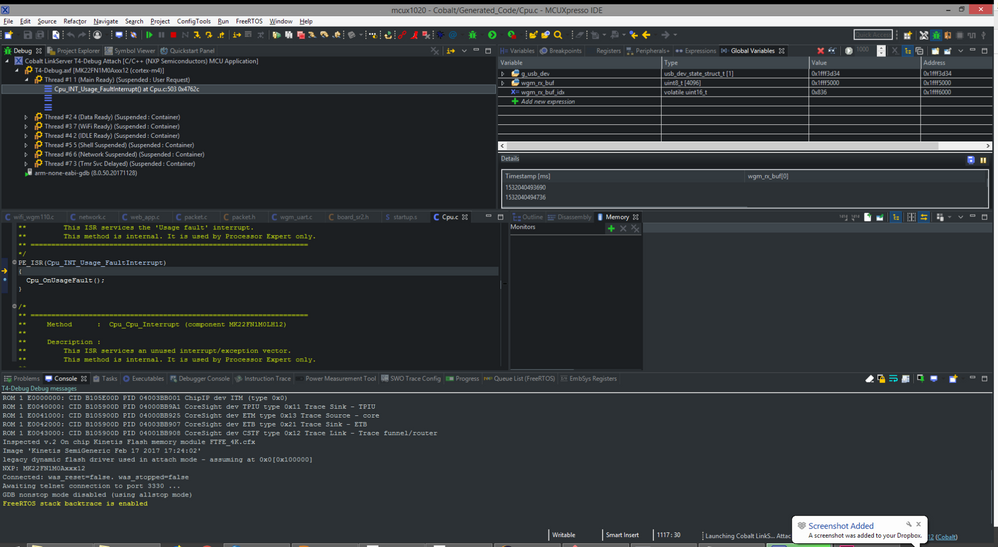
It took me a few attempts to get this screenshot. But this means that the target is NOT completely dead, that it CAN be accessed by the debugger but something on the front end is broken. If I could keep it running for 30 seconds, I could get what I need out of it.
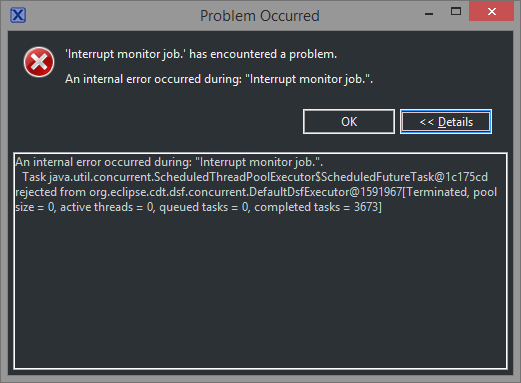
It also gave me an error between attach attempts:
And before that, while attempting to create a new debug configuration, I got yet another error:
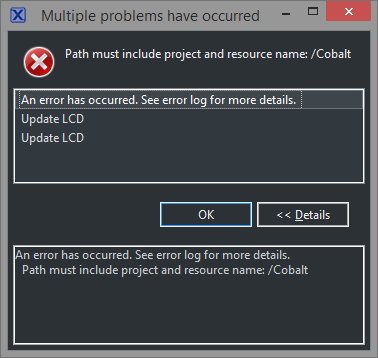
I have no idea what path it's referring to. I had to duplicate an existing configuration.
Any ideas?
- 新着としてマーク
- ブックマーク
- 購読
- ミュート
- RSS フィードを購読する
- ハイライト
- 印刷
- 不適切なコンテンツを報告
Got a couple more new errors while attaching and trying to catch the information I need:
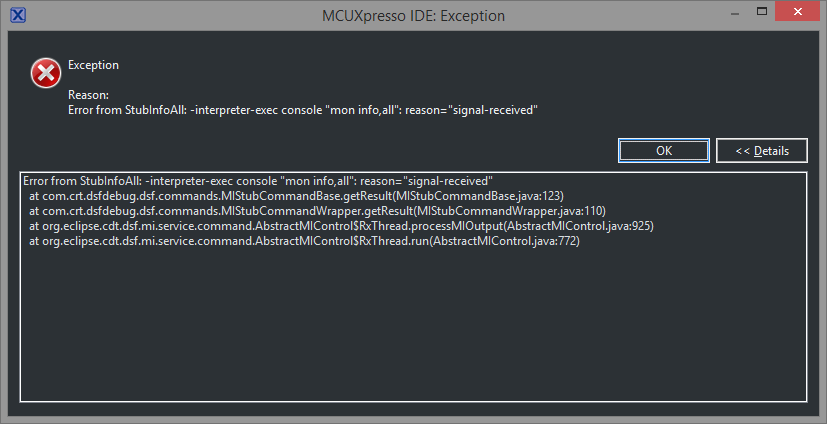

I did manage to catch some useful information in a screenshot that's pointed me toward an ISR I need to check out. This reminds me of the time we had to keep snapping pictures of the Netware server's screen with a Polaroid to catch the error message it showed for half a second on boot...
I'll work on getting my application working, but I'm going to keep posting MCUX errors here because I'd really like to get the system stable.
You might be able to see it in some of the screenshots, but another issue that's come up is that sometimes it keeps showing a progress indicator for 'configuring gdb...' that never finishes.
Scott
- 新着としてマーク
- ブックマーク
- 購読
- ミュート
- RSS フィードを購読する
- ハイライト
- 印刷
- 不適切なコンテンツを報告
I've been watching the stack usage in FreeRTOS and nothing's getting close to full that I can see, and the way I've got memory laid out it'd have to clobber a whole lot of other stuff before the stack pointer got outside of the physical memory space. Since it seems to be happening in vPortExitCritical() it makes me think that there's some pending interrupt that's causing a fault as soon as it clears the interrupt mask.
It also seems to always happen during the second blink of a periodic 2-blink front panel LED signal and there's no way that's coincidence so I've got some leads there, but I'm not looking for help debugging my application so much as trying to understand how the tools work - or at least where to find the right information - so I don't have to keep asking.
Could you explain what's happening with the LPC-Link2 and gdb when the Vector Catch is triggered? It's clearly getting *something* to gdb since it's giving me an address (the instruction is 'mov sp, r7' in portENABLE_INTERRUPTS() and the following one is 'ldr.w r7, [sp], #4') so gdb is talking to the hardware up to that point.
Let's assume your explanation is correct, that the stack pointer is referencing an invalid address and causing a usage fault. The vector catch forces IBREAKPT high (according to ARM's docs) - and then what happens? How does it get the PC value that it displays in the gdb console, and what's the OTHER PC value that it shows for VectorCatch:UsageF? What is the debugger trying to do next that's causing it to hang?
I'm trying NOT to have to learn all of the details of the debugging system's implementation. Back on the HC08 I had to do that and designed my own MON08 production programmer but I don't have enough hours in the day for that now and I don't want to get to the point where I have to hook a logic analyzer up to the SWD port and learn that protocol and all of the higher layers to understand why my debug probes stop responding.
Thanks,
Scott
lpcxpresso_supp
- 新着としてマーク
- ブックマーク
- 購読
- ミュート
- RSS フィードを購読する
- ハイライト
- 印刷
- 不適切なコンテンツを報告
So that screenshot suggests that your application has triggered a "usage fault" (one of : Undefined instruction, Attempt to enter an invalid instruction set state, Failed integrity check on exception return, Attempt to access a non-existing coprocessor, Illegal unaligned load or store, Stack overflow, Divide By 0).
You may be able to obtain more information about the trigger for the fault when debugging with LPC-Link2 using the IDE's "vectpc" functionality (described in section 11.6, "Registers" of the MCUXpresso IDE v10.2 User Manual).
The "vectpc" functionality doesn't work with P&E, but you could use something like the mechanism described on the mcuoneclipse blog instead : Debugging ARM Cortex-M Hard Faults with GDB Custom Command | MCU on Eclipse
For a more detailed explanation of usage faults, check ARM's Cortex-M documentation. In particular this Keil/ARM application note which gives a good overview: Application Note 209: Using Cortex-M3/M4/M7 Fault Exceptions
Regards,
MCUXpresso IDE Support
- 新着としてマーク
- ブックマーク
- 購読
- ミュート
- RSS フィードを購読する
- ハイライト
- 印刷
- 不適切なコンテンツを報告
Managed to catch it again on the LPC-Link2. I got the same VectorCatch message again, and this from gdb:
629,442 (gdb)
629,897 69^done,reason="signal-received",signal-name="SIGSTOP",signal-meaning="Stopped (signal)",new\
-thread-id="1",frame={level="0",addr="0x00049bc8",func="vPortExitCritical",args=[],file="../FreeRTOS\
/port.c",fullname="S:\\projects\\Cobalt\\FreeRTOS\\port.c",line="921"}
So it's getting SOME debug information after the fault - it's not like the target disappears without a trace. The registers view initially shows the registers but not their contents, and as soon as I try to do anything with the view it wipes entirely.
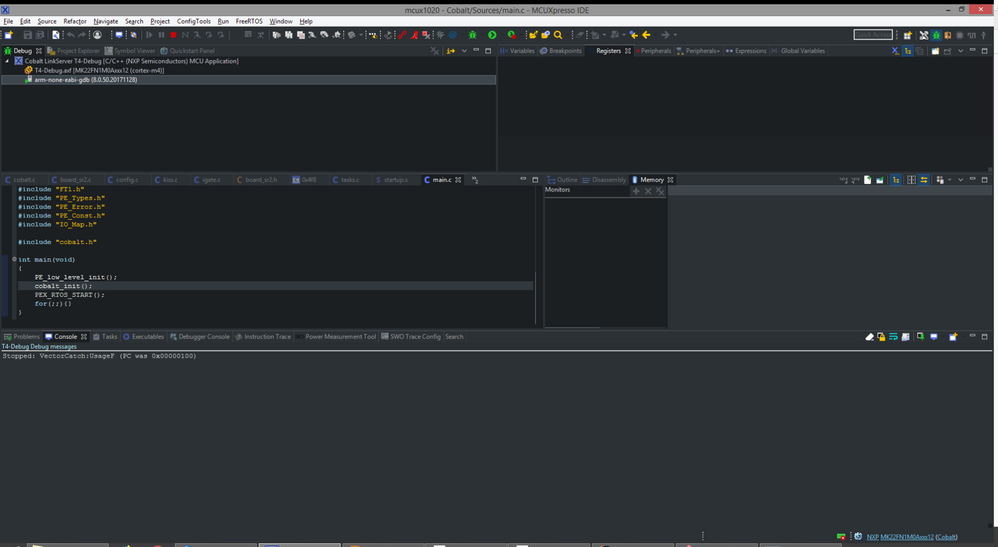
gdb also keeps running, with its CPU utilization maxed out.
How should I interpret the VectorCatch PC value? Was PC really 0x100 when the fault happened? 0x100 on this device is the PIT0 interrupt vector, which I'm not using.
- 新着としてマーク
- ブックマーク
- 購読
- ミュート
- RSS フィードを購読する
- ハイライト
- 印刷
- 不適切なコンテンツを報告
I've spent a lot of time chasing down various fault exceptions (and I've implemented Erich's fault handler) but they generally don't stop the debugger connection - I'm able to inspect registers and enter instruction stepping mode. When this fault occurs, I can't see any registers or memory. That one line of console output is the only thing I've ever seen the fault generate. It sometimes takes several hours for the fault to appear so it's very frustrating to catch it and then not be able to do any debugging.
Is there an explanation somewhere of how the vectpc mechanism works? Is the LPC-Link2 doing something special to get the fault information, or is it just interpreting the registers?
Also, why doesn't BFAR show up in my register list like it does in the manual, and like it did in CodeWarrior? I have to switch to the Peripherals+ view and go to the SCB to see it. Not that that's a huge deal, but it's frustrating when it doesn't work like the manual shows.
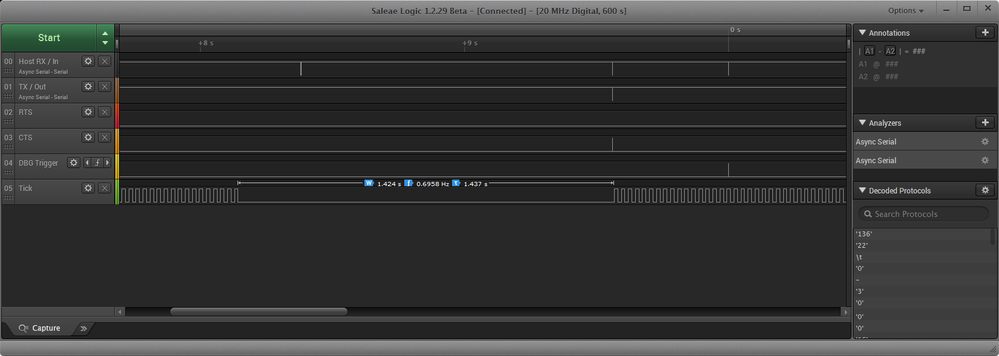
And on a related note, I'm trying to understand the system's behavior when the 'stop' button is pressed. In CW the behavior always seemed to be to halt the target and leave it halted. In MCUX the target resumes running after a delay. In the logic analyzer screenshot below, the bottom trace is toggled by a FreeRTOS timer. The 1.4-second gap is where I pressed 'stop'. The target does not get reset - it continues where it left off. This is also not a huge deal, but in this case it trips the EWM and triggers an alarm and it's just annoying. I'd rather have it held in reset but I don't see a way to do that.
Thanks,
Scott
lpcxpresso_supp
- 新着としてマーク
- ブックマーク
- 購読
- ミュート
- RSS フィードを購読する
- ハイライト
- 印刷
- 不適切なコンテンツを報告
Although the debugger will poll the target cpu periodically to see if it has dropped into debug state, often it will only be when you force a definite action - such as a pause - that a more indepth attempt will be made to interrogate the target will be made. And in your case, it is then that it sounds like the problem detected. My best guess would be that something in your application has caused some form of bus fault so serious that it has hung the debug bus.
What, if any, messages / log output do you actually get when the loss of debug connection is detected?
Regards,
MCUXpresso IDE Support.
- 新着としてマーク
- ブックマーク
- 購読
- ミュート
- RSS フィードを購読する
- ハイライト
- 印刷
- 不適切なコンテンツを報告
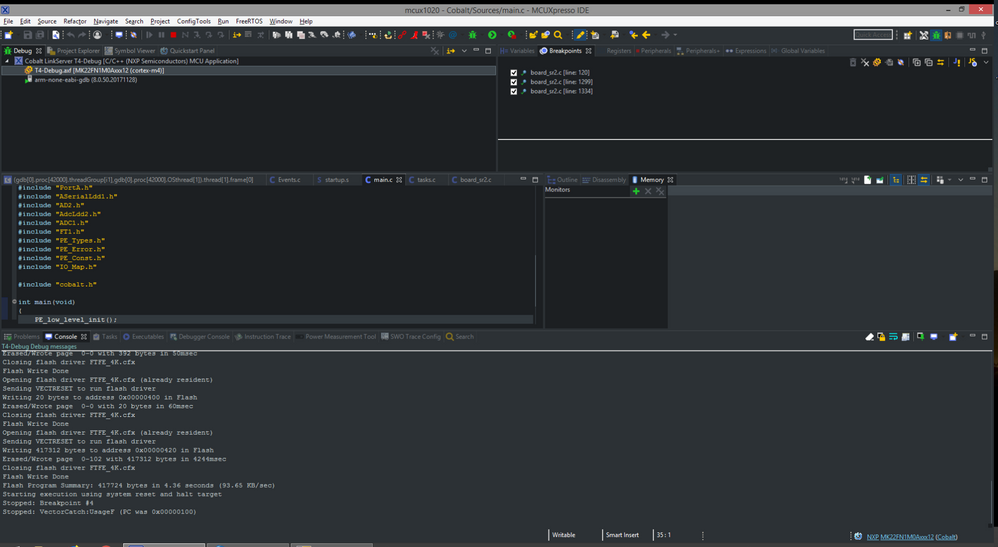
I went through all of the consoles this time when it stopped, and this is what I found. There are only 3 breakpoints, so it's possible breakpoint #4 is the temporary one at startup. Since there aren't any timestamps I'm not sure when that happened. This time I was testing with an LPC-Link2.
It says PC was 0x100 (which is the PIT0 vector, not used in this application) but I'm not clear if PC means anything here.
If this *is* the fault I'm looking for, how is it that the debugger gets the exception and reads at least PC but then can't read any other registers or memory contents?
I've started it again and cleared all of the consoles, so anything that shows up now will be from after the fault.
I'm not asking for the debugger to catch things it can't catch, but I'd like to understand what can make it fail like this. When you say a bus fault so serious it hangs the debug bus, can you give an example? Or point me to some documentation on how it works?
Thanks,
Scott
- 新着としてマーク
- ブックマーク
- 購読
- ミュート
- RSS フィードを購読する
- ハイライト
- 印刷
- 不適切なコンテンツを報告
Generally nothing - press the pause button and it doesn't do anything, other than gray out the run and pause buttons. I've checked all of the console windows and there are no error messages in any of them. It's after I click 'stop' that the target board starts running again and reports an EWM timeout, but I never get anything on the debugger side.
- 新着としてマーク
- ブックマーク
- 購読
- ミュート
- RSS フィードを購読する
- ハイライト
- 印刷
- 不適切なコンテンツを報告
Posting here instead of starting over with a new thread because I'm still dealing with the original problem, or at least something similar.
I'm debugging a board that's freezing after some interval. It's not getting a watchdog reset so I think it's a task-level problem (it's a FreeRTOS project) but I'm not able to figure out where it's happening because the debugger silently loses its connection.
This is true with both the Cyclone ACP and the LPC-Link2. The EWM is configured (it drives a hardware safety to prevent an attached device from overheating in the event of a lockup) and I've got a breakpoint set in the EWM/WDOG interrupt. The breakpoint is never triggered. When I see that the LED has stopped flashing and the board is locked up, I can hit 'pause' on the debugger but the connection is gone.
I've put a logic analyzer on the reset line and it's never asserted during the crash. I just caught another one and I can see that the EWM line goes low about 250 ms after it stops, which is the expected behavior, but again the breakpoint didn't work - or wasn't shown by the debugger at least - and the connection was lost when I paused it.
The EWM interrupt triggers a message on the UART, and interestingly the message wasn't displayed until *after* I stopped the debugger. This is entirely separate from the IDE - it's not semihosted, it's a dedicated UART on its own serial port.
That suggests to me that maybe the breakpoint *did* work but it just wasn't displayed in the IDE.
Can someone explain how this is possible? Under what conditions can the debugger lose contact with the target board without a reset signal, and why would the loss of contact not be detected immediately? More importantly, how can I maintain the connection so I can see where the fault is happening?
Thanks,
Scott
lpcxpresso_supp
- 新着としてマーク
- ブックマーク
- 購読
- ミュート
- RSS フィードを購読する
- ハイライト
- 印刷
- 不適切なコンテンツを報告
Hi Scott,
Sorry for the continued problems. The "Wire ACK Fault in DAP access" is a result of an ACK error being reported by the DAPLink probe after an AP/DP register transaction. It's hard to speculate as to the cause/effect of the ACK. In this case, the debugger reports a wire fail using a system reset signal after the flash operation. In your project launch configuration, set VECTRESET as the Reset Handling method, and retry the connection. Report your results.
Thanks and regards,
MCUXpresso Support
- 新着としてマーク
- ブックマーク
- 購読
- ミュート
- RSS フィードを購読する
- ハイライト
- 印刷
- 不適切なコンテンツを報告
Continuing with my troubleshooting. My main problems now are no task-aware debugging with the LPC-Link2, and I still can't launch debug configurations directly.
'Search Project' from the debug configuration has been weirdly inconsistent. It'll simply not find binaries. I can browse to them and they're in the right place but it won't find them otherwise. I just rebuilt all of the configurations and now all three are showing up in the list again.
Of my P&E configs, now two are giving me an active debug button. And now that I switch back to the NXP configs, all three have debug buttons. On P&E #3, copied the application location from NXP #3 but still no debug button. 'Search Project', selected the binary, no change. Clicked back over to the NXP #3 config for reference, then back to P&E #3 - and now the debug button is active! I changed nothing, just switched views.
Launched from the debug config screen and it worked normally. Still no debug button in quickstart. All configs still have an active debug button. Selected NXP #3 and 'debug', got a new error:
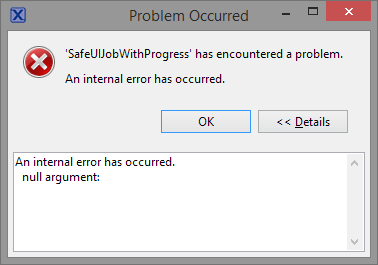
Never seen this one before. Target discovery is now stuck, won't cancel. Cleanup doesn't help. Closing the IDE and restarting.
Still no quickstart debug button. All six debug configs are still active. Launching with NXP #3. Now I get the probe selection and I can choose All-Stop. Suspend works, but still no task list in the debug view. Incidentally, reset handling has reset to the default blank setting but I'm not getting a wire ACK error.
Clicked on the flash GUI tool to check something and got this:
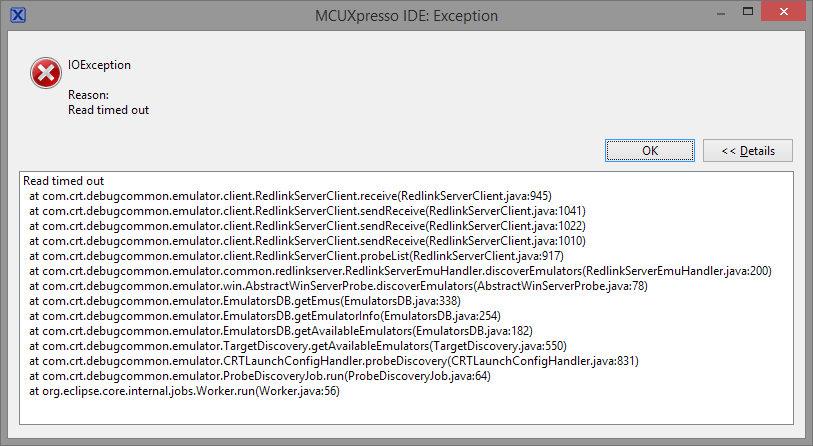
Cancelled, made sure redlink server was down, tried again. Got the probe discovery screen this time. Ran the mass erase and it worked. I was trying to recreate something I meant to ask about previously - every time I'd try to run a mass erase, it'd pop up with the probe discovery screen again, but this time showing only one option. I had that happen at least half a dozen times, and now it's not doing it.
Clicked on the blue bug. Still getting an error:
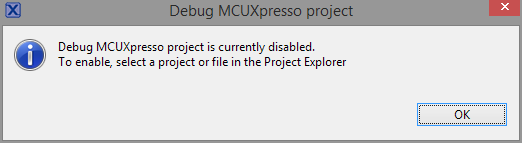
Following Erich's instructions, I've set the debug level to 4 in the debug config. FreeRTOSDebugConfig says it's missing. My FreeRTOS settings don't match Erich's; changed them and rebuilt. Ok, now we're getting a task list. It's slow to come up compared to the Cyclone, but it's there. Back to the Cyclone, still looks good there.
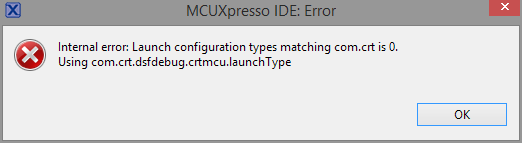
Clicked on the MCUX drop-down from the quickstart debug panel and got another error about no matching launch configs (this time with something other than using: none but I didn't catch it), but now the probe discovery comes up. Launches OK. Tried the drop-down again, captured the error this time:
Switched build configurations. Tried all three, none show a debug button in quickstart. Green button works, but oops.. launched an inactive configuration, not the current one. Remembered I had WFI in idle disabled, re-enabled it. Launched from debug config screen on NXP #1 config, got the probe screen, changed to all-stop.
Restarted the IDE. Now the blue bug is disabled again, and the one in the quickstart panel is still inactive. But if I click down to the quickstart panel and back up to a project file, NOW the blue bug is active. Still gives me a 'disabled' error.
Back into debug config to set the log level back to 2. Noticed semihosting on, which I don't want. Turned it off - and now the debug button is disabled again!
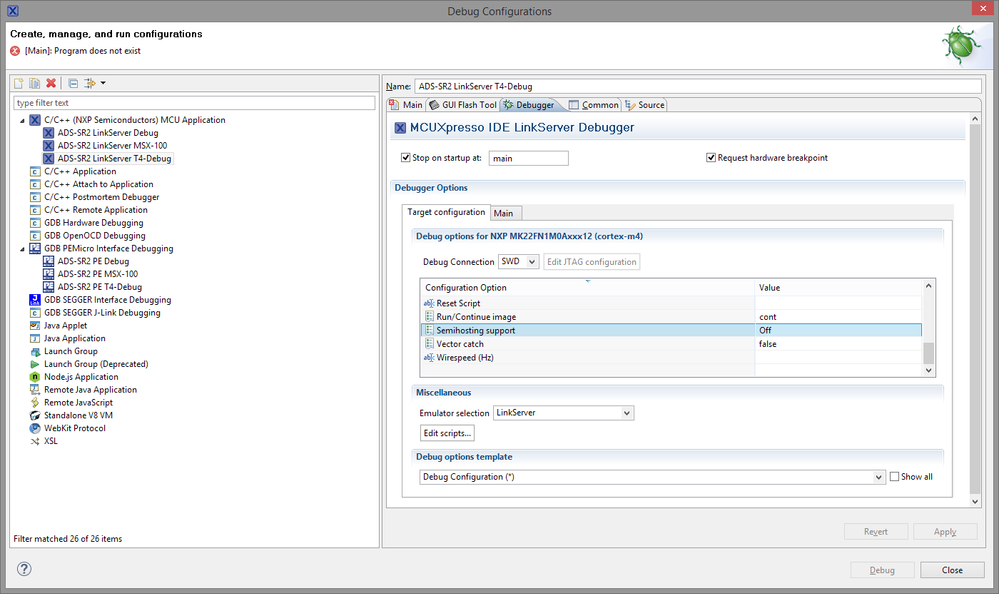
Switching back to the main tab, it now says the program does not exist:
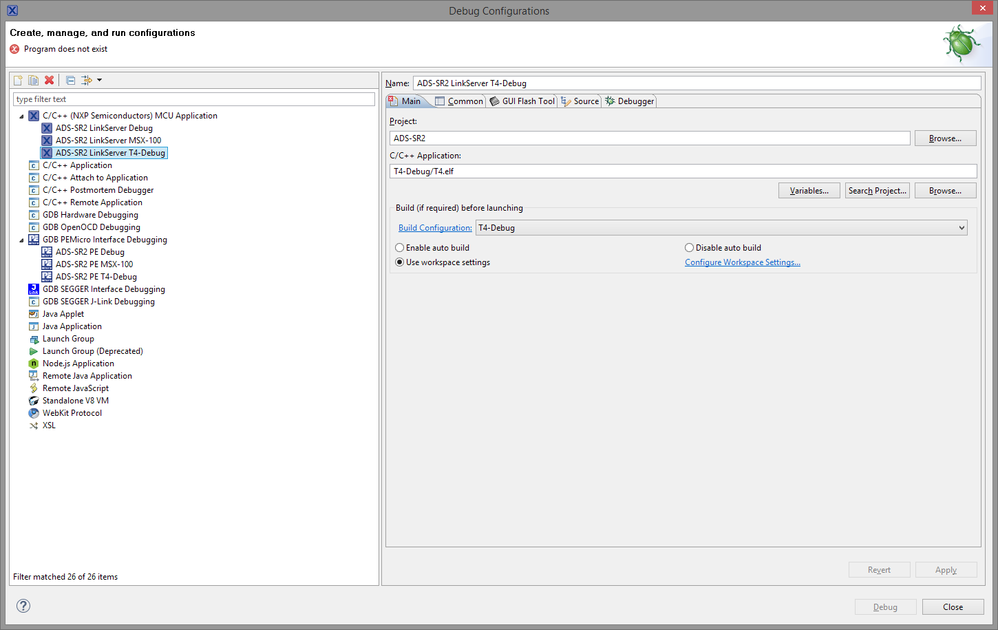
Not in the program selection:

The matching config in the P&E group is also disabled. Exited, rebuilt, no change. Cleaned and rebuilt, still no debug button. Pasted in the location of binary #1 into the location for NXP #3, 'Apply', no change. Checked P&E #3, back to NXP #3, now the debug button is back. Changed it back to the right binary, 'Apply', debug's disabled.
Clicked 'Browse', selected ELF binary. 'Apply'. No debug. Exit, rebuild - nothing to be done. Search project, still no binary found for config #3. Clean and rebuild, still no debug button. Note that it doesn't say it's missing the binary. Still nothing in 'search project'. P&E config #3 has a location of "T4-Debug/T4.elf". It does not show an error - but no debug button. Pasted that into NXP config #3 and I immediately get "program does not exist."
Restart IDE, clean, rebuild, no change. Changed the debug level and semihosting settings back just for the heck of it, no change.
Entering garbage for the application in P&E config #3 does not give a 'not found' error, so maybe it doesn't check?
Switched to build configuration #1 and rebuilt, and NOW all three binaries show up in "search project" again. Select the binary - no debug button. Look at another config, then back, now it's active.
To confirm that the build configurations are correct: Build artifacts are "ADS-SR2" for #1, "MSX-100" for #2, "T4" for #3. This is correct. It was T4-Debug/T4.elf that wasn't showing up in the list. Rebuilding Debug/ADS-SR2.elf made T4-Debug/T4.elf show up in the list. Still no quickstart blue bug.
Trying to replicate the debug button getting disabled. Active build config is #1. Set semihosting off, apply - debug is disabled for an instant but comes back. Switched to build config #3. Noticed that the debugger tab is in a different place in each debug config, and it moves at random when I switch between configs. My Android developer happens to be passing through at this moment and says "that's because it's Eclipse."
Set semihosting back on, loglevel to 4, debug launches normally. Set everything back, no change. Tried the blue bug again - same error. Switch to P&E config #3 and debug, works normally. Clean project so now binary #3 is in fact missing. T4.elf still shows up in "search project", though a file system search shows it's not really there. There's no warning about a missing application. Click debug, project builds and launches normally.
I think that's about all I have in me for tonight. To recap: I'm now able to debug with the LPC-Link2. The reset handling option is NOT set. In fact, I just changed it to 'default' and it works the same; I have no idea what actually made the difference. Disabling non-stop debugging and setting the FreeRTOS debug config properly got the suspend function working. The quickstart menu still doesn't give me a debug option, and the blue bug on the toolbar throws an error. The debug button from the debug config seems to stop working randomly and starts working again when a different config is rebuilt.
I hope that's enough to go on, and to illustrate the inconsistent behavior I'm seeing. I was going to edit this down but seeing as I haven't come to a useful conclusion on some of these issues I'm going to leave my whole rain dance of a troubleshooting session intact for reference.
Scott
- 新着としてマーク
- ブックマーク
- 購読
- ミュート
- RSS フィードを購読する
- ハイライト
- 印刷
- 不適切なコンテンツを報告
Ok, I switched it to the masserase script and set VECTRESET and I was able to get it to run a few times. One board was hanging at the MCG oscillator startup. The other board started normally. I replaced the oscillator crystal on the first board (no idea why it'd be a problem, it's the same 12 MHz crystal we've used for thousands of boards and it's 2mm away with no vias) and then I kept getting this:
Error in final launch sequence
Failed to execute MI command:
-target-select extended-remote | crt_emu_cm_redlink -msg-port=49512 -g -mi -2 -pMK22FN1M0Axxx12 -vendor=NXP -ConnectScript=kinetismasserase.scp -reset=VECTRESET -ProbeHandle=1 -CoreIndex=0 -cache=disable -x C:/Users/Scott/mcuxpresso/01/.mcuxpressoide_packages_support/MK22FN1M0Axxx12_support --flash-dir C:/Users/Scott/mcuxpresso/01/.mcuxpressoide_packages_support/MK22FN1M0Axxx12_support/Flash --telnet 3330
Error message from debugger back end:
Remote communication error. Target disconnected.: Success.
Remote communication error. Target disconnected.: Success.
I restarted the IDE, did the debugger cleanup, disconnected and reconnected the probe, but it didn't start working until I switched it to board #2 and then back again. It started this time and I hit the debugger pause button, but it's just hung with gdb taking 40% of the CPU time out of four cores. The target board is actually running - the indicator light is showing it getting data from the GPS receiver.
Stopping the debugger stopped the CPU utilization. I got "All SWD targets are currently connected to other debug sessions" when trying to restart. Ran cleanup. Same error. redlinkserv.exe is actually still running. Killed it manually, hit pause, and again it's hung.
Killed redlinkserv again, switched boards. Same result, hangs while the target keeps running. Cleanup doesn't kill redlinkserv. I would try on the TWR board but the oscillator setup isn't compatible. Switched to the Cyclone. It runs and pauses as expected.
Tried disabling the WFI in the idle loop, since I remember one of the P&E probes having trouble with that under KDS. No change, still can't pause on the LPC-Link2.
I did figure out the security problem. Looks like a linker configuration file problem - it must have been clearing the cfmprotect section to zeros and the P&E script was changing it, or else the two probes handle filling unused space differently by default. I explicitly disabled security in PEx and fixed the LCF so cfmprotect is in the right place and now it doesn't secure the device.
Trying to figure out where the LPC-Link2 dies. It seems to be something in the task-aware debugger. If I step through, I end up in prvTimerTask() and the debugger doesn't show any other tasks:
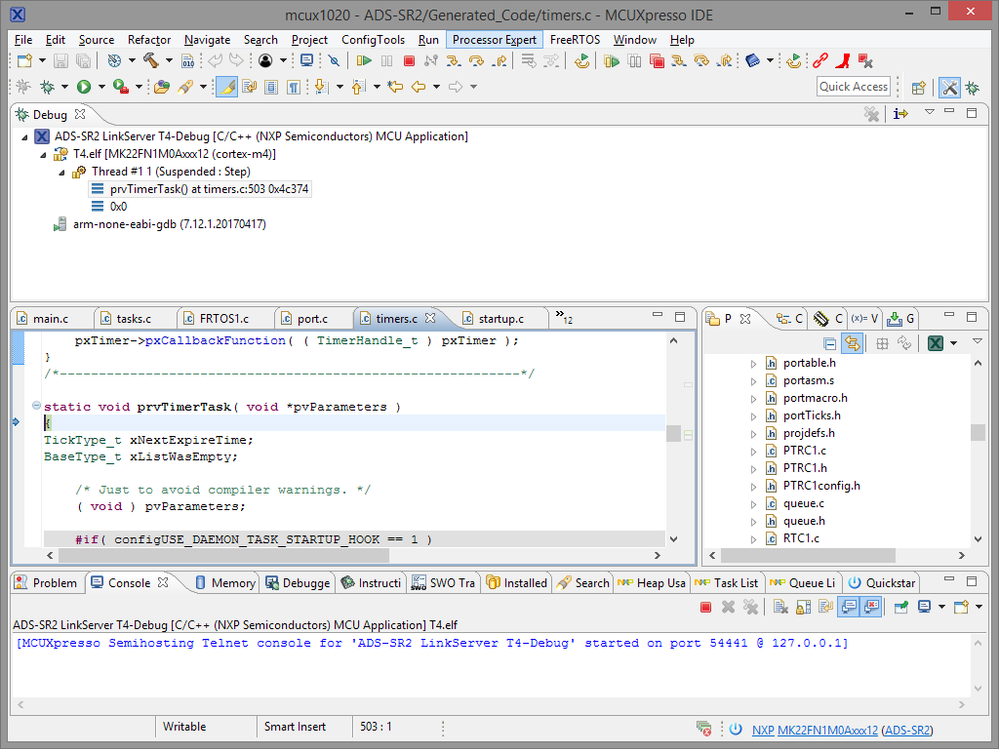
If I only step and don't let it run, the redlink server doesn't stop responding. If I set a breakpoint in the main task I see the main task in the debugger (still 'Thread #1') and no other tasks. I can set a breakpoint in a function called once per second and it'll stop there every time.
If I hit suspend (pause) during that 1-second interval, the pause button grays out and this is where it'd normally lose debugging, but with the breakpoint set it'll still stop where it's supposed to. So it's still connected to the target, but for some reason suspend doesn't work, and the debugger isn't task-aware.
Hmm... if I re-enable non-stop mode (I normally don't want it enabled) then I *am* able to suspend. I can get the FreeRTOS task list, but the stack trace only shows the one thread. Switching back to the Cyclone, things work as expected.
Erich's blog says (for previous versions at least) it needs to be set to All-Stop, and the easiest way to set that up is to delete the debug configuration and recreate it. I just deleted it, and the blue bug on the toolbar came back but the one in the quickstart is still disabled:
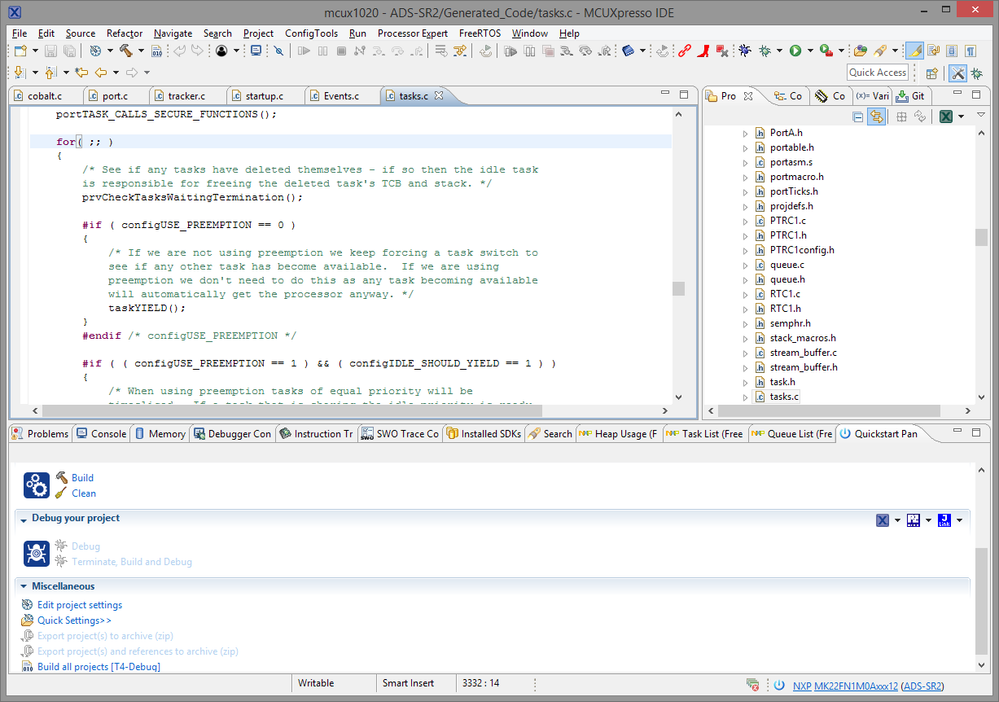
And the blue bug on the toolbar doesn't work:
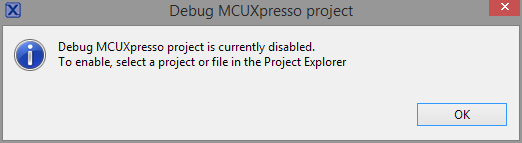
Nor does the launch shortcut dropdown from the quickstart menu:
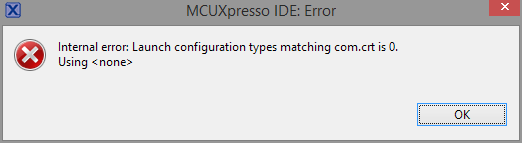
But my deleted configurations came back. Deleted them again. Blue bug again, same error, no configurations created. Clicked on the dropdown again, same error, but the configurations are back.
This is getting long. I'll continue it in another post.
Scott
lpcxpresso_supp
- 新着としてマーク
- ブックマーク
- 購読
- ミュート
- RSS フィードを購読する
- ハイライト
- 印刷
- 不適切なコンテンツを報告
Hi Scott,
Did you see this console output from the kinetisconnect.scp script?
============= SCRIPT: kinetisconnect.scp =============
Kinetis Connect Script
DpID = 2BA01477
Assert NRESET
Reset pin state: 00
Power up Debug
MDM-AP APID: 0x001C0000
MDM-AP System Reset/Hold Reset/Debug Request
MDM-AP Control: 0x00000000
MDM-AP Status (Flash Ready) : 0x00000036
Part is secured
Mass Erase Required
============= END SCRIPT =============================
The part has been found in a secure state, and needs to be mass erased. The standard kinetisconnect.scp does not mass erase for you. The reason behind this decision was to prevent users from inadvertently erasing flash resident library code. In the MCUXpresso '<install>/ide/bin/Scripts' folder you'll find a virtually identical script file, kinetismasserase.scp. If you diff this file against the kinetisconnect.scp script, you'll see the difference is script commands which perform the mass erase are uncommented. You can substitute kinetismasserase.scp as the connect script in your launch configuration for this purpose, or use the script standalone using a LinkServer console session. If you do the latter, read the kinetismasserase.scp script comments to locate the commands which need to be uncommented (line 200 and 260).
Thanks and regards,
MCUXpresso Support
- 新着としてマーク
- ブックマーク
- 購読
- ミュート
- RSS フィードを購読する
- ハイライト
- 印刷
- 不適切なコンテンツを報告
For reference, here's the output from the mass erase command when the device is secure. The 'part is secure' and 'mass erase required' messages are in a subdued color, while the ACK fault is highlighted in red. 'Mass erase required' is also rather misleading as an error message, because the operation requested is a mass erase. And at least for the HCS08 and ColdFire families, a mass erase is how you clear protection.
The user specifically requests a mass erase (in the target operations panel), the system appears to confirm that a mass erase is required, and then it dies with an apparently unrelated wire ACK fault message. This has to be one of my (ahem) 'favorite' things about working in the embedded world - the error message that keeps coming up for me, when trying to do the simplest things, is something that Google shows only 5 hits for. I read all 5 pages, and the only one that seems at all relevant says that the problem was fixed by running the mass erase script.
Does anyone know what 'Wire ACK Fault in DAP access' actually means? And what the heck is so special about my setup that I get error messages virtually no one else has ever reported? My setup is a bit non-standard but not outrageously so. I'm running a fresh install of MCUX 10.2.0 on Windows 8.1 Enterprise, with the GNU ARM toolchain (which I believe is standard for MCUX now) and Processor Expert. The other peripherals on the machine are about what you'd expect for any embedded systems developer - logic analyzers, oscilloscope, function generator, DC load, sometimes other debug probes and burners. The more exotic items (communications test set, CNC milling machines) are on RS-232 and wouldn't affect anything.
I don't have the time right now to rework these projects to not use PEx, but as a code generation tool it shouldn't affect my debug probes.
There's a Windows 7 machine in the lab with MCUX, but I'd rather not mess with that one at the moment - it's the only one that can run the pick-and-place machine and flatbed printer and we need both of those for production.
Scott

- 新着としてマーク
- ブックマーク
- 購読
- ミュート
- RSS フィードを購読する
- ハイライト
- 印刷
- 不適切なコンテンツを報告
I did in fact see that. There's nothing to indicate that it's requiring user action rather than just providing information. P&E's scripts will also warn if the device is secure, but they'll either erase automatically if configured to, prompt, or give you an error. The best piece of advice I ever got from a technical writer was this: Any time an action is described, specify explicitly who does what to whom. Just rephrasing "mass erase required" in the active voice would make it much more clear.
Also, the console window in my default perspective fits about 16 lines of text. That script output is around 40 lines, and the message appears well above the visible portion. I feel like MCUXpresso has a weird split personality; it's clear that the intent is to make things simple by hiding all of the debug launching behind one button, but then critical information is buried in a console log that scrolls immediately out of view.
Again, I'm not trying to be difficult, I'm just trying to communicate my feedback as someone who often has to spend 50 hours a week using the IDE.
It also has no effect on my main problem with the LPC-Link2, which is still that I can't debug anything despite it loading properly:
MCUXpresso IDE RedlinkMulti Driver v10.2 (May 10 2018 18:10:59 - crt_emu_cm_redlink build 510)
Reconnected to existing link server
Connecting to probe 1 core 0:0 (using server started externally) gave 'OK'
============= SCRIPT: kinetisconnect.scp =============
Kinetis Connect Script
DpID = 2BA01477
Assert NRESET
Reset pin state: 00
Power up Debug
MDM-AP APID: 0x001C0000
MDM-AP System Reset/Hold Reset/Debug Request
MDM-AP Control: 0x0000001C
MDM-AP Status (Flash Ready) : 0x00000033
Part is not secured
MDM-AP Control: 0x00000014
Release NRESET
Reset pin state: 01
MDM-AP Control (Debug Request): 0x00000004
MDM-AP Status: 0x0001003B
MDM-AP Core Halted
============= END SCRIPT =============================
Probe Firmware: LPC-LINK2 CMSIS-DAP V5.182 (NXP Semiconductors)
Serial Number: I3F2IWKT
VID:PID: 1FC9:0090
USB Path: \\?\hid#vid_1fc9&pid_0090&mi_00#9&2b842b84&0&0000#{4d1e55b2-f16f-11cf-88cb-001111000030}
Using memory from core 0:0 after searching for a good core
debug interface type = Cortex-M3/4 (DAP DP ID 2BA01477) over SWD TAP 0
processor type = Cortex-M4 (CPU ID 00000C24) on DAP AP 0
number of h/w breakpoints = 6
number of flash patches = 2
number of h/w watchpoints = 4
Probe(0): Connected&Reset. DpID: 2BA01477. CpuID: 00000C24. Info: <None>
Debug protocol: SWD. RTCK: Disabled. Vector catch: Disabled.
Content of CoreSight Debug ROM(s):
RBASE E00FF000: CID B105100D PID 04000BB4C4 ROM dev (type 0x1)
ROM 1 E000E000: CID B105E00D PID 04000BB00C ChipIP dev SCS (type 0x0)
ROM 1 E0001000: CID B105E00D PID 04003BB002 ChipIP dev DWT (type 0x0)
ROM 1 E0002000: CID B105E00D PID 04002BB003 ChipIP dev FPB (type 0x0)
ROM 1 E0000000: CID B105E00D PID 04003BB001 ChipIP dev ITM (type 0x0)
ROM 1 E0040000: CID B105900D PID 04000BB9A1 CoreSight dev TPIU type 0x11 Trace Sink - TPIU
ROM 1 E0041000: CID B105900D PID 04000BB925 CoreSight dev ETM type 0x13 Trace Source - core
ROM 1 E0042000: CID B105900D PID 04003BB907 CoreSight dev ETB type 0x21 Trace Sink - ETB
ROM 1 E0043000: CID B105900D PID 04001BB908 CoreSight dev CSTF type 0x12 Trace Link - Trace funnel/router
Inspected v.2 On chip Kinetis Flash memory module FTFE_4K.cfx
Image 'Kinetis SemiGeneric Feb 17 2017 17:24:02'
Opening flash driver FTFE_4K.cfx
Sending VECTRESET to run flash driver
flash variant 'K 2x FTFE Generic 4K' detected (1MB = 256*4K at 0x0)
Closing flash driver FTFE_4K.cfx
NXP: MK22FN1M0Axxx12
Connected: was_reset=true. was_stopped=true
Awaiting telnet connection to port 3330 ...
GDB nonstop mode enabled
Opening flash driver FTFE_4K.cfx (already resident)
Sending VECTRESET to run flash driver
Writing 392 bytes to address 0x00000000 in Flash
Erased/Wrote page 0-0 with 392 bytes in 50msec
Closing flash driver FTFE_4K.cfx
Flash Write Done
Opening flash driver FTFE_4K.cfx (already resident)
Sending VECTRESET to run flash driver
Writing 4 bytes to address 0x00000410 in Flash
Erased/Wrote page 0-0 with 4 bytes in 71msec
Closing flash driver FTFE_4K.cfx
Flash Write Done
Opening flash driver FTFE_4K.cfx (already resident)
Sending VECTRESET to run flash driver
Writing 419568 bytes to address 0x00000420 in Flash
Erased/Wrote page 0-102 with 419568 bytes in 3861msec
Closing flash driver FTFE_4K.cfx
Flash Write Done
Flash Program Summary: 419964 bytes in 3.98 seconds (102.97 KB/sec)
Starting execution using system reset and halt target
flash - system reset failed - Nn(05). Wire ACK Fault in DAP access
Target error from Commit Flash write: Nn(05). Wire ACK Fault in DAP access
GDB stub (crt_emu_cm_redlink) terminating - GDB protocol problem: Pipe has been closed by GDB.
I'm not sure how the device is getting secured at all. As far as I know, security is not enabled anywhere in the project. It doesn't come out secured when programming through the P&E driver. For production we use a Cyclone in standalone mode with the script set to enable protection. The FAT bootloader also always sets the protection bits when performing updates in the field, but that's irrelevant here - these boards don't even have the bootloader installed at the moment. It's possible that it's defaulting to secure and the P&E script is clearing it.
Scott
lpcxpresso_supp
- 新着としてマーク
- ブックマーク
- 購読
- ミュート
- RSS フィードを購読する
- ハイライト
- 印刷
- 不適切なコンテンツを報告
It sounds like something in your application code that you have put into flash is putting the MCU into a state such that the next attempt to debug / program flash is failing. It would therefore be interesting to know if doing a mass erase operation (for instance using the GUI Flash Tool) before you try launching the debug session makes any difference to the behaviour that you see.
If this doesn't help, then certainly for the LinkServer case (LPC-Link2) it would be interesting to see the text content of the Debug Messages entry from the Console View (see section 18.8, "The Console View" of the MCUXpresso IDE v10.2 User Guide for more details if needed).
With regards to your comment about killing the pegdbgserver_console.exe, please note that MCUXpresso IDE v10.2 has a new "Clean Up Debug" button on the toolbar which can kill all the excutables associated with debug sessions (for all probe types) when things go wrong

Aside - I'm curious by what you mean by...
"I decided to give my LPC-Link2 a try. I'd never been able to get it to cooperate with earlier versions of MCUX - it seemed to have a conflict with the P&E setup"
I would not expect, and certainly do not see here any clashes between the debug probes - certainly with launch configurations generated by the IDE. And LPC-Link2 is the probe we probably use most here. Can you give any more details?
Regards,
MCUXpresso IDE Support
- 新着としてマーク
- ブックマーク
- 購読
- ミュート
- RSS フィードを購読する
- ハイライト
- 印刷
- 不適切なコンテンツを報告
Here's what I get when attempting to run the mass erase using the LPC-Link2:
Executing flash operation 'Erase' (Erase flash) - Thu May 24 10:27:54 PDT 2018
Checking MCU info...
Scanning for targets...
Executing flash action...
MCUXpresso IDE RedlinkMulti Driver v10.2 (May 10 2018 18:10:59 - crt_emu_cm_redlink.exe build 510)
( 0) Reading remote configuration
Wc(03). No cache support.
( 5) Remote configuration complete
Reconnected to existing link server
Connecting to probe 1 core 0:0 (using server started externally) gave 'OK'
============= SCRIPT: kinetisconnect.scp =============
Kinetis Connect Script
DpID = 2BA01477
Assert NRESET
Reset pin state: 00
Power up Debug
MDM-AP APID: 0x001C0000
MDM-AP System Reset/Hold Reset/Debug Request
MDM-AP Control: 0x00000000
MDM-AP Status (Flash Ready) : 0x00000036
Part is secured
Mass Erase Required
============= END SCRIPT =============================
Probe Firmware: LPC-LINK2 CMSIS-DAP V5.182 (NXP Semiconductors)
Serial Number: I3F2IWKT
VID:PID: 1FC9:0090
USB Path: \\?\hid#vid_1fc9&pid_0090&mi_00#9&2b842b84&0&0000#{4d1e55b2-f16f-11cf-88cb-001111000030}
Using memory from core 0:0 after searching for a good core
connection failed - Nn(05). Wire ACK Fault in DAP access.. Retrying
Using memory from core 0:0 after searching for a good core
Failed on connect: Nn(05). Wire ACK Fault in DAP access
Connected&Reset. Was: NotConnected. DpID: 00000000. CpuID: 00000000. Info: <None>
Last stub error 0: OK
Last sticky error: 0x0 AIndex: 0
Debug bus selected: MemAp 0
DAP Speed test unexecuted or failed
Debug protocol: SWD. RTCK: Disabled. Vector catch: Enabled.
(100) Target Connection Failed
error closing down debug session - Nn(05). Wire ACK Fault in DAP access
Unable to perform operation!
Command failed with exit code 1
I switched to the Cyclone and ran a mass erase from PROGACMP and after that a mass erase from the GUI tool with the LPC-Link2 succeeded. I launched a debug session and again got the wire ACK fault. After that a mass erase with the GUI took again fails in the same way as before. When I launch from the Cyclone, the device is NOT protected - not in the debug build, anyway. Normally I only set the flash protection bits after the fact in my deployment packaging script.
Scott
- 新着としてマーク
- ブックマーク
- 購読
- ミュート
- RSS フィードを購読する
- ハイライト
- 印刷
- 不適切なコンテンツを報告
I'd tried a mass erase several times, both with the GUI tool and with the standalone PROGACMP utility from P&E. Let me see if I can cover all of the things I went through this morning.
I started a new workspace and built the FRDM-K22F LED flashing demo project and successfully ran it with the LPC-Link2. I switched back to my regular workspace and confirmed that it worked there, too. In the new workspace I switched to the TWR-K21F120M and another SDK demo. Using the LPC-Link2 it failed with a 'Wire ACK Fault'.
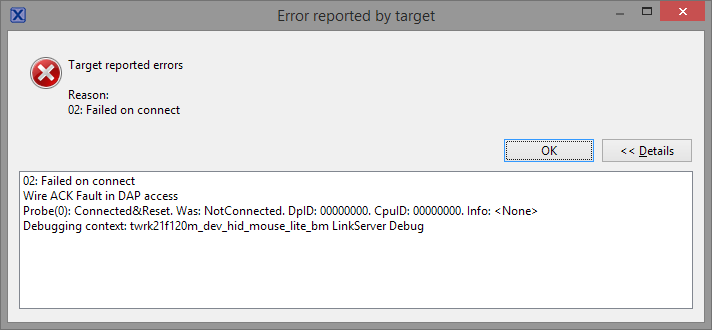
At some point I was able to get a TWR demo to run with the Cyclone, but at least one time it gave me the same symptoms on the TWR board as I was seeing yesterday, namely the debugger losing its connection.
I switched back to my own project and found that I had no debug options at all - nothing could be launched. The GUI flash tool wouldn't let me choose an image:

All of the launch options were disabled:
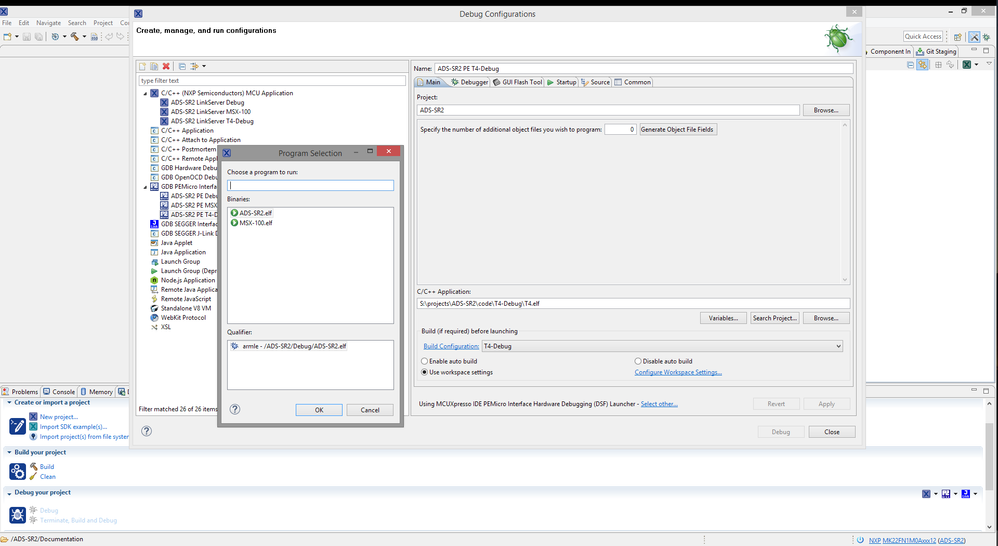
Cleaning the project did nothing. I closed the IDE, deleted the output folders for all build configurations, restarted, and tried to rebuild. The T4-Debug configuration said it was missing a makefile. I switched to another configuration and built successfully, then was able to switch back to T4-Debug and rebuild. Then it all started working again - the board that was consistently giving me debug failures last night works fine now. I'm still not able to click the 'debug' button from the debug configurations dialog, though. And it created a duplicate debug configuration for T4-Debug that wiped out my settings for supply voltage and such.
I would not expect, and certainly do not see here any clashes between the debug probes - certainly with launch configurations generated by the IDE. And LPC-Link2 is the probe we probably use most here. Can you give any more details?
I mean the blue debug button would never detect the LPC-Link2. It'd go straight to the P&E menu. Which incidentally still shows my Cyclone twice:
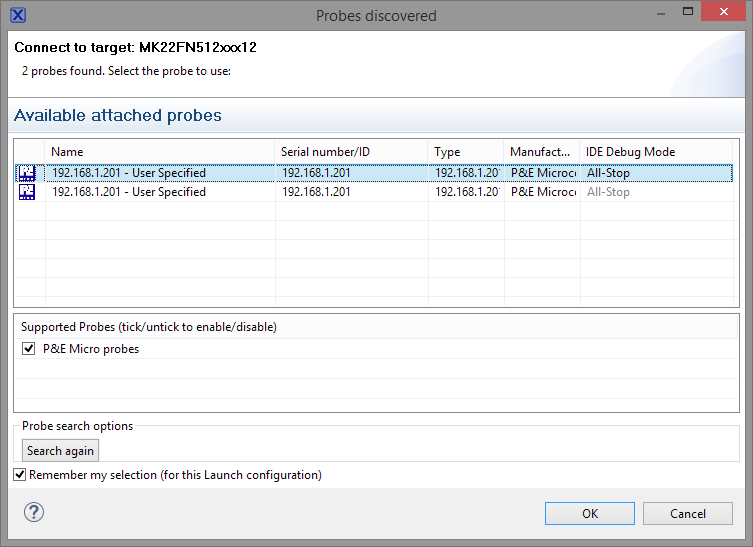
It's working right now and I have a product to ship in two weeks, so I can't spend a whole lot of time on experimentation today.
Scott
