
- Forums
- Product Forums
- General Purpose MicrocontrollersGeneral Purpose Microcontrollers
- i.MX Forumsi.MX Forums
- QorIQ Processing PlatformsQorIQ Processing Platforms
- Identification and SecurityIdentification and Security
- Power ManagementPower Management
- Wireless ConnectivityWireless Connectivity
- RFID / NFCRFID / NFC
- Advanced AnalogAdvanced Analog
- Neural Processing UnitsNeural Processing Units
- MCX Microcontrollers
- S32G
- S32K
- S32V
- MPC5xxx
- Other NXP Products
- S12 / MagniV Microcontrollers
- Powertrain and Electrification Analog Drivers
- Sensors
- Vybrid Processors
- Digital Signal Controllers
- 8-bit Microcontrollers
- ColdFire/68K Microcontrollers and Processors
- PowerQUICC Processors
- OSBDM and TBDML
- S32M
- S32Z/E
-
- Solution Forums
- Software Forums
- MCUXpresso Software and ToolsMCUXpresso Software and Tools
- CodeWarriorCodeWarrior
- MQX Software SolutionsMQX Software Solutions
- Model-Based Design Toolbox (MBDT)Model-Based Design Toolbox (MBDT)
- FreeMASTER
- eIQ Machine Learning Software
- Embedded Software and Tools Clinic
- S32 SDK
- S32 Design Studio
- GUI Guider
- Zephyr Project
- Voice Technology
- Application Software Packs
- Secure Provisioning SDK (SPSDK)
- Processor Expert Software
- Generative AI & LLMs
-
- Topics
- Mobile Robotics - Drones and RoversMobile Robotics - Drones and Rovers
- NXP Training ContentNXP Training Content
- University ProgramsUniversity Programs
- Rapid IoT
- NXP Designs
- SafeAssure-Community
- OSS Security & Maintenance
- Using Our Community
-
- Cloud Lab Forums
-
- Knowledge Bases
- ARM Microcontrollers
- i.MX Processors
- Identification and Security
- Model-Based Design Toolbox (MBDT)
- QorIQ Processing Platforms
- S32 Automotive Processing Platform
- Wireless Connectivity
- CodeWarrior
- MCUXpresso Suite of Software and Tools
- MQX Software Solutions
- RFID / NFC
- Advanced Analog
- Neural Processing Units
-
- NXP Tech Blogs
- Home
- :
- MCUXpressoソフトウェアとツール
- :
- MCUXpresso IDE
- :
- Re: Debug problems on MIMXRT1050-EVK
Debug problems on MIMXRT1050-EVK
- RSS フィードを購読する
- トピックを新着としてマーク
- トピックを既読としてマーク
- このトピックを現在のユーザーにフロートします
- ブックマーク
- 購読
- ミュート
- 印刷用ページ
Debug problems on MIMXRT1050-EVK

- 新着としてマーク
- ブックマーク
- 購読
- ミュート
- RSS フィードを購読する
- ハイライト
- 印刷
- 不適切なコンテンツを報告
When trying to use the MIMXRT1050-EVK (with the LCD display) on a Windows 10 laptop, many debug problems have occured:
1) Debugging was extremely slow - as long as it worked. It could take 1-15 s for a step-over. This may be due to the use of cache memory in the example programs, as the documentation mention, but other Eclipse IDE's from other CPU manufacturers are much more responsible in debug mode. Is the debugger really that slow? If yes, what do you suggest instead - preferable a galvanic separated device, which is also usable on the final products.
2) It is not possible to resume a debug session after a suspend.
3) The eCompass example worked, but only once. We never managed to get it to work again although nothing was changed. In the "Hello World" program, we could step through the code with the debugger, but the Console window did not show anything (worked OK with eCompass), and typed characters was not echoed. It seems to be quite random if something works or not. Sometimes it does. The next time you try the same without any changes, it doesn't.
4) The debug connection (CMSIS DAP link / redlink) died permanently with a "Wire not connected" error in the same way as in this case: Wire not connected on Q9080-DX LinkServer , so it semms to be a general NXP problem. It works one day, but not the next. Due to the instability described above, which could be caused by a too low current on the USB connector on the laptop, we tried to use an external 5-V power supply the day it stopped working, so there is a very small chance that something is burned off although we were very careful to power up the board before the USB connection to the Laptop was made. However, it is also very likely that the problem may be due to a bad content in flash memory as described in the above case, but we didn't change the code - at least not on purpose. Like other Eclipse IDE's, MCUXpresso unfortunately seems to have no way to control when you want the board to be flashed. This seems to occur automatically when you build the code, which to our opinion is a very bad and unsafe solution, and now there seems to be no way to get into contact with the board again, so how can we erase the flash? You ought to look at this "wrong content in flash memory" problem, which seems to be quite general and is also mentioned in the documentation. No matter what the content of the flash memory is, it should never kill the debugger. On the contrary, it should be possible to use the debugger to erase the flash.
5) When will the LCD emWin example in the SDK be loadable (it is announced to be late in March, which is now)? Although this program is included in the SDK, it is not in the SDK manifest, and I cannot get a manual insertion of the necessary lines to enable the project.
PS. Is there any "Save Project As" function in MCUXpresso? You simply cannot start a new project from scratch every time you just want to test something or make a new version, but like other Eclipse tools, this very valuable function seems to be missing.

 lpcxpresso_supp
- 新着としてマーク
- ブックマーク
- 購読
- ミュート
- RSS フィードを購読する
- ハイライト
- 印刷
- 不適切なコンテンツを報告
With regards to the cache disable - this relates to debug operations only (i.e. what happens we we hit a breakpoint or pause execution). It has no affect on the cache setup / performance of your code whilst it is actually executing.
With regards to debug probes, the first thing to note is that CMSIS-DAP is a protocol not the debug probe implementation itself. It basically refers to the protocol that the debugger running on the host communicates with the firmware running on the probe.
The LPC-Link2 is a very different (and much much higher performance) implementation than the probe built into the MIMXRT1050-EVK board (which is basically the same as the probe implemented on Kinetis FRDM boards).
LPC-Link2 works very well with the MIMXRT1050-EVK board (and it actually what we used in developing most of the IDE support for the i.MX RT1050). Debugging via an LPC-Link2 will give you a much better debugging experience than using the MIMXRT1050-EVK's onboard probe.
Regards,
MCUXpresso IDE Support
- 新着としてマーク
- ブックマーク
- 購読
- ミュート
- RSS フィードを購読する
- ハイライト
- 印刷
- 不適切なコンテンツを報告
Thanks a lot for the answer. I will order an LPC-Link2, but do you know if the package includes a 20-pin connection cable to the MIMXRT1050-EVK board or do I need to order such a cable separately. Unfortunately, I cannot find any information about this except for a video, which tells that a 10-pin cable is included in the package.
lpcxpresso_supp
- 新着としてマーク
- ブックマーク
- 購読
- ミュート
- RSS フィードを購読する
- ハイライト
- 印刷
- 不適切なコンテンツを報告
You’ll need to order a 20 pin cable separately. The LPC-Link2 packaging predates the iMXRT1050-EVK.
With regard to debug performance with cache enabled, the dCache clean/invalidate operation is non-optimal. This is due to the fact there is no primitive to operate on the entire data cache. The clean/invalidate is done one line at a time. The debug performance has improved for a future release, but the variable step/stepover delay is as dependent on GDB. If GDB decides to instruction step (vs. set a temporary break and go), the delay can multiply. Note it should be possible to remove the ‘—cachelib‘ option from the Additional options in your debug configuration if using the TCM (tightly coupled memory) SRAMs that do not leverage the cache.
- 新着としてマーク
- ブックマーク
- 購読
- ミュート
- RSS フィードを購読する
- ハイライト
- 印刷
- 不適切なコンテンツを報告
"You’ll need to order a 20 pin cable separately."
"LPC-Link2 works very well with the MIMXRT1050-EVK board (and it actually what we used in developing most of the IDE support for the i.MX RT1050)."
How have you made that connection? Now I have received the LPC-Link2 plus the 20-pin JTAG cable, you recommended, just to find out that the standard 20-pin JTAG connector on the MIMXRT1050-EVK is bigger than the non-standard J8, 20-pin target connector on the LPC-Link2 so the cable does not fit :-(
As I actually have bought a conversion kit between a standard 20-pin JTAG connector and a 10-pin JTAG/SWD to get the 20-pin cable, it is very likely that it is possible to use this kit (Embedded Artists EA-ACC-040) for its intended purpose. Is this allowed and will it give an equally good debug experience (why use a 20-pin JTAG connector on the MIMXRT1050-EVK)?
NXP really does not make this easy. On one PC, MCUXpresso is blocked by the anti virus program and on another PC, the debug link died permanently - maybe due to a bad flash content, but was dead slow before and has never worked in a reliable and stable way - and now the problems with the LPC-Link2 connection - plus an almost total lack of documentation for LPC-Link2.
"It is time to simplify the software design process:"
https://www.nxp.com/docs/en/brochure/MCUXPRESSO_INFOGRAPHIC.pdf .
Yes, certainly. Please do something about it :-)
lpcxpresso_supp
- 新着としてマーク
- ブックマーク
- 購読
- ミュート
- RSS フィードを購読する
- ハイライト
- 印刷
- 不適切なコンテンツを報告
I'm not sure what cable/adapter you originally ordered, but it sounds like you now have the solution most people order (i.e. Embedded Artists 10-to-20 pos JTAG adapter). Your 10 pin cable connects to the adapter and J7 on the LPC-Link2. Note the larger 20 pin (.10 pin spacing) JTAG connector on the EVK is still in widespread use on new designs.
Thanks and regards,
MCUXpresso Support
- 新着としてマーク
- ブックマーク
- 購読
- ミュート
- RSS フィードを購読する
- ハイライト
- 印刷
- 不適切なコンテンツを報告
"You’ll need to order a 20 pin cable separately."
This actually turns out to be the most difficult part. All my usual electronic component suppliers like Farnell, RS-component, Mouser and DigiKey have the LPC-Link2 probe so that is very easy to get, but no one has that cable. I ended up buying a 20-pin to 10-pin conversion kit from Embedded Artists (EA-ACC-040), which contains the wanted cable plus a 10-pin cable and a small PCB. I would recommend that NXP in the future finds a way to supply this cable.
What is the reason why NXP has chosen a 20-pin JTAG connector on the MIMXRT1050-EVK instead of the 10-pin connector used on many other NXP boards? The reason why I ask is that we of course wants to add a debug connector to the final products and if there is any advantages of using the rather big 20-pin connector instead of the much smaller 10-pin connector we would like to know. In the similar Embedded Artists development board EAK00296 they have both connectors.
Sorry, but what do you mean by GDB? I am new to this and tries to understand how the debug channel works. It actually wonders me why a simple debug processor is not build into fairly complex CPU's like the iMXRT1050 series, where it would only occupy a tiny little part of the chip area - or just an alternative register-set so that the core could be used to debug itself without destroying the present state of the RAM and all registers including program- and stack pointers. If setting a breakpoint should not slow down the program execution, which is unacceptable for many real time applications like for example high-speed communication, it must anyway be handled internal in the CPU, which is the only place where address comparison can be done at full speed - especially if encryption of the Flash memory is used. Besides, using JTAG, which is original designed for boundary scan, as a debug communication link, which should be easy to galvanic separate (preferable no DC component in the bit coding) does not seem to be the most elegant solution I can think of.
Breakpoints are usually used to be able to see if the program gets to a given point, but the most difficult problems are often to find out which part of a programs writes (a given content) to a memory location. Previous, logic analyzers have been used for that, but it is clumsy and very expensive solution and with for example BGA packages, it is impossible to connect, so more on-chip debug possibilities in the new CPU families would really be appreciated.

- 新着としてマーク
- ブックマーク
- 購読
- ミュート
- RSS フィードを購読する
- ハイライト
- 印刷
- 不適切なコンテンツを報告
Re on-chip debug capabilities of the RT1050. This is based on an ARM Cortex-M7 CPU, which has many debug features built into the chip, which can be used from MCUXpresso (and LPC-Link2). There is lots of documentation provided in the online help, but it might be more readable if you look at the various PDFs provided: User_Guide.pdf Instruction_Trace.pdf and SWO_Trace.pdf for starters...
 Alice_Yang
- 新着としてマーク
- ブックマーク
- 購読
- ミュート
- RSS フィードを購読する
- ハイライト
- 印刷
- 不適切なコンテンツを報告
Hello Carsten Kanstrup,
Refer to your questions , I will give you a general reply:
1) Yes, due to the conservative cache handling, the debug is slower than expected, you can remove
this handing refer to below (about detail please refer to Overview of using the MIMXRT1050-EVK with MCUXpresso IDE ),
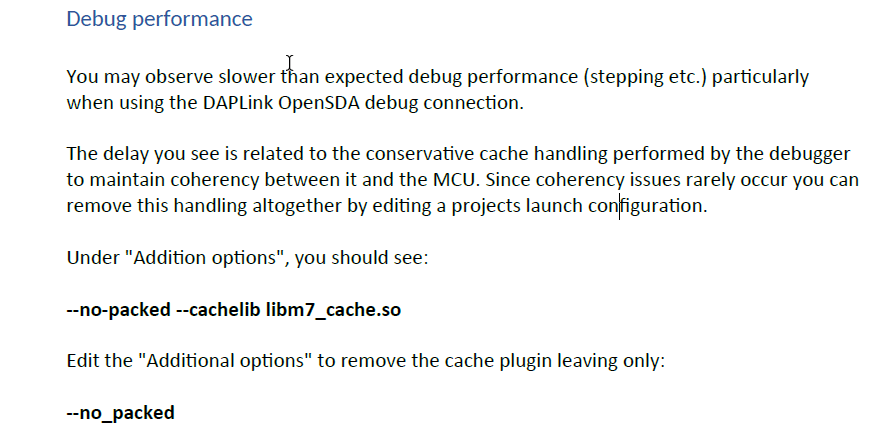
You can also use external debugger J-link , it will faster than on board debugger.
2) Yes, we can click the resume button after Suspend.
What about the error when you click resume ? Please pay attention that , when run the demo "ecompass",
after shows "Press any key to start calibrating..." on consle , we need press any key, then click "Suspend" button,
or it will show some error message.
3) "We never managed to get it to work again" ,-> could you please take a screenshot show how it can't work ?
Can't download or debug or something else ?
" but the Console window did not show anything"->Please choose as below :
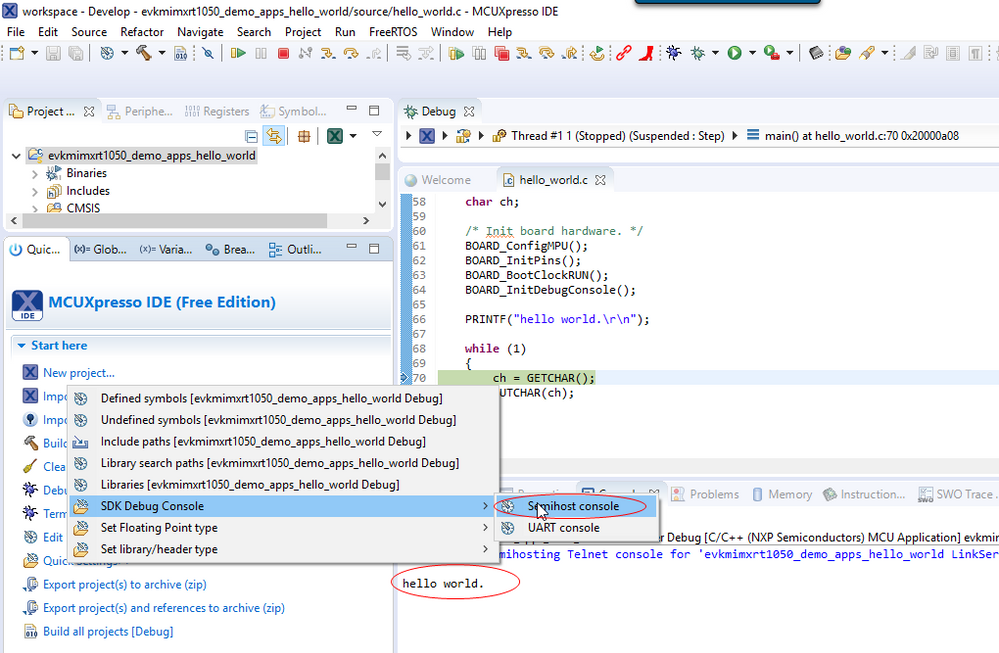
5) I will consulate the MCUXpresso expert team if need.
About save project, the name is "Export project " on MCUXpresso IDE:
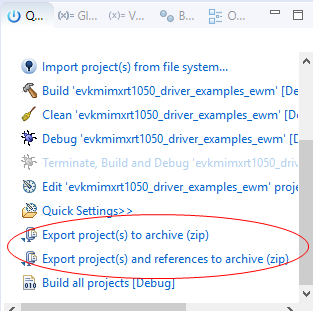
Hope it helps
Have a great day,
TIC
-----------------------------------------------------------------------------------------------------------------------
Note: If this post answers your question, please click the Correct Answer button. Thank you!
-----------------------------------------------------------------------------------------------------------------------
- 新着としてマーク
- ブックマーク
- 購読
- ミュート
- RSS フィードを購読する
- ハイライト
- 印刷
- 不適切なコンテンツを報告
Hi Alice,
Thanks for your reply.
1) Yes, we know that message from the documentation; but up to 15 seconds is so extraordinarily slow that we suspected an error. Actually, we tried to switch the cache handling off as described, but could not find the place to do it (Additional Options). Do you know if this cache switch-off disables the cache in the CPU, which would seriously affect the performance, or does it only affect the circuit while you are debugging?
We know that J-link is faster, but unfortunately, it does not seem to be galvanic separated, which is almost a "must" if you want to debug embedded systems while they run in real-world field applications. Connecting various ground potentials through a debug (or communication) cable is usually not a very good idea.
2) Yes, you can click the Resume button after Suspend, but the problem is that it has absolutely no effect! Nothing happens and the program does not restart. The only way seems to be to reload the program, but when we tried this, we never managed to make it work again. In other Eclipse IDE's, we have tried, Resume after Suspend works fast and flawless as expected.
3 and 4) Unfortunately, a screenshot would not help. We simply cannot do anything at all - neither debug nor download. The connection to the board seems to be permanently dead, but there may be a chance that it can be brought to work again if we manage to erase the flash.
According to the missing "Save Project As" function, it is unfortunately not possible to replace it with "Export project", as it is not possible to change the project name. Besides, why make a zip archive, which you then have to unzip?
I think that there is a very big difference between the preferred work flow of many embedded programmers and PC programmers. At least in our embedded world, we would like to have all files for a given project located under one main folder, which should not contain files for other projects, so that it is easy to overview and make back-ups and we can be absolutely sure that we can always recreate that particular version without any problems with any approvals - even more than 15 years later in case of service. When we want to make a new project or try something, we don't want to start from scratch, but want to base the new project on an old one - just with a new name, and all files shall be copies of the old ones - not links, so that each project is a completely independent stand-alone project. A "Save Project As" feature would be extremely helpful for that. On the other hand, many programmers in the PC-world prefer to use a version management systems like GIT where such a function may not be necessary. I know that we are not the only ones who have complained about a missing "Save Project As" feature and would prefer to have only one project in each window - not the way it is now with maybe several hundred projects visible in the same workspace at the same time, which totally confuses everything, but unfortunately, Eclipse seems to be programmed by the PC-type of programmers, who cannot think of anything else than a version management system and therefore need a common workspace to be able to make links. Actually, we have thought about using one workspace for each project to improve the overview considerably and hopefully make a work-around for the missing "Save Project As" feature, as it may only be necessary to give the workspace the name of the project and then just copy all necessary project files, but it is not a pretty solution. I simply don't understand why everything should be made so extremely complicated for everyone. Let the ones, who prefer a version management system with the belonging links and common workspace, have that, and let all of us others have a simple, easy and efficient tool. After trying several Eclipse-based IDE's in our look for a new microprocessor family for the future, I begin to understand why Arduino is so popular. It may not have enough features for professional use, but you are up and running i 5 minutes completely flawless, where we until now have used approximately 2 weeks on MCUXpresso and have not experienced anything else than a dead slow debugging, an unacceptable high level of instability where something may work one day, but not the next and now a completely dead link, which disables all further use - plus an Adaware Antivirus kill, which prevents the MCUXpresso IDE from starting up on one of our computers :-(
Alice_Yang
- 新着としてマーク
- ブックマーク
- 購読
- ミュート
- RSS フィードを購読する
- ハイライト
- 印刷
- 不適切なコンテンツを報告
Hello Carsten,
Thanks very much for your sharing.
1) - I take a screenshot about the debug configuration place, please have a look :
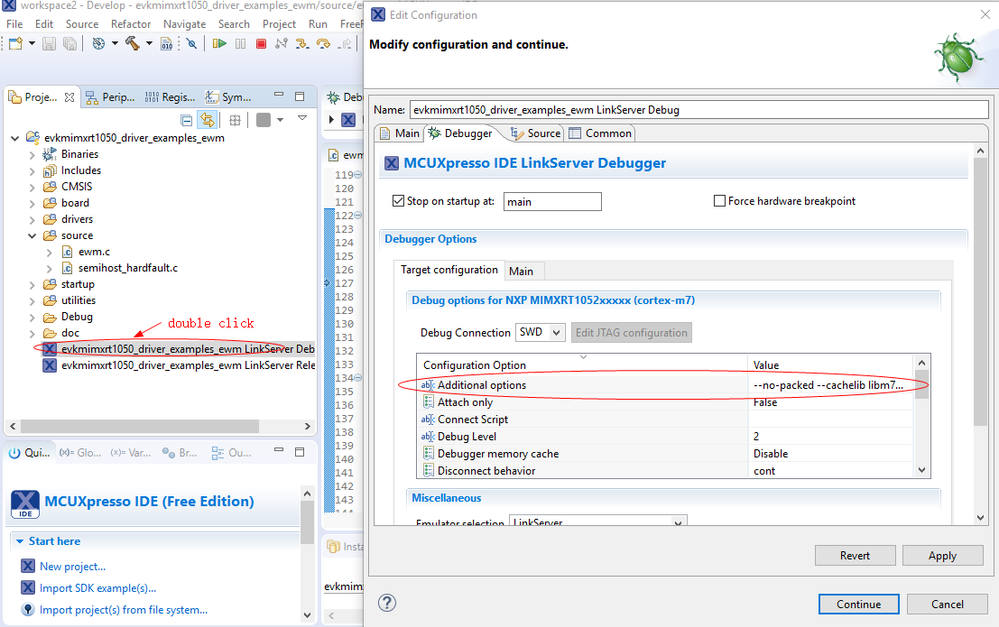
And about this question "Do you know if this cache switch-off disables the cache in the CPU, which would seriously affect the performance, or does it only affect the circuit while you are debugging?", I will double check with MCUXpresso Expert team .
2) I test the "Hello World" demo on my side , it can work well for "Resume button after Suspend ".
(Firstly , I think you should install the IDE well, I mean solve the virus problem. )
3 and 4). Some times , when it can't download, we can restart the IDE , reconnect board, then it will work .
About export a .zip file , we needn't unzip it , when you want to open it on MCUXPresso IDE, just do as the below steps :
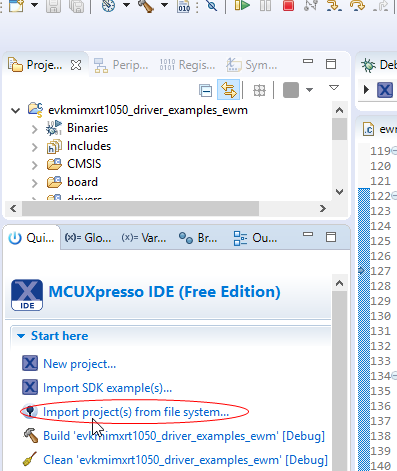
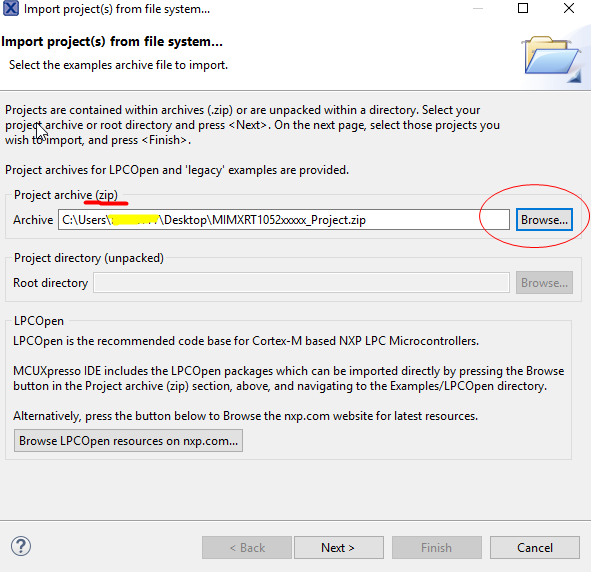
Hope it helps
Have a great day,
TIC
-----------------------------------------------------------------------------------------------------------------------
Note: If this post answers your question, please click the Correct Answer button. Thank you!
-----------------------------------------------------------------------------------------------------------------------
- 新着としてマーク
- ブックマーク
- 購読
- ミュート
- RSS フィードを購読する
- ハイライト
- 印刷
- 不適切なコンテンツを報告
Hi Alice,
Thanks a lot for your reply.
1) Thanks for the screen shot, which shows where to set it up.
Maybe it could be a good idea for NXP to write the documentation together with somebody, who tries it for the first time, to find out what is missing? For example, we want to use MIMXRT1050-EVK together with the LCD-display, but faced the problem how to push the very thin and fragile PCB flex cables into the connectors? OK, I an an electronic engineer and found out that you first have to pull the dark gray rings/parts forward, but a simple photograph showing how to do it or even just one line of text could be very helpful for many and save some time and perhaps some destroyed connectors.
2) Yes, I will try to solve the virus problem and have contacted Adaware to have them look at the suspicious file.
3 and 4) "Some times , when it can't download, we can restart the IDE , reconnect board, then it will work".
Sorry to say it directly, but this is a typical Microsoft solution from the PC-world :-) If it is necessary to restart even the IDE - not just the debug session, somebody has to my opinion simply not done his or her job properly, but again it shows the big difference between my embedded world (electronic process control) where everything is expected to work fast, reliable and flawless, and the PC-world where slow response times, instability, crashes and the necessity for a restart now and then must be acceptable.
The iMXRT1020/1050/1060 series of microprocessors seems to be a marvelous new processor family with extraordinary good peripherals in a reasonably low-pin-count package and to a reasonable low price, so to be able to give it a fair chance compared to other microprocessor families from other vendors, we will probably forget the CMSIS-DAP debug link, which only seems to cause endless problems, and buy a better 3rd party probe - once we have solved the virus problem and can get MCUXpresso to work. However, I would recommend that NXP takes my criticism seriously and not just regard me as cantankerous. Others, who face the same problems as us, may just run screaming away and start looking at for example microprocessors from ST Microelectronics with the belonging Atollic development IDE, which has a much faster and stable debug link (we have tried it) - but a horrible file structure, which is almost impossible to overview :-)
According to the .zip file in import and export, I think that you misunderstand me. I know that you can import .zip files directly (although we have seen that it not always works with the SDK), but when you want to make a new project similar to and old one, you don't want to make a .zip archive, which you then have to import, but simply a new working project - just with a new name. Import and Export seems to be designed for back-up purpose and are really great for that, but not as a replacement for "Save Project As", which I will recommend you add to the Quickstart panel and/or file menu although it seems to be possible to do it with Ctrl-C/V.
- 新着としてマーク
- ブックマーク
- 購読
- ミュート
- RSS フィードを購読する
- ハイライト
- 印刷
- 不適切なコンテンツを報告
Hi Alice,
"And about this question "Do you know if this cache switch-off disables the cache in the CPU, which would seriously affect the performance, or does it only affect the circuit while you are debugging?", I will double check with MCUXpresso Expert team ."
Yes, please do. I have been looking for an alternative, reasonably priced debugger to be able to use the MIMXRT1050-EVK, but the available versions of Segger J-link are way too expensive just for evaluation purpose. The EDU version is slow and only for educational use and the small J-Link Lite Cortex-M module is only sold to manufacturers of evaluation boards and unfortunately, it does not seem to be possible to buy this through NXP. It is a little crazy that you can by a full speed, fully galvanic separated (2.5 kVac) debugger for STM32 microprocessors (ST-Link/V2-ISOL) for approximately the same price as the J-link EDU version and less than 1/3 the price for a just galvanic separation for J-link (JTAG isolator).
Do you know if NXP's LPC-Link2 is actually the same as the debugger on the MIMXRT1050-EVK? It seems to use the same CMSIS-DAP link, so trying this may not improve things.
- 新着としてマーク
- ブックマーク
- 購読
- ミュート
- RSS フィードを購読する
- ハイライト
- 印刷
- 不適切なコンテンツを報告
You can create a new version of an existing project by using copy and paste. Select the project in the Project view, copy it, using Ctrl-C, and then paste it using Ctrl-V. A dialog will pop-up asking you for a new name, and voila, you have a renamed project.
BTW: Blame your anti-virus provider for a false positive. Complain to them, to get it fixed - how can it possibly be NXP's problem?
- 新着としてマーク
- ブックマーク
- 購読
- ミュート
- RSS フィードを購読する
- ハイライト
- 印刷
- 不適切なコンテンツを報告
Thanks for the copy tip.
According to the antivirus problem, it is very difficult to tell whom to blame. MCUXpresso is allowed to be loaded and to start up (blue field) and the workspace can be set during the process, but a split second after all loading is finished and the reduced size IDE with the four windows is shown, a process from the IDE is killed by the real-time protection and MCUXpresso is terminated. It may be a false positive in the definition files, but in that case, MCUXpresso would probably not have been allowed to be loaded at all and the same version of MCUXpresso would probably not be able to run without virus problems on a Windows 10 PC with the same version of Adaware. It is therefore likely that the process may try to do something, which at least Adaware regards as illegal on a Windows 7 (pro) PC, and in that case, it is an NXP problem. Unfortunately, Adaware, which is based on a Bitdefender engine and definition files, does not describe the problem any further.
Why can programmers never learn to report exactly what is wrong in case of an error - and this also applies to the programmers of MCUXpresso, who just tells me that I have a "Wire Not Connected" error, which totally blocks everything? It is typical an If-statement, which causes the error message, so the test criteria is known in details.
- 新着としてマーク
- ブックマーク
- 購読
- ミュート
- RSS フィードを購読する
- ハイライト
- 印刷
- 不適切なコンテンツを報告
PS. It seems that Bitdefender (engine of Adaware) previously have claimed that MCUXpresso IDE contains an Gen.Atc4.Detection virus - se this thread: Bitdefender marks MCUXpresso IDE as a virus .
