
- Forums
- Product Forums
- General Purpose MicrocontrollersGeneral Purpose Microcontrollers
- i.MX Forumsi.MX Forums
- QorIQ Processing PlatformsQorIQ Processing Platforms
- Identification and SecurityIdentification and Security
- Power ManagementPower Management
- Wireless ConnectivityWireless Connectivity
- RFID / NFCRFID / NFC
- Advanced AnalogAdvanced Analog
- Neural Processing UnitsNeural Processing Units
- MCX Microcontrollers
- S32G
- S32K
- S32V
- MPC5xxx
- Other NXP Products
- S12 / MagniV Microcontrollers
- Powertrain and Electrification Analog Drivers
- Sensors
- Vybrid Processors
- Digital Signal Controllers
- 8-bit Microcontrollers
- ColdFire/68K Microcontrollers and Processors
- PowerQUICC Processors
- OSBDM and TBDML
- S32M
- S32Z/E
-
- Solution Forums
- Software Forums
- MCUXpresso Software and ToolsMCUXpresso Software and Tools
- CodeWarriorCodeWarrior
- MQX Software SolutionsMQX Software Solutions
- Model-Based Design Toolbox (MBDT)Model-Based Design Toolbox (MBDT)
- FreeMASTER
- eIQ Machine Learning Software
- Embedded Software and Tools Clinic
- S32 SDK
- S32 Design Studio
- GUI Guider
- Zephyr Project
- Voice Technology
- Application Software Packs
- Secure Provisioning SDK (SPSDK)
- Processor Expert Software
- Generative AI & LLMs
-
- Topics
- Mobile Robotics - Drones and RoversMobile Robotics - Drones and Rovers
- NXP Training ContentNXP Training Content
- University ProgramsUniversity Programs
- Rapid IoT
- NXP Designs
- SafeAssure-Community
- OSS Security & Maintenance
- Using Our Community
-
- Cloud Lab Forums
-
- Knowledge Bases
- ARM Microcontrollers
- i.MX Processors
- Identification and Security
- Model-Based Design Toolbox (MBDT)
- QorIQ Processing Platforms
- S32 Automotive Processing Platform
- Wireless Connectivity
- CodeWarrior
- MCUXpresso Suite of Software and Tools
- MQX Software Solutions
- RFID / NFC
- Advanced Analog
- Neural Processing Units
-
- NXP Tech Blogs
- Home
- :
- MCUXpresso Software and Tools
- :
- MCUXpresso Config Tools
- :
- Re: Configure ADC Sampling from PDB
Configure ADC Sampling from PDB
- Subscribe to RSS Feed
- Mark Topic as New
- Mark Topic as Read
- Float this Topic for Current User
- Bookmark
- Subscribe
- Mute
- Printer Friendly Page

- Mark as New
- Bookmark
- Subscribe
- Mute
- Subscribe to RSS Feed
- Permalink
- Report Inappropriate Content
Hello,
I'm trying to determine how to configure an ADC0 conversion trigger from the PDB peripheral in the Peripherals too. I'm attempting capture BLDC motor phase current based on PWM edges, and it's my understanding that this is possible, however I don't see this option in the ADC16 Configuration options.
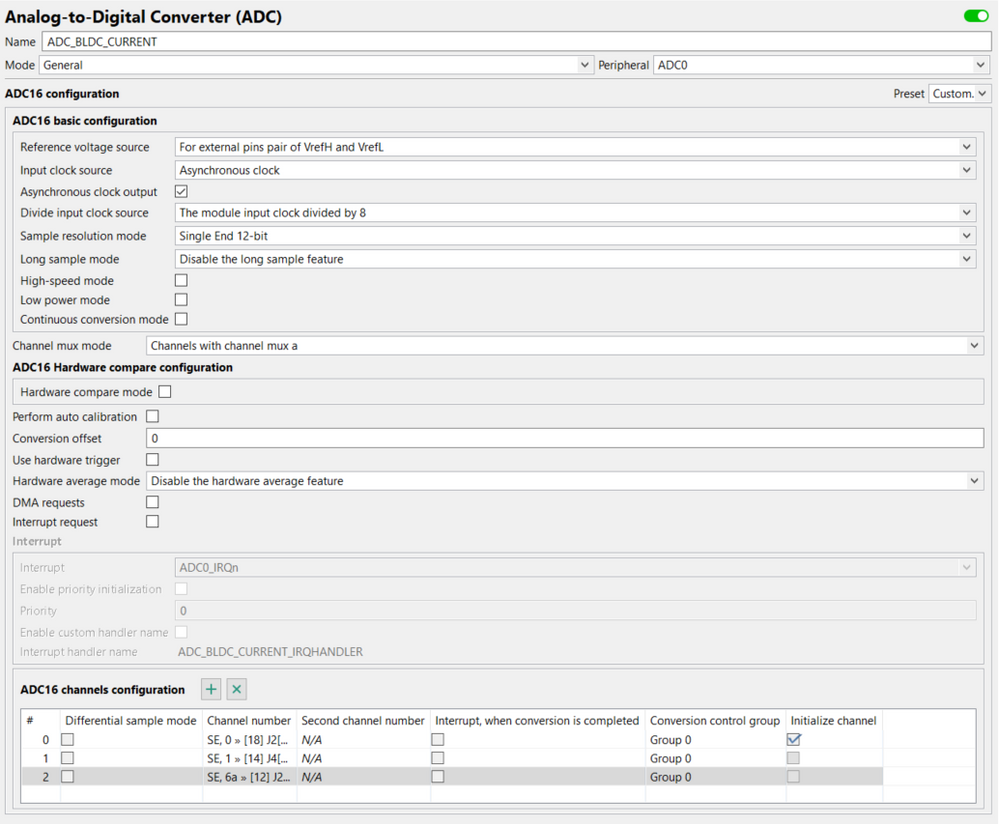
Any guidance or suggestions on reading material would be greatly appreciated.
Thanks,
Eric
Solved! Go to Solution.
 jch
jch
- Mark as New
- Bookmark
- Subscribe
- Mute
- Subscribe to RSS Feed
- Permalink
- Report Inappropriate Content
Hi Eric,
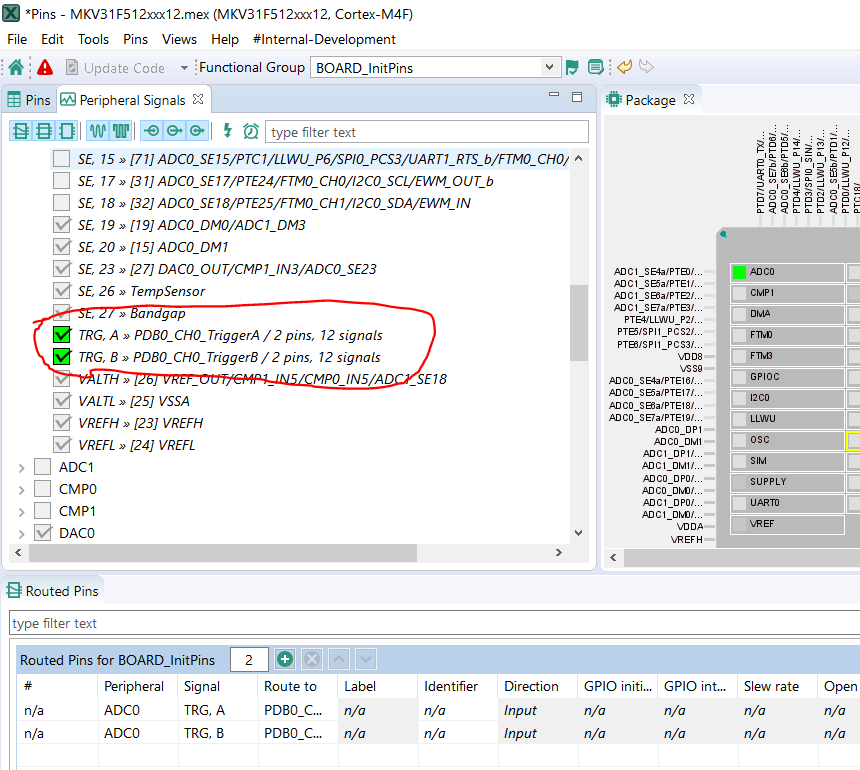
Routing of the ADC triggers SIM_SOPT7 can be easily setup in Pins tool (on picture are both set to the PDB0_CH0 A and B - only PDB option allows to use more than 1 HW trigger in ADC):
Peripherals tool:
Inside the ADC component:
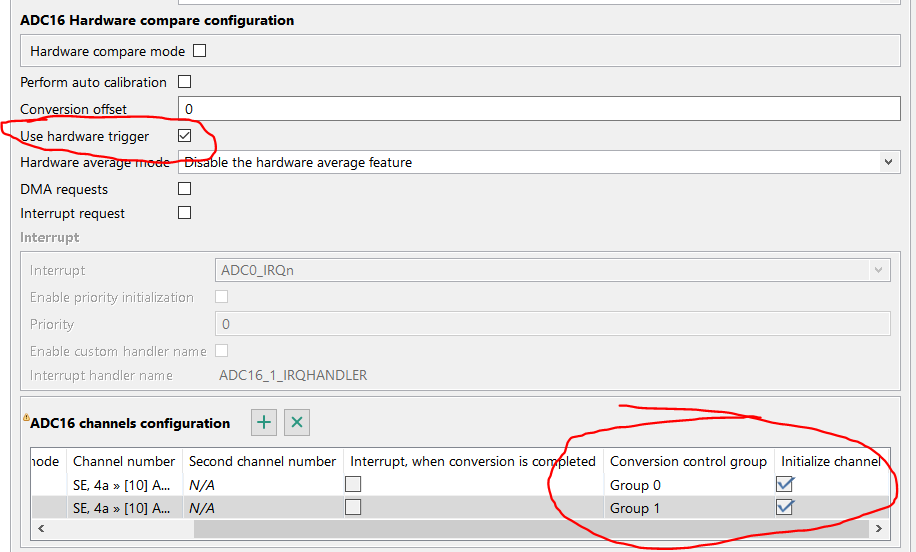
You have to set Use hardware trigger and specify asignement of the channel to the Conversion group (Group 0 = SC1A, Group 1 = SC1B register) and set initialize channel to write to this register selected setting:
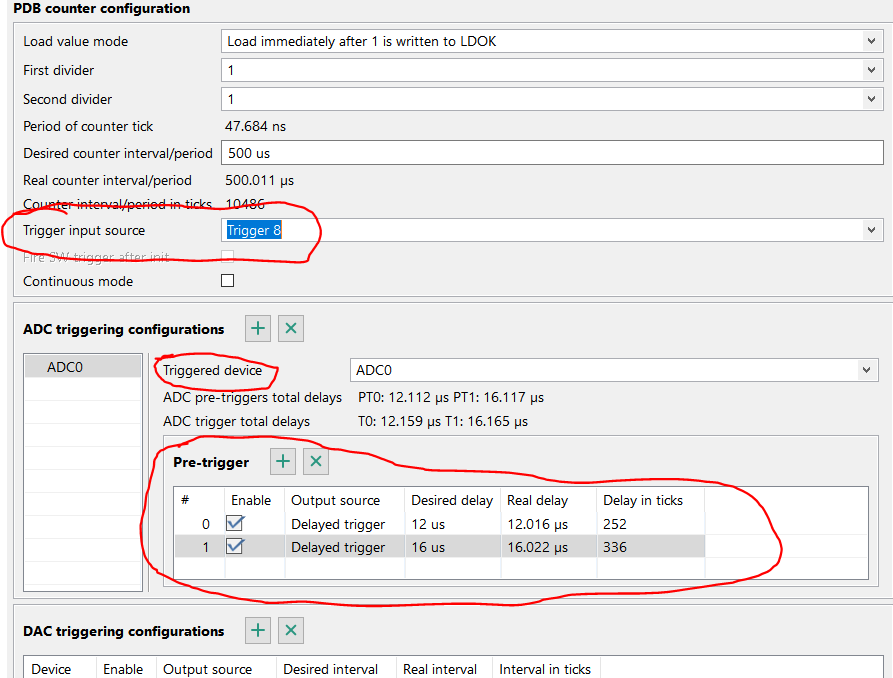
Inside PDB component set the appropriate input trigger for the PDB in Trigger input source (here Trigger 8 - FTM0 initialization trigger and channel triggers, as programmed in the FTM external trigger register (EXTTRIG)) for other options please see 3.8.1.1.2 PDB Input Trigger Connections in KV31F Sub-Family Reference Manual , Rev. 4, 02/2016.
Then add ADC triggering configurations (+ button), select Triggered device (ADC0 by default), then add Pre-trigger (+ button) and set up Pre-triggers configuration (delays are available only with Output source set to Delayed trigger):
Inside the FTM component (I expect that you use FTM for the PWM outputs generation) you need to setup the sources of the PDB trigger:
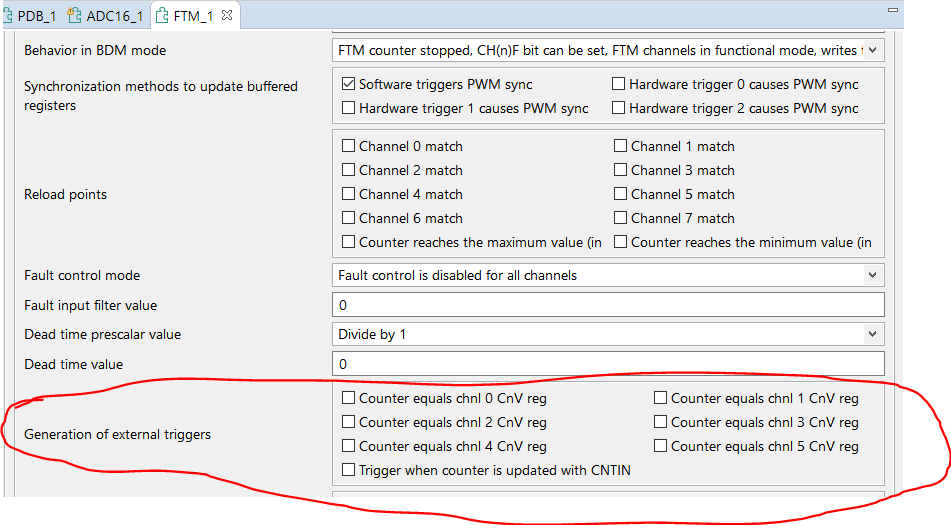
This is the main trigger thread which satisfies all your needs.
If you have other questions do not hesitate to ask us - your Config tools team.
Have a nice day
Jiri
jch
- Mark as New
- Bookmark
- Subscribe
- Mute
- Subscribe to RSS Feed
- Permalink
- Report Inappropriate Content
Hi Eric,
Routing of the ADC triggers SIM_SOPT7 can be easily setup in Pins tool (on picture are both set to the PDB0_CH0 A and B - only PDB option allows to use more than 1 HW trigger in ADC):
Peripherals tool:
Inside the ADC component:
You have to set Use hardware trigger and specify asignement of the channel to the Conversion group (Group 0 = SC1A, Group 1 = SC1B register) and set initialize channel to write to this register selected setting:
Inside PDB component set the appropriate input trigger for the PDB in Trigger input source (here Trigger 8 - FTM0 initialization trigger and channel triggers, as programmed in the FTM external trigger register (EXTTRIG)) for other options please see 3.8.1.1.2 PDB Input Trigger Connections in KV31F Sub-Family Reference Manual , Rev. 4, 02/2016.
Then add ADC triggering configurations (+ button), select Triggered device (ADC0 by default), then add Pre-trigger (+ button) and set up Pre-triggers configuration (delays are available only with Output source set to Delayed trigger):
Inside the FTM component (I expect that you use FTM for the PWM outputs generation) you need to setup the sources of the PDB trigger:
This is the main trigger thread which satisfies all your needs.
If you have other questions do not hesitate to ask us - your Config tools team.
Have a nice day
Jiri
 FelipeGarcia
- Mark as New
- Bookmark
- Subscribe
- Mute
- Subscribe to RSS Feed
- Permalink
- Report Inappropriate Content
Hello Eric,
Could you please let me know which device are you working on?
Best regards,
Felipe
- Mark as New
- Bookmark
- Subscribe
- Mute
- Subscribe to RSS Feed
- Permalink
- Report Inappropriate Content
Felipe,
We are currently targeting the MKV31F512VLL12.
Thanks,
Eric
FelipeGarcia
- Mark as New
- Bookmark
- Subscribe
- Mute
- Subscribe to RSS Feed
- Permalink
- Report Inappropriate Content
Hi Eric,
Unfortunately, there is no way to do that using the Config Tools. However, you can do that by writing to the SIM_SOPT7 register. Please check reference manual chapter 12.2.6.
In addition, I recommend you to check the mc_bldc example from the SDK, I think this may be helpful as a starting point to your application.
I hope it helps!
Have a great day,
Felipe
-------------------------------------------------------------------------------
Note:
- If this post answers your question, please click the "Mark Correct" button. Thank you!
- We are following threads for 7 weeks after the last post, later replies are ignored
Please open a new thread and refer to the closed one, if you have a related question at a later point in time.
-------------------------------------------------------------------------------
