
- Forums
- Product Forums
- General Purpose MicrocontrollersGeneral Purpose Microcontrollers
- i.MX Forumsi.MX Forums
- QorIQ Processing PlatformsQorIQ Processing Platforms
- Identification and SecurityIdentification and Security
- Power ManagementPower Management
- Wireless ConnectivityWireless Connectivity
- RFID / NFCRFID / NFC
- Advanced AnalogAdvanced Analog
- Neural Processing UnitsNeural Processing Units
- MCX Microcontrollers
- S32G
- S32K
- S32V
- MPC5xxx
- Other NXP Products
- S12 / MagniV Microcontrollers
- Powertrain and Electrification Analog Drivers
- Sensors
- Vybrid Processors
- Digital Signal Controllers
- 8-bit Microcontrollers
- ColdFire/68K Microcontrollers and Processors
- PowerQUICC Processors
- OSBDM and TBDML
- S32M
- S32Z/E
-
- Solution Forums
- Software Forums
- MCUXpresso Software and ToolsMCUXpresso Software and Tools
- CodeWarriorCodeWarrior
- MQX Software SolutionsMQX Software Solutions
- Model-Based Design Toolbox (MBDT)Model-Based Design Toolbox (MBDT)
- FreeMASTER
- eIQ Machine Learning Software
- Embedded Software and Tools Clinic
- S32 SDK
- S32 Design Studio
- GUI Guider
- Zephyr Project
- Voice Technology
- Application Software Packs
- Secure Provisioning SDK (SPSDK)
- Processor Expert Software
- Generative AI & LLMs
-
- Topics
- Mobile Robotics - Drones and RoversMobile Robotics - Drones and Rovers
- NXP Training ContentNXP Training Content
- University ProgramsUniversity Programs
- Rapid IoT
- NXP Designs
- SafeAssure-Community
- OSS Security & Maintenance
- Using Our Community
-
- Cloud Lab Forums
-
- Knowledge Bases
- ARM Microcontrollers
- i.MX Processors
- Identification and Security
- Model-Based Design Toolbox (MBDT)
- QorIQ Processing Platforms
- S32 Automotive Processing Platform
- Wireless Connectivity
- CodeWarrior
- MCUXpresso Suite of Software and Tools
- MQX Software Solutions
- RFID / NFC
- Advanced Analog
- Neural Processing Units
-
- NXP Tech Blogs
- Home
- :
- QorIQ Processing Platforms
- :
- Layerscape
- :
- Re: Boot LS 1012A (FRDM) from USB
Boot LS 1012A (FRDM) from USB
- Subscribe to RSS Feed
- Mark Topic as New
- Mark Topic as Read
- Float this Topic for Current User
- Bookmark
- Subscribe
- Mute
- Printer Friendly Page
Boot LS 1012A (FRDM) from USB

- Mark as New
- Bookmark
- Subscribe
- Mute
- Subscribe to RSS Feed
- Permalink
- Report Inappropriate Content
I have currently compiled the QorIQ SDK (update 1703) for the (LS1012A FRDM) board, more specifically fsl-image-full and fsl-image-kernelitb. This gives me some u-boot, rcw, kernel and rootfs files / images. Now I would like to boot this extended Linux (the full image) from a USB drive. Unfortunately I'm not sure as of how to setup the environment correctly to achieve this.
The USB drive is recognized correctly in both the U-boot bootloader and the Linux that came preinstalled on the board. Some debug info:
=> usb storage
Device 0: Vendor: Intenso Rev: 1.00 Prod: Speed Line
Type: Removable Hard Disk
Capacity: 15237.1 MB = 14.8 GB (31205621 x 512)
=> usb part
Partition Map for USB device 0 -- Partition Type: DOS
Part Start Sector Num Sectors UUID Type
1 32 31205344 0005d59e-01 83
=> usb dev
USB device 0: Vendor: Intenso Rev: 1.00 Prod: Speed Line
Type: Removable Hard Disk
Capacity: 15237.1 MB = 14.8 GB (31205621 x 512)
The drive has been formatted as ext2 and I put all the files of the rootfs archive (extracted it) and the kernel-fsl-ls1012a-frdm.itb file on it.
Thanks in advance!
- Mark as New
- Bookmark
- Subscribe
- Mute
- Subscribe to RSS Feed
- Permalink
- Report Inappropriate Content
I've already done it, but with dtb and kernel files instead of itb:
(I'm using OpenWRT distribution instead of Yocto)
Two partitions in the usb drive, made with gparted in linux.
First one, a small FAT partition, second an ext4 file system.
In the first one, I've put the following files:
image-fsl-ls1012a-frdm.dtb
ls1012afrdm-kernel.bin
In the second partition, the linux file system.
Uboot commands:
usb start
fatload usb 0:1 90000000 image-fsl-ls1012a-frdm.dtb
fatload usb 0:1 96000000 ls1012afrdm-kernel.bin
setenv bootargs "console=${console},${baudrate} root=/dev/sda2 rootwait rw"
bootm 96000000 - 90000000
In your case, this should work, if the itb file is in root of usb drive:
usb start
ext2load usb 0:1 90000000 kernel-fsl-ls1012a-frdm.itb
setenv bootargs "console=${console},${baudrate} root=/dev/sda1 rootwait rw"
bootm 90000000
Hope this helps.
- Mark as New
- Bookmark
- Subscribe
- Mute
- Subscribe to RSS Feed
- Permalink
- Report Inappropriate Content
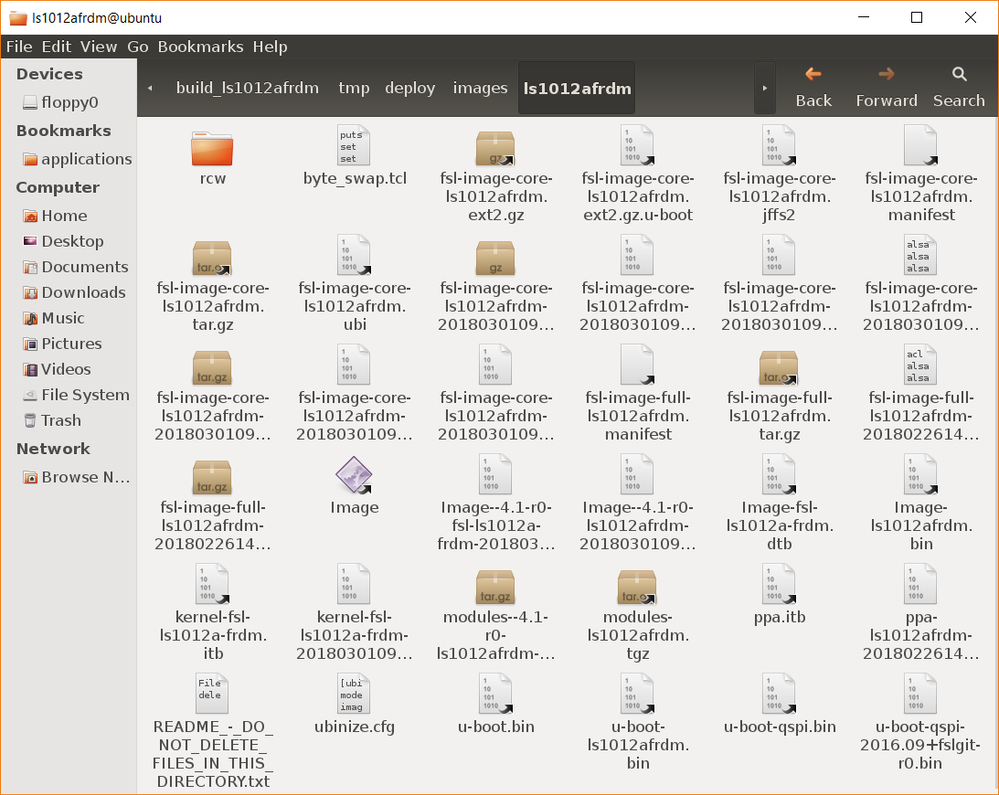
I tried to follow these steps, but it seems like I am missing some files to do so correctly. I only have an image .bin file so I used that one instead, without luck unfortunately. The files I have are listed on this screenshot:
- Mark as New
- Bookmark
- Subscribe
- Mute
- Subscribe to RSS Feed
- Permalink
- Report Inappropriate Content
You need uImage format, not Image, to load it with bootm in u-boot (or zImage if you use bootz).
uImage has a wrapper to tell u-boot how to load the binary file, created with mkimage.
Have you tried with the itb file?
usb start
ext2load usb 0:1 90000000 kernel-fsl-ls1012a-frdm.itb
setenv bootargs "console=${console},${baudrate} root=/dev/sda1 rootwait rw"
bootm 90000000
I can't test it myself rigth now, because I don't have an itb file generated in my system.

 Pavel
Pavel
- Mark as New
- Bookmark
- Subscribe
- Mute
- Subscribe to RSS Feed
- Permalink
- Report Inappropriate Content
Look at the Section 4.4.9.5.3 of SDK 2.0-1703 documentation about "Deploying the full file system":
https://www.nxp.com/docs/en/supporting-information/QORIQ-SDK-2.0-IC-REV0.pdf
Have a great day,
Pavel Chubakov
-----------------------------------------------------------------------------------------------------------------------
Note: If this post answers your question, please click the Correct Answer button. Thank you!
-----------------------------------------------------------------------------------------------------------------------
- Mark as New
- Bookmark
- Subscribe
- Mute
- Subscribe to RSS Feed
- Permalink
- Report Inappropriate Content
Thank you for the advice, unfortunately I keep getting this message when performing the steps described in that section:
ERROR: can't get kernel image!
